
Best Practices for Image Alt Text
Alt text, short for alternative text, is a crucial component for making your website inclusive, accessible, and search engine-friendly. Alt text seems like a small detail and far too often it gets overlooked when creating websites. When given proper attention and thought, alt text can play a crucial role in boosting your SEO and increasing your site’s accessibility. Let’s explore some best practices to ensure your alt text game is on point!

What is Image Alt Text?
Alt text can also be referred to as alt description, alt tag, or alt attribute. For simplicity’s sake in this post we’ll stick with alt text. Alt text is, essentially, a snippet of information that describes what an image is showing. It is meant to relay the “why” of the image as it relates to its context. Image alt text is different from an image title or caption which is generally one or two words that add to the user experience. Alt text is responsible for describing the content of the image to both search engines and screen readers.
Alt Text’s Impact on SEO and Accessibility
From an SEO perspective, well-crafted alt text provides search engines with valuable context about the content of an image, contributing to improved indexing and ranking. By incorporating relevant keywords naturally into alt text, website owners can enhance their visibility in search results and attract the right audience. On the accessibility front, alt text is a vital tool for making web content inclusive to individuals with visual impairments. Screen readers rely on alt text to convey the meaning of images, ensuring that everyone, regardless of abilities, can fully comprehend and engage with the content. Therefore, the conscientious implementation of alt text not only boosts a website’s search engine performance but also aligns with the principles of digital inclusivity, making the internet a more welcoming space for all users.
8 Tips for writing Good Alt Text
Now that we know what it is and why it matters, let’s dive into some practical applications. Here are 8 pieces of advice for writing good alt text for your images.
1. Be Descriptive, Not Decorative:
Alt text is about conveying the meaning and purpose of an image to those who may not be able to see it. Focus on the information the image is trying to convey rather than its aesthetic details. If it’s a chart, describe the data. If it’s a photo of people, mention their actions or expressions.
2. Keep it Concise:
While it’s essential to be descriptive, it’s equally important to be concise. Aim for a sweet spot between providing enough information and avoiding unnecessary details. Alt text should efficiently relay the message through a screen reader without overwhelming the user.
3. Keyword Conscious:
Consider incorporating relevant keywords in your alt text to boost your SEO. Think about what users might search for to find content similar to your image. However, always prioritize natural language – no keyword stuffing! This will also help you ensure that your images are relevant to your content.
4. Skip Redundancy:
If the surrounding text already describes the image adequately, there’s no need to repeat the same information in the alt text. Redundancy can be confusing and may clutter the user experience. In this case, use html code that helps screen readers skip the image, rather than read out the image file name.
5. Context is Key:
Think about the context in which the image appears. How does it contribute to the overall content and message? Tailor your alt text to complement the surrounding text, providing a seamless and comprehensive user experience.
6. Avoid Generic Phrases:
Steer clear of generic alt text like “image” or “image of.” Instead, strive for specificity. If it’s a picture of a cat, say so! Specific alt text helps users understand the content more precisely.
7. Test, Test, Test:
Before publishing your website, test your alt text with screen readers or accessibility tools. This hands-on approach allows you to identify any potential issues and ensures a smooth user experience for everyone.
8. Dynamic Content Consideration:
For dynamic content like memes or GIFs, consider the message or humor they convey. Describe the essence of the content, making sure to capture the intended sentiment.
Advanced Image Block
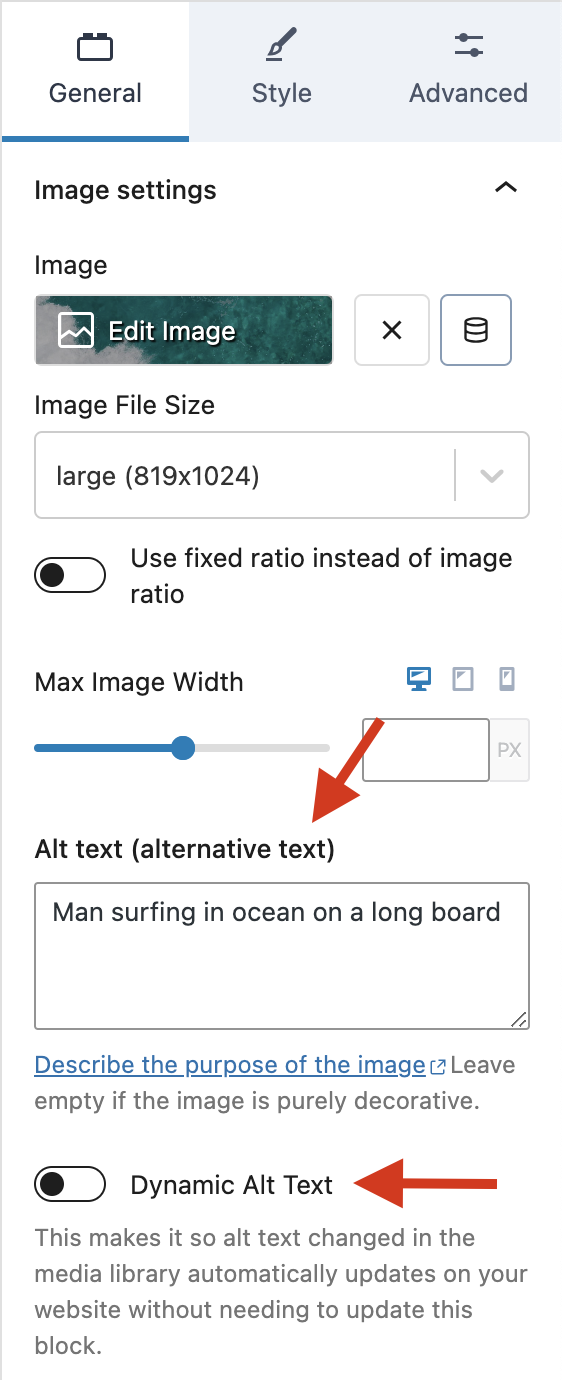
Alt text is generally written in your media library. Though the Advanced Image Block from Kadence Blocks Pro allows you to set the image alt text right in the block settings. Or, if you prefer, you can choose to enable “Dynamic Alt Text.” This will pull the alt text directly from your media gallery.
Wrapping Up
Good alt text is about so much more than following best practice, it’s about making your website more inclusive and contributing to a more positive user experience.
Tools like the Advanced Image Block not only make it simple for adding alt text to your images, but with it you get control over image sizes, access to the pexels media library, AI-curated image collections with preset alt text, and tons more! Kadence can help you thrive when it comes to accessibility and strong SEO. If you’re not already a Kadence Blocks user, grab a Kadence Bundle today!
Create Your Website With KadenceWP Today!


Written by Hannah
Hannah Ritner is the product expert at KadenceWP. With over 10 years at Kadence, she’s worn many hats, but her main drive has always been helping customers reach their goals. Hannah loves empowering people and has been a key player in building the Kadence Community. She’s all about making a real impact for businesses and their customers.
4 responses to “Best Practices for Image Alt Text”
-

-

Given the importance of Alt Text, please ensure that Kadence Galleries have an option to display Alt Text in the image Lightbox. Currently they do not. Rather they can display captions, which are far less important than Alt Text, as evidenced by the fact that you dedicated an entire post to Alt Text, but have not done so for captions. Thank you!
-

This was really helpful. I’ve been using alt text properly (for the most part) but I love the “dynamic alt text” feature.
-

This is a solid overview of the importance of a foundational part of good SEO practice. Ancillary to the image ALT tag is utilizing your keywords in the image filename which will further enhance a screen reader user’s experience.
Not to be a Debbie Downer though, I noted that the featured image above does not have an ALT tag attached. The image of the Kadence Image Settings has an ALT tag set.
Well done!
By Hannah
Hannah Ritner is the product expert at KadenceWP. With over 10 years at Kadence, she’s worn many hats, but her main drive has always been helping customers reach their goals. Hannah loves empowering people and has been a key player in building the Kadence Community. She’s all about making a real impact for businesses and their customers.
Updated July 22, 2024
Create Your Website With Kadence


Any reference to using alt text for SEO is a mistake. It is to convey relevant information to those using assistive technology. Add alt text solely for SEO can do a disservice to those that rely on only meaningful information being present. The vast majority of the time, automated text generators are not ideal at discerning to context.