Skip to content
Help Center
  • Pricing
  • ProductsExpand
    • Premium PlansGet all the tools you need in one plan
    • Kadence ThemeLightning-fast performance theme for modern websites
    • Kadence BlocksDrop in ready designs with advanced controls for pixel perfect websites
    • Kadence Shop KitCreate a more effective WooCommerce shopping experience
    • Kadence ConversionsBoost sales and build engaged audiences with popups and banners
    • Kadence InsightsEasily create A/B tests. Optimize your pages to drive higher conversions.
    • View All Products
    • Get Kadence + Hosting
      In One Place

      Enjoy faster setup, top-tier performance, and worry-free WordPress hosting – Kadence Theme, Kadence Blocks, and Solid Security all pre-installed.

      Learn More

  • Kadence AI
  • Starter Templates
  • Blog
  • SupportExpand
    • Resource HubStart here for guides, Product docs, FAQs, and Troubleshooting tips, all in one place.
    • Contact SupportStuck on something? We’re here to help! Open a ticket for top-notch support.
    • Contact Our TeamGot pre-sales questions or need help choosing a plan? Open a ticket and our team will guide you.
    • About usCrafted with love in Missoula, Montana. Meet the team behind the mission.
Account Account
Get Kadence
Kadence ai
Help Center
Kadence ai

Kadence AI

  • Kadence AI-Powered Design Library
  • Home
  • Knowledge Base
  • Kadence AI
  • Kadence Blocks

Show More Block

The Show More Block gives you an easy way to preview of a larger section of content. The preview size can be adjusted by device type and a fade-out can be applied to the preview.
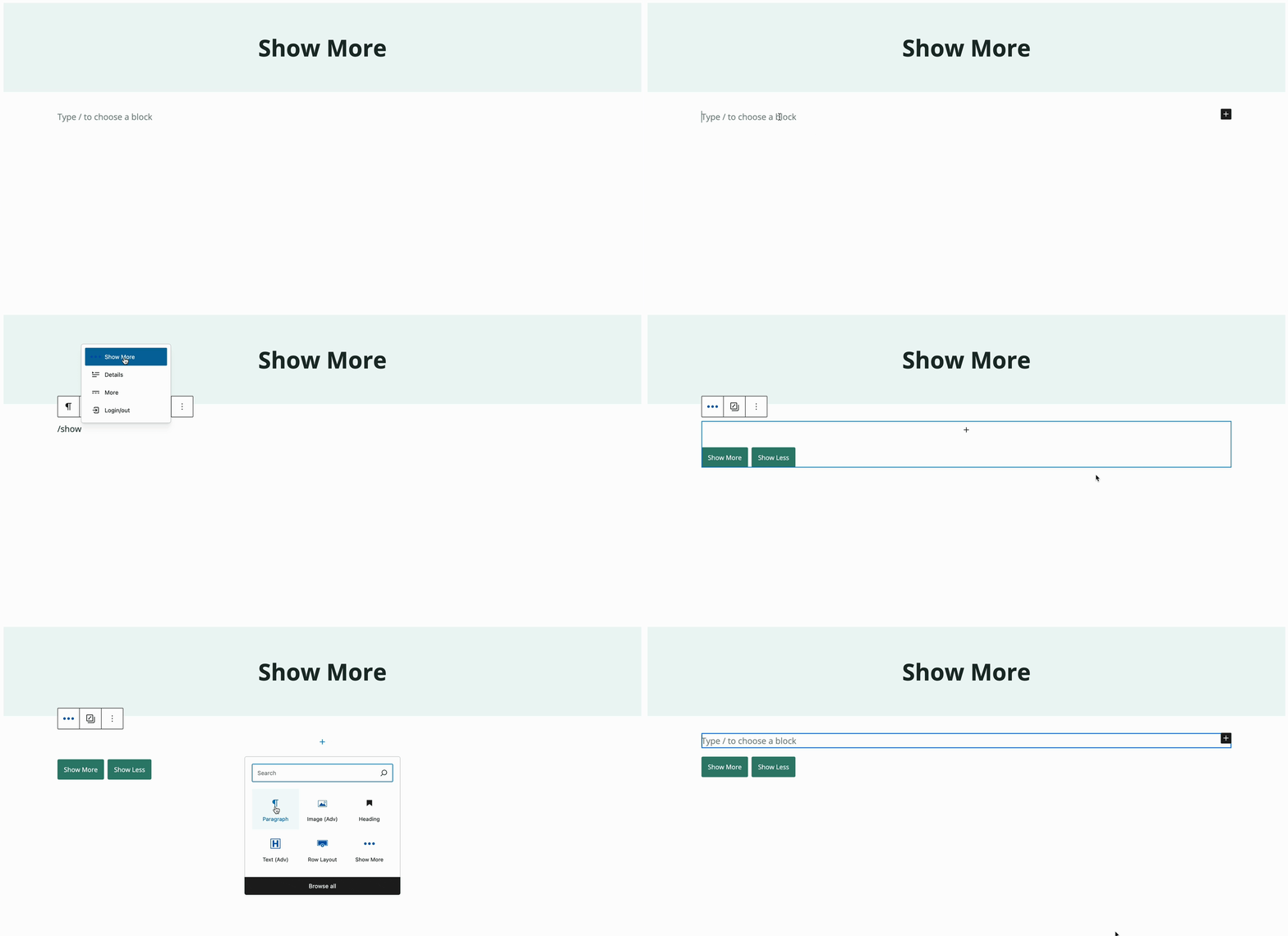
Table of Contents
  • Overview
  • General Block Settings
  • Advanced Block Settings
  • Live Example
Insert a Show More block

Overview

The Show More block is actually a group of blocks that includes a Section block and a Buttons (Adv) block. The Section block serves as the container for your content.

The “Show More” and “Show Less” buttons are powered by our Buttons (Adv) block so you can customize them like you would any group of buttons.
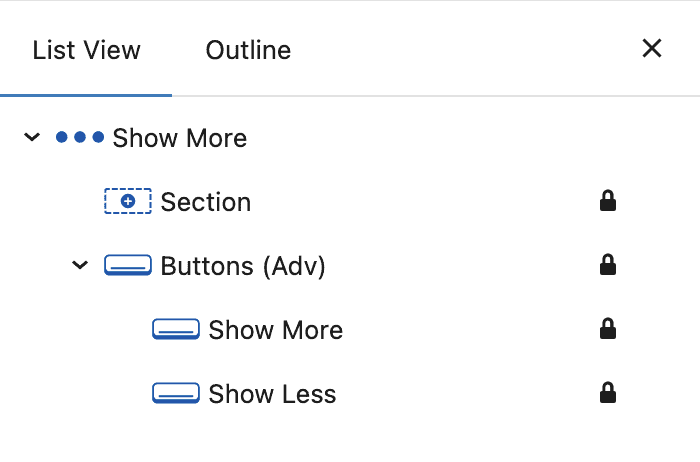
Kadence Show More block - List View

General Block Settings

Once you’ve added your content to the Show More block, you can adjust your settings.
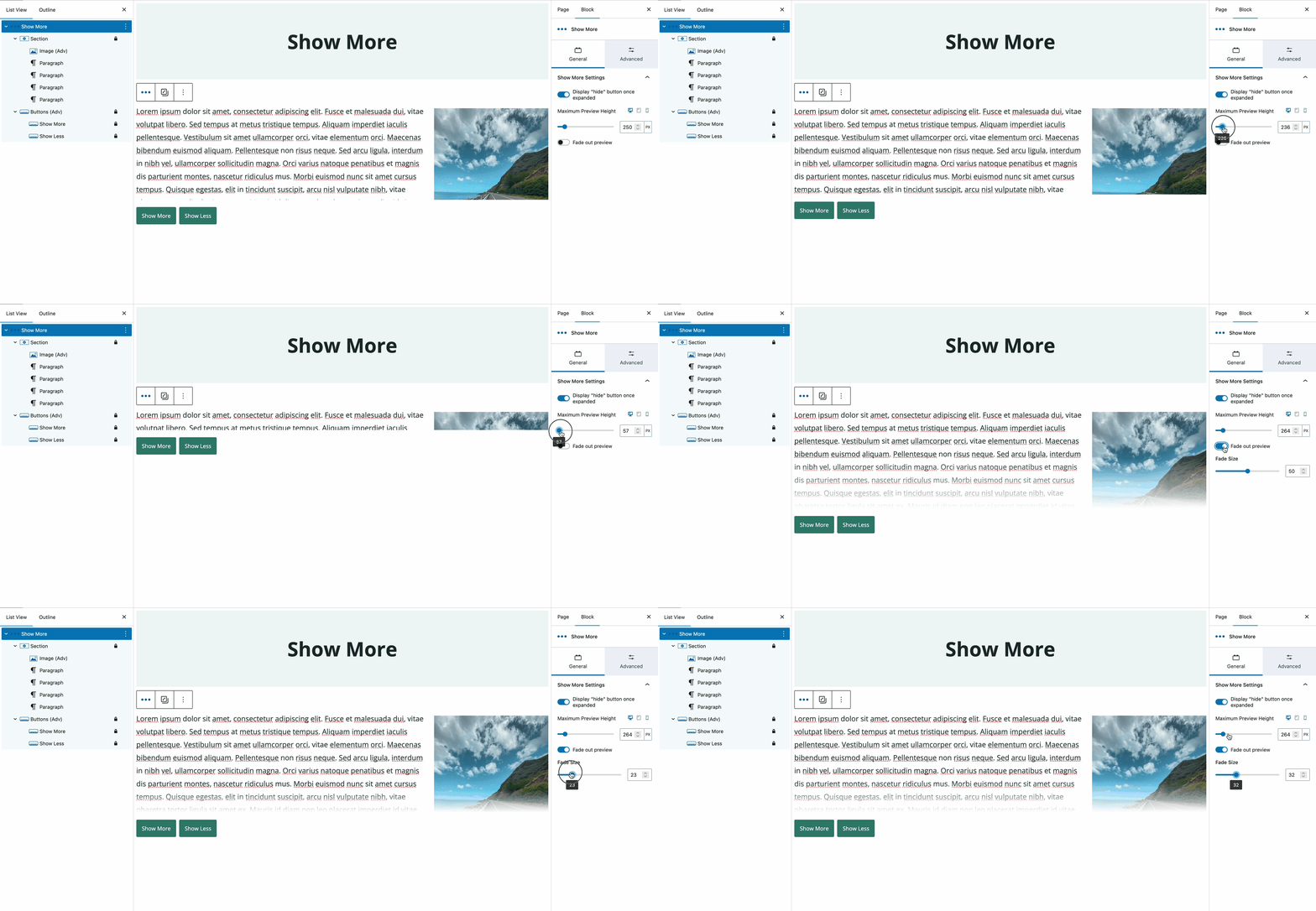
Show More Block - General Settings

Display “hide” button once expanded – when enabled, the “Show Less” button appears after the content has been expanded. When disabled, the button does not appear and users cannot revert to the preview state.

Maximum Preview Height – the height of the preview window. Responsive height settings for tablet and mobile are also available.

Fade out preview – toggle whether to fade the preview.

Fade Size – Adjust the size of the preview fade.
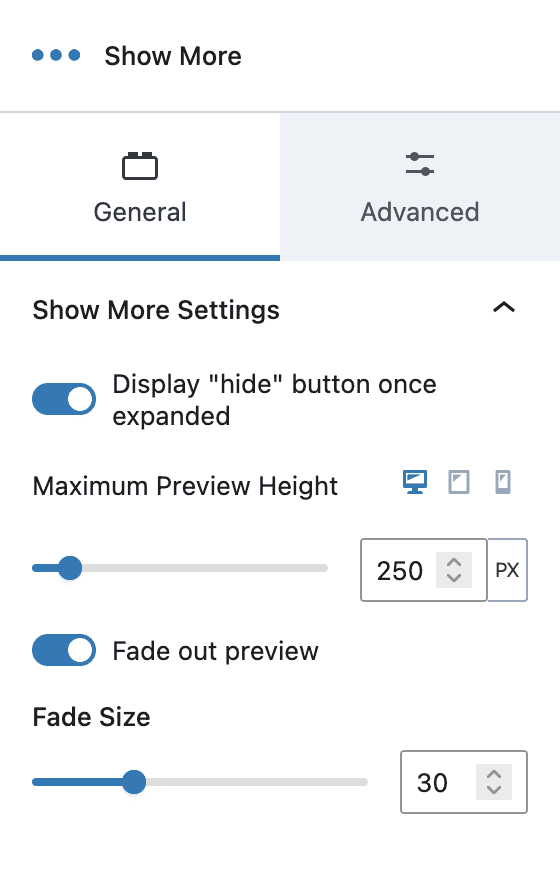
Show More - General Settings

Advanced Block Settings

Padding – Set the padding for the block. Responsive options are available.

Margins – Set the margins for the block. Responsive options are available.

Expand Settings – Set the default expand state for desktop, tablet, and mobile.

Block Defaults – Allows you to save your settings for future Show More blocks.

Advanced – Add Additional CSS class(es) to your block.
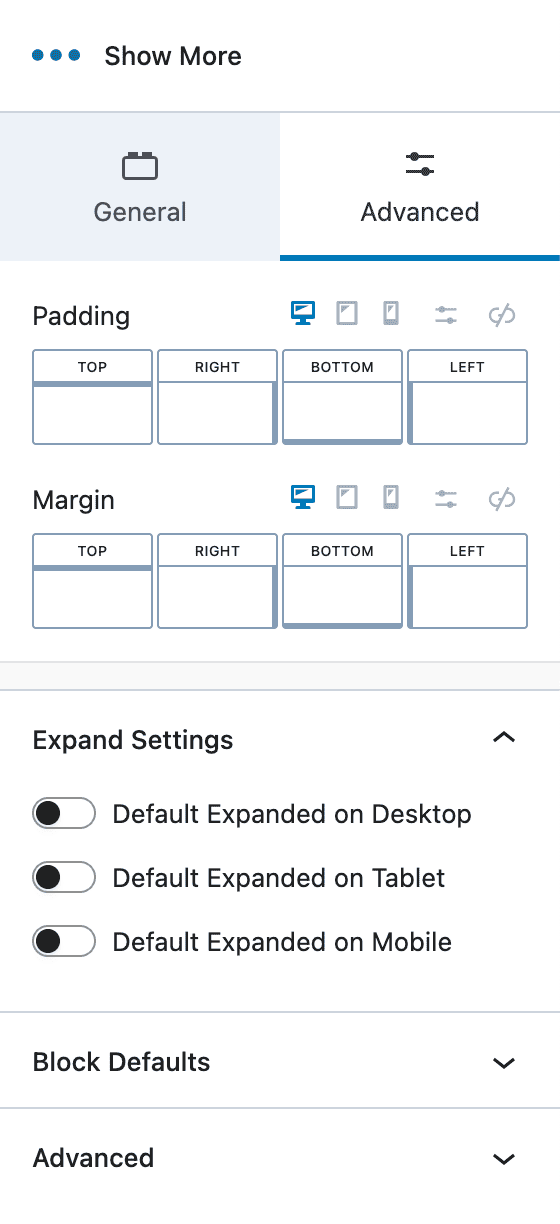
Show More block - Advanced Settings

Live Example

waterfalls Nature Image

Lorem ipsum dolor sit amet, consectetur adipiscing elit. Fusce et malesuada dui, vitae volutpat libero. Sed tempus at metus tristique tempus. Aliquam imperdiet iaculis pellentesque. Vestibulum sit amet ullamcorper orci, vitae elementum orci. Maecenas bibendum euismod aliquam. Pellentesque non risus neque. Sed arcu ligula, interdum in nibh vel, ullamcorper sollicitudin magna. Orci varius natoque penatibus et magnis dis parturient montes, nascetur ridiculus mus. Morbi euismod nunc sit amet cursus tempus. Quisque egestas, elit in tincidunt suscipit, arcu nisl vulputate nibh, vitae pharetra tortor ligula sit amet ex. Mauris id diam non leo placerat imperdiet id vitae eros.

Phasellus at ante eget justo volutpat pharetra. Nullam a diam in leo posuere convallis vitae eu nunc. Curabitur orci mi, finibus id mi id, gravida finibus massa. Curabitur sit amet nulla nec risus dapibus semper. Phasellus a ipsum tristique, convallis ante porta, sagittis nunc. Aliquam blandit, justo id mollis vehicula, justo mauris convallis sem, a pellentesque leo sem a massa. Curabitur consectetur, erat ut consequat fringilla, nibh magna varius diam, in molestie odio nulla id mauris. Fusce arcu dui, finibus a mi ultrices, pulvinar feugiat nulla. Pellentesque eleifend elit malesuada quam vulputate rhoncus. Nullam faucibus nisl sed orci pharetra consectetur.

Aliquam id suscipit nisl, quis gravida augue. Mauris iaculis gravida hendrerit. Vestibulum placerat enim a magna pretium porta. Etiam elementum malesuada dui eget lobortis. Aliquam posuere commodo odio at faucibus. Etiam accumsan rutrum quam sit amet posuere. Nunc imperdiet quam quis leo rhoncus tincidunt. Vestibulum ut erat posuere, mattis tortor et, gravida nulla. Duis elit sapien, pellentesque at ex eu, mollis laoreet orci. Nulla in vehicula ante. Nunc mollis vitae felis a maximus. Integer tempus dui quis mauris volutpat, a iaculis ligula mollis. Nam eget nisi eget arcu mollis eleifend.

Suspendisse eu purus nunc. Mauris sollicitudin purus arcu, a bibendum arcu auctor eu. Nam at convallis enim. Nam venenatis, dolor at commodo commodo, velit neque maximus diam, in posuere ipsum leo quis nibh. In in convallis diam. Curabitur porttitor pellentesque dolor quis blandit. Nullam a tortor ipsum.


Do you feel this document was helpful?
The Kadence WP Logo
Crafted in Missoula, Montana
  • Follow Kadence on Facebook
  • Follow Kadence on Youtube
  • X
  • Follow Kadence on Instagram
Trustpilot
Products
  • Kadence Plans
  • Kadence Theme
  • Kadence Blocks
  • Kadence AI
  • Kadence Starter Templates
  • Kadence Shop Kit
  • Kadence Conversions
  • Kadence Pattern Hub
  • View All
Resources
  • Blog
  • Podcast
  • Knowledgebase
  • Support ticket
  • Feature Requests
  • FAQ
  • WordPress Hosting Services
About Us
  • About Kadence
  • Become an affiliate
  • Contact us
  • Terms
  • Privacy Policy
  • Security
Our Partner Brands
  • SolidWP
  • LearnDash
  • The Events Calendar
  • GiveWP
  • MemberDash
Kadence Community
  • Kadence Marketplace
  • Join the Facebook Group
  • Subscribe to our YouTube Channel
© 2024 Kadence WP | All prices are in USD
Logo for StellarWP an umbrella brand of Premium WordPress plugins
  • Pricing
  • Products
    • Premium PlansGet all the tools you need in one plan
    • Kadence ThemeLightning-fast performance theme for modern websites
    • Kadence BlocksDrop in ready designs with advanced controls for pixel perfect websites
    • Kadence Shop KitCreate a more effective WooCommerce shopping experience
    • Kadence ConversionsBoost sales and build engaged audiences with popups and banners
    • Kadence InsightsEasily create A/B tests. Optimize your pages to drive higher conversions.
    • View All Products
    • Get Kadence + Hosting
      In One Place

      Enjoy faster setup, top-tier performance, and worry-free WordPress hosting – Kadence Theme, Kadence Blocks, and Solid Security all pre-installed.

      Learn More

  • Kadence AI
  • Starter Templates
  • Blog
  • Support
    • Resource HubStart here for guides, Product docs, FAQs, and Troubleshooting tips, all in one place.
    • Contact SupportStuck on something? We’re here to help! Open a ticket for top-notch support.
    • Contact Our TeamGot pre-sales questions or need help choosing a plan? Open a ticket and our team will guide you.
    • About usCrafted with love in Missoula, Montana. Meet the team behind the mission.
Account Login