Skip to content
Help Center
  • Pricing
  • ProductsExpand
    • Premium PlansGet all the tools you need in one plan
    • Kadence ThemeLightning-fast performance theme for modern websites
    • Kadence BlocksDrop in ready designs with advanced controls for pixel perfect websites
    • Kadence Shop KitCreate a more effective WooCommerce shopping experience
    • Kadence ConversionsBoost sales and build engaged audiences with popups and banners
    • Kadence InsightsEasily create A/B tests. Optimize your pages to drive higher conversions.
    • View All Products
    • Get Kadence + Hosting
      In One Place

      Enjoy faster setup, top-tier performance, and worry-free WordPress hosting – Kadence Theme, Kadence Blocks, and Solid Security all pre-installed.

      Learn More

  • Kadence AI
  • Starter Templates
  • Blog
  • SupportExpand
    • Resource HubStart here for guides, Product docs, FAQs, and Troubleshooting tips, all in one place.
    • Contact SupportStuck on something? We’re here to help! Open a ticket for top-notch support.
    • Contact Our TeamGot pre-sales questions or need help choosing a plan? Open a ticket and our team will guide you.
    • About usCrafted with love in Missoula, Montana. Meet the team behind the mission.
Account Account
Get Kadence
Kadence Blocks
  • Features
  • Pro
  • Blocks
  • HelpExpand
    • Documentation
    • Submit a Ticket
    • Facebook Group
    • Feature Requests
    • Roadmap
    • Changelog
Help Center
Kadence Blocks

Kadence Blocks

Getting Started

Block Tutorials

  • Responsive Breakpoints in Kadence
  • Create a Full Screen Landing Page
  • How to Control the Hero or Title Section Sitewide and Per Page in Kadence

Kadence Blocks Pro

  • How to hook elements inside of post or page content
  • Kadence Custom Fonts
  • How to Create a Custom Search Page with Hooked Elements and the Advanced Query Loop

Troubleshooting Blocks

  • Troubleshooting White/Blank Screens in the Editor or Customizer
  • How to Download Previous Versions of the Kadence Theme and Plugins
  • How to run the WordPress built-in database repair tool
  • Recommended Server Resources
  • Troubleshooting the “Update Failed: Service Unavailable” error when updating Kadence Pro plugins

Advanced

Advanced Headers

Kadence Form Integrations

  • Home
  • Knowledge Base
  • Kadence Blocks
  • Kadence Theme
  • Customize Settings

How to Add a Sidebar

Are you interested in incorporating sidebars into your website? With the Kadence theme, you can easily add sidebars to your site and customize them with Gutenberg blocks. Additionally, you can choose whether to display a left or right sidebar and select which pages will show the sidebar. Moreover, you have the option to add or remove sidebars on individual pages. Sticky sidebars are also available.
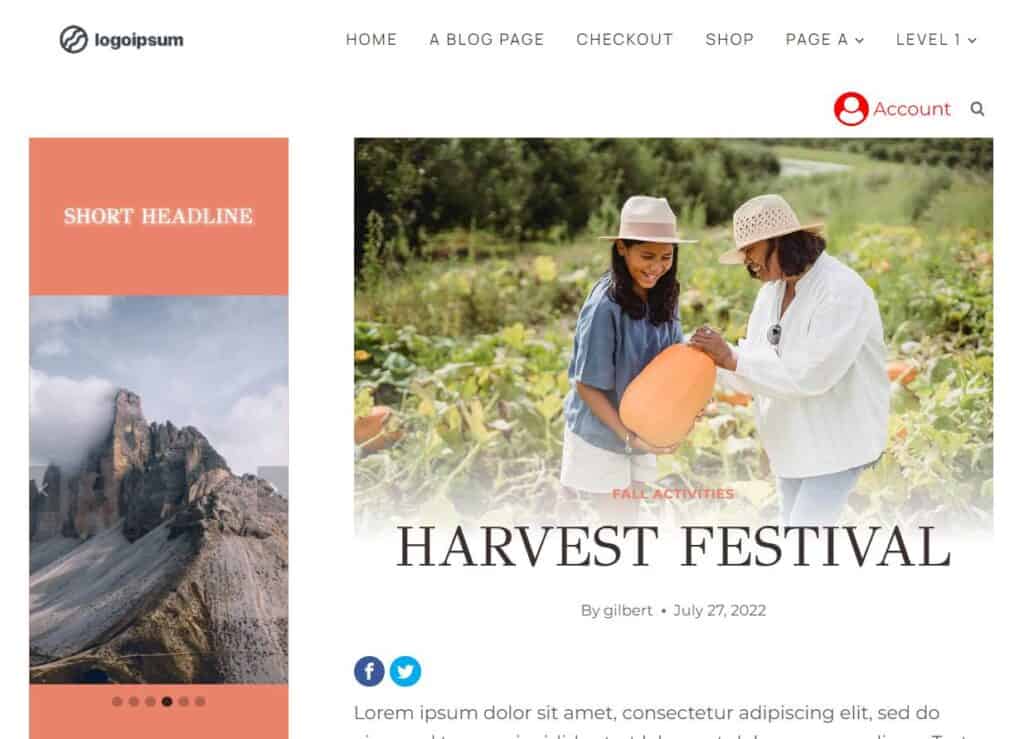
Sidebar

You can add sidebars to pages, posts, archives, and custom post types. To add sidebars to your website globally, go to Appearance > Customize > Posts/Pages Layout and choose the post type where you wish to include a sidebar. Find the Default Page Layout for your post type, and select the option for a right or left sidebar. Afterward, select the default sidebar.
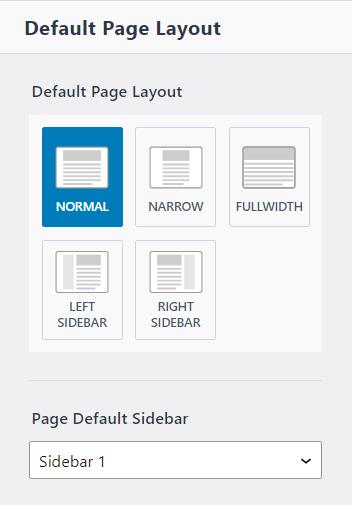
Default Page Layout

You can edit the sidebars in the admin dashboard by navigating to Appearance > Widgets and editing the default sidebar of your choice.
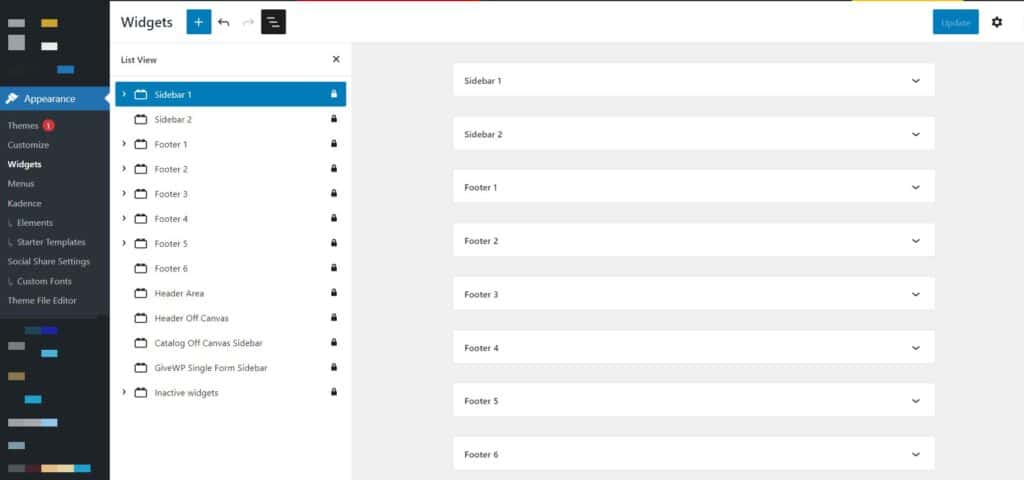
Edit Widgets

To add a sidebar to a single post or page, simply access the editor and click on the post/page settings icon located at the top right. From there, you can easily set the post layout and sidebar to match your preferences, just as you would through the Customizer.
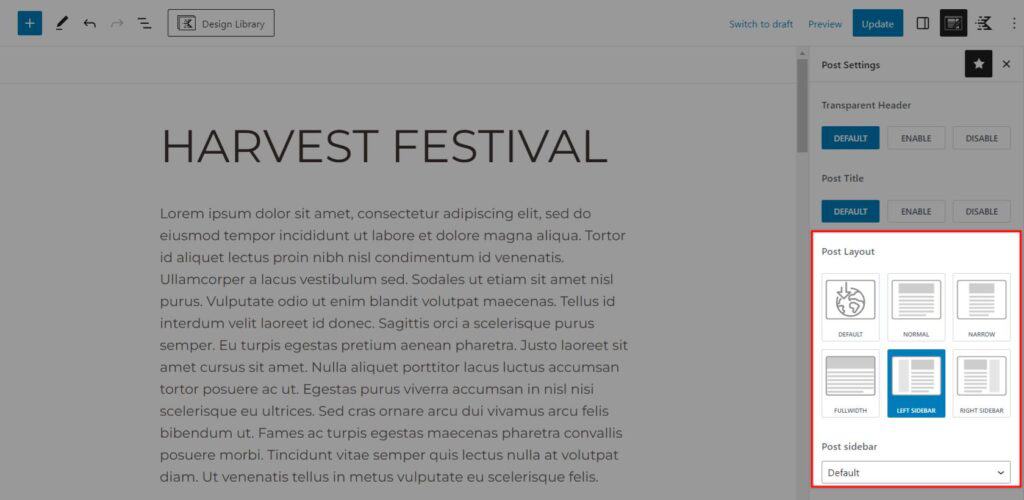
sidebar set per page

How to Add WooCommerce Sidebar

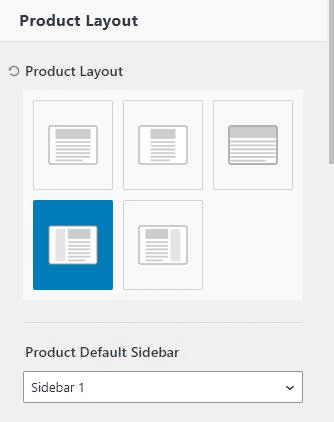
If you have the WooCommerce plugin enabled on your site, you will find a “WooCommerce” section in the customizer. In this section you can add separate sidebars to your shop or single product pages. To do this, navigate to the customizer and click on “WooCommerce.” Then choose either “Product Catalog” or “Single Product Layout.” Here, you can find the layout options for products and archives, allowing you to set a left or right sidebar and its default sidebar. Once that’s done, you can customize the content of your sidebar using the widget editor in the admin dashboard.
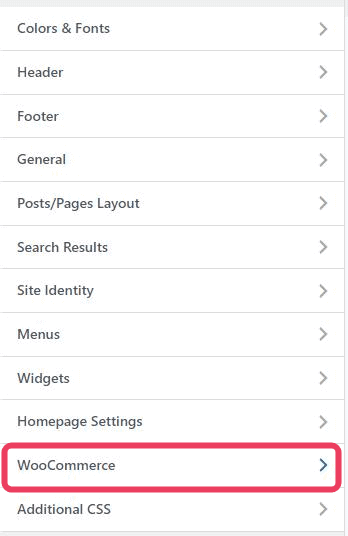
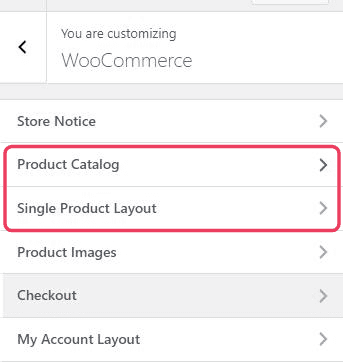
WooCommerce Customizer
WooCommerce Customizer Product Layout
Product Layout
Edit Widgets
Do you feel this document was helpful?
The Kadence WP Logo
Crafted in Missoula, Montana
  • Follow Kadence on Facebook
  • Follow Kadence on Youtube
  • X
  • Follow Kadence on Instagram
Trustpilot
Products
  • Kadence Plans
  • Kadence Theme
  • Kadence Blocks
  • Kadence AI
  • Kadence Starter Templates
  • Kadence Shop Kit
  • Kadence Conversions
  • Kadence Pattern Hub
  • View All
Resources
  • Blog
  • Podcast
  • Knowledgebase
  • Support ticket
  • Feature Requests
  • FAQ
  • WordPress Hosting Services
About Us
  • About Kadence
  • Become an affiliate
  • Contact us
  • Terms
  • Privacy Policy
  • Security
Our Partner Brands
  • SolidWP
  • LearnDash
  • The Events Calendar
  • GiveWP
  • MemberDash
Kadence Community
  • Kadence Marketplace
  • Join the Facebook Group
  • Subscribe to our YouTube Channel
© 2024 Kadence WP | All prices are in USD
Logo for StellarWP an umbrella brand of Premium WordPress plugins
  • Pricing
  • Products
    • Premium PlansGet all the tools you need in one plan
    • Kadence ThemeLightning-fast performance theme for modern websites
    • Kadence BlocksDrop in ready designs with advanced controls for pixel perfect websites
    • Kadence Shop KitCreate a more effective WooCommerce shopping experience
    • Kadence ConversionsBoost sales and build engaged audiences with popups and banners
    • Kadence InsightsEasily create A/B tests. Optimize your pages to drive higher conversions.
    • View All Products
    • Get Kadence + Hosting
      In One Place

      Enjoy faster setup, top-tier performance, and worry-free WordPress hosting – Kadence Theme, Kadence Blocks, and Solid Security all pre-installed.

      Learn More

  • Kadence AI
  • Starter Templates
  • Blog
  • Support
    • Resource HubStart here for guides, Product docs, FAQs, and Troubleshooting tips, all in one place.
    • Contact SupportStuck on something? We’re here to help! Open a ticket for top-notch support.
    • Contact Our TeamGot pre-sales questions or need help choosing a plan? Open a ticket and our team will guide you.
    • About usCrafted with love in Missoula, Montana. Meet the team behind the mission.
Account Login
  • Features
  • Pro
  • Blocks
  • HelpExpand
    • Documentation
    • Submit a Ticket
    • Facebook Group
    • Feature Requests
    • Roadmap
    • Changelog