
Notice: These forums are now retired and closed. For active support, please Submit a Ticket or visit our official WordPress.org community pages.
Kadence Theme | Kadence Blocks | Starter Templates | WooCommerce Email Designer | Ascend | Virtue | Pinnacle
Search Results for 'page '
-
AuthorSearch Results
-
In forum: Kadence Theme
In reply to: HELP Child Theme stylesheet doesn’t apply changes
Hello,
Does that mean that a Kadnece child theme will not function when using optimizing applications for caching or combining css files so the site performs better?
No, the child theme will function. The point of some optimizations is to make the loading of your websites faster by saving the resources in a single or fewer file. However, you have to make sure that after changing anything(updates, custom CSS codes change, etc), you’ll have to purge your cache so that those resources will be refreshed, will include your changes, and will reflect on your pages.
Hope this clarifies and let us know if we can assist you further.
Regards,
KarlaIn forum: Pinnacle ThemeIn reply to: Category image
Hello Anders,
Thank you for reaching out to us.
The background image for the page title section can be set in Theme Options > Page Title > Page Header Default Background option.
Hope this helps and let us know if we can assist you further.
Best Regards,
KarlaIn forum: Kadence ThemeIn reply to: Creating Re-usable Page “Templates” in Kadence WP?
Thanks for your reply, Hannah!
Child themes are intriguing but unfortunately do not address this issue of re-usable page designs …
So, am I to understand that once a satisfactory Kadence page design has been built (either from scratch, or modified from a Starter Pack page design, etc.), Kadence offers NO provision to use that same page design/structure elsewhere on the site for other pages?
And that, instead, every single new page on the site must be similarly built from scratch?
Appreciate any advice!
In forum: Kadence ThemeIn reply to: Different header color styling for specific pages
August 31, 2021 at 3:38 pm #267565Wow, that is indeed exactly what I need.
However I cannot get it working. I can set up the addon but cannot activate preview mode for different headers. The page refresh happens but I’m still editing my default header. Tried exactly like in this video https://www.youtube.com/watch?v=Ew-Ko0ichuE
I’ll try different things (and browsers – now Chrome) tomorrow.
August 31, 2021 at 2:20 pm #267563Both pages and posts take content from same single.php. Looks like it is connected with many functions and their hooks. What would be the simplest way to separate the two?
In forum: Membership ForumsIn reply to: Google reCaptcha hide
August 31, 2021 at 9:27 am #267553Hey,
I really want to make it clear first and foremost that you should load v3 on every page of your site. It’s highly encouraged by google to allow this to work successfully at being able to defer spam.As for the filter not working, that sounds like caching. But it’s possible you are loading a form on every page in a modal so without seeing your site it’s hard to guess. Can you please post a link to your site?
Ben
In forum: Kadence ThemeTopic: Close search modal options?
Hello,
Is there a way to close the search modal by clicking outside the search field?
Most other sites usually has the search like that.
Now the visitor has to find that little X up in the corner to close the search modal (or hit ESC)Like in this page:
*Login to see linkIt would also be nice to have the option to turn off that search field drop shadow instead of having to add custom css.
Or even switch to this (slide-out) style of the search:
*Login to see linkThanks 🙂
In forum: Kadence ThemeIn reply to: Trying to shrink the overall column size
I tried to edit my post but was unable. I wanted to be more clear about my intent. You’ll se the heading “(some of) our services”. Below that, there are some orange sub-headings and text beneath them. You’ll see that there is one full-width container which is the splitx2 layout from my kadence advanced row layout block. I’d like that full width container to not be so full-width. I can achieve this visually by adding padding to the left and right sides, but is that the CORRECT way to do it? The logic in me feels like the container should just be sized the way I want it, but I’m unsure.
Thanks!
 In forum: Kadence Theme
In reply to: Scrolling
In forum: Kadence ThemeAugust 31, 2021 at 6:17 am #267539Hi there,
For some reason, a H2 headline inside a two-column won’t Left align properly. Row Layout ( kadence plugin). Can anyone here see what the issue can be?
Link to page is here: *Login to see link
The headline H2 to look for is in the light-blue Block with two-column and black text. It reads “Teckna…” and you can see the empty space left of the “T” in “Teckna perspektiv, teknisk ritning”. It looks a bit like if I pressed the Tab button or the Space bar on the keyboard.
Thanks in advance,
Stefan L-
This topic was modified 4 years, 8 months ago by
Stefan Lindblad.
-
This topic was modified 4 years, 8 months ago by
In forum: Kadence ThemeI’m too having this issue. I have a featured image on every page. If I change one page to be the blog page (in wp reading settings), the featured image disappeares from the top of that page.
NOTE: It’s not the post featured image but the main featured image of that blog page (wide top image should show on every page).
I need that featured image to show when using blog page (like all other pages, they should look similar with just different photo).
Regards
marko-
This reply was modified 4 years, 8 months ago by
tuki-3752.
In forum: Pinnacle ThemeAugust 30, 2021 at 8:32 pm #267534Hi Hannah.
Thanks for answering, sorry for not writing earlier.
I speak Spanish, I will try to explain in your language.I tell you:
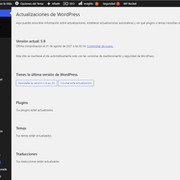
1. The page is updated (see Img01)
2. I am using the Pinnacla Premium theme (see Img02)
3. The following happens, look at the last two posts that I have published (see Img03):
I did both posts on the same day, but the last one needed to have an old date, and I put 2020 Sep 03, and the previous post I put 2021 Aug 22. Then, when consulting the category at the following url (https://lupaporlavida.org/actualidad): it appears in the order that I have edited the post and not in the order of publication (see Img04). You see it?It is not ordering the posts according to the date published when I consult the categories.
Thanks for your help.
JennyImgs:


 In forum: Kadence Blocks
Hi there,
I was wondering if there was a way to align all of the buttons to the bottom for my product carousel:
On my shop page in the Customizer settings for Woocommerce I’m able to select an option to align the buttons to the bottom so it looks like the following:
I noticed that by doing so, Woocommerce adds the class “align-buttons-bottom” to the unordered list that wraps around all of the product list items. For the shop page, it’s working, all the buttons are aligned, but for the carousel it doesn’t work despite the class “align-buttons-bottom” being listed.
If anyone has a solution for this I’d love to know, thanks!
In forum: Membership ForumsTopic: Google reCaptcha hide
August 30, 2021 at 9:51 am #267528I’m posting this as a new thread because it’s been 12 days as a question on a another thread that was a similar problem, with no response:
I’ve been having the same problem with the reCaptcha badge displaying on every single page as well. I had worked out how to remove it by dequeueing the “ktv3-google-recaptcha” script with some logic to decide which page it should be on. But then I found you seem to have a filter called ‘kadence_recaptcha_v3_load_every_page’, so I just set that to false and it works. Sort of. If you’re logged in already it only shows the badge on the pages that are selected in the plugin settings, but if you logout it continues to show the badge on every page. I’ve cleared the cache and even turned it off and cleared the browser cache etc. and it doesn’t help.
I am also doing the same thing on another website where it works perfectly using the ‘kadence_recaptcha_v3_load_every_page’ filter. The only difference on that site is that I’m not using Kadence theme.
In forum: Kadence ThemeLoving Kadence WP so far, but still a lot to learn!
Is it possible to create from scratch a complete page layout, with certain common page elements (Header, Navigation, Row Layout, Sidebar(s), Footer, etc.), save that layout as a page ‘template’ of sorts, then apply that same template to multiple pages?
If so, can such templates then be later edited/updated such that the changes will be applied globally to ALL pages built on that template?
Can a site built with Kadence utilize multiple such templates, ex.: “Template A” used for all Car pages, “Template B” for all Truck pages, etc.?
The “Prebuilt Library” option looks interesting, but unsure whether edits/customizations made to these can be saved and applied globally?
Thanks!
In forum: Pinnacle ThemeTopic: Category image
August 30, 2021 at 2:59 am #267523Hi,
Where can I find the templates in which this image is located?
it is a Category page.regard Anders
In forum: Kadence ThemeIn forum: Kadence ThemeAugust 29, 2021 at 12:25 pm #267517If I’ve understood correctly, the Kadence Theme supports one header styling for all pages. I would like to have different color settings for specific pages. The simplest use case would be to have a set of colors for the transparent header to be used either against light vs dark background images. How difficult is this to achieve?
In forum: Kadence ThemeTopic: latest posts design settings
August 29, 2021 at 6:50 am #267513Hi,
I am trying to build a blogs archive page using the posts block from Kadence blocks.
My target is a grid view of all posts (paginated or infinite), each tile having the same size and a defined background color.Is this possible?
Best regards,
KevinIn forum: Kadence ThemeTopic: Scrolling
Hello,
on mobile devices (iPhone 11) and Chrome Browser I can scroll to the right on this page (and every other page):
What can I do to prevent the white space?
Best regards,
Holger
-
This topic was modified 4 years, 8 months ago by
-
AuthorSearch Results



