Notice: These forums are now retired and closed. For active support, please Submit a Ticket or visit our official WordPress.org community pages.
Kadence Theme | Kadence Blocks | Starter Templates | WooCommerce Email Designer | Ascend | Virtue | Pinnacle
Search Results for 'page '
-
AuthorSearch Results
-
Dear sirs, Thanks again for your great products, but I have one small thing which I need to fix.
Bread Crumbs are under H1 on pages on Desktop screens. (but ok in Posts). You can see it by this link *Login to see link or see ScreeshotPlease help me to resolve this problem (Maybe ad mo space between)
ThanksIn forum: Ascend ThemeIn reply to: Odd Attribute Filter Widget
Hi Ben,
your screenshot is what I see too, but that dropdown on the right isn’t a category widget, it’s the attribute widget showing the 3 attributes for the 3 test products.
The main problem remains that the whole widget disappears on product category pages.
You can see this in action by browsing the 3 categories in the menu: “Kataloge”, “Plakate”, “Künstlereditionen”.
So the filter counts the 3 products on the shop page but not on the other category pages.
Thanks
In forum: Pinnacle ThemeIn reply to: woocommerce product image overlay
We are setting up a multi-lingual website on our development site at *Login to see link with a Virtue Premium theme using qTranslate, and all the English language content is translating correctly throughout the site (including for all plugin-generated content) in all languages, except in the cases of the Chinese (zh) and Korean (kr) languages, there are no translations appearing for the “Name”, “Email” and “Message” field headings on the contact page (which uses the Virtue Premium theme template).
It would be appreciated if you could advise how we might be able to remedy this.
Thank you.
In forum: Membership ForumsIn reply to: Post Grid/Carousel – Read More top margin ignored
In forum: Kadence ThemeSeptember 9, 2020 at 9:47 pm #256612There’s a massive amount of space between my sidebar and the post and I can’t seem to find a setting to decrease that. No matter what % I set the sidebar at the post/page size adjusts and the big space remains.
In forum: Kadence ThemeIn forum: Ascend ThemeIn reply to: Odd Attribute Filter Widget
September 9, 2020 at 3:24 pm #256597Would you be able to send me a screen shot of what you are seeing on your shop page? I only see the category dropdown.
Ben
 In forum: Pinnacle Theme
In reply to: Homepage loading
In forum: Ascend ThemeIn reply to: Create Page Header for blog archive page
Hi Kim,
You can do this from your post archive edit page. You can create your post archive page by selecting the Blog page template. See here: http://docs.kadencethemes.com/ascend-premium/templates/blog-page-template/ Then to add a page title scroll down to Page Title and Subtitle and there you can set a page title background image. Just make sure Hide Page Title Area is set to Show. Does this work for you?Hannah
In forum: Ascend ThemeIn reply to: Row Question
In forum: Ascend ThemeIn forum: Ascend ThemeTopic: Row Question
Hope all is well. *Login to see link , the row above the footer showing “Membership has it’s benefits” currently displays on all pages. How can I edit this, so that it only shows on the home page?
In forum: Membership ForumsIn reply to: Create Starter Templates
September 9, 2020 at 2:59 am #256562Thanks Ben.
I’m reluctant to use the word ‘Master’ but I’m fairly proficient at tinkering. This is my first time digging into Gutenberg blocks though so please excuse my ignorance.
What I have done is to add this to the child theme’s functions.php file:
function kblocksextend_enqueue() {
    wp_enqueue_script(
        'kblocksextend-script',
        plugins_url( 'kblocksextend.js', __FILE__ ),
        array( 'wp-blocks', 'wp-dom-ready', 'wp-edit-post' ),
        filemtime( plugin_dir_path( __FILE__ ) . 'kblocksextend.js' )
    );
}
add_action( 'enqueue_block_editor_assets', 'kblocksextend_enqueue' );
And then created the kblocksextend.js file in the same directory as functions.php.
The kblocksextend.js file is as follows:
function example_add_to_prebuilt( options ) {
	const blockOptions = [
           {
		key: 'forum_blocks',
		name: 'Forum Blocks',
		keywords: [  'forum', 'business' ],
		pro: false,
		pages: 1,
		by: 'LV',
		byLink: 'https://mysite.com/',
		category: [ 'agency', 'business' ],
		image: 'URL TO IMAGE HERE',
		templates: [
			{
				key: 'forum_hero_section',
				pro: false,
				content: '{"__file"...JSON-block-export-content-here"}',
				name: 'Forum Hero Section',
				image: 'https://imagesource.png',
			}
                  ],
             },
	];
	const newOptions = options.concat( blockOptions );
	return newOptions;
}
wp.hooks.addFilter( 'kadence.prebuilt_templates_array', 'example/prebuilt', example_add_to_prebuilt );
Any chance you could point me in the right direction from here or let me know what I have misunderstood?
Also, where do I add this bit?
That needs to be enqueued on the https://developer.wordpress.org/reference/hooks/enqueue_block_assets/ action
Thanks for your time and apologies for the noob levels happening! 🙂
If I can figure this out I will create a video tutorial for it and upload it to my YouTube channel 😀
-
This reply was modified 5 years, 7 months ago by
Shane Rielly.
-
This reply was modified 5 years, 7 months ago by
-
This reply was modified 5 years, 7 months ago by
In forum: Membership ForumsSeptember 8, 2020 at 4:56 pm #256543Hey,
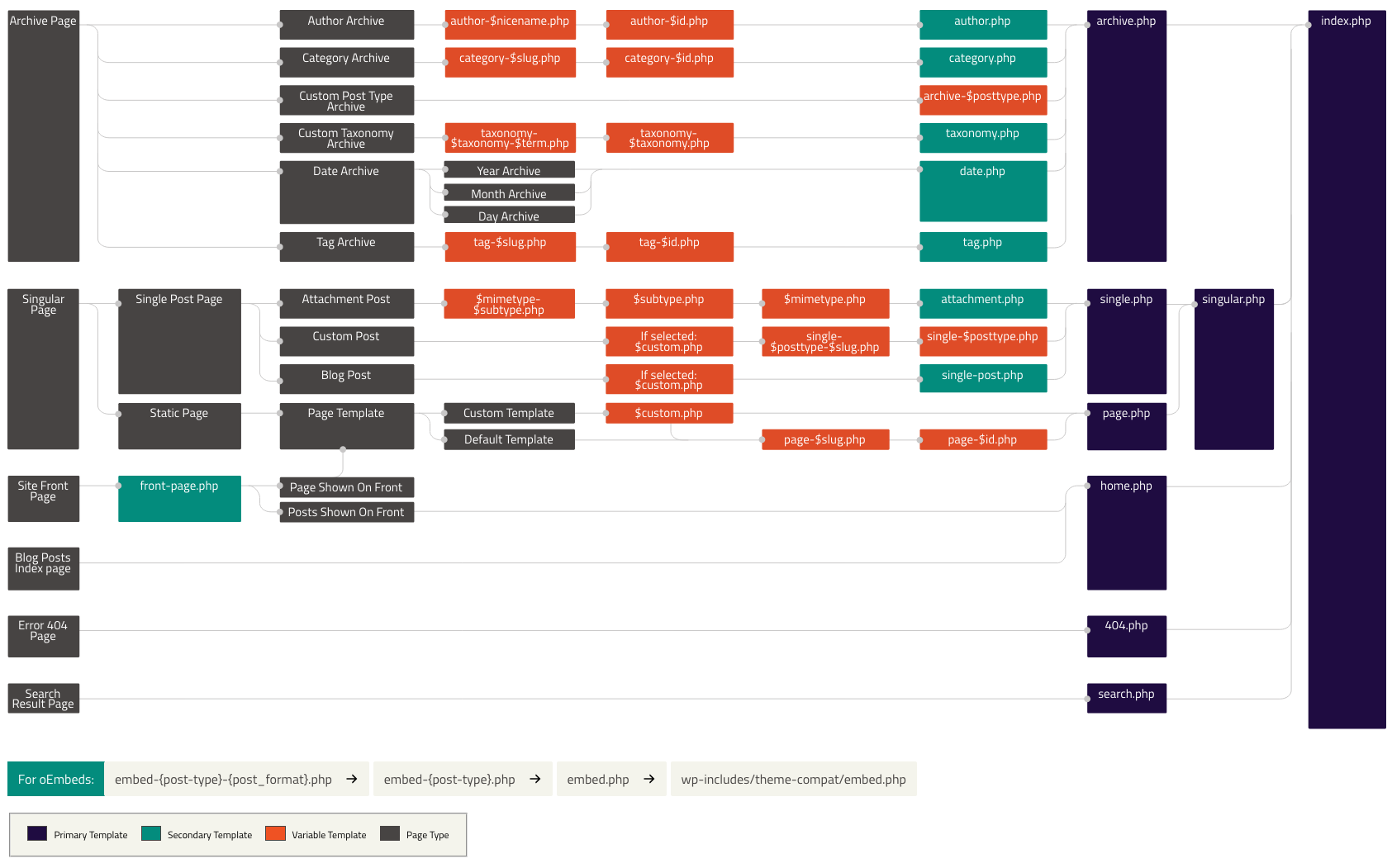
So yeah you are correct, there is no archive file, instead it pulls from the index, see the hierarchy here: https://developer.wordpress.org/files/2014/10/Screenshot-2019-01-23-00.20.04.pngJust to note, the theme does have a template-parts/content/archive.php file which is hooked in on the kadence_archive action. This makes it work really well with pagebuilders because they can hook in their content.
Ben
In forum: Membership ForumsIn reply to: Create Starter Templates
September 8, 2020 at 4:51 pm #256541Hey,
Just want to make sure I am clear for everyone, this is not a basic thing where you simply copy and paste. You should only do this if you consider yourself a developer or a master tinkerer. In the future, I will be building an interface for this for the average user. For now you would need to use something like page builder cloud to have an interface.Do I need to create a .js file
Yes, you need to create a custom js file that would be in your child theme or a custom plugin. That needs to be enqueued on the https://developer.wordpress.org/reference/hooks/enqueue_block_assets/ action.
I hope that helps!
Ben
In forum: Kadence BlocksIn reply to: Display Page content in another page or template
September 8, 2020 at 4:44 pm #256540Hey,
with the pro version of the theme (beta is accessible from the my-account page, it’s stable) you can use an element which you can either hook in or use the shortcode to add your page.https://kadence-theme.com/docs/how-to-use-element-hooks/
Ben
In forum: Kadence ThemeIn reply to: Turn off shipping information on shop page
In forum: Kadence BlocksIn reply to: Display Page content in another page or template
September 8, 2020 at 1:55 pm #256529Thanks so much Hannah. Love the re-usable blocks option. It is very helpful. For this use I need to kind of inject the block or page into an existing theme or page via shortcake or PHP. Is that doable somehow?
Griffin
In forum: Kadence ThemeIn reply to: Turn off shipping information on shop page
-
This reply was modified 5 years, 7 months ago by
-
AuthorSearch Results