Notice: These forums are now retired and closed. For active support, please Submit a Ticket or visit our official WordPress.org community pages.
Kadence Theme | Kadence Blocks | Starter Templates | WooCommerce Email Designer | Ascend | Virtue | Pinnacle
Search Results for 'page '
-
AuthorSearch Results
-
In forum: Pinnacle Theme
Topic: AMP Woocommerce Support
Hello,
do I need a special kadencethemes plugin for using AMP in Woocmerce Shop with Pinnacle Theme? Because it doesn´t work right now an the redirect to the amp woocommerce page doesn´t work:
(I have now deactivated woocomerce support plugin from AMPforWP)
Best regards
In forum: Ascend ThemeIn reply to: Display Second Widget area on home page only
In forum: Virtue ThemeIn reply to: CSS Question
For this page: BOLD TEXT with > symbol should change color from back to orange when hovered over using above CCS. It will only follow CCS when the default high light color is set to black (currently it is set to blue). http://b33.d3f.myftpupload.com/roof-guardrail/
For this page: most of the BOLD TEXT with > (bottom of page) does change from black to orange, one does not. Again, default high light color is set to blue.
http://b33.d3f.myftpupload.com/roof-safety-rail/For Home Page: BOLD TEXT with > uses the above code for h2 and has no issues. Again, default high light color is set to blue. http://b33.d3f.myftpupload.com/
In forum: Virtue ThemeTopic: Site Style Four (Review)
In forum: Ascend ThemeIn reply to: Display Second Widget area on home page only
In forum: Ascend ThemeIn reply to: Display Second Widget area on home page only
May 22, 2019 at 1:09 pm #226377ok, let me know if that is what you were thinking, it’s live on your home page.
Ben
In forum: Virtue ThemeIn reply to: Quantity +/- in the category
Checkout this post: https://aceplugins.com/how-to-add-a-quantity-field-to-shop-pages-in-woocommerce/
Hope it’s helpful! Let me know if you have further questions on this.Hannah
In forum: Ascend ThemeIn reply to: Display Second Widget area on home page only
The widget could go where the logo is now, but I also noticed that when I make the widget visible on the home page the logo disappears, the Welcome text gets pushed way over to the left, and the widget appears where the welcome text is now. That would work too.
Maybe the best answer would be that the widget would replace the logo on the home page only…if that’s possible.
If you’d prefer a mock up I’d be happy to do one, just let me know!
In forum: Virtue ThemeIn reply to: Quantity +/- in the category
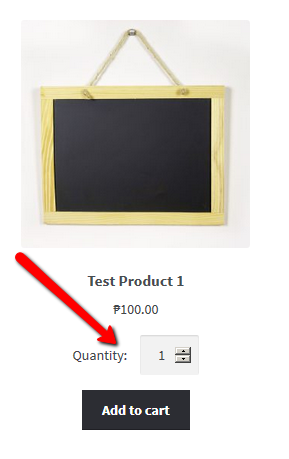
there says “add to the cart”, I would like you to have the possibility to put the amount, as shown inside the “shop” section
LIKE THIS:
https://ps.w.org/quantity-field-on-shop-page-for-woocommerce/assets/screenshot-1.png?rev=1593571In forum: Ascend ThemeIn forum: Virtue ThemeIn reply to: Quantity +/- in the category
In forum: Virtue ThemeIn reply to: Round out corner for articles photo for home page.
Therу are my 2 main pages: https://playbestcasino.net/ and https://slotogram.com/ And you can see the page, for example, with what I need https://playbestcasino.net/en/elk-studios-provider/ Thank you
In forum: Virtue ThemeIn reply to: Round out corner for articles photo for home page.
In forum: Virtue ThemeIn reply to: Problem with editing articles
In forum: Virtue ThemeDear friends, how it possible to change the radius for corners of images and add shadows for home page? I know how to do it with elemenentor (just sent border radius 9, and shadow horizontal 5 and vertical -5) and its look nice. But Elenmentro doesn’t work for the main page. How to do it foк all articles preview images of the home page? Thank you
In forum: Ascend ThemeIn reply to: bread crumb styling
May 22, 2019 at 1:33 am #226314Hi!
The result i want is to have the page title in RED, the background white, the breadcrumbs background white and the breadcrumb font color RED. So i tried to configure it but as you can see the BC is still grey/white.
now the configuration is: title & breadcrumb background is white, and title and breadcrumb font colore is red… but the bc is still in grey…
is something that i cannot understand correctly
thank you very much
AnbgeloIn forum: Ascend ThemeIn reply to: Display Second Widget area on home page only
In forum: Virtue ThemeIn reply to: Integration with Elementor on Woo Product pages
May 21, 2019 at 6:32 pm #226290I suppose I can develop some sort of footer for my product pages. I could either use it universally or for times like this when the same content goes on several pages.
Cynthia
In forum: Virtue ThemeIn reply to: Integration with Elementor on Woo Product pages
May 21, 2019 at 6:22 pm #226287OK, I see, woocommerce looks for content before it will render a tab, content in the form of some text or image or something. The template widget renders later in the page load so when woocommerce checks for content it doesn’t see anything and so it doesn’t render that tab.
You just will have to add some kind of content into the tab if you want to build your page that way with the elementor template, or you can hack woocommerce and force it to show that tab but I don’t suggest that.
Ben
In forum: Ascend ThemeTopic: customized fonts
AnonymousMay 21, 2019 at 2:51 pm #226262Hi there,
Please see this website:
*Login to see linkI have used the ‘use any font’ plugin and uploaded a font called ‘the styled edit’ which I have set to be the font for H3 headings.
This was displaying perfectly for months, but now it has stopped working and it has been replaced by a strange serif font.
I have checked both the Typography settings for the theme as well as the settings within the plugin and there is nothing that I can see to fix, do you have a suggestion of how to fix it?
Here is a sample page where the H3 font is displaying incorrectly:
*Login to see link“bonjour, je suis Julia” should be written in ‘the styled edit’ font.
Thank you in advance for your help!
-
AuthorSearch Results