
Notice: These forums are now retired and closed. For active support, please Submit a Ticket or visit our official WordPress.org community pages.
Kadence Theme | Kadence Blocks | Starter Templates | WooCommerce Email Designer | Ascend | Virtue | Pinnacle
Search Results for 'page '
-
AuthorSearch Results
-
In forum: Virtue Theme
In reply to: Pinnacle Staff on Virtue Theme
In forum: Pinnacle ThemeIn reply to: aspect ratios of images throughout the site
November 29, 2018 at 11:06 am #209501Hey,
For the portfolio grid page you can set the ratio in your portfolio page settings. Scroll down to the section for image ratio: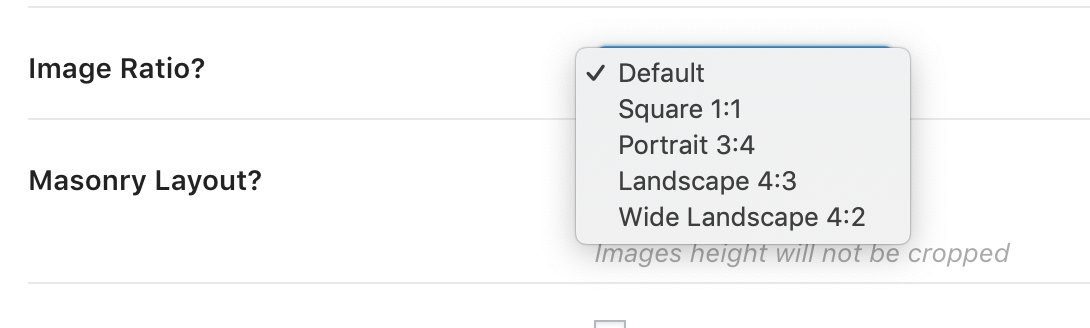
Inside a portfolio post for the slider, you can set the image ratio by setting the max width and max height in the portfolio settings.
Does that help with the portfolio items? You can set the ratio because you can set the slider or single image size in your portfolio post settings and you can set the ratio for the grid for the portfolio grid output.
For blog posts, If you want the grid to output images in whatever ratio you upload you can do that. Go to theme options > blog settings and turn off “Hard Crop excerpt images to the same height.”
For a standard blog list style if you set the post summary to “portrait image” that will output as a square see the last post in on this page: http://themes.kadencethemes.com/pinnacle-premium/our-blog/
If you set the post summary to landscape image that will output your image in whatever ratio you uploaded it. See the first post in the above link.
Does that help? If you can post a link to your site so I can see what you have set up that would really help me answer specifically.
Ben
In forum: Pinnacle ThemeIn forum: Pinnacle ThemeHi,
Yes, I have chosen SiteOrigin PageBuilder to create my site template and so what I have logically deduced through deductive reasoning is this, without any hard coding to be done… I was looking in Theme Options, off hand, is there a universal setting for website design layout to be changed to one column instead of two columns… being that of eliminating the sidebar? I want to eliminate the sidebar from pages and posts.
Thanks.
In forum: Virtue ThemeIn reply to: Pinnacle Staff on Virtue Theme
In forum: Pinnacle ThemeHey,
The best way to do this would be to use a page builder plugin to build your sidebars. You could setup a template thats used for all posts and pages and then just change out the widgets within your page builder layout.
Take a look at this post that covers the various plugins out there:
https://www.kadencewp.com/recommended-page-builders-for-wordpress/Let me know if that works for you.
-Kevin
In forum: Pinnacle ThemeHi,
… Thanks for responding so quickly Hannah. That’s just it I need to create thousands of Customized Sidebars & this would be impractical to manage from the WIDGET AREA because it seems that most of the Customize Sidebars plugins out there do not support a search for the Post and Page area other than a drop down menu… could you imagine me searching through a dropdown menu of thousands of sidebars…hehheh. I should re-word what I’m asking… Is it possible to create/edit customize sidebars directly from posts or pages without using widgets for them?
Thanks.
In forum: Pinnacle ThemeIn forum: Pinnacle ThemeHi,
I am building a very large website that I would like to change out the sidebar to each and every posts which would be impractical in the widget area to manage with any basic Customize Sidebar plugin that’s out there. Is it possible to edit/modify each page or posts of the sidebars in the Appearance / Customize area? I notice it is set to modify and change from the homepage, I don’t know if this is by default and can be changed.
Thanks.
Dawn
In forum: Virtue ThemeVirtue Premium theme for my WordPress website appears to be constantly consuming huge queries for MySQL database query limit for its proper functionality. Due to which the query limit might have exceeded and caused the website to be down and revert to /wp-admin/install.php page with 403 Forbidden- “You don’t have permission to access /wp-admin/install.php on this server”. Query limit needs to be reset all the time for the website to come back up and then down again. At the same time, my WP Dashboard login page will also revert to /wp-admin/install.php page and I am unable to login to WP Dashboard.
This has been happening for 5 days since the last few latest updates and as soon as I switch to a different theme, my website is up and running with no problems.
In forum: Pinnacle ThemeNovember 28, 2018 at 4:30 pm #209426In the pages that you have marked where worship is the parent just go in and edit the page and set the parent to none.
Ben
In forum: Pinnacle ThemeBen –
This is helpful info, thanks! I need some further help.
I deleted the worship page and cleared the cache. I reloaded the page, but the same path existed: “Home/Worship/Compline”.
When I hover over Worship it shows the address: saintmarks.ecwwblog.org/worship__trashed/
Also, the path for the Compline page is: http://saintmarks.ecwwblog.org/worship__trashed/compline/
Before I delete anymore pages, can you give me some insight on the URL changing to include “trashed” and how I can get rid of that.
FYI – in the meantime, I have restored the Worship page.
Thanks!
In forum: Virtue ThemeIn reply to: Virtue kad_blog pagination
November 28, 2018 at 4:09 pm #209422Hey,
I would suggest not using pagination on the home page.But you can use a child theme and hook into https://codex.wordpress.org/Plugin_API/Action_Reference/pre_get_posts
Then check for “is_home()” and if true set the
$query->set( 'cat', '123' );where 123 is the category ID.So like this:
function my_home_category( $query ) {
    if ( $query->is_home() && $query->is_main_query() ) {
        $query->set( 'cat', '123' );
    }
}
add_action( 'pre_get_posts', 'my_home_category' );
In forum: Pinnacle ThemeNovember 28, 2018 at 3:41 pm #209415Hey,
You have created the worship page in your pages and assigned child pages under it. You do not need to do this for your menu. So I simply suggest you remove the worship page and that would remove it from your breadcrumbs.You should only assign a page as a parent if it truly is a parent page since your page is blank it shouldn’t be a parent page at all.
The menu is its own structure and your Worship and Prayer menu item is a custom menu item not a reference to any page. There is no such thing has a real page that is non-hyperlinked.
Does that make sense?
Ben
Example page: *Login to see link
Breadcrumbs: Home/Worship/Compline
The “Worship” link in the breadcrumbs is a top navbar item that doesn’t link anywhere…it’s just a placeholder to display the submenu items that are grouped under Worship.
If you hover over the navbar item “Worship & Prayer” the address that displays in the lower left of the browser window is:
saintmarks.ecwwblog.org/#But if you click on Worship in the breadcrumbs, the address that displays in the lower left of the browser window is:
saintmarks.ecwwblog.org/worship and that page doesn’t exist.Is there a way to make the non-hyperlinked navbar items be non-hyperlinked breadcrumbs?
Thanks!
In forum: Virtue ThemeIn reply to: Virtue kad_blog pagination
In forum: Virtue ThemeIn reply to: Virtue kad_blog pagination
Sorry Hannah, no that seems a bit muddled.
Isn’t that a shortcode rather than CSS?
And if I’m using the homepage to display posts, I can’t add the shortcode to set the category.Right now I have the homepage showing pagination but I am unable (I think) to set the category.
Grateful for any further clarity.
Phil.In forum: Virtue ThemeIn reply to: Virtue kad_blog pagination
You can limit your posts to a specific category with css like this:
[kad_blog orderby=date items=4 fullpost=false cat=photos]
If you were to set your homepage as your latest posts page from settings > reading you could set the “Blog pages show at most” to whatever number you wanted and then would get pagination for the rest. Just enable Page Content in the homepage layout manager from Theme Options > Home Layout.
Hope that’s helpful!Hannah
In forum: Virtue ThemeIn reply to: Virtue kad_blog pagination
Thanks Hannah, the posts were actually being displayed on the homepage so it’s going to need some more configuration to get this setup, I think.
Can I set a category for the posts being displayed on the homepage, rather than have all of them on there?
Cheers,
Phil.In forum: Pinnacle ThemeIn reply to: still sides background
-
AuthorSearch Results



