
Notice: These forums are now retired and closed. For active support, please Submit a Ticket or visit our official WordPress.org community pages.
Kadence Theme | Kadence Blocks | Starter Templates | WooCommerce Email Designer | Ascend | Virtue | Pinnacle
Search Results for 'site'
-
AuthorSearch Results
-
In forum: Virtue Theme
Topic: removing blog
Hi, When I go to my url, the “home page” seems to be the “latest post” I will not be having a blog on my website, I will not be doing “posts” I am just going to have a store. How do I make the first page I see when I type my url in the search bar the actual “home page”, Instead of this page trying to show “posts”
In forum: Virtue ThemeTopic: Video training Site set up
Please accept my apologies if this message has already been received. I thought I had sent it a couple of hours ago but can’t seem to see it now. I was wondering if there is any video/ videos showing the creation of a sample virtue ecommerce site from scratch right through to shipping and gateways etc.
In forum: Pinnacle ThemeIn reply to: Are there any product options?
March 30, 2016 at 3:54 pm #88472I would send screenshots if I could, but there’s no way to attach here
Use any photosharing site like http://tinygrab.com/ or https://www.awesomescreenshot.com/
In terms of how variations work… it sounds like you’re talking about addons which is handled different from a product variation. For example a shoe size is a variation which would be different from your desire.
Here is a woocommerce plugin for adding addons: https://www.woothemes.com/products/product-add-ons/
I think thats more what your looking for.
But if your not wanting to spend for a plugin I can think of one way to make the options you want work. I’ve updated your product so you can see: http://shoottheplanet.net/product/mojave-national-preserve-lava-tubes-and-sand-dunes/
And nope not seeing any popupsBen
In forum: Virtue ThemeIn reply to: Virtue Gallery Lightbox Off
In forum: Virtue ThemeIn reply to: Related Products on Cart page
In forum: Virtue ThemeIn reply to: Related Products on Cart page
In forum: Virtue ThemeIn reply to: Video on eCommerce setup
Here is a tutorial about getting started with WooCommerce for your site. The tutorial links to some deeper instructions on the WooThemes site.
https://www.kadencewp.com/installing-woocommerce/
Give that a look and let me know if that helps.
In forum: Pinnacle ThemeIn reply to: Are there any product options?
In forum: Virtue ThemeTopic: Video on eCommerce setup
In forum: Virtue ThemeIn reply to: linking sire with braintree
This is the p;ugin supplied by braintree https://wordpress.org/plugins/woocommerce-gateway-paypal-powered-by-braintree/
The problem is Braintree payment solution does not show on site.In forum: Pinnacle ThemeIn reply to: Pinnacle Image Gallery Caption
In forum: Virtue ThemeIn reply to: How to add social sharing buttons below add to cart
Kevin, thanks for your advice. I got a code from the plugin author,that can be added anywhere in the website.
<?php if ( function_exists( 'ADDTOANY_SHARE_SAVE_KIT' ) ) { ADDTOANY_SHARE_SAVE_KIT(); } ?>Is it possible to use that code into my child theme’s function.php. I’d like the buttons placed (option 1) between the product image and the thumbnails, or (option 2) right below the add-to-cart button?
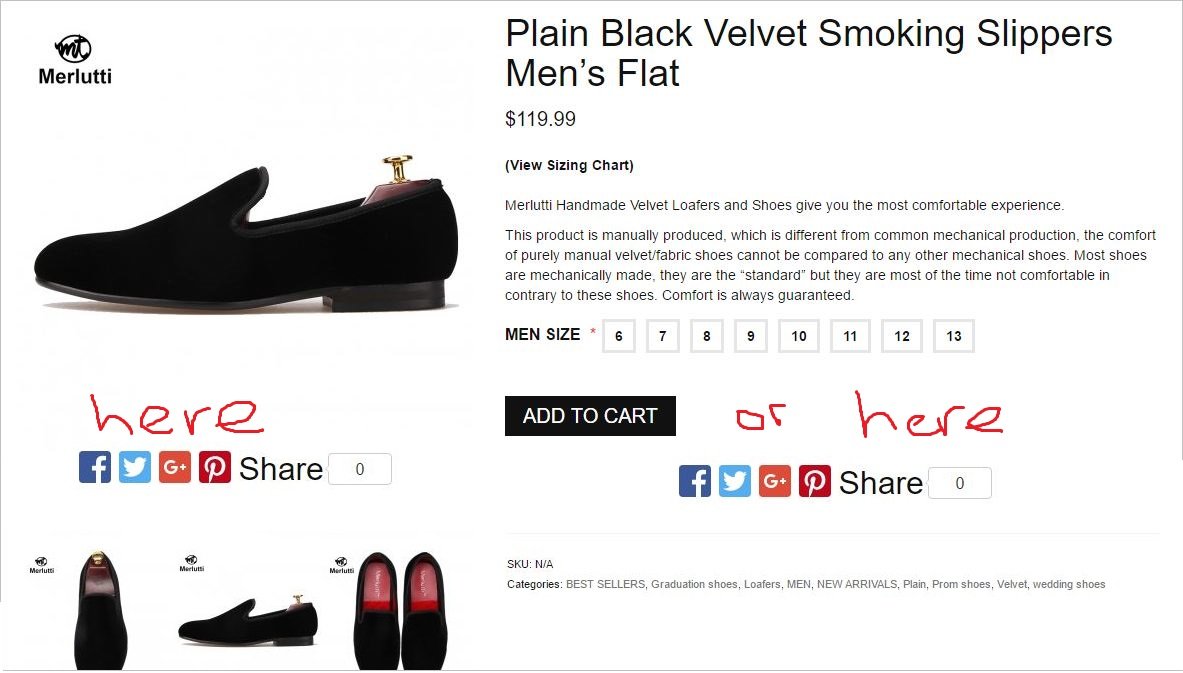
Here is my function.php
<?php

//Creating a popup for the Shoes Size Chart.

add_action('woocommerce_single_product_summary', 'kt_size_chart_custom', 15);
function kt_size_chart_custom() {
	echo '<div class="mycustom_size_chart"><a href="http://merlutti.com/size-chart/" class="pvideolight kt_sizing_chart">(View Sizing Chart)</a></div>';
	}


//Removing Addtional Information Tab WooCommcerce.
add_filter( 'woocommerce_product_tabs', 'woo_remove_product_tabs', 98 );

function woo_remove_product_tabs( $tabs ) {

    unset( $tabs['additional_information'] );  	// Remove the additional information tab

    return $tabs;

}
In forum: Virtue ThemeIn reply to: Products images fuzzy
March 30, 2016 at 12:29 pm #88406Yes, I looked at your settings, figured out why you were having the issue based on your images and sizes and settings and came up with a solution that would make your site better even though most of your images are not large enough to show crystal clear on large retina screens (like an imac for example or ipad).
I alway suggest using larger images that are compressed well. 1200×1200 is a good start but 1600×1600 is good future proof. Also uploading images at the same ratio that you’re going to use them is a nice way to get the most out of your image sizes.
Ben
In forum: Pinnacle ThemeIn reply to: Are there any product options?
March 30, 2016 at 12:24 pm #88402Indigo,
I’m confused. I didn’t see any variable product in your site? Can you link to a variable product for me?sudheer, Please do not post in someone else topic. You can create your own.
You can change the footer copyright text from within your theme options > misc settings.
Ben
In forum: Virtue Themehello
my site is conop.us
and in the footer, i have a gallery i am putting in column 2. i have already made the css to make column 2 80% of the width, and i have created a gallery for the column. i wanted the images to be smaller, so in a 5 column gallery, i changed .tcol-lg-25 size to 15% as opposed to the standard 20%.
but what is happening now is all of the items are going over to the left.. is there a better way to make them still take up 100% of the width while keeping the smaller size?
In forum: Virtue ThemeIn reply to: Products images fuzzy
In forum: Virtue ThemeIn reply to: How to hide Cyclone Slider on small screens
In forum: Virtue ThemeBen
Sure… site is here: Roebling Lofts
The site width in Misc Settings wasn’t set previously, though I did turn it on just now and have left it set. There’s still a white border next to the slider.
Michael
In forum: Virtue ThemeIn reply to: Mobile site
March 30, 2016 at 11:47 am #88382You can use a mobile redirect and make a “mobile” home page like this: https://wordpress.org/plugins/simple-mobile-url-redirect/
Or you can create a seperate site and use the redirect to control a totally different site.
Or you can use a mobile theme like this: https://wordpress.org/plugins/wptouch/
Ben
In forum: Pinnacle ThemeIn reply to: Call To Action Button
-
AuthorSearch Results



