Notice: These forums are now retired and closed. For active support, please Submit a Ticket or visit our official WordPress.org community pages.
Kadence Theme | Kadence Blocks | Starter Templates | WooCommerce Email Designer | Ascend | Virtue | Pinnacle
Search Results for 'widget '
-
AuthorSearch Results
-
In forum: Virtue Theme
In reply to: Looped Gifs or Mp4 as page backgrounds
Hi Michael,
There isn’t a built-in function to have video backgrounds. Have you worked with Elementor page builder (https://elementor.com/)? It allows you to add rows with video backgrounds and place whatever widgets you would like on the row. Would something like that work for you?Hannah
In forum: Virtue ThemeHi
I’ve got a client-requested page design – with large spacing above the opening paragraph on desktop view.
I’ve dropped in a blank text widget before the opening para, and extended it’s bottom margin to get the affect.On mobile, the text is pushed out of view due to the widget above the text.
I’ve tried reversing the standard collapse order on the row, but for some reason the “Right to Left” collapse option doesn’t work.Also if there’s 3 columns and 1 & 3 are blank, the 3rd blank column will show before the para.
– any way to render a specific column first, second and third etc on mobile view using CSS?
any suggestions?
In forum: Virtue ThemeIn reply to: site origin editor widget not functioning as normal
Sure. Here’s a screenshot from another website. Typically the editor widget includes “add media, virtue shortcode, and the visual/text view option”.
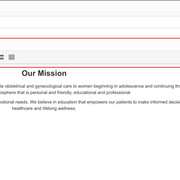
I’m not getting any of those options in this editor widget on this website:

https://forzainsurancegroup.com/home-3/
Thanks for your help.
CarrieIn forum: Virtue ThemeIn reply to: Category Sidebars
August 6, 2019 at 12:41 pm #232573Hey,
Any would have to be removed through the plugin you are using to output those select boxes, you can’t do it with css. Looks like that is in core woocommerce. You would need to change the text there.You can use https://wordpress.org/plugins/say-what/
And the string would be: ‘Any %s’ just change to ‘%s’ the textdomain is woocommerce.
You can use css for the spacing:
#pl-20141 .so-panel.widget_layered_nav {
    margin-bottom: 10px;
}
Ben
In forum: Virtue ThemeIn reply to: site origin editor widget not functioning as normal
Try installing this plugin: https://wordpress.org/plugins/black-studio-tinymce-widget/
Did you have that plugin installed previously? I think it will do what you’re after.Hannah
In forum: Virtue ThemeHi-The basic function of editing widget content in visual vs. text mode has dissapeared in the on this site.
*Login to see link
I’ve had this problem before on this site, and deactivating ‘Advanced Custom Fields’ widget corrected it. That’s not working this time. In fact I had all of the plug ins deactivated and still didn’t get the view options back.Any ideas?
Thanks very much-
CarrieIn forum: Virtue ThemeTopic: Audio Widget Files
Hello All,
My client is wanting to upload audio mp3 files for her monthly teleclinics and have her attendants be able to download the files and save if they want.
I found the audio widget and it works fine, but it doesn’t seem to let you download the file to your computer if you want.
Any suggestions?
Thanks!
In forum: Virtue ThemeHey,
Try adding the shortcode into a text widget within the home widget area. You can enable that from Theme Options > Home Layout, then add a widget from Appearance > Widgets. Another option is to display your posts using the “latest blog posts” in theme options > home layout. If you scroll down to Home Blog Settings there’s an option to limit your posts to a specific category.
Hope that’s helpful!Hannah
In forum: Virtue ThemeIn reply to: Category Sidebars
In forum: Virtue ThemeIn reply to: testimonial carousel
In forum: Ascend ThemeAnonymousAugust 4, 2019 at 1:10 pm #232406Hi
I have a search icon in the top bar (it should just search products) – but when I search I don’t get any results. Regardless of which page I am on when I search, I just get redirected to the home page instead of the search results page. The search appears to be running eg the URL changes to include ?s=<search_term>&post_type=product but the results aren’t shown.
It used to work, but I suspect it stopped working when we redesigned the homepage using SiteOrgin Layout.
Additionally, I tried adding a search box via header widgets as a workaround, but that doesn’t seem to be working either now.
Any thoughts on how to fix this?
The website is *Login to see link
Many thanks
DomIn forum: Ascend ThemeIn reply to: change the menu text color on specific post/page
August 4, 2019 at 3:43 am #232391Hey Ben,
It is still a draft (not published yet), but Public –
Sorry, I’m not sure what to do so you can view it?
see below 🙂
I’ve upload image previously (above).Permalink: https://www.adventuretravelcoach.com/draft/ Edit Get Shortlink
Edit with Elementor
SiteOrigin Hero
A big hero image with a few settings to make it your own.
SiteOrigin Headline
A headline widget.
SiteOrigin Features
round
SiteOrigin Image
https://layouts.siteorigin.com/wp-content/uploads/2015/10/Everest-Iphone.png#250×500
SiteOrigin Features
round
SiteOrigin Headline
A headline widget.
SiteOrigin Editor
Everest, a Page Builder layout Lorem ipsum dolor sit amet, consetetur sadipscing elitr, sed diam nonumy eirmod tempor invidunt ut labore
SiteOrigin Button
Beautiful
Word count: 103
Last edited by mhuman on July 28, 2019 at 3:47 pm
Toggle panel: Publish
PublishPreview (opens in a new tab)
Status: Draft Edit Edit status
Visibility: Public Edit Edit visibility
Revisions: 5 Browse Browse revisions
Publish immediately Edit Edit date and time
Readability: Needs improvement
SEO: Not availableIn forum: Virtue ThemeIn reply to: testimonial carousel
You should be able to create the same effect using the testimonial carousel widget with elementor as you would with the homepage carousel. Where exactly are you getting stuck? Can you post a link to where you’re adding it? Can you ensure that you have enough testimonial posts assigned to the group you’re selecting?
Hannah
In forum: Virtue ThemeIn reply to: testimonial carousel
In forum: Virtue ThemeIn reply to: testimonial carousel
August 2, 2019 at 1:46 pm #232354Hey,
In your page you can add a row wherever you like in elementor and then add the testimonial carousel widget. Would that work for you?Ben
In forum: Ascend ThemeIn reply to: Ascend Agency Demo-like styling questions
August 2, 2019 at 1:15 pm #2323491. That is theme css. It’s there because it pulls the menus items to the container. Your container is missing the padding though, which is why it’s being pushed out. You seem to be adding this which is removing that padding:
aside#kad-vertical-menu {
    padding: 0;
}
3. You can use this css:
.kt-flip-box-back, .kt-flip-box-front {
    -webkit-transition: all 1s ease-in-out;
    -o-transition: all 1s ease-in-out;
    transition: all 1s ease-in-out;
}
4. You can add a gallery and set it to custom links. Use the Ascend Gallery widget. Then you will need this plugin to allow for custom links: https://wordpress.org/plugins/gallery-custom-links/
Ben
In forum: Virtue ThemeIn reply to: Sidebar not showing on some pages/posts
This reply has been marked as private.August 1, 2019 at 2:17 pm #232293In forum: Virtue ThemeIn reply to: Safari not updating changes and css errors
August 1, 2019 at 1:49 pm #2322844px for a height doesn’t work or make sense, so don’t set that. Doesn’t matter if you are seeing a change in safari it shouldn’t be set to that if you have content larger then 4px.
Ok so yeah using Pinnacle… PLEASE in the future post in the forum for the theme you are using.
You are using this css:
.widget-first {
    margin-top: 20px !important;
}
Which isn’t smart, using important there is not needed and creates issues. I removed important for you.
Please try now.
In forum: Virtue ThemeIn reply to: Sidebar not showing on some pages/posts
August 1, 2019 at 1:43 pm #232283You are using the “Widget Visibility” plugin and you are setting the widgets to only show on pages. You’ve selected some “main pages” but posts and pages are totally different. A “Posts Page” is a page that shows posts. Not a single post. Since you are wanting this to show on single posts your settings are intentionally hiding it.
I’m not sure where you are wanting the widget to not show but you need to relook at the logic. Just remove all your visibility settings and you will see what I mean.
Ben
In forum: Virtue ThemeIn reply to: Safari not updating changes and css errors
note: after i swapped the original widget (custom html) for the Menu widget the needed items disappeared, only on the home page the homepage.
You can see the top bar error on any other page.I uploaded some screenshots below.
https://hkgcpa.com/industries/


-
AuthorSearch Results