
Notice: These forums are now retired and closed. For active support, please Submit a Ticket or visit our official WordPress.org community pages.
Kadence Theme | Kadence Blocks | Starter Templates | WooCommerce Email Designer | Ascend | Virtue | Pinnacle
Search Results for 'widget area'
-
AuthorSearch Results
-
In forum: Virtue Theme
In reply to: Footer column no 5
December 24, 2018 at 12:26 pm #211495There isn’t a 5th widget area to call into the footer so you can use a child theme and code this but its more then one small change. You would need to create that 5th widget area first
Then edit the templates/footer.php file and add in the call for this widget area.
If you prefer that you can use the functions.php file in your child theme to create the widget area:
function custom_widget_area_init() {
      register_sidebar(array(
        'name' => __('Footer Column 5', 'virtue'),
        'id' => 'footer_5',
        'before_widget' => '<div class="footer-widget widget"><aside id="%1$s" class="%2$s">',
        'after_widget' => '</aside></div>',
        'before_title' => '<h3>',
        'after_title' => '</h3>',
      );
}
add_action('widgets_init', 'custom_widget_area_init');
Then in the templates footer.php between lines 101 and 102 you can add this:
<?php if (is_active_sidebar('footer_5') ) { ?>
<div class="col-md-25 footercol5">
<?php dynamic_sidebar('footer_5'); ?>
</div>
<?php }; ?>
<?php } ?>
Then post back because you will need some css to make this all align in a row.
Ben
In forum: Virtue ThemeIn reply to: Search Bar in Top bar is not showing
In forum: Virtue ThemeIn reply to: Testimonials
Hey Hannah,
Thanks to your guidance,I finally managed to create testimonial menus and a testimonial widget that I placed in the footer area.
I have 2 more questions:
1. I’d like to change the background color of dropdown menu to black with white font. I went to theme options menu settings, but it doesn’t work.
2. I would like the testimonial widget to be centered in the footer. How can I do this ?Pascal
In forum: Pinnacle ThemeIn forum: Virtue ThemeIn reply to: side bar as menu
Using a page builder plugin, you can add a Product Categories widget to the top of your content area of a page. Then edit the widget and set it to show as dropdown. Then let me know when you have done so and provide a link and I’ll provide css to hide it on desktop.
Hannah
In forum: Virtue ThemeIn reply to: Secondary Menu on Mobile
December 18, 2018 at 6:05 pm #211104Hey,
The icons are missing, search, account, cart.
Those are not options with the standard header unless you add them to your standard header either using a widget area or the top bar. They, of course, would show on all screen sizes.
The standard header does output a mobile menu that navigates similar to the simple mobile header.
To hook in a secondary menu into your simple mobile header through a child theme you need to add this function into the functions.php file:
add_action( 'kadence_mobile_header_after_items', 'force_second_menu_into_mobile' );
function force_second_menu_into_mobile() {
	if ( has_nav_menu( 'secondary_navigation' ) ) {
		?>
		<div id="mobile_cat_nav" class="navclass">
			<nav id="mobile-nav-second" class="clearfix">
				<?php
				wp_nav_menu( array(
					'theme_location' => 'secondary_navigation',
					'menu_class'     => 'sf-menu',
				) );
				?>
			</nav>
		</div><!--close navclass-->
	<?php
	}
}
Ben
In forum: Pinnacle ThemeIn reply to: Topbar Widget Causing Navigation Menu to go Haywire
Sorry I was totally confused in that post. This is actually completely possible for you since you’re using Pinnacle.
For the header layout with the extras on the side and the menu below, you can set that in Theme Options> Header Settings, “Choose Header Style.”
Then, add the widgets to your header areas in Appearance> Widgets. Your menu should display below just link in the Ascend Demo.
Let me know if this is actually helpful! Sorry for the misunderstanding.
-Kevin
In forum: Pinnacle ThemeIn reply to: Topbar Widget Causing Navigation Menu to go Haywire
Sorry, I guess I’m a bit confused. Are you wanting to have the header layout where there is a widget area on each side of the logo such as in this demo:
http://themes.kadencethemes.com/ascend-premium-3/This wouldn’t actually be setup by using the topbar, that is a header configuration that’s only available in Ascend theme where the widget area is a part of the header.
As for the topbar, its pretty straightforward. You can add widgets to it if you enable the topbar widget area. And the topbar icon menu is intended to be a compact topbar menu made of icons. You select the icons and add the links in Theme Options> Topbar Settings> Topbar Icon Menu. Click the plus, and it should open up to show you the options available for each menu item.
I’m not sure if there is a good workaround for adding that style header with the widgets on each side of the logo in Virtue theme, but I’ll flag this for a developer followup so that Ben can let us know. I know that in Virtue 5 there will be some added features, though I’m not sure if this is one of them.
-Kevin
In forum: Virtue ThemeIn reply to: Blog Exerpt and Home Page Text
Hey info813,
You can do that by adding a Virtue: Contact/VCard widget to your topbar widget area from Appearance > Widgets. Just make sure you have enabled the topbar and set “Enable widget area in right of Topbar?” to “On” in Theme Options > Topbar Settings.
Hope that helps!Hannah
In forum: Virtue ThemeIn reply to: Testimonials
Hi Pascal,
1. You could typically use the Testimonial grid page template on your about page, but seeing as you’re wanting two separate categories to display you can use a shortcode like this: [testimonial_posts orderby=date items=4 columns=4 cat=photos] Have you already created separate categories for your feedback and reviews? If so, you can just replace “photos” with your category slug.
2. You can use the home widget area (enabled in theme options > home layout) then add a virtue:testimonial carousel widget (from appearance > widgets).
Hope that’s helpful!
Hannah
In forum: Ascend ThemeDecember 13, 2018 at 11:18 am #210665Can you make sure your settings looks like this where you drag the first widget area to the top.
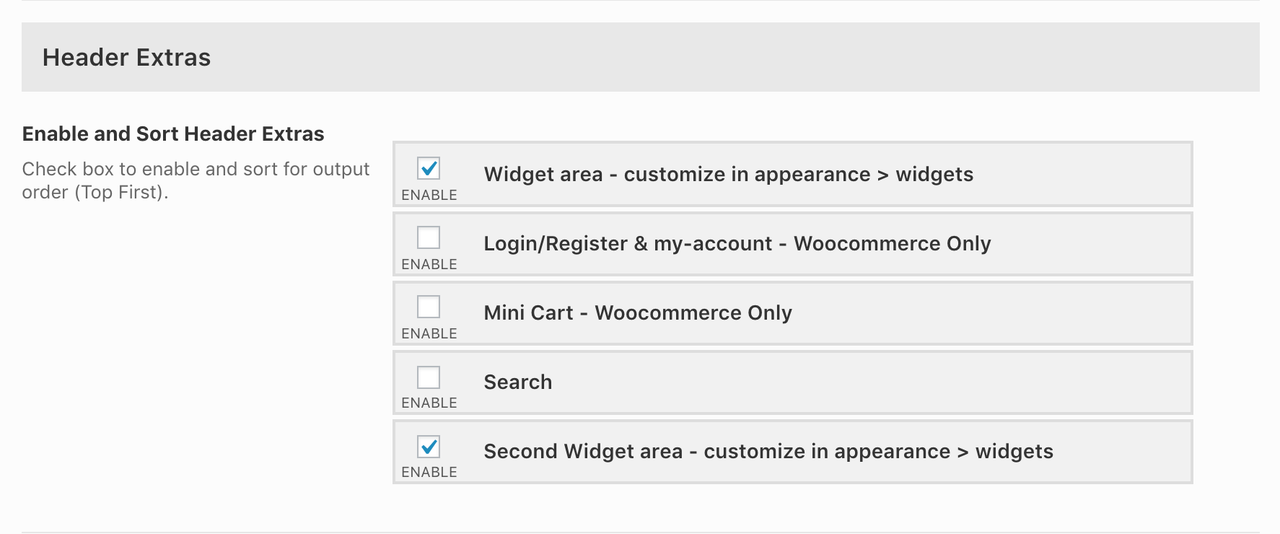
After that post back here.
In forum: Virtue ThemeIn reply to: How to make Kadence Silder Pro Fullwidth?
Actually, the slider wont display any wider than its container size. So to get it to show full page width, you have a few options. If you’re using the new editor, you can add it to a fullwidth column in the Kadence Blocks row layout block:
You can use site origin page builder and add the slider to a text widget that’s set to display “fullwidth stretched.” This will also work in elementor.
Another option is rather than adding the slider to your page content, try adding it in Theme Options> Home Slider. Then it will display in the same area and be fullwidth.
Let me know if any of those options work for you.
-Kevin
In forum: Membership ForumsHey,
I hope I’m following right. You can use a shortcode like the following to only display products from a specific category:[products limit="8" columns="4" category="hoodies"]
You can paste that into any text widget or content area. Then display the same shortcode with a different category underneath. Would that work for you?Hannah
In forum: Virtue ThemeIn reply to: Display secondary menu at page area?
In forum: Virtue ThemeIn reply to: Elementor and Virtue Split content
In forum: Pinnacle ThemePage: *Login to see link
I want to customize the text on these images (Worship Schedule, Programs for Children, Events, and Sermons) to make them more readable:
screenshot 1:*Login to see linkscreenshot 2: *Login to see link
I’d like to do this via drop shadow or a block of background color (like we did on the image at the top of the page: *Login to see link
These images were created using SiteOrigin Page Builder via Appearance > Widgets > Home Widget Area > Layout Builder (1), using “Pinnacle: Image Menu Item”. It’s unclear to me where to style this text in the ways I would like to.
I’ve tried the Pinnacle Portfolio option and after a lot of custom CSS we just weren’t able to get the look/function. This is why we switched the above option.
Thanks!
In forum: Ascend ThemeIn reply to: Header widget widths
Sorry for the delay. To get the rest of your menu to appear, increase your header height in Theme Options > Header Settings. Then add this to your custom css box in Theme Options > Custom CSS:
li.menu-widget-area-kt {
    min-width: 200px;
}
Then rather than enabling a search in your header extras on the right, enable a second widget area and add a search widget.
The cart icon can be changed with css. Which icon are you wanting? http://themes.kadencethemes.com/ascend-premium/icons/Hannah
In forum: Pinnacle ThemeHi,
… Thanks for responding so quickly Hannah. That’s just it I need to create thousands of Customized Sidebars & this would be impractical to manage from the WIDGET AREA because it seems that most of the Customize Sidebars plugins out there do not support a search for the Post and Page area other than a drop down menu… could you imagine me searching through a dropdown menu of thousands of sidebars…hehheh. I should re-word what I’m asking… Is it possible to create/edit customize sidebars directly from posts or pages without using widgets for them?
Thanks.
In forum: Pinnacle ThemeHi,
I am building a very large website that I would like to change out the sidebar to each and every posts which would be impractical in the widget area to manage with any basic Customize Sidebar plugin that’s out there. Is it possible to edit/modify each page or posts of the sidebars in the Appearance / Customize area? I notice it is set to modify and change from the homepage, I don’t know if this is by default and can be changed.
Thanks.
Dawn
In forum: Ascend ThemeTopic: Header widget widths
November 28, 2018 at 3:38 pm #209414Hello!
I need to have the company phone number (with an icon) to the left of the header, and to the right of the header I need the shopping cart and a search bar. I can’t figure out how to move the search bar, and the width of both widget areas is too small.
Also, can I upload my own cart icon and if so, how do I change it? My client wants a specific graphic there.
Thank you!
-
AuthorSearch Results



