
Skip to content
Help Center
  • Pricing
  • ProductsExpand
    • Premium PlansGet all the tools you need in one plan
    • Kadence ThemeLightning-fast performance theme for modern websites
    • Kadence BlocksDrop in ready designs with advanced controls for pixel perfect websites
    • Kadence Shop KitCreate a more effective WooCommerce shopping experience
    • Kadence ConversionsBoost sales and build engaged audiences with popups and banners
    • Kadence InsightsEasily create A/B tests. Optimize your pages to drive higher conversions.
    • View All Products
    • Get Kadence + Hosting
      In One Place

      Enjoy faster setup, top-tier performance, and worry-free WordPress hosting – Kadence Theme, Kadence Blocks, and Solid Security all pre-installed.

      Learn More

  • Kadence AI
  • Starter Templates
  • Blog
  • SupportExpand
    • Resource HubStart here for guides, Product docs, FAQs, and Troubleshooting tips, all in one place.
    • Contact SupportStuck on something? We’re here to help! Open a ticket for top-notch support.
    • Contact Our TeamGot pre-sales questions or need help choosing a plan? Open a ticket and our team will guide you.
    • About usCrafted with love in Missoula, Montana. Meet the team behind the mission.
Account Account
Get Kadence
Kadence ai
Help Center
Kadence ai

Kadence AI

  • Design Libary: Changing AI Details
  • Design Library: Changing AI Image Collections
  • Kadence AI-Powered Inline Content
  • Kadence AI Languages FAQs
  • Activating Kadence AI
  • Kadence AI-Powered Design Library
  • What is Kadence AI?
  • Kadence AI-Powered Starter Templates
  • Kadence AI Credits
  • Troubleshooting Kadence AI
  • Home
  • Knowledge Base
  • Kadence AI
  • Kadence AI

Kadence AI-Powered Inline Content

The Kadence Blocks Advanced Text Block features the Kadence AI Powered Inline Text Generator. This feature allows you to modify, add, remove, or generally improve texts across your website using Kadence AI-powered technology. To get started, you need the Kadence Blocks plugin installed and activated on your website. You also will need to Activate Kadence AI.

Table of Contents
  • Preset Text Prompts
  • Manual Text Prompts
  • Writing Great AI Prompts

In order to use Kadence AI-Powered Inline Text with Kadence Blocks, you must first Activate Kadence AI. You can Click Here to learn more.

You can Click Here to learn more about the Kadence Text (Adv) Block.

Preset Text Prompts


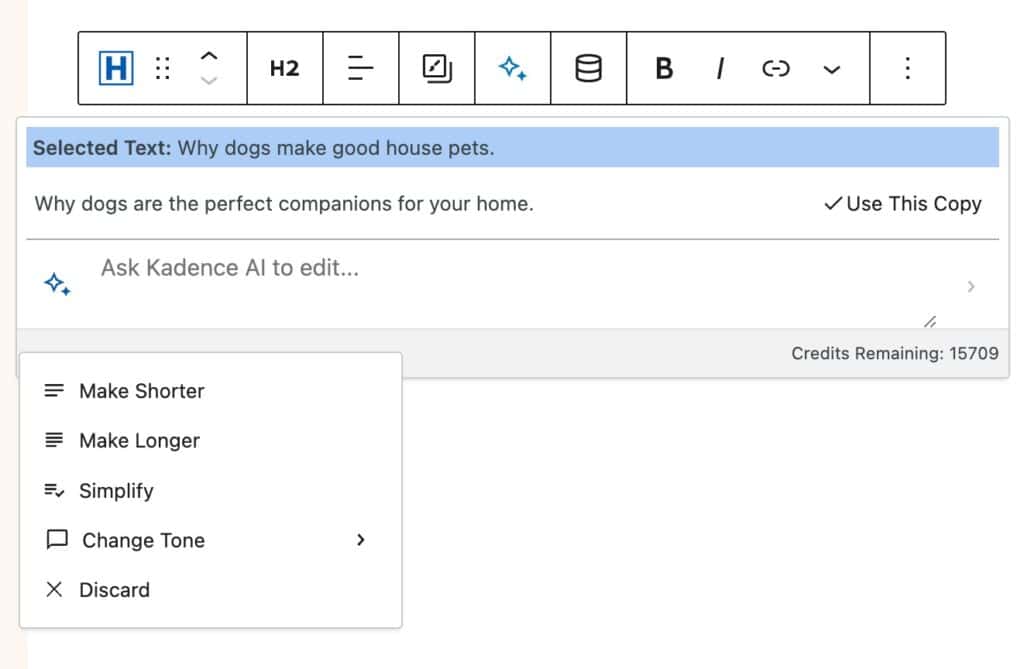
Preset prompts can be accessed without writing any prompt. You can just select any text, click on the AI star icon in the toolbar, and then click again on the AI star icon next to the input field (see photo below).
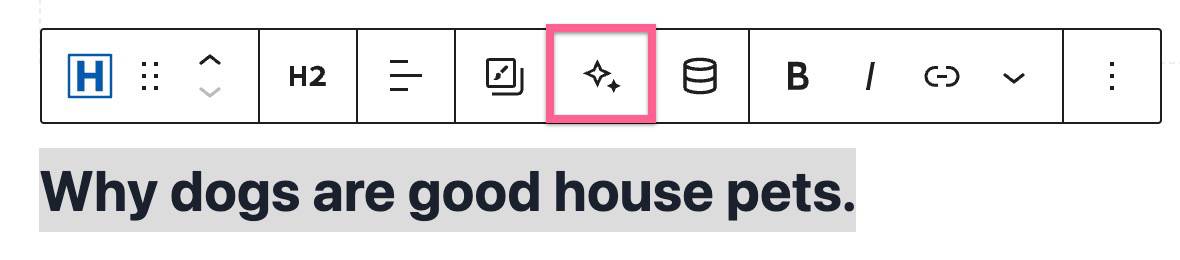
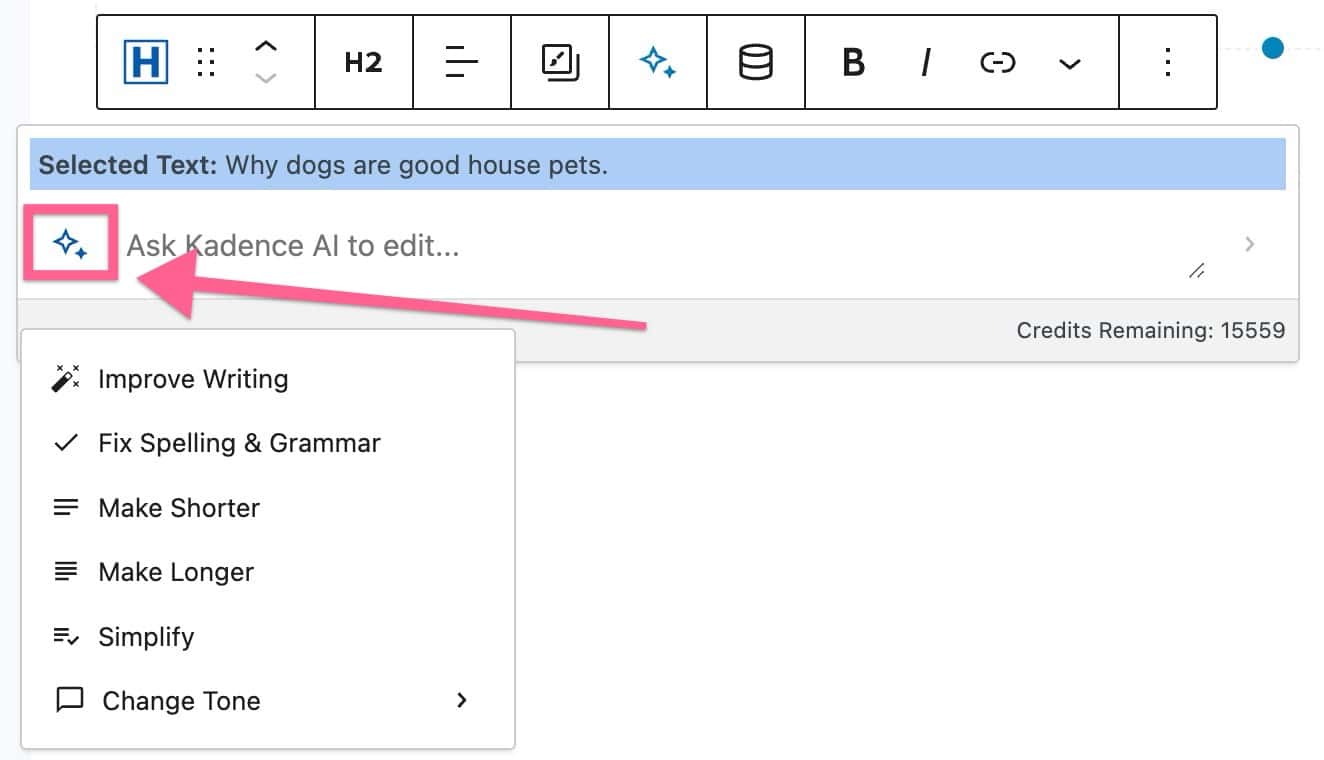
AI Prompt
Kadence AI Preset Prompts

You will have options, such as Improve Writing, Fix Spelling & Grammer, Make Shorter, Make Longer, Simplify, and Change Tone. The selectable tones are; Professional, Friendly, Informative, Engaging, or Funny. Each preset will prompt the AI to apply that prompt to your selected text. For example, in the Image Below, we used the Make Longer Preset Prompt to make the “Why dogs are good house pets” text longer.
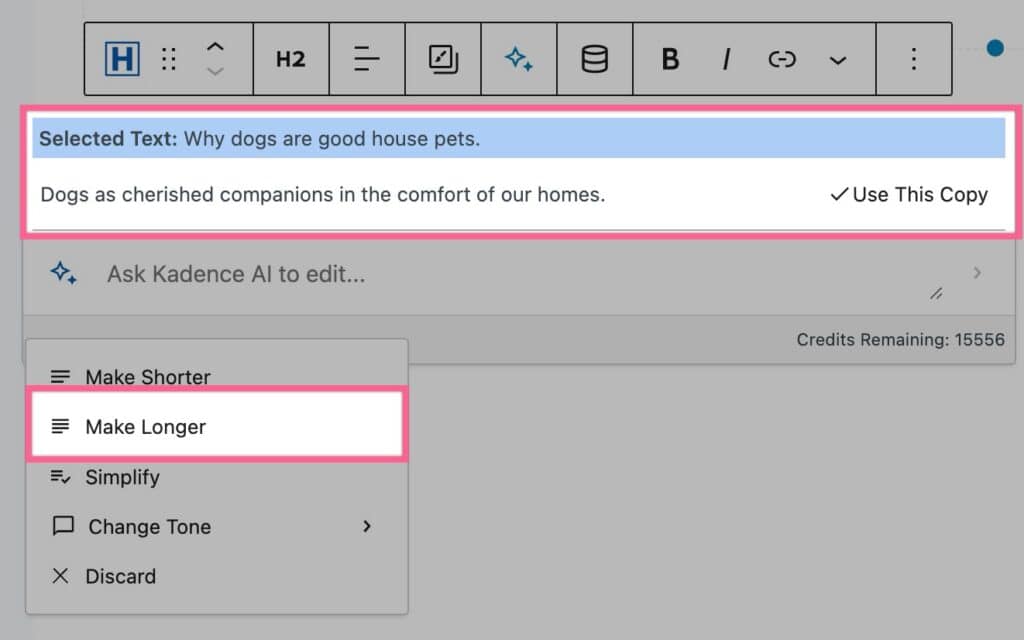
Preset Prompts

Manual Text Prompts

You can also manually enter a prompt to tell the AI what you would like to change about the current text. You can input your custom prompt in the input field.

When finished describing how you’d like to change your text, you can press the Enter key on your keyboard.
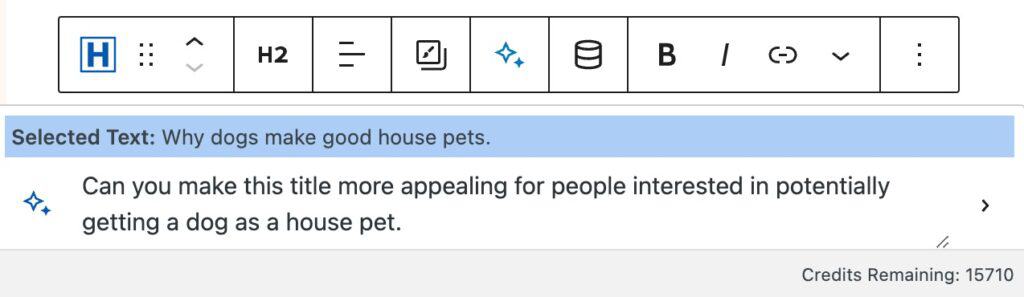
Ai Prompt
Ai Suggested Text

AI will then alter your text to fit the description you provided. You will then be left with a revised version of your Text that you can use or continue to revise.

You can also ask AI to generate text from a blank Advanced Text Block. However, please note that the Inline Text Generated works better and is designed for improving and modifying existing texts. This feature isn’t capable of writing fully properly structured articles and should be used with that kept in mind.

Generate Paragraph
Generated Paragraph

Writing Great AI Prompts

Writing a Great AI Prompt ensures that you get the most out of your AI Prompt. Here are some key details you should pay attention to when writing a Prompt using AI.

  1. Be specific about the context: Explain in what context the text will be used, what page is it in, and what industry/company is it for.
  2. Provide clear instructions: Ask the AI exactly what you want, the type of content you’d like generated, the tone, and the length.
  3. Review and refine: Continue iterating and adjust your prompt to get better quality results.

Example:

Prompt: Write a 3-5 word hero headline for the website’s homepage of an IT consulting firm, using a formal tone of voice.
Result: Transform your IT infrastructure.

Refinement: Rephrase this headline, avoiding the use of the word Infrastructure
Result: Transform your IT Systems.


Do you feel this document was helpful?
Design Library: Changing AI Image CollectionsKadence AI Languages FAQs
The Kadence WP Logo
Crafted in Missoula, Montana
  • Follow Kadence on Facebook
  • Follow Kadence on Youtube
  • X
  • Follow Kadence on Instagram
Trustpilot
Products
  • Kadence Plans
  • Kadence Theme
  • Kadence Blocks
  • Kadence AI
  • Kadence Starter Templates
  • Kadence Shop Kit
  • Kadence Conversions
  • Kadence Pattern Hub
  • View All
Resources
  • Blog
  • Podcast
  • Knowledgebase
  • Support ticket
  • Feature Requests
  • FAQ
  • WordPress Hosting Services
About Us
  • About Kadence
  • Become an affiliate
  • Contact us
  • Terms
  • Privacy Policy
  • Security
Our Partner Brands
  • SolidWP
  • LearnDash
  • The Events Calendar
  • GiveWP
  • MemberDash
Kadence Community
  • Kadence Marketplace
  • Join the Facebook Group
  • Subscribe to our YouTube Channel
© 2024 Kadence WP | All prices are in USD
Logo for StellarWP an umbrella brand of Premium WordPress plugins
  • Pricing
  • Products
    • Premium PlansGet all the tools you need in one plan
    • Kadence ThemeLightning-fast performance theme for modern websites
    • Kadence BlocksDrop in ready designs with advanced controls for pixel perfect websites
    • Kadence Shop KitCreate a more effective WooCommerce shopping experience
    • Kadence ConversionsBoost sales and build engaged audiences with popups and banners
    • Kadence InsightsEasily create A/B tests. Optimize your pages to drive higher conversions.
    • View All Products
    • Get Kadence + Hosting
      In One Place

      Enjoy faster setup, top-tier performance, and worry-free WordPress hosting – Kadence Theme, Kadence Blocks, and Solid Security all pre-installed.

      Learn More

  • Kadence AI
  • Starter Templates
  • Blog
  • Support
    • Resource HubStart here for guides, Product docs, FAQs, and Troubleshooting tips, all in one place.
    • Contact SupportStuck on something? We’re here to help! Open a ticket for top-notch support.
    • Contact Our TeamGot pre-sales questions or need help choosing a plan? Open a ticket and our team will guide you.
    • About usCrafted with love in Missoula, Montana. Meet the team behind the mission.
Account Login