
Skip to content
Help Center
  • Pricing
  • ProductsExpand
    • Premium PlansGet all the tools you need in one plan
    • Kadence ThemeLightning-fast performance theme for modern websites
    • Kadence BlocksDrop in ready designs with advanced controls for pixel perfect websites
    • Kadence Shop KitCreate a more effective WooCommerce shopping experience
    • Kadence ConversionsBoost sales and build engaged audiences with popups and banners
    • Kadence InsightsEasily create A/B tests. Optimize your pages to drive higher conversions.
    • View All Products
    • Get Kadence + Hosting
      In One Place

      Enjoy faster setup, top-tier performance, and worry-free WordPress hosting – Kadence Theme, Kadence Blocks, and Solid Security all pre-installed.

      Learn More

  • Kadence AI
  • Starter Templates
  • Blog
  • SupportExpand
    • Resource HubStart here for guides, Product docs, FAQs, and Troubleshooting tips, all in one place.
    • Contact SupportStuck on something? We’re here to help! Open a ticket for top-notch support.
    • Contact Our TeamGot pre-sales questions or need help choosing a plan? Open a ticket and our team will guide you.
    • About usCrafted with love in Missoula, Montana. Meet the team behind the mission.
Account Account
Get Kadence
Kadence Conversions
  • Features
  • Pricing
  • HelpExpand
    • Docs
    • Feature Requests
    • Roadmap
    • Changelog
Help Center
Kadence Conversions

Conversions Setup

  • How to Install & Activate Kadence Conversions
  • What Kadence Conversions Can Do, Types of Conversions
  • Getting started: Creating your First Kadence Conversion
  • Setting up your Kadence Conversion Item Settings
  • Launch Triggers
  • Conversion Settings
  • Repeat Control Settings
  • Position Settings
  • Size Settings
  • Container Styling Settings
  • Target Pages
  • Target Visitors
  • Target WooCommerce Cart
  • Target Devices
  • Target Requests
  • Scheduling Kadence Conversions
  • Home
  • Knowledge Base
  • Kadence Conversions
  • Kadence Conversions
  • Conversions Setup

Target Requests

When a request is made to your website, there can often be additional parameters sent by the request. Kadence Conversions can detect these additional parameters, and you as the site owner can show a conversion item to a user based on the request that they have made.

These are optional settings, but they give you an additional way to personalize your conversions so that they can better be received by site visitors and increase the conversion rate for the offers you create.

Show if Query Strings in URL

A query string is a group of variables that is often sent along with the request to your website. They look like anything after your webpage URL and a question mark, for example:

www.example.com/webpage-address?source_name=friendsite.com&campaign_name=october+sale

In the example above, everything after the question mark (?) is part of the query string. The variable “source_name” is set to “friendsite.com” and the campaign_name is set to october+sale.

These can be tracking codes, most notably UTM codes that tell us where your site visitor is coming from and the campaign from which they are visiting. You can easily add the UTM tracking variables to Kadence Conversions in the Target Requests section of your conversion item settings.

In our example, we want to show our conversion item to anyone coming in on our October sale campaign, so we will set our conversion target request setting as shown below.
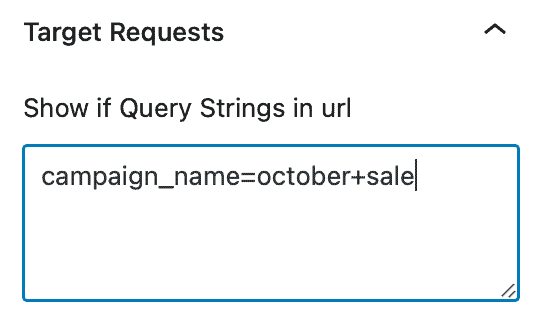
Our site visitors will see the conversion item whether they came from friendsite.com or anywhere else.

If we wanted to restrict showing the conversion item to someone only coming from friendsite.com, then we would enter source_name=friendsite.com.

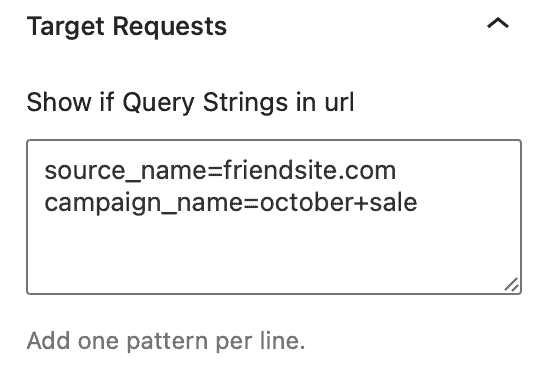
If we wanted to only show the conversion item to someone coming from friendsite.com AND for the October sale campaign, we would enter both items on separate lines as shown below.
Show based on Referrer Domain

Many sites will not show a referring domain, but if you are certain that a referring site will, you can limit the display of your conversion item if a referrer is picked up by environment variables in PHP.

Show if Cookie is Present

If you know the name of a cookie that is being set, you can limit display of your conversion item only if a cookie is detected. Be aware that the cookie name must match exactly.

Only show after a specific amount of page views

If you turn this toggle on, you will then be able to set the number of page views you would like a visitor to view prior to seeing the conversion item.


Do you feel this document was helpful?
Target DevicesScheduling Kadence Conversions
The Kadence WP Logo
Crafted in Missoula, Montana
  • Follow Kadence on Facebook
  • Follow Kadence on Youtube
  • X
  • Follow Kadence on Instagram
Trustpilot
Products
  • Kadence Plans
  • Kadence Theme
  • Kadence Blocks
  • Kadence AI
  • Kadence Starter Templates
  • Kadence Shop Kit
  • Kadence Conversions
  • Kadence Pattern Hub
  • View All
Resources
  • Blog
  • Podcast
  • Knowledgebase
  • Support ticket
  • Feature Requests
  • FAQ
  • WordPress Hosting Services
About Us
  • About Kadence
  • Become an affiliate
  • Contact us
  • Terms
  • Privacy Policy
  • Security
Our Partner Brands
  • SolidWP
  • LearnDash
  • The Events Calendar
  • GiveWP
  • MemberDash
Kadence Community
  • Kadence Marketplace
  • Join the Facebook Group
  • Subscribe to our YouTube Channel
© 2024 Kadence WP | All prices are in USD
Logo for StellarWP an umbrella brand of Premium WordPress plugins
  • Pricing
  • Products
    • Premium PlansGet all the tools you need in one plan
    • Kadence ThemeLightning-fast performance theme for modern websites
    • Kadence BlocksDrop in ready designs with advanced controls for pixel perfect websites
    • Kadence Shop KitCreate a more effective WooCommerce shopping experience
    • Kadence ConversionsBoost sales and build engaged audiences with popups and banners
    • Kadence InsightsEasily create A/B tests. Optimize your pages to drive higher conversions.
    • View All Products
    • Get Kadence + Hosting
      In One Place

      Enjoy faster setup, top-tier performance, and worry-free WordPress hosting – Kadence Theme, Kadence Blocks, and Solid Security all pre-installed.

      Learn More

  • Kadence AI
  • Starter Templates
  • Blog
  • Support
    • Resource HubStart here for guides, Product docs, FAQs, and Troubleshooting tips, all in one place.
    • Contact SupportStuck on something? We’re here to help! Open a ticket for top-notch support.
    • Contact Our TeamGot pre-sales questions or need help choosing a plan? Open a ticket and our team will guide you.
    • About usCrafted with love in Missoula, Montana. Meet the team behind the mission.
Account Login
  • Features
  • Pricing
  • HelpExpand
    • Docs
    • Feature Requests
    • Roadmap
    • Changelog