
Installing Free Tools by KadenceWP
If you’re using the free version of Kadence Theme or Block, you’ll find those available in the WordPress repository by searching for “Kadence”:
- To locate the free Kadence Theme from the WordPress repository, navigate to your WordPress website’s dashboard > Appearance > Themes > Add New and search for “Kadence”:

- To locate the free Kadence Blocks plugin in the WordPress repository navigate to your WordPress website’s dashboard > Plugins > Add New and search for “Kadence”:

You will find both the Kadence Blocks plugin, called “Gutenberg Blocks with AI” as well as our AI Powered Starter Templates to use for free.
If you’re looking to manually install Kadence Theme or Kadence Blocks to your site, see our guides:
Install Paid Tools from KadenceWP
If you’ve purchased any KadenceWP products, you’ll find all core (free) and paid downloads and your license keys in your KadenceWP account.
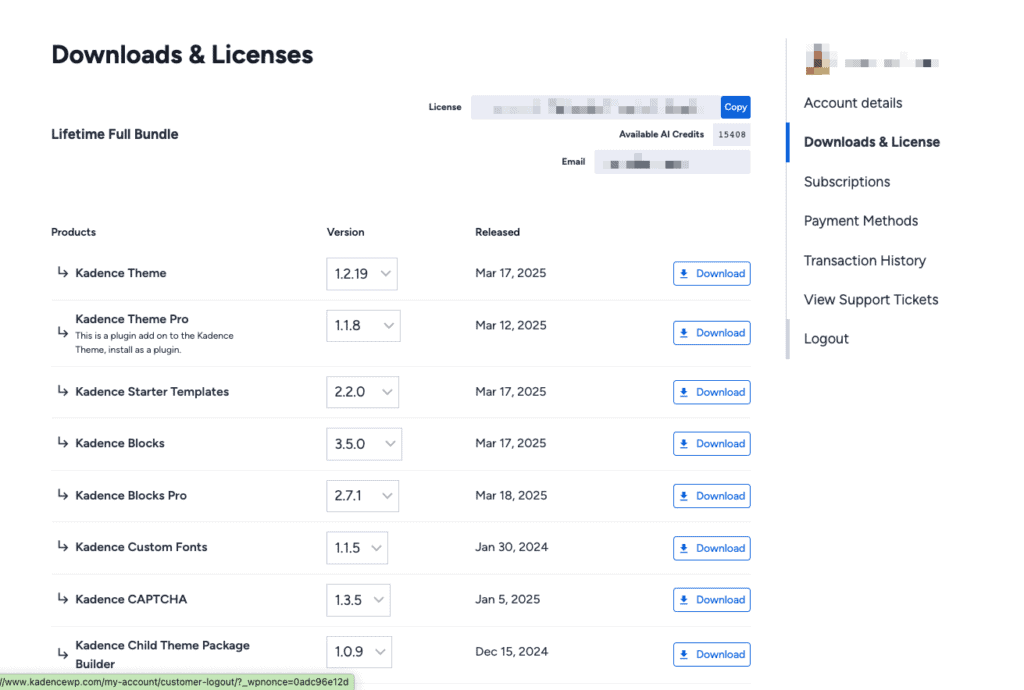
If you haven’t already installed and activated your core (free) Kadence downloads, you can find those in your account download list. Here’s what to install and activate first:
- Kadence Theme
- Kadence Blocks
- Kadence Starter Templates
Installing Kadence with the Express Plan
- Kadence Theme (Free):
- Go to your WordPress Dashboard → Appearance → Themes → Add New.
- Search for “Kadence” and click Install → Activate.
- Kadence Blocks (Free):
- Install Kadence Blocks from Plugins → Add New and search for “Kadence Blocks.”
- Install Kadence Blocks from Plugins → Add New and search for “Kadence Blocks.”
- Creative Kit: Navigate to your KadenceWP.com account → Downloads & Licensing to download Creative Kit (which gives you access to all Starter Templates).
- This video here briefly walks through installing Creative Kit, using the example of Travel Blog Template.
- This video here briefly walks through installing Creative Kit, using the example of Travel Blog Template.
Installing Kadence premium features with the Plus or Ultimate Plans:
Next, you can start adding your paid features by downloading and installing them (from your KadenceWP.com account) in the following order:
- Kadence Theme Kit Pro
Note that this is a plugin add-on to the Kadence Theme and is installed as a plugin in your WordPress website’s dashboard under Plugins > Add New. - Kadence Blocks Pro
- Any other Kadence paid tool you’ve purchased like Kadence Insights, Kadence Pattern Hub, Kadence Conversions and more
Rather watch? Check this out: – Somehow the HTML broke.

