
Skip to content
Help Center
  • Pricing
  • ProductsExpand
    • Premium PlansGet all the tools you need in one plan
    • Kadence ThemeLightning-fast performance theme for modern websites
    • Kadence BlocksDrop in ready designs with advanced controls for pixel perfect websites
    • Kadence Shop KitCreate a more effective WooCommerce shopping experience
    • Kadence ConversionsBoost sales and build engaged audiences with popups and banners
    • Kadence InsightsEasily create A/B tests. Optimize your pages to drive higher conversions.
    • View All Products
    • Get Kadence + Hosting
      In One Place

      Enjoy faster setup, top-tier performance, and worry-free WordPress hosting – Kadence Theme, Kadence Blocks, and Solid Security all pre-installed.

      Learn More

  • Kadence AI
  • Starter Templates
  • Blog
  • SupportExpand
    • Resource HubStart here for guides, Product docs, FAQs, and Troubleshooting tips, all in one place.
    • Contact SupportStuck on something? We’re here to help! Open a ticket for top-notch support.
    • Contact Our TeamGot pre-sales questions or need help choosing a plan? Open a ticket and our team will guide you.
    • About usCrafted with love in Missoula, Montana. Meet the team behind the mission.
Account Account
Get Kadence
Kadence Theme
  • Features
  • Pro
  • Starter Templates
  • HelpExpand
    • Documentation
    • Facebook Group
    • Submit a Ticket
    • Feature Requests
    • Roadmap
    • Changelog
Help Center
Kadence Theme

Getting Started

Customize Settings

Header

General WordPress

Troubleshooting

Advanced

Theme Kit Pro

Kadence Elements

Hooked Element Guides

Woocommerce

  • Home
  • Knowledge Base
  • Kadence Theme
  • Kadence AI

Kadence AI Credits

Kadence AI Credits are how we manage the amount of times you can prompt the AI to generate/edit content on your site. Free users get 250-lifetime credits. Premium users get different amounts of AI Credits depending on their specific purchase. Below is a list that goes over these.

PlanAI Credits
Free Kadence Users250 Lifetime AI Credits (Does not recur)
Kadence Blocks Pro Users (Stand-alone)1,200 AI Credits per year (For users who have Kadence Blocks Pro outside of a Plan)
Express Plan Holders1,250 AI Credits per year
Plus Plan Holders4,000 AI Credits per year
Ultimate Plan Holders8,000 AI Credits per year
Ultimate Lifetime Plan Holders16,000 Lifetime AI Credits (Does not recur)
Table of Contents
  • Spending Credits
  • Checking Your Credit Balance

Spending Credits

When you ask the AI to perform a task, it uses up credits. The number of credits used depends on the complexity of the task.

TypeContent
Generate Initial ContentTypically 70 AI Credits
Generate Context for the Design LibraryTypically costs between 1-10 AI Credits
Generate Inline ContentTypically costs 1 AI Credit

Generate Initial Content:
When you ask the AI to perform a task, it uses up credits. The number of credits used depends on the complexity of the task. For instance, generating the Initial Content usually requires 70 AI Credits since it generates multiple pages and uses your context in multiple spots. This is usually done during the initial activation of Kadence AI. You can learn about activating Kadence AI by Clicking Here.

Generate Initial Content

Generate Context for the Design Library:
The Kadence AI Powered Design Library has multiple Pattern categories. Not all of them are automatically generated. Usually, to generate new Design Library Content, it would cost between 1-10 AI Credits. Each context differs depending on how many prompts are needed to fill out a context. Filling out the entire context library costs around 100 credits.

Design Library Context

Generate Inline Content:
When using Kadence AI-Powered Inline Content, you can improve texts across your website. These are simple tasks and usually cost 1 AI Credit to achieve.
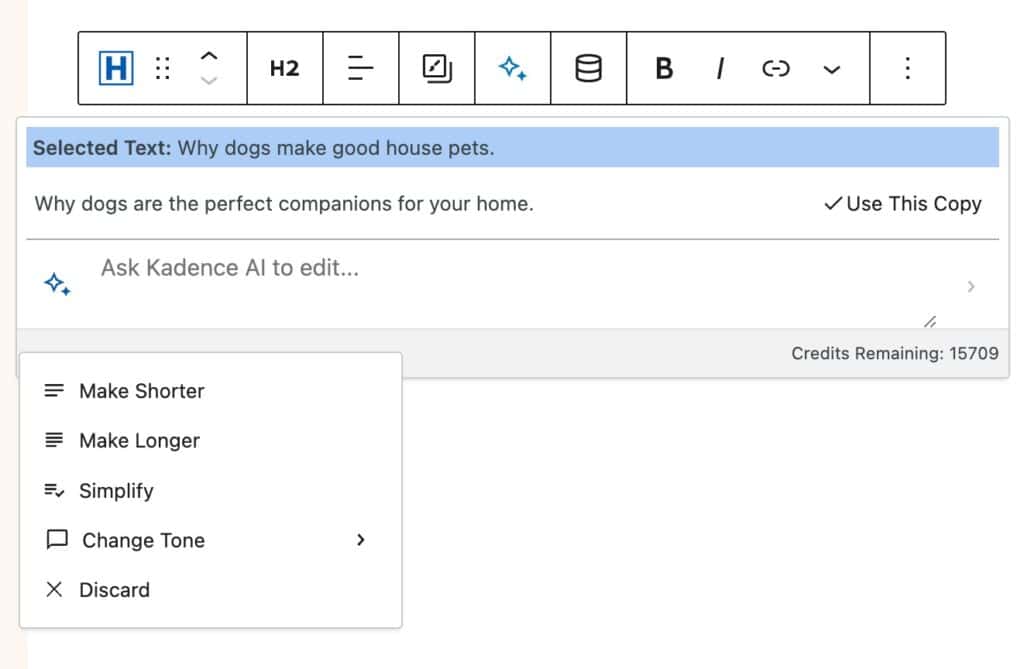
Ai Suggested Text

Checking Your Credit Balance

There are a few places you can check your AI Credit Balance. The first place you can check is directly from your Kadence Account Downloads & Licenses page. You can find your current balance next to Available AI Credits.
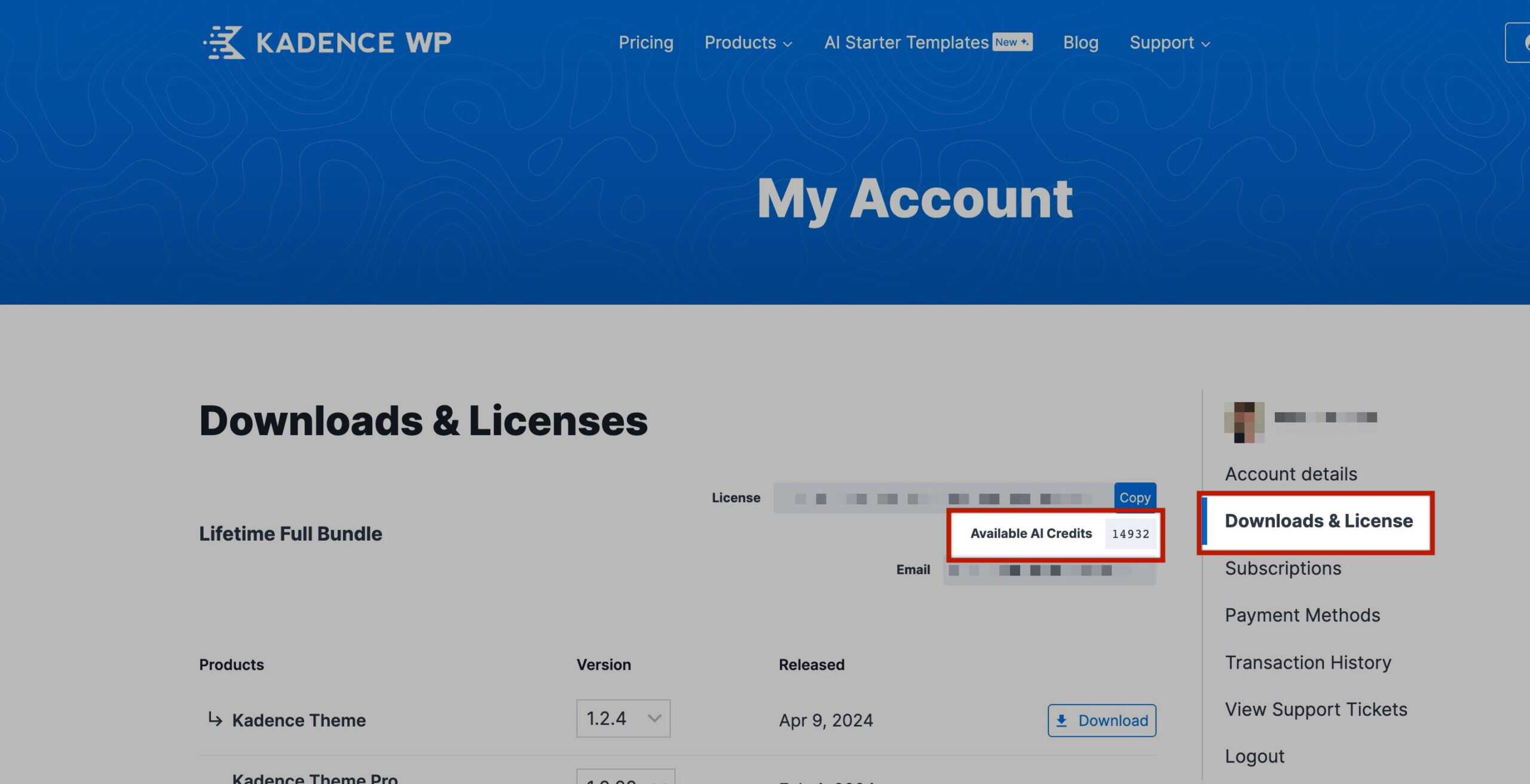
AI Credits Dashboard

The next place you can check is your Dashboard -> Kadence -> Home page. In the Hero Section of this page, you will see an Information Icon represented by an I. You can click on this Icon to view your AI Credit Balance.
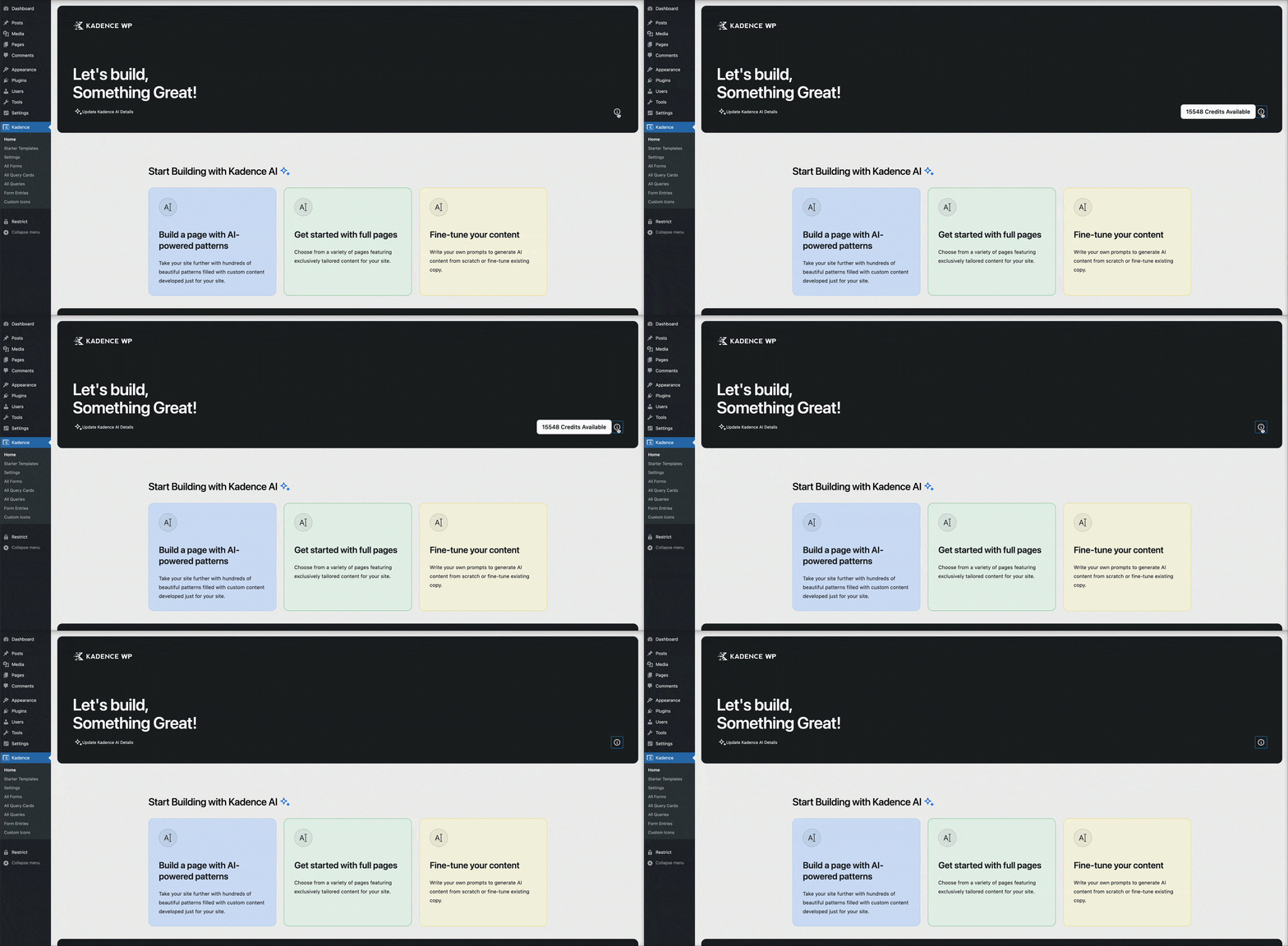
Check AI Credits

You can also view your AI Credit Balance in your Design Library. In the Design Library, click on With AI, then go to Patterns. Next to each Pattern Category, you will see a refresh icon for regenerating content. Click on the refresh Icon. In the regenerate AI popup, you will see your remaining credits above the Regenerate Content button.
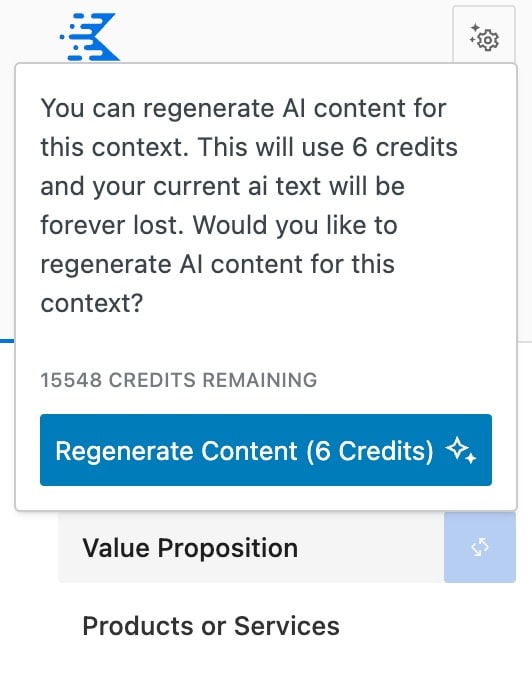
Regenerate Content Credits Remaining

When using Kadence AI-Powered Inline Content, you will also see your Credit Balance near the bottom right of the Inline Content Editor.


Ai Suggested Text
Do you feel this document was helpful?
The Kadence WP Logo
Crafted in Missoula, Montana
  • Follow Kadence on Facebook
  • Follow Kadence on Youtube
  • X
  • Follow Kadence on Instagram
Trustpilot
Products
  • Kadence Plans
  • Kadence Theme
  • Kadence Blocks
  • Kadence AI
  • Kadence Starter Templates
  • Kadence Shop Kit
  • Kadence Conversions
  • Kadence Pattern Hub
  • View All
Resources
  • Blog
  • Podcast
  • Knowledgebase
  • Support ticket
  • Feature Requests
  • FAQ
  • WordPress Hosting Services
About Us
  • About Kadence
  • Become an affiliate
  • Contact us
  • Terms
  • Privacy Policy
  • Security
Our Partner Brands
  • SolidWP
  • LearnDash
  • The Events Calendar
  • GiveWP
  • MemberDash
Kadence Community
  • Kadence Marketplace
  • Join the Facebook Group
  • Subscribe to our YouTube Channel
© 2024 Kadence WP | All prices are in USD
Logo for StellarWP an umbrella brand of Premium WordPress plugins
  • Pricing
  • Products
    • Premium PlansGet all the tools you need in one plan
    • Kadence ThemeLightning-fast performance theme for modern websites
    • Kadence BlocksDrop in ready designs with advanced controls for pixel perfect websites
    • Kadence Shop KitCreate a more effective WooCommerce shopping experience
    • Kadence ConversionsBoost sales and build engaged audiences with popups and banners
    • Kadence InsightsEasily create A/B tests. Optimize your pages to drive higher conversions.
    • View All Products
    • Get Kadence + Hosting
      In One Place

      Enjoy faster setup, top-tier performance, and worry-free WordPress hosting – Kadence Theme, Kadence Blocks, and Solid Security all pre-installed.

      Learn More

  • Kadence AI
  • Starter Templates
  • Blog
  • Support
    • Resource HubStart here for guides, Product docs, FAQs, and Troubleshooting tips, all in one place.
    • Contact SupportStuck on something? We’re here to help! Open a ticket for top-notch support.
    • Contact Our TeamGot pre-sales questions or need help choosing a plan? Open a ticket and our team will guide you.
    • About usCrafted with love in Missoula, Montana. Meet the team behind the mission.
Account Login
  • Features
  • Pro
  • Starter Templates
  • HelpExpand
    • Documentation
    • Facebook Group
    • Submit a Ticket
    • Feature Requests
    • Roadmap
    • Changelog