
Notice: These forums are now retired and closed. For active support, please Submit a Ticket or visit our official WordPress.org community pages.
Kadence Theme | Kadence Blocks | Starter Templates | WooCommerce Email Designer | Ascend | Virtue | Pinnacle
Search Results for 'child theme'
-
AuthorSearch Results
-
In forum: Kadence Theme
In reply to: Kadence Theme: Hide the Title on some archive pages
May 5, 2021 at 8:55 am #265600Sure, the site isn’t really ready yet but it is live at https://extendedcollection.com/
If it helps, I’m using a child theme. If you have a way to hide the posts archive title when using the posts page as the front page, that would be ideal.
-
This reply was modified 5 years ago by
Joseph Simpson. Reason: Adding a note about child theme
In forum: Virtue ThemeIn reply to: Responsive main menu
In forum: Virtue ThemeIn reply to: Blog post widget
Hi Norman,
Our newest Kadence Theme has a Hooked Elements feature that would allow for this. https://kadence-theme.com/knowledge-base/pro-addon/how-to-use-element-hooks/
In Virtue, however, there isn’t a function for this. Sorry. There may be a plugin that allows you to set this up, otherwise you would need to manually add your html into each post or else code this in using a child theme or a code snippets plugin.Kindly,
HannahIn forum: Membership ForumsIn reply to: Child Themes and Attached Images to Post
In forum: Kadence ThemeApril 20, 2021 at 9:56 pm #265220Hi guys,
I’m currently working on a child theme for Kadence. One of the things I wanted to do, was have a button activate a modal in my header. You can see the site currently here
I noticed the search button has this feature, but it seems like normal buttons in the header don’t work. Ideally, I was hoping to create an element that would display in a modal when the user clicks the “I’d like” button. You can see this functionality here:
Thanks in advance for anyone spending the time looking over this!
-
This topic was modified 5 years ago by
Zach Atkinson.
In forum: Membership ForumsApril 20, 2021 at 5:05 am #265197I thought that when I exported a new child theme the images from that export are linked to my theme. However I find all the images are also exported in the media file. As I am using stock photos I believe these images should be embedded. Am I creating child themes correctly or have I missed a step? I don’t want the images to go with my exported child theme. I read somewhere that the child theme connects to my demo site. Any advice would be appreciated 😉
In forum: Virtue ThemeHere is the website: *Login to see link
I was told to add this information:
system report:### WordPress Environment ###
WordPress address (URL): *Login to see link
Site address (URL): *Login to see link
WC Version: 5.2.0
REST API Version: ✔ 5.2.0
WC Blocks Version: ✔ 4.7.1
Action Scheduler Version: ✔ 3.1.6
WC Admin Version: ✔ 2.1.5
Log Directory Writable: ✔
WP Version: 5.7
WP Multisite: –
WP Memory Limit: 768 MB
WP Debug Mode: –
WP Cron: ✔
Language: en_US
External object cache: ✔### Server Environment ###
Server Info: Apache
PHP Version: 7.3.27
PHP Post Max Size: 256 MB
PHP Time Limit: 120
PHP Max Input Vars: 3000
cURL Version: 7.66.0
OpenSSL/1.1.1k-fipsSUHOSIN Installed: –
MySQL Version: 5.7.32-35-log
Max Upload Size: 256 MB
Default Timezone is UTC: ✔
fsockopen/cURL: ✔
SoapClient: ✔
DOMDocument: ✔
GZip: ✔
Multibyte String: ✔
Remote Post: ✔
Remote Get: ✔### Database ###
WC Database Version: 5.2.0
WC Database Prefix: wp_
Total Database Size: 36.38MB
Database Data Size: 27.39MB
Database Index Size: 8.99MB
wp_woocommerce_sessions: Data: 0.02MB + Index: 0.02MB + Engine InnoDB
wp_woocommerce_api_keys: Data: 0.02MB + Index: 0.03MB + Engine InnoDB
wp_woocommerce_attribute_taxonomies: Data: 0.02MB + Index: 0.02MB + Engine InnoDB
wp_woocommerce_downloadable_product_permissions: Data: 0.02MB + Index: 0.06MB + Engine InnoDB
wp_woocommerce_order_items: Data: 0.06MB + Index: 0.02MB + Engine InnoDB
wp_woocommerce_order_itemmeta: Data: 0.27MB + Index: 0.27MB + Engine InnoDB
wp_woocommerce_tax_rates: Data: 0.02MB + Index: 0.06MB + Engine InnoDB
wp_woocommerce_tax_rate_locations: Data: 0.02MB + Index: 0.03MB + Engine InnoDB
wp_woocommerce_shipping_zones: Data: 0.02MB + Index: 0.00MB + Engine InnoDB
wp_woocommerce_shipping_zone_locations: Data: 0.02MB + Index: 0.03MB + Engine InnoDB
wp_woocommerce_shipping_zone_methods: Data: 0.02MB + Index: 0.00MB + Engine InnoDB
wp_woocommerce_payment_tokens: Data: 0.02MB + Index: 0.02MB + Engine InnoDB
wp_woocommerce_payment_tokenmeta: Data: 0.02MB + Index: 0.03MB + Engine InnoDB
wp_woocommerce_log: Data: 0.02MB + Index: 0.02MB + Engine InnoDB
wp_actionscheduler_actions: Data: 0.17MB + Index: 0.14MB + Engine InnoDB
wp_actionscheduler_claims: Data: 0.02MB + Index: 0.02MB + Engine InnoDB
wp_actionscheduler_groups: Data: 0.02MB + Index: 0.02MB + Engine InnoDB
wp_actionscheduler_logs: Data: 0.02MB + Index: 0.03MB + Engine InnoDB
wp_bp_activity: Data: 0.00MB + Index: 0.01MB + Engine MyISAM
wp_bp_activity_meta: Data: 0.00MB + Index: 0.00MB + Engine MyISAM
wp_bp_notifications: Data: 0.00MB + Index: 0.00MB + Engine MyISAM
wp_bp_notifications_meta: Data: 0.00MB + Index: 0.00MB + Engine MyISAM
wp_bp_xprofile_data: Data: 0.00MB + Index: 0.00MB + Engine MyISAM
wp_bp_xprofile_fields: Data: 0.00MB + Index: 0.01MB + Engine MyISAM
wp_bp_xprofile_groups: Data: 0.00MB + Index: 0.00MB + Engine MyISAM
wp_bp_xprofile_meta: Data: 0.00MB + Index: 0.00MB + Engine MyISAM
wp_commentmeta: Data: 0.00MB + Index: 0.00MB + Engine MyISAM
wp_comments: Data: 0.16MB + Index: 0.08MB + Engine MyISAM
wp_countries: Data: 0.05MB + Index: 0.02MB + Engine InnoDB
wp_failed_jobs: Data: 0.02MB + Index: 0.00MB + Engine InnoDB
wp_kbp_countdown_entry: Data: 0.02MB + Index: 0.02MB + Engine InnoDB
wp_kbp_form_entry: Data: 0.02MB + Index: 0.02MB + Engine InnoDB
wp_kbp_form_entrymeta: Data: 0.02MB + Index: 0.03MB + Engine InnoDB
wp_ksp_layers: Data: 0.02MB + Index: 0.00MB + Engine InnoDB
wp_ksp_sliders: Data: 0.02MB + Index: 0.00MB + Engine InnoDB
wp_ksp_slides: Data: 0.02MB + Index: 0.00MB + Engine InnoDB
wp_links: Data: 0.00MB + Index: 0.00MB + Engine MyISAM
wp_mailchimp_carts: Data: 0.02MB + Index: 0.00MB + Engine InnoDB
wp_mailchimp_jobs: Data: 0.02MB + Index: 0.00MB + Engine InnoDB
wp_options: Data: 1.97MB + Index: 0.06MB + Engine MyISAM
wp_p2p: Data: 0.03MB + Index: 0.04MB + Engine MyISAM
wp_p2pmeta: Data: 0.04MB + Index: 0.03MB + Engine MyISAM
wp_postmeta: Data: 6.14MB + Index: 1.41MB + Engine MyISAM
wp_posts: Data: 1.03MB + Index: 0.19MB + Engine MyISAM
wp_queue: Data: 0.02MB + Index: 0.00MB + Engine InnoDB
wp_revslider_css: Data: 0.09MB + Index: 0.00MB + Engine MyISAM
wp_revslider_layer_animations: Data: 0.00MB + Index: 0.00MB + Engine MyISAM
wp_revslider_navigations: Data: 0.00MB + Index: 0.00MB + Engine MyISAM
wp_revslider_sliders: Data: 0.02MB + Index: 0.00MB + Engine MyISAM
wp_revslider_slides: Data: 0.20MB + Index: 0.00MB + Engine MyISAM
wp_revslider_static_slides: Data: 0.00MB + Index: 0.00MB + Engine MyISAM
wp_signups: Data: 0.00MB + Index: 0.01MB + Engine MyISAM
wp_simple_history: Data: 2.02MB + Index: 0.53MB + Engine InnoDB
wp_simple_history_contexts: Data: 14.02MB + Index: 5.08MB + Engine InnoDB
wp_termmeta: Data: 0.01MB + Index: 0.02MB + Engine MyISAM
wp_terms: Data: 0.02MB + Index: 0.04MB + Engine MyISAM
wp_term_relationships: Data: 0.03MB + Index: 0.05MB + Engine MyISAM
wp_term_taxonomy: Data: 0.02MB + Index: 0.02MB + Engine MyISAM
wp_usermeta: Data: 0.13MB + Index: 0.08MB + Engine MyISAM
wp_users: Data: 0.01MB + Index: 0.02MB + Engine MyISAM
wp_wc_admin_notes: Data: 0.02MB + Index: 0.00MB + Engine InnoDB
wp_wc_admin_note_actions: Data: 0.02MB + Index: 0.02MB + Engine InnoDB
wp_wc_category_lookup: Data: 0.02MB + Index: 0.00MB + Engine InnoDB
wp_wc_customer_lookup: Data: 0.02MB + Index: 0.03MB + Engine InnoDB
wp_wc_download_log: Data: 0.02MB + Index: 0.03MB + Engine InnoDB
wp_wc_order_coupon_lookup: Data: 0.02MB + Index: 0.03MB + Engine InnoDB
wp_wc_order_product_lookup: Data: 0.05MB + Index: 0.06MB + Engine InnoDB
wp_wc_order_stats: Data: 0.05MB + Index: 0.05MB + Engine InnoDB
wp_wc_order_tax_lookup: Data: 0.02MB + Index: 0.03MB + Engine InnoDB
wp_wc_product_meta_lookup: Data: 0.02MB + Index: 0.09MB + Engine InnoDB
wp_wc_reserved_stock: Data: 0.02MB + Index: 0.00MB + Engine InnoDB
wp_wc_tax_rate_classes: Data: 0.02MB + Index: 0.02MB + Engine InnoDB
wp_wc_webhooks: Data: 0.02MB + Index: 0.02MB + Engine InnoDB
wp_wpbannerizeclicks: Data: 0.02MB + Index: 0.00MB + Engine InnoDB
wp_wpbannerizeimpressions: Data: 0.02MB + Index: 0.00MB + Engine InnoDB
wp_yoast_seo_links: Data: 0.02MB + Index: 0.02MB + Engine InnoDB
wp_yoast_seo_meta: Data: 0.02MB + Index: 0.00MB + Engine InnoDB### Post Type Counts ###
advanced_ads: 11
attachment: 758
bp-email: 16
business: 111
custom_css: 2
event: 88
invoice: 260
kadslider: 1
mc4wp-form: 1
nav_menu_item: 65
oembed_cache: 2
page: 44
person: 72
portfolio: 4
post: 36
product: 52
product_variation: 5
revision: 2
shop_order: 505
shop_order_refund: 1
slide: 13
staff: 3
team_member: 1
testimonial: 6
themefusion_elastic: 2
tmm: 2
wp_bannerize: 1### Security ###
Secure connection (HTTPS): ✔
Hide errors from visitors: ✔### Active Plugins (33) ###
Chamber Dashboard Member Updater: by Chandrika Guntur – 1.4.3
Authorize.net Payment Gateway For WooCommerce: by Eshan Varma – 6.2.5
BBQ Firewall: by Jeff Starr – 20210211
CD MailChimp Addon: by Chandrika Guntur – 1.3
Chamber Dashboard Business Directory: by Chandrika Guntur
Morgan Kay – 3.3.3Chamber Dashboard CRM: by Chandrika Guntur
Morgan Kay – 1.5.6Chamber Dashboard Events Calendar: by Chandrika Guntur
Morgan Kay – 2.3.8Chamber Dashboard Exporter: by Morgan Kay
Chandrika Guntur – 1.2.6Chamber Dashboard Member Manager: by Chandrika Guntur
Morgan Kay – 2.5.7Chamber Dashboard Payment Options: by Chandrika Guntur – 1.3
Chamber Dashboard Recurring Payments: by Morgan Kay
Chandrika Guntur – 1.6.6Chamber Dashboard WC Payments: by Chandrika Guntur – 1.5
Classic Editor: by WordPress Contributors – 1.6
Feed Them Social - for Twitter feed, Youtube, and more: by SlickRemix – 2.9.5
Kadence Blocks - PRO Extension: by Kadence WP – 1.4.29
Kadence Blocks – Gutenberg Blocks for Page Builder Features: by Kadence WP – 1.10.7
Kadence Custom Fonts: by Kadence WP – 1.1.0
Kadence reCAPTCHA: by Kadence WP – 1.1.0
Kadence Slider: by Kadence WP – 2.3.1
MC4WP: Mailchimp for WordPress: by ibericode – 4.8.3
PDF Embedder: by Lever Technology LLC – 4.6.2
SG Optimizer: by SiteGround – 5.7.20
Simple History: by Pär Thernström – 2.42.0
Page Builder by SiteOrigin: by SiteOrigin – 2.11.8
SiteOrigin Widgets Bundle: by SiteOrigin – 1.17.11
Social Icons Widget & Block by WPZOOM: by WPZOOM – 4.1.1
Team Members: by WP Darko – 5.0.9
UpdraftPlus - Backup/Restore: by UpdraftPlus.Com
DavidAnderson – 1.16.53Product Customer List for WooCommerce: by Kokomo – 2.9.3
Checkout Field Editor for WooCommerce: by ThemeHigh – 1.4.6
WooCommerce Payments: by Automattic – 2.2.0
WooCommerce Shipping & Tax: by Automattic – 1.25.11
WooCommerce: by Automattic – 5.2.0### Inactive Plugins (1) ###
Advanced Ads: by Thomas Maier
Advanced Ads GmbH – 1.24.1### Dropin Plugins (1) ###
object-cache.php: Memcached
### Settings ###
API Enabled: –
Force SSL: –
Currency: USD ($)
Currency Position: left
Thousand Separator: ,
Decimal Separator: .
Number of Decimals: 2
Taxonomies: Product Types: external (external)
grouped (grouped)
simple (simple)
variable (variable)Taxonomies: Product Visibility: exclude-from-catalog (exclude-from-catalog)
exclude-from-search (exclude-from-search)
featured (featured)
outofstock (outofstock)
rated-1 (rated-1)
rated-2 (rated-2)
rated-3 (rated-3)
rated-4 (rated-4)
rated-5 (rated-5)Connected to WooCommerce.com: –
### WC Pages ###
Shop base: #4 - /shop-2/
Cart: #5 - /cart-2/
Checkout: #6 - /checkout-2/
My account: ❌ Page visibility should be public
Terms and conditions: #14174 - /terms-and-conditions/### Theme ###
Name: Virtue - Premium
Version: 4.9.33
Author URL: *Login to see link
Child Theme: ❌ – If you are modifying WooCommerce on a parent theme that you did not build personally we recommend using a child theme. See: How to create a child theme
WooCommerce Support: ✔### Templates ###
Overrides: virtue_premium/woocommerce/archive-product.php
virtue_premium/woocommerce/content-product.php
virtue_premium/woocommerce/content-single-product.php
virtue_premium/woocommerce/loop/loop-end.php
virtue_premium/woocommerce/loop/loop-start.php
virtue_premium/woocommerce/loop/rating.php
virtue_premium/woocommerce/loop/sale-flash.php
virtue_premium/product-searchform.php
virtue_premium/woocommerce/single-product/add-to-cart/external.php
virtue_premium/woocommerce/single-product/add-to-cart/grouped.php version 4.0.0 is out of date. The core version is 4.8.0
virtue_premium/woocommerce/single-product/add-to-cart/simple.php
virtue_premium/woocommerce/single-product/add-to-cart/variable.php
virtue_premium/woocommerce/single-product/product-image.php
virtue_premium/woocommerce/single-product/product-thumbnails.php
virtue_premium/woocommerce/single-product/related.php
virtue_premium/woocommerce/single-product/sale-flash.php
virtue_premium/woocommerce/single-product/up-sells.php
virtue_premium/woocommerce/single-product.php
virtue_premium/woocommerce/content-product_cat.php
virtue_premium/woocommerce/taxonomy-product_cat.php
virtue_premium/woocommerce/taxonomy-product_tag.phpOutdated Templates: ❌
Learn how to update
### Action Scheduler ###
Canceled: 5
Oldest: 2021-03-30 18:42:16 -0700
Newest: 2021-04-03 14:09:36 -0700Complete: 1,082
Oldest: 2021-03-13 13:14:10 -0800
Newest: 2021-04-13 13:20:21 -0700### Status report information ###
Generated at: 2021-04-13 13:36:58 -07:00
In forum: Kadence ThemeApril 8, 2021 at 2:59 pm #264932The child “Design Course” which is recommended for Learn Dash is only installing the ‘Home’ page, and although visible when “Editing” it does not load to the public. Following is what I get when trying to view the public page:
The page isn’t redirecting properly
If I load the “Course” child theme (which does not call for Learn Dash as a required plugin) it loads perfectly.
Thank you in advance for your input.
Cheers;
NestorMain Settings —> Site Tagline – Below Logo. I’m trying to change and save the text but each time “undefined” is displayed in the box at the top of the page. It worked perfectly for my first change but then I tried to put in a “TM” subscript after Solapa and it has not worked properly since.
I’m trying to change the text from Free Shipping in USA on Orders Over $40…Introducing the NEW Solapa Hat Flap! to Free Shipping in USA on Orders Over $40…Introducing the NEW Solapa Hat Shade!
Thanks for your help.
palmfreesunwear.com
In forum: Pinnacle ThemeIn reply to: Portfolio type page – order by date
April 1, 2021 at 3:25 pm #264779Hi,
When I look at your page I’m not seeing it display random? Also there is no code that would make them randmon in the theme.Portfolio posts (different from blog posts) are designed to not be ordered by date as they are not designed to be displayed in any kind of timeline way. For example, the post’s publish date doesn’t show on the portfolio posts at any time.
Using the order options within the post itself is the best way to order your posts.
If you have to change the way they are ordered to date then you would need to override taxonomy-portfolio-type.php in your child theme and change the orderby on line 126
You can determine which page should show in your breadcrumbs for the portfolio archive by going to portfolio options in your theme options and selecting the page under “All Projects Default Portfolio Page”
Ben
In forum: Pinnacle ThemeIn reply to: Portfolio type page – order by date
Hi Anita,
Hope you enjoyed your weekend!
The portfolio posts are set up to display by menu order, it is not random. You can go in and order these yourself in each portfolio post. To order these by date you would need to change the query in your child theme by overriding taxonomy-portfolio-type.php. Though this is not supported.Best,
HannahIn forum: Kadence ThemeIn reply to: Output in child themes’ header.php
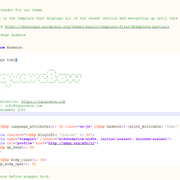
Thanks for the reply. My site URL is https://squarebow.com and you should see the ASCII logo or whatever between the HTML comment tags printed in chrome/firefox dev tools (F12) but it’s not there. Could it be that Cloudflare strips some HTML off? Something else? As I said, it works perfectly fine in other themes and on my local site built on Kadence when previewed. It is definitely in the child header.php file.
Appreciate your input, Ales
-
This reply was modified 5 years, 1 month ago by
allpzz.
In forum: Kadence ThemeIn reply to: Output in child themes’ header.php
Hello,
Thanks for reaching out to us.
I tried replicating the issue on my test website but I can see the comment – https://share.getcloudapp.com/4gu1k01e. Could we have a link to your website? Additionally, please double-check if the comment part is on your child theme’s header.php file.
Regards,
KarlaIn forum: Kadence ThemeHi, I have a peculiar dilemma and perhaps someone can help.
I use Local by Flywheel for local development and exactly the same stack for live servers, including Kadence. I want to add a tiny custom signature to HTML header in the form of a comment tag to header.php inside child-theme. When inspected in the browser, the signature is printed out nicely where I want it in the local environment, but exactly the same code snippet is not printed on a live server. It looks like it is completely ignored and missing.
Is this a server or a theme issue or am I missing something? I did this with plenty of themes in the past with no problems at all.
This is the example code immediately after the doctype declaration
<!--
__ __ ___ _
| \/ |_ _| _ )_ _ __ _ _ _ __| |
| |\/| | || | _ \ '_/ _<code>| ' \/ _</code> |
|_| |_|\_, |___/_| \__,_|_||_\__,_|
|__/
*
*
Some text
More text
*
*
*
-->Thanks for your input, Al
-
This topic was modified 5 years, 1 month ago by
In forum: Virtue ThemeIn reply to: Custom Post Type with Portfolio Options capability
Hi,
thank you for the answer.
In the meanwhile I’ve played around with the Theme template files (in the Child Theme which I was already using) and I was able to apply the meta fields to my CP and to load the values and settings in the frontend. I was also able to load the CPT into a new archive page with the portfolio-archive structure but I’m stuck on how to customize the archive page. I think, to have a clean job done, I’ll need to copy and rename a huge amount of templates and functions for which I’m not skilled enough at the moment, so I’ll follow a different strategy. Anyway It was interesting to see how the Theme is built.
Thank you again.
Mone
In forum: Kadence ThemeMarch 17, 2021 at 8:42 pm #264443Hello!
First of all, congratulations for the excellent theme!
I’m trying to remove the cart summary title because it doesn’t fit a particular project of mine. I don’t think it’s a good solution use ‘display: none’, so I tried to use a remove_action with the init function:
add_action( ‘init’, ‘custom_child_setup’);
function custom_child_setup() {
remove_action( ‘woocommerce_before_cart_table’, cart_summary_title’ );
}It doesn’t work… What am I doing wrong?
Thanks in advance!
In forum: Virtue ThemeIn reply to: Custom Post Type with Portfolio Options capability
March 16, 2021 at 10:26 pm #264420Hi,
Unfortunately, there is not a way to do this. It’s not about what the post type supports, that has to do with core things like excerpts. The layout and the code to setup the layout only applies to the portfolio posts type, recreating this for another post type would require a child theme and the creation of a lot of templates as well as all the meta boxes.Ben
In forum: Virtue ThemeIn reply to: About “archive-events” and “tribe-events”
March 15, 2021 at 5:26 pm #264388Hey “archive-events” was added in support of Event Organizer plugin (different then tribe events). If you are wanting to use that same slug for your custom post type I suggest using a child theme and overriding the archive-events template Or just using a different custom post type slug (the URL can always use events if you like the slug doesn’t have to affect that).
With regard to your issue with tribe events check the plugin settings there are different ways to load their templates and you need to make sure you are using the correct setting there.
Ben
In forum: Kadence ThemeIn reply to: Remove Google fonts from Kadence Theme
In forum: Membership ForumsMarch 6, 2021 at 9:06 am #264159Hi! I packaged up my child theme using the child theme builder and installed it on a client’s website. Everything imported and it looks great, but when I go to Appearance > Theme Editor > Starter > theme_options.json, I am seeing this error:
I have not messed with or edited this file at all. Just simply packaged up the theme and installed it on another website. Any ideas? Thanks!
Carissa
-
This topic was modified 5 years, 2 months ago by
Carissa Allen.
-
This reply was modified 5 years ago by
-
AuthorSearch Results



