
Notice: These forums are now retired and closed. For active support, please Submit a Ticket or visit our official WordPress.org community pages.
Kadence Theme | Kadence Blocks | Starter Templates | WooCommerce Email Designer | Ascend | Virtue | Pinnacle
Search Results for 'child theme'
-
AuthorSearch Results
-
In forum: Virtue Theme
Hi there,
I am using the Virtue Premium child theme for one of my sites: *Login to see link The hosts have informed me that they will no longer be supporting PHP 5.3. So I need to know if the theme will be compliant with with PHP 5.6 and more recent versions? Do you anticipate any issues and how can I make the upgrade as smooth as possible?
Best wishes,
PaulHi,
if you have multiple payment and shipping methods than these are rendered as
li > input | label
markup.Looks ok for the payment methods, but for the shipping methods the input and its label do not have space between them. There seems to be some “wrong” text-indent: -17px and missing display: block on the shipping’s input/label CSS.
I know how I could fix this myself by overwriting the CSS in our child theme, but I think it is a visual “bug” that might be better fixed at the root, that is in the Virtue Premium plugin itself.
Links and Screenshot in the next private post
In forum: Membership ForumsIn reply to: Simple Share
May 9, 2019 at 11:55 am #225207Hey,
You can use a shortcode in your post[kadence_simple_share]
Or in your child theme in the template for your custom post type you can add:
echo do_shortcode('[kadence_simple_share]');Ben
In forum: Pinnacle Themehmm, that code doesn’t work either… I did try that hook before because I found it in another thread and tried it
this script is supposed to be produced and can be seen in the view-source if its working…

the plugin allows me to choose to place the code in the footer (not recommended) …but works
or choosing ‘custom’ option, then edit the child theme to place it after the body tag using that function in the functions.php of the child… but that wont work for meother suggestions I’ve seen around the web are to edit the header.php but I don’t want to do that as its not future proof even if I create a child copy
for reference, this is the plugin I’m trying to configure…
https://wordpress.org/plugins/duracelltomi-google-tag-manager/In forum: Virtue ThemeIn reply to: Author Box is missing on our site
Hi Ben,
I’m sorry, I’m kind of clueless on this one since we had an outside developer make this modification to our theme files. I tried moving the sidebar.php file out of the templates directory in our child theme and that didn’t work at all….made things worse, in fact. I started looking more closely at the custom child theme files…I’m starting to think it might be a plugin problem….We are using a plugin called Co-Authors Plus to assign more than one author to a post and there is some code to display things within theme templates.
Looking more closely at our child them files I see the following code in the content-single.php file:
<?php
		remove_action( 'kadence_single_post_after', 'virtue_post_authorbox', 20 );
?>

<?php global $post; ?>
	<?php $authors = get_coauthors(get_the_ID()); ?>
		<?php if ($authors): ?>
		<?php foreach ($authors as $author): ?>
			<div class="author-box">
				<ul class="nav nav-tabs" id="authorTab">
			  <li class="active"><a href="#about"><?php _e('About Author', 'virtue'); ?></a></li>
			  <li><a href="#latest"><?php _e('Latest Posts', 'virtue'); ?></a></li>
			</ul>

			<div class="tab-content postclass">
			  <div class="tab-pane clearfix active" id="about">
			  	<div class="author-profile vcard">
					<?php echo get_avatar( get_the_author_meta('ID', $author->ID), 80 ); ?>
			        <div class="author-follow"><span class="followtext"><?php _e('Follow', 'virtue'); ?> <?php the_author_meta( 'display_name', $author->ID ); ?>:</span>
			        <?php if ( get_the_author_meta( 'facebook', $author->ID ) ) { ?>
						<span class="facebooklink">
							<a href="<?php the_author_meta( 'facebook', $author->ID ); ?>" target="_blank" title="<?php _e('Follow', 'virtue'); ?>  <?php the_author_meta( 'display_name', $author->ID ); ?> <?php _e('on Facebook', 'virtue');?>"><i class="icon-facebook"></i></a>
						</span>
			            <?php } if ( get_the_author_meta( 'twitter', $author->ID ) ) { ?>
			            <span class="twitterlink">
							<a href="<?php the_author_meta( 'twitter', $author->ID ); ?>" target="_blank" title="<?php _e('Follow', 'virtue'); ?>  <?php the_author_meta( 'display_name', $author->ID ); ?> <?php _e('on Twitter', 'virtue');?>"><i class="icon-twitter"></i></a>
						</span>
			            <?php } if ( get_the_author_meta( 'google', $author->ID ) ) { ?>
			            <span class="googlepluslink">
							<a href="<?php the_author_meta( 'google', $author->ID ); ?>" target="_blank" title="<?php _e('Follow', 'virtue'); ?>  <?php the_author_meta( 'display_name', $author->ID ); ?> <?php _e('on Google Plus', 'virtue');?>"><i class="icon-google-plus"></i></a>
						</span>
			            <?php } if ( get_the_author_meta( 'youtube', $author->ID ) ) { ?>
			            <span class="youtubelink">
			        <a href="<?php the_author_meta( 'youtube', $author->ID ); ?>" target="_blank" title="<?php _e('Follow', 'virtue'); ?>  <?php the_author_meta( 'display_name', $author->ID ); ?> <?php _e('on YouTube', 'virtue');?>"><i class="icon-youtube"></i></a>
			      </span>
			            <?php } if ( get_the_author_meta( 'flickr', $author->ID ) ) { ?>
			            <span class="flickrlink">
							<a href="<?php the_author_meta( 'flickr', $author->ID ); ?>" target="_blank" title="<?php _e('Follow', 'virtue'); ?>  <?php the_author_meta( 'display_name', $author->ID ); ?> <?php _e('on Flickr', 'virtue');?>"><i class="icon-flickr2"></i></a>
						</span>
			            <?php } if ( get_the_author_meta( 'vimeo', $author->ID ) ) { ?>
			            <span class="vimeolink">
							<a href="<?php the_author_meta( 'vimeo', $author->ID ); ?>" target="_blank" title="<?php _e('Follow', 'virtue'); ?>  <?php the_author_meta( 'display_name', $author->ID ); ?> <?php _e('on Vimeo', 'virtue');?>"><i class="icon-vimeo"></i></a>
						</span>
			            <?php } if ( get_the_author_meta( 'linkedin', $author->ID ) ) { ?>
			            <span class="linkedinlink">
							<a href="<?php the_author_meta( 'linkedin', $author->ID ); ?>" target="_blank" title="<?php _e('Follow', 'virtue'); ?>  <?php the_author_meta( 'display_name', $author->ID ); ?> <?php _e('on linkedin', 'virtue');?>"><i class="icon-linkedin"></i></a>
						</span>
			            <?php } if ( get_the_author_meta( 'dribbble', $author->ID ) ) { ?>
			            <span class="dribbblelink">
							<a href="<?php the_author_meta( 'dribbble', $author->ID ); ?>" target="_blank" title="<?php _e('Follow', 'virtue'); ?>  <?php the_author_meta( 'display_name', $author->ID ); ?> <?php _e('on Dribbble', 'virtue');?>"><i class="icon-dribbble"></i></a>
						</span>
			      <?php } if ( get_the_author_meta( 'pinterest', $author->ID ) ) { ?>
			            <span class="pinterestlink">
							<a href="<?php the_author_meta( 'pinterest' ); ?>" target="_blank" title="<?php _e('Follow', 'virtue'); ?>  <?php the_author_meta( 'display_name', $author->ID ); ?> <?php _e('on Pinterest', 'virtue');?>"><i class="icon-pinterest"></i></a>
						</span>
			      <?php } if ( get_the_author_meta( 'instagram', $author->ID ) ) { ?>
			      <span class="instagramlink">
			        <a href="<?php the_author_meta( 'instagram', $author->ID ); ?>" target="_blank" title="<?php _e('Follow', 'virtue'); ?>  <?php the_author_meta( 'display_name', $author->ID ); ?> <?php _e('on Instagram', 'virtue');?>"><i class="icon-instagram"></i></a>
			      </span>
					<?php } ?>
			        </div><!--Author Follow-->

					<h5 class="author-name">
						<a href="<?php echo $author->data->user_url; ?>"><?php echo get_the_author_meta('display_name', $author->ID); ?></a>
					</h5>
			        <?php if ( get_the_author_meta( 'occupation', $author->ID ) ) { ?>
			        <p class="author-occupation"><strong><?php the_author_meta( 'occupation', $author->ID ); ?></strong></p>
			        <?php } ?>
					<p class="author-description author-bio">
						<?php the_author_meta( 'description', $author->ID ); ?>
					</p>
			        </div>
			   </div><!--pane-->
			  <div class="tab-pane clearfix" id="latest">
			  <div class="author-latestposts">
			  <?php echo get_avatar( get_the_author_meta('ID', $author->ID), 80 ); ?>
			  <h5><?php _e('Latest posts from', 'virtue'); ?><a href="<?php echo get_author_posts_url($author->ID); ?>"> <?php echo get_the_author_meta('first_name', $author->ID); ?></a></h5>
			  			<ul>
						<?php
					  $authordata = $author;
			          $temp = null;
			          $wp_query = null;
			          $wp_query = new WP_Query();
			          $wp_query->query(array(
			          'author' => $authordata->ID,
			          'posts_per_page'=>3));
			          $count =0;
			           if ( $wp_query ) :
			          while ( $wp_query->have_posts() ) : $wp_query->the_post(); ?>

			          <li><a href="<?php the_permalink();?>"><?php the_title(); ?></a><span class="recentpost-date"> - <?php echo get_the_time('F j, Y'); ?></span></li>
			       <?php endwhile;
			        endif;
			        $wp_query = null;
			          $wp_query = $temp;  // Reset
			        wp_reset_query(); ?>
						</ul>
				</div><!--Latest Post -->
			  </div><!--Latest pane -->
			</div><!--Tab content -->
			</div><!--Author Box -->
		<?php endforeach; ?>
		<?php endif; ?>
At this point, I’d be happy to have a modification to the code above that would at least display one author.
thanks for any thoughts you might have.
john.In forum: Virtue ThemeHi Ben
Sorry to bother you again!
On an Event Venue record, you can have a Featured Image and you can add an image to the Text area.
When you view all events for a venue, it picks up the image from the Text area if you have put one in, but also displays Image Placeholder on the screen. I am not sure if the Featured Image should be displayed in this space?
Anyway, I contacted the Event Organiser plugin owners with the problem and they responded as follows:What’s creating that placeholder image?
The plugin can’t automatically display a the venue image, because its largely the theme that’s left to determine what is displayed. However, it just requires adding:
echo eo_get_venue_thumbnail( get_queried_object_id(), ‘post-thumbnail’ );
to the venue template. I can help with that if required, but if you’re trying to replace the placeholder image it would be good to know what’s creating that in the first place: the theme, or a plugin?Are you able to shed some light on this please? Not sure how I would update the template (I think I would need to use a child theme plugin?).
Many thanks
SusieIn forum: Virtue ThemeIn reply to: Author Box is missing on our site
May 7, 2019 at 5:28 am #224946Hey,
In your child theme is your sidebar template in the templates folder or just in the child theme folder. As of the latest versions it should just be in the child theme folder.Your file should include this as well:
<aside id="ktsidebar" class="<?php echo esc_attr( virtue_sidebar_class() ); ?> kad-sidebar" role="complementary" itemscope itemtype="https://schema.org/WPSideBar">
	<div class="sidebar">
		<?php // YOUR CONTENT HERE ?>
	</div><!-- /.sidebar -->
</aside><!-- /aside -->
Ben
In forum: Virtue ThemeIn reply to: Author Box is missing on our site
Hi Kevin
Yeah, we’re using a child theme. Here’s the code we’re using in our custom sidebar.php file.<?php if (is_single()): ?> <?php global $virtue_premium, $post; ?> <?php $authors = get_coauthors(get_the_ID()); ?> <div class="author-box"> <ul class="nav nav-tabs" id="authorTab"> <li class="active"><a href="#about"><?php _e('About Author', 'virtue'); ?></a></li> <li><a href="#latest"><?php _e('Latest Posts', 'virtue'); ?></a></li> </ul> <div class="tab-content postclass"> <div class="tab-pane clearfix active" id="about"> <?php if (count($authors) > 1): ?> <h4 class="author-label">About the Authors</h4> <?php else: ?> <h4 class="author-label">About the Author</h4> <?php endif; ?> <?php $i = 1; ?> <?php foreach ($authors as $author): ?> <div class="author-profile vcard"> <div class="author-info-left"> <?php echo get_avatar( $author->ID, 80 ); ?> <ul> <li class="author-all-posts"> <a href="<?php echo get_author_posts_url($author->ID); ?>">All Articles By <?php echo get_the_author_meta('first_name', $author->ID); ?></a> </li> <?php if ( get_the_author_meta( 'facebook', $author->ID ) ) { ?> <li class="facebooklink"> <a href="<?php the_author_meta( 'facebook', $author->ID ); ?>" target="_blank" title="<?php _e('Follow', 'virtue'); ?> <?php the_author_meta( 'display_name', $author->ID ); ?> <?php _e('on Facebook', 'virtue');?>"><i class="icon-facebook"></i> Facebook</a> </li> <?php } if ( get_the_author_meta( 'twitter', $author->ID ) ) { ?> <li class="twitterlink"> <a href="http://twitter.com/<?php the_author_meta( 'twitter', $author->ID ); ?>" target="_blank" title="<?php _e('Follow', 'virtue'); ?> <?php the_author_meta( 'display_name', $author->ID ); ?> <?php _e('on Twitter', 'virtue');?>"><i class="icon-twitter"></i> Twitter</a> </li> <?php } if ( get_the_author_meta( 'google', $author->ID ) ) { ?> <li class="googlepluslink"> <a href="<?php the_author_meta( 'google', $author->ID ); ?>" target="_blank" title="<?php _e('Follow', 'virtue'); ?> <?php the_author_meta( 'display_name', $author->ID ); ?> <?php _e('on Google Plus', 'virtue');?>"><i class="icon-google-plus"></i> Google+</a> </li> <?php } if ( get_the_author_meta( 'youtube', $author->ID ) ) { ?> <li class="youtubelink"> <a href="<?php the_author_meta( 'youtube', $author->ID ); ?>" target="_blank" title="<?php _e('Follow', 'virtue'); ?> <?php the_author_meta( 'display_name', $author->ID ); ?> <?php _e('on YouTube', 'virtue');?>"><i class="icon-youtube"></i> YouTube</a> </li> <?php } if ( get_the_author_meta( 'flickr', $author->ID ) ) { ?> <li class="flickrlink"> <a href="<?php the_author_meta( 'flickr', $author->ID ); ?>" target="_blank" title="<?php _e('Follow', 'virtue'); ?> <?php the_author_meta( 'display_name', $author->ID ); ?> <?php _e('on Flickr', 'virtue');?>"><i class="icon-flickr2"></i> Flickr</a> </li> <?php } if ( get_the_author_meta( 'vimeo', $author->ID ) ) { ?> <li class="vimeolink"> <a href="<?php the_author_meta( 'vimeo', $author->ID ); ?>" target="_blank" title="<?php _e('Follow', 'virtue'); ?> <?php the_author_meta( 'display_name', $author->ID ); ?> <?php _e('on Vimeo', 'virtue');?>"><i class="icon-vimeo"></i> Vimeo</a> </li> <?php } if ( get_the_author_meta( 'linkedin', $author->ID ) ) { ?> <li class="linkedinlink"> <a href="<?php the_author_meta( 'linkedin', $author->ID ); ?>" target="_blank" title="<?php _e('Follow', 'virtue'); ?> <?php the_author_meta( 'display_name', $author->ID ); ?> <?php _e('on linkedin', 'virtue');?>"><i class="icon-linkedin"></i> LinkedIn</a> </li> <?php } if ( get_the_author_meta( 'dribbble', $author->ID ) ) { ?> <li class="dribbblelink"> <a href="<?php the_author_meta( 'dribbble', $author->ID ); ?>" target="_blank" title="<?php _e('Follow', 'virtue'); ?> <?php the_author_meta( 'display_name', $author->ID ); ?> <?php _e('on Dribbble', 'virtue');?>"><i class="icon-dribbble"></i> Dribbble</a> </li> <?php } if ( get_the_author_meta( 'pinterest', $author->ID ) ) { ?> <li class="pinterestlink"> <a href="<?php the_author_meta( 'pinterest', $author->ID ); ?>" target="_blank" title="<?php _e('Follow', 'virtue'); ?> <?php the_author_meta( 'display_name', $author->ID ); ?> <?php _e('on Pinterest', 'virtue');?>"><i class="icon-pinterest"></i> Pinterest</a> </li> <?php } if ( get_the_author_meta( 'instagram', $author->ID ) ) { ?> <li class="instagramlink"> <a href="<?php the_author_meta( 'instagram', $author->ID ); ?>" target="_blank" title="<?php _e('Follow', 'virtue'); ?> <?php the_author_meta( 'display_name', $author->ID ); ?> <?php _e('on Instagram', 'virtue');?>"><i class="icon-instagram"></i> Instagram</a> </li> <?php } ?> </ul> </div> <div class="author-info-right"> <h5 class="author-name"> <a href="<?php echo $author->data->user_url; ?>"><?php echo get_the_author_meta('display_name', $author->ID); ?></a> </h5> <?php if ( get_the_author_meta( 'occupation', $author->ID ) ) { ?> <p class="author-occupation"><strong><?php the_author_meta( 'occupation', $author->ID ); ?></strong></p> <?php } ?> <p class="author-description author-bio"> <?php the_author_meta( 'description', $author->ID ); ?> </p> </div> </div> <?php if ($i < count($authors)) { echo '<hr>'; } $i++; ?> <?php endforeach; ?> </div><!--pane--> </div><!--Tab content --> </div><!--Author Box --> <?php endif; ?> <?php dynamic_sidebar( kadence_sidebar_id() ); ?>In forum: Virtue ThemeIn reply to: Author Box is missing on our site
In forum: Virtue ThemeHi Ben –
We noticed recently that our custom placement at the top of the sidebar of our Author Box is no longer displaying information (we’re using a Virtue Premium child theme). I think this may have happened after a recent update to Virtue Premium.Here is an example of a post on our site where the author box information is missing. And here is a link to the same page in the internet archive where it is working
Any idea on why this has happened?
Thanks
John.In forum: Virtue ThemeTopic: Migrate a customers page
One of our customers bought the theme and runs his website for more than a year now.
His support is not valid any longer so i duplicated his page for a relaunch to one of our servers (duplicator).
Fine – this worked and no wonder the license doesn’t not work on the new location
I tried the free virtue version, but no change, the site is running but no effekt at all to the front end. I can see sthe structure and all pages in the backend but cannot reach the SiteOrigin Content.
However, i bought a one year license for our customer and entered that one at our develop page, copied by the duplicator to the new location but the result is still the same as you can see under the following links.
origin:
*Login to see link
duplicated page
*Login to see linkThe virtue is a child of the origin virtue theme.
I cannot reach the templates at the new location (blank page).
I can switch to site Origin content but it does not look the same in the backend, a lot of entries are missing and no effekt to the front page.I need to copy the content for developing the new page without disturbing their business process.
thx a lot for your help.
In forum: Ascend ThemeMay 1, 2019 at 2:23 pm #224538Hey,
Thanks for posting,The link is not designed to show in the grid. You can use a child theme, edit the testimonial-loop template and put that in but it’s not a built-in option.
Ben
In forum: Virtue ThemeI’m still prompted to update Virtue Premium periodically, I thought even though I have a child theme, WordPRess understood this, and was till updating the parent theme?
I prefer to just have my images link to nothing or to the original image file, or whatever I was doing that used to work to have the Virtue lightbox pop up.
Now that I’ve used Gutenberg for a while, I can’t remember what my settings were, but I think it was linked to nothing, or maybe “Default” ? I’m certain they were not usually linked to the attachment page or whatever that’s usually called….
I will check out the kb manual update link–but If this has been necessary all along, then it’s been many years since I last updated, and I’m still confused on how I’ve had child themes for various WP installs for years, and been prompted to update via the normal methods (a theme update notice in the WP dashboard) and have reaped the benefits of major noticeable updates….
In forum: Virtue ThemeYou still need to update your parent theme when using a child theme. See here to learn how to manually update: https://kb.kadencethemes.com/knowledge-base/manually-update-your-theme/
Kadence blocks does not include an image block. Only an image overlay (available with Pro only). How are you currently adding your images to the page? What are your image link settings?Hannah
In forum: Virtue ThemeWell, I have a child theme, is that what makes it seem like an old version? Because otherwise, I don’t show any updates pending, and if it’s been a while since I updated my theme or plugins, they’re automatically installed by my hosting software.
Here’s a post with no ability to click on most images and have them open in a lightbox:
https://krisbunda.com/blog/2019/04/29/digitizing-a-hand-drawn-logo-scan/When I click on the first image, I don’t seem to be able to get it to be clickable/lightboxable no matter which of these settings I change… Can you advise on this?

and I think I left the Kadence Pro blocks uninstalled for now, but I’m not seeing any kadence image blocks here:
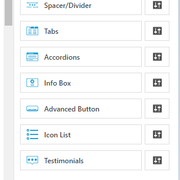
what am I missing?
In forum: Virtue ThemeIn reply to: Blog Archive Pages – Reverse Order
April 24, 2019 at 11:05 am #223909Hey,
Need to clarify some things. A blog archive is not a page. Archives are categories or tags for example and they don’t represent a page in the admin. They are linked to internally and created through an archive template. If you are wanting to edit those archives and change the way posts are queried then you need to use a child theme.If you are creating a custom page and you just want to add some blog posts to it then you can use a shortcode regardless of what editor you are using, for example:
[kad_blog items="10" orderby="date" order="ASC"]If you are using the WordPress block editor (Gutenberg) then you can use Kadence Blocks and Kadence Blocks Pro (comes with theme) and add a post grid/carousel block that would allow you to add this more visually and set the order.
If you are using Siteorigin you can use their loop widget but beware it’s pretty easy to mess up the settings and create an endless loop. I would suggest using the shortcode over it.
Ben
In forum: Pinnacle ThemeApril 24, 2019 at 9:45 am #223881It’s possible your server is preveting form from being added to the database for security reasons.
You can just add this function into your child theme functions.php file:
add_action('wp_footer', 'add_custom_paypal_form', 80 );
function add_custom_paypal_form() {
	<?php
<div id="ppfootersif">
<form action="https://www.paypal.com/cgi-bin/webscr" method="post" target="_top">
<input type="hidden" name="cmd" value="_s-xclick">
<input type="hidden" name="hosted_button_id" value="7CT8LVTPSA2N4">
<input type="image" src="https://www.paypalobjects.com/en_US/i/btn/btn_donateCC_LG.gif" border="0" name="submit" alt="PayPal - The safer, easier way to pay online!">
<img alt="" border="0" src="https://www.paypalobjects.com/en_US/i/scr/pixel.gif" width="1" height="1">
</form>
</div>
?>
}
Ben
In forum: Virtue ThemeIn reply to: Modify display for Custom Post Type (CPT)
April 23, 2019 at 11:25 am #223775Even better would be to force the bottom carousel to show only these post-types. Is that possible?
It’s possible but not with the built-in templates you would have to add in your own templates for the carousel pulling in your custom post type.
To remove the carousel from the custom post type you can add this function:
remove_action( 'kadence_single_post_after', 'virtue_post_bottom_carousel', 30 );
add_action( 'kadence_single_post_after', 'custom_carousel_control', 30 );
function custom_carousel_control() {
	global $post;
	$type = get_post_type( $post );
	if ( 'post' === $type ) {
		virtue_post_bottom_carousel();
	}
}
To add your own carousel you would just update that a bit:
remove_action( 'kadence_single_post_after', 'virtue_post_bottom_carousel', 30 );
add_action( 'kadence_single_post_after', 'custom_carousel_control', 30 );
function custom_carousel_control() {
	global $post;
	$type = get_post_type( $post );
	if ( 'post' === $type ) {
		virtue_post_bottom_carousel();
	} elseif ( 'epkb_post_type_1' === $type ) {
		get_template_part( 'templates/recentepkb', 'carousel' );
	}
}
Where your custom carousel file is named recentepkb-carousel.php in the templates folder of your child theme.
That can be a copy of the recentblog-carousel.php template.
You would just need to add:
'post_type' => 'epkb_post_type_1',to the query arguments.Ben
In forum: Virtue ThemeIn reply to: Woocommerce backend pages showing blank
In forum: Pinnacle Theme -
AuthorSearch Results



