
Notice: These forums are now retired and closed. For active support, please Submit a Ticket or visit our official WordPress.org community pages.
Kadence Theme | Kadence Blocks | Starter Templates | WooCommerce Email Designer | Ascend | Virtue | Pinnacle
Search Results for 'page '
-
AuthorSearch Results
-
In forum: Kadence Theme
In reply to: Trigger menu button issue
Great insight on initializing interaction listeners to solve click-response delays—this could really help reduce latency in dense Kadence-based pages.
I faced a similar issue on my site and found optimizing script load timing significantly improved UX.
Feel free to take a look at the demo here: https://myavatarworldmod.com/ — curious to know if that approach resonates with what you’re working on.In forum: Kadence ThemeIn reply to: Unwanted Markers on Archive Pages
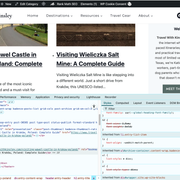
August 18, 2025 at 12:23 pm #294692I am experiencing this exact same issue. In the screenshot, you can see there is a bullet point in front of the post title. I added the inspection tool which shows that it is pulling from the “archive-container” on the list of items. This is happening on every “post” module, but I was able to add custom CSS to remove it. But since this is on an archive page, I don’t know how to remove it: https://www.travelwithkinsley.com/category/europe/poland/
 In forum: Membership Forums
Hi Anthony
Thank you for getting back to me. Unfortunately you are not telling me anything that I had not worked out when I first registered my query. You will be able to see that I mentioned the automation in my original enquiry. The problem is the Brevo automation requires a URL to scan for. I use a Kadence pop-up conversion on my home page. Providing the home page URL does not work, I suspect because that URL does not correctly identify the pop-up. What URL should I provide to get this to work?In forum: Kadence ThemeTopic: Custome page with filter
August 18, 2025 at 3:59 am #294690Hello, I would like to create a page with filters by vertical. These filters would be used to sort infographics. Similar to the example below, I’d like each infographic to be printable but also link to an article. My main question is about the layout of this page with photographs: how can I add filters at the top?
Exemple : *Login to see link
In forum: Kadence ThemeIn reply to: Unwanted Markers on Archive Pages
August 15, 2025 at 2:18 am #294682Hi @uouofox123,
Welcome to Kadence Support. I’d be happy to help.
It looks like the cache files issue. You can also check the cache plugin you are using to find similar options to clear or regenerate all cache files. This will ensure a fresh CSS cache file is created with the latest changes.
If the issue persists after this, please share the URL to one of the affected archive pages so we can take a closer look. You can post it as a private reply if preferred.
I hope this helps. Let us know if we can assist you further.
Best Regards,
ArchitaIn forum: Membership ForumsIn reply to: Recaptcha setup error
August 14, 2025 at 7:53 pm #294680Hey Thomas,
No worries at all! However, to investigate further, can you please submit a ticket to either of the following support pages:
* https://www.kadencewp.com/help-center/premium-support/
* https://www.kadencewp.com/help-center/free-support/And share the login link or credentials for your site.
Thanks,
ChitoIn forum: Kadence ThemeAugust 14, 2025 at 7:09 pm #294679Hi Kadence Team,
After updating Kadence Theme and Kadence Blocks, I noticed an issue on archive pages when CSS Minify is enabled. The bullet points or markers appear next to posts on archive pages, which was not happening before the update. When I disable CSS Minify, the posts display correctly, but I want to keep Minify enabled for performance.
Could you please advise how to prevent CSS Minify from adding these markers on archive pages or provide a fix/workaround?
Thank you for your support.
In forum: Membership ForumsIn reply to: Kadence Blocks Accordion add items
August 13, 2025 at 1:04 pm #294664If you want to add more items to a Kadence Blocks Accordion, here’s the process:
Open the page/post in the WordPress editor.
Select your Accordion Block.
In the toolbar, click the “+ Add Item” button.
Enter a Title and the content you want for that new item.
Repeat for each additional item, then save or update the page.
💡 Pro Tip: Just like using the AI-powered Remini photo quality enhancer app to bring old pictures to life, Kadence Blocks makes it effortless to expand your accordion with fresh, engaging content.
In forum: Kadence BlocksIn reply to: Password on a Kadence Archive page
Hi @architabasandrai
Thanks for your reply with confirmation as I suspected that Kadence Archive and Single pages do not actually exist except as dynamic creations, hence the inability to apply visibility settings or other other settings as you can with standard pages.I have taken your advice and am investigating the ‘Simple Membership’ plugin as a potential method to control access to my site.
Thanks again.
In forum: Kadence BlocksIn reply to: Password on a Kadence Archive page
August 12, 2025 at 2:54 am #294624Hi @ianzmail,
Welcome to Kadence Support. I’d be happy to help.
Archive pages aren’t standard WordPress pages or posts, so WordPress ignores meta box settings like the “Password Protected” option. With Kadence Template Elements, archive “pages” are generated dynamically, meaning you can’t apply WordPress’ built-in visibility or Passster’s per-page protection directly to them.
To restrict access, you can either:
- Use a membership or content restriction plugin (e.g., Restrict Content Pro, Members) and set rules for the relevant post types.
- Create WordPress user accounts, assign roles, and restrict archives/singles using a plugin or custom pre_get_posts / template checks.
- You can also try the plugins like “Password Protect WordPress (PPWP)” or similar solutions that are designed for this purpose.
I hope this helps. Let us know if we can assist you further.
Best Regards,
ArchitaIn forum: Kadence BlocksHi, I have a relatively simple ACF/Kadence-pro based website that has three custom post types. The custom post types are Photo, Face and Editor. Each custom post type has its own archive page and its own single page as per normal. The archive pages are made with Kadence Template Elements and the QueryLoop(adv) block.
My Primary menu has four items being Home, Photos, Editors and Faces with the menu items being url links to the archive pages.
The behaviour I want is for the general public to be freely able to access the Photo archive and via to the Photo single pages, but only my ‘Editors’ to be able to access the ‘Editor’ and ‘Faces’ archive and aingle pages.
My plan was to create passwords for the Editors and Faces archive pages, either using the WP visibility settings or the Passster plugin but both of these methods appear to be unavailable to me because I do not actually have an editable ‘Archive Page’ as such. All I have access to is the Kadence Template Element where the Archive is built and obviously that is a Template, not an actual page.
Please note that, at this time, I do not have ‘users’ implemented in any form, basically because I do not know how to do that and was trying to avoid the added complexity. But I am open to doing that if it is the only way to achieve restrictions on who accesses what.
So my questions are:
1. Is there an ‘Archive Page’ somewhere that I can edit the ‘Visibility settings’ for and possibly apply Passster settings to?
2. Is there another way to implement a password gateway to my Archive pages?Thanks in advance for any help or comments.
In forum: Virtue ThemeTopic: Virtue & Sensei Conflict
I have recently purchased Sensei to sell online courses – but when I go to the course page the formatting is a mess. There are huge blue arrows and massive black crosses and ticks and the whole page is messed up.
Is there a workaround to get Sensei to display correctly?
In forum: Membership ForumsAugust 7, 2025 at 12:37 pm #294599Hi Joanne,
I’m glad you reached out. I’ll be happy to help!
I took a look at the Brevo documentation on double-optin and it looks to me that the “Confirmation page after submitting the form” and the “Confirmation page after clicking on the validation link” are optional. When either of these are checked, the user will be redirected to a confirmation page of your choice. This could be a dedicated page letting the user know they will be receiving a confirmation email or a simple “Thank you” page. You should be able to turn on the double-optin with or without setting these pages. If you need clarification on this, you may want to reach out to Brevo for more details. Let us know if we can do anything else to assist.

Thanks,
AnthonyIn forum: Kadence ThemeIn reply to: Header is jumping
August 7, 2025 at 10:35 am #294597The issue of your header jumping on page reload, as shown in the screenshot, likely stems from a JavaScript or CSS-related problem that affects the initial positioning of the header on “normal” site pages but not the blog. A common cause could be a script that adjusts the header’s position (e.g., a sticky header or scroll-based repositioning) but runs after the page loads, causing a delay that misplaces the header until scrolling triggers the correction. Alternatively just like crictime, it might be due to inconsistent CSS, such as a position: fixed or sticky property being applied late due to a render-blocking resource or a conflicting style that’s resolved on scroll. To fix this, ensure the header’s CSS (e.g., position: sticky; top: 0;) is consistently applied on page load, check for JavaScript delays by deferring non-critical scripts, and verify that no blog-specific styles (e.g., different container margins or padding) are causing the discrepancy.
-
This reply was modified 9 months ago by
midhat10082000.
In forum: Membership ForumsHi there
I’m trying to set up a double opt-in process for subscribers to my web page. I have set up a pop-up conversion asking for users name and email. At the moment that contact information is passed directly to Brevo with no opt-in. Brevo’s advice is to create an automation, which will place contacts in a temporary list which requires a URL of the confirmation page so that entries can be tracked and contacts put in the temporary list first. My conversion only appears on my home page so I have I have tried using the homepage as the URL but that doesn’t seem to work. I think I need to provide the URL of the pop-up form but not sure what that URL is or if that’s even possible. Can you help?
My website is http://www.houndsconnect.co.ukThank you
In forum: Kadence ThemeAugust 7, 2025 at 4:56 am #294589Ah, I think I’ve run into this before. It’s a tricky one with how the ::after pseudo-element and anchor links interact. It sounds like the :after element is essentially “overriding” the hover state of the actual link, especially when it’s an anchor to a section on the same page. A temporary fix might be to add a bit of custom CSS that specifically targets those ::after elements on hover, or maybe adds a z-index to the actual link itself to make sure it’s on top. Hope that helps you get it sorted!
In forum: Kadence ThemeAugust 6, 2025 at 7:09 pm #294586The new support layout look nice but is very very confusing.
Why if we have so mucho open space to tickets you narrow this in a very tight window.This affects the UX on the page
In forum: Kadence BlocksIn reply to: Blog filter query loop
AnonymousAugust 6, 2025 at 9:59 am #294581Hi Favre,
Can you clarify?
What do you mean it does not display? Are you talking about the Query Loop posts?
Or that the filters do not work and the posts do not update when the filters are clicked?
Or that the filter buttons are not showing at all?
Can you send us the page link where we can see the issue?
Let us know how we could help you further.
Kind Regards,
Michael TaroIn forum: Kadence ThemeTopic: Header is jumping
August 6, 2025 at 5:46 am #294578Hi,
my header jumps every time I reload the page. Here’s a screenshot showing where the header gets stuck after the page loads. As soon as I scroll once, the header moves to the correct position and stays there. The issue only reappears when I load a new page. It just appears on “normal” sited, not in the blog.
What could be the problem?
Thanks
JanIn forum: Kadence BlocksTopic: Blog filter query loop
August 6, 2025 at 4:31 am #294573Hello, after creating my query loop in the filter block, it does not display on my page once it is published. I don’t understand. Did I do something wrong? I have removed all the plugins, but it still doesn’t work.
here my blog : *Login to see link
-
AuthorSearch Results



