
Notice: These forums are now retired and closed. For active support, please Submit a Ticket or visit our official WordPress.org community pages.
Kadence Theme | Kadence Blocks | Starter Templates | WooCommerce Email Designer | Ascend | Virtue | Pinnacle
Search Results for 'page '
-
AuthorSearch Results
-
In forum: Kadence ThemeFebruary 23, 2021 at 8:54 am #263821
Hi
Scratching my head here a bit. I stripped the page to almost bare bones now really and still having the the problem. So I have created few elements:
1. Button – FIXED ON TOP
2. REPLACE HEADER element
3. Button – FIXED ON BOTTOM
4. Elements FIXED ON BOTTOM AFTER SCROLL with scroll down distance set to 0 (just to test what is going on)As soon as I activate element no 2 – REPLACE HEADER – it sets elements 1 and 3 in fixed position and stops them from scrolling, like here *Login to see link
On the page where REPLACE HEADER is not visible/active all works fine, like here *Login to see link
Only difference between this two pages is REPLACE HEADER element being shown on the first one and not on the second
No, I don’t need so many floating elements, but I came across this when I already had REPLACE HEADER on some pages, and I wanted to add floating element at the bottom. I might just not fully understand and maybe it works as it should?
Thanks a lot
In forum: Kadence ThemeHi Michael,
To confirm, are you referring to the Page Title section of the pages? If you go to Customizer > Page Layout > Design tab, you’ll see the Use Featured Image for Background? option for the Page Title Background – https://share.getcloudapp.com/WnuB7N8l. This way, you’ll just have to set different featured images for the pages so those will be used as their page title section’s background.
Hope this helps and let us know if we can assist you further.
Regards,
KarlaIn forum: Pinnacle ThemeIn reply to: Pinnacle and polylang at homepage
Hello Michael,
Thank you for providing the login details.
I went ahead and logged in to your website to check your settings. I’ll be attaching the screen recording of the process I did to fix the string on the English page as a private reply. The string I translated is the
portfolio_full_title. When I searched for it, it does not have the correct English translation yet.Hope this helps.
Regards,
KarlaIn forum: Kadence ThemeIn forum: Membership ForumsIn reply to: Ascend left menu on Woo Template page
In forum: Membership ForumsHey again,
Is there a easy way to style a left menu on a woo template (category page). I would like to replace the standard category menu with a customized menu.
The left menu could have the same styling as this category menu:
/* WOO COMMERCE PRODUCT CATEGORY MENU*/
.woocommerce .product-categories li a {
font-size: 16px;
color: #000000;
}ul.product-categories {
position: static;
list-style-type: none;
margin-left: -20px;and put a link to you in next message.
Pamela
In forum: Virtue ThemeIn reply to: Double Image Issue with Advanced Gallery
Hi Hannah,
sure this helps, but then I have not the lightbox-feature to click through the images.
Another solution is to deactivate the lightbox feature in the theme settings, but then I have not the lightbox feature on other pages…
There should be an solution to use lightbox settings in the theme and lightbox settings in advanced gallery at the same time…
Thanks
MatthiasIn forum: Membership ForumsThank you Hannah for your reply,
The Woo Templates have a slug, and you can also name them in the same way as pages.
But this case is solved, I found a walk-around and can now translate my templates, but it would have been easier to only replace slug.Thank you!
Pamel
In forum: Pinnacle ThemeHello Sarah,
Here’s a screen recording for your reference regarding what Hannah said about “Try setting the home page slider to page title. Then add your hero image that way.” – https://share.getcloudapp.com/L1uNRk9x.
Hope this helps you further.
Regards,
KarlaIn forum: Kadence ThemeIn reply to: Transparent header
February 22, 2021 at 1:11 am #263757Hello Gaius,
I tried replicating the issue on my test site, but it seems to work properly on my end.
I think this is a sort of browser cache issue on your end.
Could you please try to clear your browser cache, hard refresh the page using CTRL + F5, or open a browser incognito window?
Let me know how it goes.
Regards,
ChitoIn forum: Kadence ThemeTopic: Buttons on Mobile
In forum: Pinnacle ThemeHi,
on product page the product proberties selection fields does not work correct with different mobile devices. On iphone 8 it does not work with safari and firefox. On Samsung tablet device with chrome does not work, with firefox everything works well. One exmaple at *Login to see link
Any idea what’s going wrong?
Thanks and by
Michael-
This topic was modified 5 years, 2 months ago by
Michael.
In forum: Kadence ThemeIn reply to: WooCommerce Product Catalogue Archive Title
February 21, 2021 at 4:25 am #263746Hi Karla,
The class name issue in the HTML code appears on empty article/product categories too.
Post categories – empty vs filled
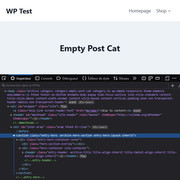

Product categories – empty vs filled


It is not a big deal but I think there’s a problem with the slug retrieval. Seems that “get_post_type()” in “inc\template-functions\archive-functions.php” returns nothing when archive pages are empty (I’m not a WP/PHP expert however, so I might be wrong).
But “get_queried_object()” returns a value in “template-parts\content\archive_hero.php” and “template-parts\content\archive_header.php” (when I passed the variable to “get_archive_hero_classes($slug)” and “get_archive_title_classes($slug)”, the slug reappeared in the class name and the title bar was styled).
Could you take a look?
Thanks!
In forum: Kadence ThemeFebruary 21, 2021 at 12:32 am #263745I just started working on the header part of my website.
Kadence Theme.
Template: Agency.I was experimenting with the options in the header builder, but whatever I tried I could not adjust the template’s primary navigation menu.
I ended up deleting all the menus and created new ones for Primary and Secondary navigation.The Secondary Navigation is taking on the menu I select for it, however the Primary Navigation only shows all the pages in the template + one I made to test with. It doesn’t matter where I place them in the header. I deleted them and add them again. Nothing seems to work.
How can I customize the Primary Navigation menu?
In forum: Membership ForumsTopic: Modal stopped opening
February 20, 2021 at 11:09 am #263741Hello.
One of my modals stopped opening. It has a fluent form in it which should open with a button. No changes were made to the form. I was working on the sizing of the modal when it stopped opening. It has been working with no problem for months. This form is on many pages and the modal no longer opens no matter which page I am on. Additionally, if you click the button which should open the modal, the page now freezes. I tried numerous browsers – all have the same problem. Oddly, it still opens normally on my cellphone. Any advice?
In forum: Pinnacle ThemeIn forum: Kadence ThemeIn reply to: Blog preview on Start page?
February 20, 2021 at 7:19 am #263735That Ascend Premium block looks lovely!
I think ill stay with the current solution for now. I dont like to have my Homepage into a sole latest blog post page. But I will check it on my test site and see how that looks and works.Thanks!
StefanIn forum: Kadence ThemeIn reply to: Lightbox not working in Kadence theme
February 20, 2021 at 7:15 am #263734Hi Hannah,
It was not enabled. Now is enabled. Still didnt give me any arrows/back and forth. But, the gallery is the default WordPress gallery block. I will change to Kadence Advanced gallery block instead. I did that at one of the other gallery portfolio pages on my site, and it worked. https://canvas.nu/portfolio/teckningar-illustrator-stefan-lindblad
Thanks
StefanIn forum: Kadence ThemeTopic: Transparent header
February 19, 2021 at 9:31 pm #263728Hi,
I’m getting used to the Kadence Theme, having switched from Ascend. But I’m having a few issues. Hoping you can help.I’ve enabled transparent header, however, it isn’t working on my pages, even though I have “Disable on Pages” off.
Am I missing something?
Thanks in advance.
-
This topic was modified 5 years, 2 months ago by
-
AuthorSearch Results



