Notice: These forums are now retired and closed. For active support, please Submit a Ticket or visit our official WordPress.org community pages.
Kadence Theme | Kadence Blocks | Starter Templates | WooCommerce Email Designer | Ascend | Virtue | Pinnacle
Search Results for 'post'
-
AuthorSearch Results
-
In forum: Virtue Theme
In reply to: Customize Testimonial Widget on Homepage
March 26, 2016 at 8:00 pm #878891.
.home-widget-box h3 {
    text-align: center;
}
2. The home page uses:
.home-padding {
    padding: 25px 0 30px;
}
To control between each item. You can adjust that and it would adjust all.
3. You can use this:
.home-widget-box {
    background: #eee;
    padding: 20px;
}
If you’re wanting a full width background then you would need to use page builder and set the row to fullwidth. see here: https://www.kadencewp.com/using-page-builder-virtue-premium/
7. There isn’t an option to add after the title. You can add a link in a text widget right below.
8. Set the post to -1. (you can use negative numbers)
9. See here: https://www.kadencewp.com/child-themes/
Ben
In forum: Pinnacle ThemeIn reply to: Help to make call to action
March 26, 2016 at 7:08 pm #87882Hey,
so you want basically a contact form with no message box. You can create custom forms using this plugin: https://wordpress.org/plugins/contact-form-7/In terms of the style you would just need to customize with css. If you’re not familiar with that set up the form from above and post a link I can help change the styling.
Ben
In forum: Pinnacle ThemeIn reply to: Images linking back to them selfs
March 26, 2016 at 7:05 pm #87881Hey,
When you add an image using the add media button in a page editor on the bottom right (above where you click insert to post) there are options. One is the image link there you can make it custom or select none or use the image file location as the link.Ben
In forum: Pinnacle ThemeIn reply to: Portfolio carousel/custom carousel
March 26, 2016 at 7:03 pm #87880The pinnacle carousel pulls images from posts. You’re making a carousel of posts really not iamges. So if you choose portfolio posts then it would pull the featured image from those portfolio posts.
If you just want a carousel with images then use the pinnacle gallery widget. You can use the type carousel.
Ben
In forum: Virtue ThemeIn reply to: Customize Testimonial Widget on Homepage
1-3 Sorry, link is wp.smartmusicteacher.com
4-6 I decided to go without the image as I don’t think I’ll get many to use anyway.
7. Okay, I figured out that this was meant for each post. I am wanting there to be some sort of link to the Testimonials page directly, like a Read More just after the title or something. Otherwise, I have to have a Read More after every post, and that looks cluttered.
8. Okay, the problem is, since every post is set to default to “0”, I can’t simply set the one post to “1” because “0” comes before “1”. It seems that I have to change the order on every post in order to get the one post to be first…. Is there a way around this?
9. I am not using a child theme. I will have to figure out how child themes work….
In forum: Virtue ThemeIn reply to: Customize Testimonial Widget on Homepage
March 26, 2016 at 6:42 pm #87870Hey,
1. Post a link?
2. ^
3. ^
4. You can set a featured image in each post, or if you want to change the defualt it’s an icon made with a font not an iamge so do you have a custom font uploaded?
5. Sure what size?
6. Yes
7. Can you clarify the theme version?
8. If you set the order by to menu order then you can set a custom order using the post attributes order number.
9. Are you using a child Theme? add this into the functions.php of a child theme:add_filter('kadence_display_sidebar', 'kt_testimonial_post_sidebar'); function kt_testimonial_post_sidebar($sidebar) { if (is_singular('testimonial') ) { return false; } return $sidebar; }Ben
In forum: Virtue ThemeIn reply to: Pictures in the footer -recent projects
March 26, 2016 at 6:35 pm #87868That is a “virtue: post grid” widget. You can see on your widgets page. It adds a grid of either portfolio posts or blog posts.
Ben
In forum: Virtue ThemeIn reply to: Dropdown menu disappears
March 26, 2016 at 6:17 pm #878621.This is caused by your product zoom plugin. add this css to override:
#nav-main, .nav-main {
    z-index: 2000;
}
2. Always best to start a new topic. We appreciate it.
For speed please see this post: https://www.kadencewp.com/need-for-speed/
Ben
In forum: Virtue ThemeIn reply to: Add accordion with custom fields to template
March 26, 2016 at 6:04 pm #87858Are you using this function to call the custom field: https://developer.wordpress.org/reference/functions/get_post_meta/
Ben
In forum: Virtue ThemeIn reply to: Sticky/fixed sidebar?
In forum: Virtue ThemeIn reply to: Product subcategory image resize
March 26, 2016 at 6:01 pm #87856Hey,
To post an image use a posting source like : https://www.awesomescreenshot.com/
Or http://tinygrab.com/In terms of the product category image sizing you can adjust in the theme options > shop settings. “Shop Category Image Size”
Ben
In forum: Virtue ThemeIn reply to: Need some features.
Hi, Ben
1)I tried to use this get post meta, but I don’t understand how to make it visible. I added this code inside the imghoverclass in content loop portfolio file:
<div class=”captiontitle headerfont”><?php $price1 = get_post_meta ( $post->ID, ‘value price’, true );
echo esc_attr($price1); ?></div>However the value doesn’t show up on the thumbnail, what am I missing?
2)I have 2 carousels with 3 columns on homepage and one carousel with 5. What css should I add to @media (max-width:480px;) in order to make carousels of 3 items show 2 columns instead of 1 on mobile? carousel with 5 items shows 2 column layout by default.
Thanks!
http://asp-polyana-sochi.ruIn forum: Virtue ThemeIn forum: Virtue ThemeIn reply to: Space above cyclone slider on home page
I think I fixed it so a link would no lnger show the space. I used something Hanna posted for another kind of slider and it seems to have worked for the cyclone slider as well. I just thought that it would have been tight to the menu anyways?? Below is what I added.
.siteorigin-panels-stretch.kt-panel-row-full-stretch.panel-row-style {
padding-top: 0 !important;
}
.contentclass {
padding-top: 0;
}
.home .contentclass {
padding-top: 0px !important;
}In forum: Virtue ThemeIn reply to: Mobile to be split column?
March 25, 2016 at 4:22 pm #87783Hey,
You can’t make mobile “exactly” like computer. It’s not the point of a responsive theme. The theme’s code is responsive to screen size and the layout breaks down as you access on smaller devices. This is for better mobile browsing (no zooming in and out) and it’s also important for mobile SEO. The text doesn’t shrink as you screen breaks down. That is key. I really suggest you consider what’s more valuable in terms of mobile traffic.So can you have two columns on mobile? absolutely. Should you try to make the space on mobile for all your content and a sidebar.. no. really really no.
But If you want to experiment with the code I can let you try and force something like that. (but again this will not look good because text remains the same size as desktop).
In terms of the link you posted? That isn’t a responsive site so simple put. No you can’t do that with a responsive theme. And more then that I would strongly encourage you to look around at articles for how bad that is for your site to not be mobile friendly.
Ben
In forum: Virtue ThemeIn reply to: Language settings
Hi Guys,
I have just purchased your Virtue Premium Theme and I have encontered the first problem which didn’t exist with Virtue Free Theme.
My website is in 2 languages, english and spanish. When I used the Free Theme in Page / Post Edit I could choose between Visual and Text ways. In both of them I could place english text independently from the spanish one. I have one tab for English and another for Spanish. With the Premium Theme I am using Page Builder since it offers mosaic gallery and other widgets, but it seems like the content I place in the english tab copies to the spanish one. So as a result all my home page content is exactly the same. Check it out for yourself:
http://happyfrogtravels.com/ and http://happyfrogtravels.com/es/
I would like to put one gallery inside the english tab and another one inside the spanish tab, but I don0t know how!!??
I am wondering if your Premium Theme and it’s widgets are compatible with qTranslate-X Plugin that I am using. If that is the case I bought your theme for nothing! I will have to go back to the Free Version.
Please help me resolve this issue.
Thanks,
Milos Mitrovic
Happy Frog TravelsIn forum: Virtue ThemeIn reply to: Portfolio category pages duplicates content
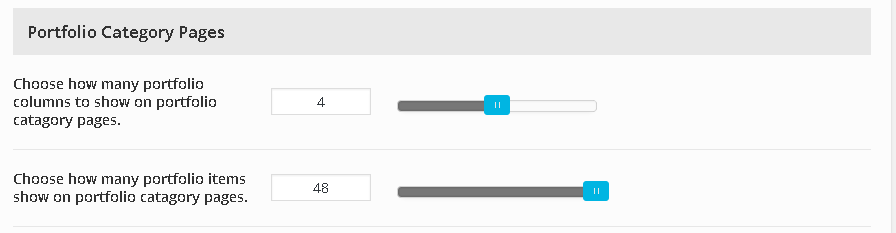
March 25, 2016 at 3:41 pm #87766It’s the same, “posts” so set those to the same number like 16.
The order is set by menu order. Which you can change based on the post order number in each post.
Ben
In forum: Virtue ThemeIn reply to: Portfolio category pages duplicates content
In forum: Virtue ThemeIn reply to: Display of goods
March 25, 2016 at 3:14 pm #877521. https://www.kadencewp.com/post-frequently-asked-questions/
@media (min-width: 992px) {
body .main.col-lg-9 {float:right;}
}
2. I don’t get what you’re asking?
BenIn forum: Virtue ThemeIn reply to: Single product image
-
AuthorSearch Results