
Notice: These forums are now retired and closed. For active support, please Submit a Ticket or visit our official WordPress.org community pages.
Kadence Theme | Kadence Blocks | Starter Templates | WooCommerce Email Designer | Ascend | Virtue | Pinnacle
Search Results for 'sidebar'
-
AuthorSearch Results
-
In forum: Pinnacle Theme
In reply to: Margin Between Post and Footer
That didn’t work.
This is the html:
<div class="wrap contentclass" role="document"> <div class="container bc_nomargin"> <div id="kadbreadcrumbs" class=""><span itemscope itemtype="http://data-vocabulary.org/Breadcrumb"><span itemprop="title">Home</span></span> / <span itemscope itemtype="http://data-vocabulary.org/Breadcrumb"><span itemprop="title">Distributor Login</span></span> / <span class="kad-breadcurrent">Distributor Portal</span></div> </div><!--container--> <div id="content" class="container"> <div class="row"> <div class="main col-md-12 kt-nosidebar" role="main"> <div class="postclass pageclass clearfix entry-content" itemprop="mainContentOfPage"> <div id="pl-252"><div class="panel-grid" id="pg-252-0" ><div class="panel-grid-cell" id="pgc-252-0-0" ><div class="so-panel widget widget_sow-headline panel-first-child panel-last-child" id="panel-252-0-0-0"><div class="so-widget-sow-headline so-widget-sow-headline-sow-headline-36f0515a2975"><div id="sow-headline-container" class="sow-headline"> <h1>Welcome to the Distributor Portal!</h1> <div class="decoration"> <div class="decoration-inside"></div> </div> <h5>Here you will find tools designed to make your job easier.</h5> </div></div></div></div></div><div class="panel-grid" id="pg-252-1" ><div style="background-color:#ffffff;padding-top: 20px; padding-bottom: 50px; " class="panel-row-style" ><div class="panel-grid-cell" id="pgc-252-1-0" > <div class="so-panel widget widget_pinnacle_imgmenu_widget pinnacle_imgmenu_widget panel-first-child" id="panel-252-1-0-0"> <div class="kad-animation" data-animation="fade-in" data-delay="150"> <div class="infobanner" style="background: url(http://localhost:8888/promomatting/wp-content/uploads/2016/02/pricing_img.jpg) center center no-repeat; height:220px; background-size:cover;"> <div class="home-message" style="height:220px;"> <h4>Pricing</h4> </div> </div> </div> </div> <div class="so-panel widget widget_pinnacle_imgmenu_widget pinnacle_imgmenu_widget panel-last-child" id="panel-252-1-0-1"> <div class="kad-animation" data-animation="fade-in" data-delay="150"> <div class="infobanner" style="background: url(http://localhost:8888/promomatting/wp-content/uploads/2016/02/marketing_img.jpg) center center no-repeat; height:220px; background-size:cover;"> <div class="home-message" style="height:220px;"> <h4>Marketing</h4> </div> </div> </div> </div> </div><div class="panel-grid-cell" id="pgc-252-1-1" > <div class="so-panel widget widget_pinnacle_imgmenu_widget pinnacle_imgmenu_widget panel-first-child" id="panel-252-1-1-0"> <div class="kad-animation" data-animation="fade-in" data-delay="150"> <div class="infobanner" style="background: url(http://localhost:8888/promomatting/wp-content/uploads/2016/02/catalog_img.jpg) center center no-repeat; height:220px; background-size:cover;"> <div class="home-message" style="height:220px;"> <h4>Virtual Catalog</h4> </div> </div> </div> </div> <div class="so-panel widget widget_pinnacle_imgmenu_widget pinnacle_imgmenu_widget panel-last-child" id="panel-252-1-1-1"> <div class="kad-animation" data-animation="fade-in" data-delay="150"> <div class="infobanner" style="background: url(http://localhost:8888/promomatting/wp-content/uploads/2016/02/ordering_img.jpg) center center no-repeat; height:220px; background-size:cover;"> <div class="home-message" style="height:220px;"> <h4>Ordering Info</h4> </div> </div> </div> </div> </div><div class="panel-grid-cell" id="pgc-252-1-2" > <div class="so-panel widget widget_pinnacle_imgmenu_widget pinnacle_imgmenu_widget panel-first-child" id="panel-252-1-2-0"> <div class="kad-animation" data-animation="fade-in" data-delay="150"> <div class="infobanner" style="background: url(http://localhost:8888/promomatting/wp-content/uploads/2016/02/quote_img.jpg) center center no-repeat; height:220px; background-size:cover;"> <div class="home-message" style="height:220px;"> <h4>Request a Quote</h4> </div> </div> </div> </div> <div class="so-panel widget widget_pinnacle_imgmenu_widget pinnacle_imgmenu_widget panel-last-child" id="panel-252-1-2-1"> <div class="kad-animation" data-animation="fade-in" data-delay="150"> <div class="infobanner" style="background: url(http://localhost:8888/promomatting/wp-content/uploads/2016/02/sample_img.jpg) center center no-repeat; height:220px; background-size:cover;"> <div class="home-message" style="height:220px;"> <h4>Request a Sample</h4> </div> </div> </div> </div> </div></div></div><div class="panel-grid" id="pg-252-2" ><div class="siteorigin-panels-stretch kt-panel-row-stretch panel-row-style" style="background-color:#397cbf;visibility: hidden;padding-top: 100px; padding-bottom: 100px; " data-stretch-type="full" ><div class="panel-grid-cell" id="pgc-252-2-0" > <div class="so-panel widget widget_pinnacle_calltoaction_widget pinnacle_calltoaction_widget panel-first-child panel-last-child" id="panel-252-2-0-0"><h2 style="color:#ffffff; font-size:40px; text-align:center;">Have you signed up for our newsletter yet?</h2><h5 style="color:#ffffff; font-size:20px; text-align:center;">Sign up today to be up-to-date with the latest news!</h5><div style="text-align:center">Subscribe <style type="text/css" media="screen">#kadbtn15:hover {} </style></div></div> </div></div></div></div> </div> </div><!-- /.main --> </div><!-- /.row--> </div><!-- /.content --> </div><!-- /.wrap --> <footer id="containerfooter" class="footerclass"> <div class="container"> <div class="row"> <div class="col-md-12 col-sm-12 footercol1"> <div class="widget-1 widget-first footer-widget"><aside id="kadence_simple_image-2" class="widget kadence_simple_image"> <div class="kad_img_upload_widget"> </div>
</aside></div> </div>
<div class="col-md-4 footercol2">
<div class="widget-1 widget-first footer-widget"><aside id="nav_menu-2" class="widget widget_nav_menu"><h4 class="widget-title">Quick Links</h4><ul id="menu-quick-links-footer" class="menu"><li class="menu-home"><span>Home</span>
<li class="menu-our-team"><span>Our Team</span>
<li class="menu-testimonials"><span>Testimonials</span>
<li class="menu-case-histories"><span>Case Histories</span>
<li class="menu-products"><span>Products</span>
<li class="menu-artwork-requirements"><span>Artwork Requirements</span>
<li class="menu-distributors current-page-ancestor"><span>Distributors</span>
</aside></div> </div>
<div class="col-md-4 footercol3">
<div class="widget-1 widget-first footer-widget"><aside id="widget_kadence_social-2" class="widget widget_kadence_social"><h4 class="widget-title">Connect With Us</h4> <div class="kadence_social_widget clearfix">
<i class="kt-icon-facebook3"></i><i class="kt-icon-twitter2"></i><i class="kt-icon-googleplus2"></i><i class="kt-icon-youtube"></i><i class="kt-icon-linkedin2"></i> </div>
</aside></div>
<div class="widget-2 widget-last footer-widget"><aside id="kadence_gallery_widget-2" class="widget kadence_gallery_widget"><h4 class="widget-title">Associations</h4><div id="kad-wp-gallery63" class="kad-wp-gallery init-isotope kad-light-wp-gallery clearfix rowtight" data-fade-in="1" data-iso-style="masonry" data-iso-selector=".g_item" data-iso-filter="false"><div class="tcol-lg-3 tcol-md-3 tcol-sm-4 tcol-xs-6 tcol-ss-12 g_item"><div class="grid_item kt_item_fade_in kad_gallery_fade_in gallery_item">
</div>
</aside></div> </div>
<div class="col-md-4 footercol2">
<div class="widget-1 widget-first footer-widget"><aside id="nav_menu-2" class="widget widget_nav_menu"><h4 class="widget-title">Quick Links</h4><ul id="menu-quick-links-footer" class="menu"><li class="menu-home"><span>Home</span>
<li class="menu-our-team"><span>Our Team</span>
<li class="menu-testimonials"><span>Testimonials</span>
<li class="menu-case-histories"><span>Case Histories</span>
<li class="menu-products"><span>Products</span>
<li class="menu-artwork-requirements"><span>Artwork Requirements</span>
<li class="menu-distributors current-page-ancestor"><span>Distributors</span>
</aside></div> </div>
<div class="col-md-4 footercol3">
<div class="widget-1 widget-first footer-widget"><aside id="widget_kadence_social-2" class="widget widget_kadence_social"><h4 class="widget-title">Connect With Us</h4> <div class="kadence_social_widget clearfix">
<i class="kt-icon-facebook3"></i><i class="kt-icon-twitter2"></i><i class="kt-icon-googleplus2"></i><i class="kt-icon-youtube"></i><i class="kt-icon-linkedin2"></i> </div>
</aside></div>
<div class="widget-2 widget-last footer-widget"><aside id="kadence_gallery_widget-2" class="widget kadence_gallery_widget"><h4 class="widget-title">Associations</h4><div id="kad-wp-gallery63" class="kad-wp-gallery init-isotope kad-light-wp-gallery clearfix rowtight" data-fade-in="1" data-iso-style="masonry" data-iso-selector=".g_item" data-iso-filter="false"><div class="tcol-lg-3 tcol-md-3 tcol-sm-4 tcol-xs-6 tcol-ss-12 g_item"><div class="grid_item kt_item_fade_in kad_gallery_fade_in gallery_item"> </div></div><div class="tcol-lg-3 tcol-md-3 tcol-sm-4 tcol-xs-6 tcol-ss-12 g_item"><div class="grid_item kt_item_fade_in kad_gallery_fade_in gallery_item">
 </div></div><div class="tcol-lg-3 tcol-md-3 tcol-sm-4 tcol-xs-6 tcol-ss-12 g_item"><div class="grid_item kt_item_fade_in kad_gallery_fade_in gallery_item">
 </div></div><div class="tcol-lg-3 tcol-md-3 tcol-sm-4 tcol-xs-6 tcol-ss-12 g_item"><div class="grid_item kt_item_fade_in kad_gallery_fade_in gallery_item">
 </div></div></div></aside></div>
</div>
<div class="col-md-4 footercol4">
<div class="widget-1 widget-first footer-widget"><aside id="sow-editor-2" class="widget widget_sow-editor"><div class="so-widget-sow-editor so-widget-sow-editor-base"><h4 class="widget-title">Get In Touch</h4>
<div class="siteorigin-widget-tinymce textwidget">
<div role="form" class="wpcf7" id="wpcf7-f243-o1" lang="en-US" dir="ltr">
<div class="screen-reader-response"></div>
<form action="/promomatting2/distributor-login/distributor-portal/#wpcf7-f243-o1" method="post" class="wpcf7-form" novalidate="novalidate">
<div style="display: none;">
<input type="hidden" name="_wpcf7" value="243" /><br />
<input type="hidden" name="_wpcf7_version" value="4.4" /><br />
<input type="hidden" name="_wpcf7_locale" value="en_US" /><br />
<input type="hidden" name="_wpcf7_unit_tag" value="wpcf7-f243-o1" /><br />
<input type="hidden" name="_wpnonce" value="dc14348368" />
</div>
<p>Your Name *<br />
<span class="wpcf7-form-control-wrap your-name"><input type="text" name="your-name" value="" size="40" class="wpcf7-form-control wpcf7-text wpcf7-validates-as-required" aria-required="true" aria-invalid="false" /></span> </p>
<p>Your Email *<br />
<span class="wpcf7-form-control-wrap your-email"><input type="email" name="your-email" value="" size="40" class="wpcf7-form-control wpcf7-text wpcf7-email wpcf7-validates-as-required wpcf7-validates-as-email" aria-required="true" aria-invalid="false" /></span> </p>
<p>Subject*<br />
<span class="wpcf7-form-control-wrap your-subject"><input type="text" name="your-subject" value="" size="40" class="wpcf7-form-control wpcf7-text wpcf7-validates-as-required" aria-required="true" aria-invalid="false" /></span> </p>
<p>Your Message*<br />
<span class="wpcf7-form-control-wrap text-917"><input type="text" name="text-917" value="" size="40" class="wpcf7-form-control wpcf7-text wpcf7-validates-as-required" aria-required="true" aria-invalid="false" /></span>
</p>
<p><input type="submit" value="Send" class="wpcf7-form-control wpcf7-submit" /></p>
<div class="wpcf7-response-output wpcf7-display-none"></div>
</form>
</div>
</div>
</div></aside></div> </div>
</div> <!-- Row -->
<div class="footercredits clearfix">
<p>© 2016 PromoMatting</p> </div><!-- credits -->
</div><!-- container -->
</footer>
<script>
jQuery(document).ready(function() {
if (jQuery('#wp-admin-bar-revslider-default').length>0 && jQuery('.rev_slider_wrapper').length>0) {
var aliases = new Array();
jQuery('.rev_slider_wrapper').each(function() {
aliases.push(jQuery(this).data('alias'));
});
if (aliases.length>0)
jQuery('#wp-admin-bar-revslider-default li').each(function() {
var li = jQuery(this),
t = jQuery.trim(li.find('.ab-item .rs-label').data('alias')); //text()
if (jQuery.inArray(t,aliases)!=-1) {
} else {
li.remove();
}
});
} else {
jQuery('#wp-admin-bar-revslider').remove();
}
});
</script>
<script type='text/javascript' src='http://localhost:8888/promomatting2/wp-includes/js/admin-bar.min.js?ver=4.4.2'></script>
<script type='text/javascript' src='http://localhost:8888/promomatting2/wp-content/plugins/contact-form-7/includes/js/jquery.form.min.js?ver=3.51.0-2014.06.20'></script>
<script type='text/javascript'>
/* <![CDATA[ */
var _wpcf7 = {"loaderUrl":"http://localhost:8888/promomatting2/wp-content/plugins/contact-form-7/images/ajax-loader.gif","recaptchaEmpty":"Please verify that you are not a robot.","sending":"Sending ..."};
/* ]]> */
</script>
<script type='text/javascript' src='http://localhost:8888/promomatting2/wp-content/plugins/contact-form-7/includes/js/scripts.js?ver=4.4'></script>
<script type='text/javascript'>
/* <![CDATA[ */
var wc_add_to_cart_params = {"ajax_url":"/promomatting2/wp-admin/admin-ajax.php","wc_ajax_url":"/promomatting2/distributor-login/distributor-portal/?wc-ajax=%%endpoint%%","i18n_view_cart":"View Cart","cart_url":"","is_cart":"","cart_redirect_after_add":"no"};
/* ]]> */
</script>
<script type='text/javascript' src='//localhost:8888/promomatting2/wp-content/plugins/woocommerce/assets/js/frontend/add-to-cart.min.js?ver=2.5.2'></script>
<script type='text/javascript' src='//localhost:8888/promomatting2/wp-content/plugins/woocommerce/assets/js/jquery-blockui/jquery.blockUI.min.js?ver=2.70'></script>
<script type='text/javascript'>
/* <![CDATA[ */
var woocommerce_params = {"ajax_url":"/promomatting2/wp-admin/admin-ajax.php","wc_ajax_url":"/promomatting2/distributor-login/distributor-portal/?wc-ajax=%%endpoint%%"};
/* ]]> */
</script>
<script type='text/javascript' src='//localhost:8888/promomatting2/wp-content/plugins/woocommerce/assets/js/frontend/woocommerce.min.js?ver=2.5.2'></script>
<script type='text/javascript' src='//localhost:8888/promomatting2/wp-content/plugins/woocommerce/assets/js/jquery-cookie/jquery.cookie.min.js?ver=1.4.1'></script>
<script type='text/javascript'>
/* <![CDATA[ */
var wc_cart_fragments_params = {"ajax_url":"/promomatting2/wp-admin/admin-ajax.php","wc_ajax_url":"/promomatting2/distributor-login/distributor-portal/?wc-ajax=%%endpoint%%","fragment_name":"wc_fragments"};
/* ]]> */
</script>
<script type='text/javascript' src='//localhost:8888/promomatting2/wp-content/plugins/woocommerce/assets/js/frontend/cart-fragments.min.js?ver=2.5.2'></script>
<script type='text/javascript' src='http://localhost:8888/promomatting2/wp-content/plugins/kadence-slider/js/min/kadence-slider-min.js?ver=153'></script>
<script type='text/javascript' src='http://localhost:8888/promomatting2/wp-content/themes/pinnacle_premium/assets/js/min/kt_plugins.min.js'></script>
<script type='text/javascript' src='http://localhost:8888/promomatting2/wp-content/themes/pinnacle_premium/assets/js/kt_main.js?ver=161'></script>
<script type='text/javascript' src='http://localhost:8888/promomatting2/wp-content/themes/pinnacle_premium/assets/js/min/kt-add-to-cart-variation-min.js?ver=4.4.2'></script>
<script type='text/javascript' src='http://localhost:8888/promomatting2/wp-content/themes/pinnacle_premium/assets/js/min/wc-quantity-increment.min.js?ver=4.4.2'></script>
<script type='text/javascript' src='http://localhost:8888/promomatting2/wp-includes/js/wp-embed.min.js?ver=4.4.2'></script>
<script type='text/javascript'>
/* <![CDATA[ */
var panelsStyles = {"fullContainer":"body"};
/* ]]> */
</script>
<script type='text/javascript' src='http://localhost:8888/promomatting2/wp-content/plugins/siteorigin-panels/js/styling-23.min.js?ver=2.3.1'></script>
<script type="text/javascript">
(function() {
var request, b = document.body, c = 'className', cs = 'customize-support', rcs = new RegExp('(^|\s+)(no-)?'+cs+'(\s+|$)');
request = true;
b[c] = b[c].replace( rcs, ' ' );
b[c] += ( window.postMessage && request ? ' ' : ' no-' ) + cs;
}());
</script>
<div id="wpadminbar" class="nojq nojs">
Skip to toolbar
<div class="quicklinks" id="wp-toolbar" role="navigation" aria-label="Toolbar" tabindex="0">
<ul id="wp-admin-bar-root-default" class="ab-top-menu">
<li id="wp-admin-bar-wp-logo" class="menupop"><span class="ab-icon"></span><span class="screen-reader-text">About WordPress</span><div class="ab-sub-wrapper"><ul id="wp-admin-bar-wp-logo-default" class="ab-submenu">
<li id="wp-admin-bar-about">About WordPress <ul id="wp-admin-bar-wp-logo-external" class="ab-sub-secondary ab-submenu">
<li id="wp-admin-bar-wporg">WordPress.org
<li id="wp-admin-bar-documentation">Documentation
<li id="wp-admin-bar-support-forums">Support Forums
<li id="wp-admin-bar-feedback">Feedback </div>
<li id="wp-admin-bar-site-name" class="menupop">PromoMatting<div class="ab-sub-wrapper"><ul id="wp-admin-bar-site-name-default" class="ab-submenu">
<li id="wp-admin-bar-dashboard">Dashboard <ul id="wp-admin-bar-appearance" class="ab-submenu">
<li id="wp-admin-bar-themes">Themes
<li id="wp-admin-bar-widgets">Widgets
<li id="wp-admin-bar-menus">Menus </div>
<li id="wp-admin-bar-customize" class="hide-if-no-customize">Customize
<li id="wp-admin-bar-ktoptions"><span class="ab-icon dashicons-admin-generic"></span>Theme Options
<li id="wp-admin-bar-updates"><span class="ab-icon"></span><span class="ab-label">3</span><span class="screen-reader-text">3 Plugin Updates</span>
<li id="wp-admin-bar-comments"><span class="ab-icon"></span><span id="ab-awaiting-mod" class="ab-label awaiting-mod pending-count count-0">0</span>
<li id="wp-admin-bar-new-content" class="menupop"><span class="ab-icon"></span><span class="ab-label">New</span><div class="ab-sub-wrapper"><ul id="wp-admin-bar-new-content-default" class="ab-submenu">
<li id="wp-admin-bar-new-post">Post
<li id="wp-admin-bar-new-media">Media
<li id="wp-admin-bar-new-page">Page
<li id="wp-admin-bar-new-portfolio">Portfolio Item
<li id="wp-admin-bar-new-product">Product
<li id="wp-admin-bar-new-shop_order">Order
<li id="wp-admin-bar-new-shop_coupon">Coupon
<li id="wp-admin-bar-new-kadslider">Slider Item
<li id="wp-admin-bar-new-testimonial">Testimonial
<li id="wp-admin-bar-new-staff">Staff
<li id="wp-admin-bar-new-user">User </div>
<li id="wp-admin-bar-edit">Edit Page
<li id="wp-admin-bar-revslider" class="menupop revslider-menu"><span class="rs-label">Slider Revolution</span><div class="ab-sub-wrapper"><ul id="wp-admin-bar-revslider-default" class="ab-submenu">
<li id="wp-admin-bar-web-product-light" class="revslider-sub-menu"><span class="rs-label" data-alias="web-product-light">Web Product Light</span>
<li id="wp-admin-bar-home-body" class="revslider-sub-menu"><span class="rs-label" data-alias="home-body">Home Body</span>
<li id="wp-admin-bar-what-we-do" class="revslider-sub-menu"><span class="rs-label" data-alias="what-we-do">What We Do</span>
<li id="wp-admin-bar-testimonial" class="revslider-sub-menu"><span class="rs-label" data-alias="testimonial">testimonial</span> </div> <ul id="wp-admin-bar-top-secondary" class="ab-top-secondary ab-top-menu">
<li id="wp-admin-bar-search" class="admin-bar-search"><div class="ab-item ab-empty-item" tabindex="-1"><form action="http://localhost:8888/promomatting2/" method="get" id="adminbarsearch"><input class="adminbar-input" name="s" id="adminbar-search" type="text" value="" maxlength="150" /><label for="adminbar-search" class="screen-reader-text">Search</label><input type="submit" class="adminbar-button" value="Search"/></form></div>
<li id="wp-admin-bar-my-account" class="menupop with-avatar">Howdy, cmccallister
</div></div></div></aside></div>
</div>
<div class="col-md-4 footercol4">
<div class="widget-1 widget-first footer-widget"><aside id="sow-editor-2" class="widget widget_sow-editor"><div class="so-widget-sow-editor so-widget-sow-editor-base"><h4 class="widget-title">Get In Touch</h4>
<div class="siteorigin-widget-tinymce textwidget">
<div role="form" class="wpcf7" id="wpcf7-f243-o1" lang="en-US" dir="ltr">
<div class="screen-reader-response"></div>
<form action="/promomatting2/distributor-login/distributor-portal/#wpcf7-f243-o1" method="post" class="wpcf7-form" novalidate="novalidate">
<div style="display: none;">
<input type="hidden" name="_wpcf7" value="243" /><br />
<input type="hidden" name="_wpcf7_version" value="4.4" /><br />
<input type="hidden" name="_wpcf7_locale" value="en_US" /><br />
<input type="hidden" name="_wpcf7_unit_tag" value="wpcf7-f243-o1" /><br />
<input type="hidden" name="_wpnonce" value="dc14348368" />
</div>
<p>Your Name *<br />
<span class="wpcf7-form-control-wrap your-name"><input type="text" name="your-name" value="" size="40" class="wpcf7-form-control wpcf7-text wpcf7-validates-as-required" aria-required="true" aria-invalid="false" /></span> </p>
<p>Your Email *<br />
<span class="wpcf7-form-control-wrap your-email"><input type="email" name="your-email" value="" size="40" class="wpcf7-form-control wpcf7-text wpcf7-email wpcf7-validates-as-required wpcf7-validates-as-email" aria-required="true" aria-invalid="false" /></span> </p>
<p>Subject*<br />
<span class="wpcf7-form-control-wrap your-subject"><input type="text" name="your-subject" value="" size="40" class="wpcf7-form-control wpcf7-text wpcf7-validates-as-required" aria-required="true" aria-invalid="false" /></span> </p>
<p>Your Message*<br />
<span class="wpcf7-form-control-wrap text-917"><input type="text" name="text-917" value="" size="40" class="wpcf7-form-control wpcf7-text wpcf7-validates-as-required" aria-required="true" aria-invalid="false" /></span>
</p>
<p><input type="submit" value="Send" class="wpcf7-form-control wpcf7-submit" /></p>
<div class="wpcf7-response-output wpcf7-display-none"></div>
</form>
</div>
</div>
</div></aside></div> </div>
</div> <!-- Row -->
<div class="footercredits clearfix">
<p>© 2016 PromoMatting</p> </div><!-- credits -->
</div><!-- container -->
</footer>
<script>
jQuery(document).ready(function() {
if (jQuery('#wp-admin-bar-revslider-default').length>0 && jQuery('.rev_slider_wrapper').length>0) {
var aliases = new Array();
jQuery('.rev_slider_wrapper').each(function() {
aliases.push(jQuery(this).data('alias'));
});
if (aliases.length>0)
jQuery('#wp-admin-bar-revslider-default li').each(function() {
var li = jQuery(this),
t = jQuery.trim(li.find('.ab-item .rs-label').data('alias')); //text()
if (jQuery.inArray(t,aliases)!=-1) {
} else {
li.remove();
}
});
} else {
jQuery('#wp-admin-bar-revslider').remove();
}
});
</script>
<script type='text/javascript' src='http://localhost:8888/promomatting2/wp-includes/js/admin-bar.min.js?ver=4.4.2'></script>
<script type='text/javascript' src='http://localhost:8888/promomatting2/wp-content/plugins/contact-form-7/includes/js/jquery.form.min.js?ver=3.51.0-2014.06.20'></script>
<script type='text/javascript'>
/* <![CDATA[ */
var _wpcf7 = {"loaderUrl":"http://localhost:8888/promomatting2/wp-content/plugins/contact-form-7/images/ajax-loader.gif","recaptchaEmpty":"Please verify that you are not a robot.","sending":"Sending ..."};
/* ]]> */
</script>
<script type='text/javascript' src='http://localhost:8888/promomatting2/wp-content/plugins/contact-form-7/includes/js/scripts.js?ver=4.4'></script>
<script type='text/javascript'>
/* <![CDATA[ */
var wc_add_to_cart_params = {"ajax_url":"/promomatting2/wp-admin/admin-ajax.php","wc_ajax_url":"/promomatting2/distributor-login/distributor-portal/?wc-ajax=%%endpoint%%","i18n_view_cart":"View Cart","cart_url":"","is_cart":"","cart_redirect_after_add":"no"};
/* ]]> */
</script>
<script type='text/javascript' src='//localhost:8888/promomatting2/wp-content/plugins/woocommerce/assets/js/frontend/add-to-cart.min.js?ver=2.5.2'></script>
<script type='text/javascript' src='//localhost:8888/promomatting2/wp-content/plugins/woocommerce/assets/js/jquery-blockui/jquery.blockUI.min.js?ver=2.70'></script>
<script type='text/javascript'>
/* <![CDATA[ */
var woocommerce_params = {"ajax_url":"/promomatting2/wp-admin/admin-ajax.php","wc_ajax_url":"/promomatting2/distributor-login/distributor-portal/?wc-ajax=%%endpoint%%"};
/* ]]> */
</script>
<script type='text/javascript' src='//localhost:8888/promomatting2/wp-content/plugins/woocommerce/assets/js/frontend/woocommerce.min.js?ver=2.5.2'></script>
<script type='text/javascript' src='//localhost:8888/promomatting2/wp-content/plugins/woocommerce/assets/js/jquery-cookie/jquery.cookie.min.js?ver=1.4.1'></script>
<script type='text/javascript'>
/* <![CDATA[ */
var wc_cart_fragments_params = {"ajax_url":"/promomatting2/wp-admin/admin-ajax.php","wc_ajax_url":"/promomatting2/distributor-login/distributor-portal/?wc-ajax=%%endpoint%%","fragment_name":"wc_fragments"};
/* ]]> */
</script>
<script type='text/javascript' src='//localhost:8888/promomatting2/wp-content/plugins/woocommerce/assets/js/frontend/cart-fragments.min.js?ver=2.5.2'></script>
<script type='text/javascript' src='http://localhost:8888/promomatting2/wp-content/plugins/kadence-slider/js/min/kadence-slider-min.js?ver=153'></script>
<script type='text/javascript' src='http://localhost:8888/promomatting2/wp-content/themes/pinnacle_premium/assets/js/min/kt_plugins.min.js'></script>
<script type='text/javascript' src='http://localhost:8888/promomatting2/wp-content/themes/pinnacle_premium/assets/js/kt_main.js?ver=161'></script>
<script type='text/javascript' src='http://localhost:8888/promomatting2/wp-content/themes/pinnacle_premium/assets/js/min/kt-add-to-cart-variation-min.js?ver=4.4.2'></script>
<script type='text/javascript' src='http://localhost:8888/promomatting2/wp-content/themes/pinnacle_premium/assets/js/min/wc-quantity-increment.min.js?ver=4.4.2'></script>
<script type='text/javascript' src='http://localhost:8888/promomatting2/wp-includes/js/wp-embed.min.js?ver=4.4.2'></script>
<script type='text/javascript'>
/* <![CDATA[ */
var panelsStyles = {"fullContainer":"body"};
/* ]]> */
</script>
<script type='text/javascript' src='http://localhost:8888/promomatting2/wp-content/plugins/siteorigin-panels/js/styling-23.min.js?ver=2.3.1'></script>
<script type="text/javascript">
(function() {
var request, b = document.body, c = 'className', cs = 'customize-support', rcs = new RegExp('(^|\s+)(no-)?'+cs+'(\s+|$)');
request = true;
b[c] = b[c].replace( rcs, ' ' );
b[c] += ( window.postMessage && request ? ' ' : ' no-' ) + cs;
}());
</script>
<div id="wpadminbar" class="nojq nojs">
Skip to toolbar
<div class="quicklinks" id="wp-toolbar" role="navigation" aria-label="Toolbar" tabindex="0">
<ul id="wp-admin-bar-root-default" class="ab-top-menu">
<li id="wp-admin-bar-wp-logo" class="menupop"><span class="ab-icon"></span><span class="screen-reader-text">About WordPress</span><div class="ab-sub-wrapper"><ul id="wp-admin-bar-wp-logo-default" class="ab-submenu">
<li id="wp-admin-bar-about">About WordPress <ul id="wp-admin-bar-wp-logo-external" class="ab-sub-secondary ab-submenu">
<li id="wp-admin-bar-wporg">WordPress.org
<li id="wp-admin-bar-documentation">Documentation
<li id="wp-admin-bar-support-forums">Support Forums
<li id="wp-admin-bar-feedback">Feedback </div>
<li id="wp-admin-bar-site-name" class="menupop">PromoMatting<div class="ab-sub-wrapper"><ul id="wp-admin-bar-site-name-default" class="ab-submenu">
<li id="wp-admin-bar-dashboard">Dashboard <ul id="wp-admin-bar-appearance" class="ab-submenu">
<li id="wp-admin-bar-themes">Themes
<li id="wp-admin-bar-widgets">Widgets
<li id="wp-admin-bar-menus">Menus </div>
<li id="wp-admin-bar-customize" class="hide-if-no-customize">Customize
<li id="wp-admin-bar-ktoptions"><span class="ab-icon dashicons-admin-generic"></span>Theme Options
<li id="wp-admin-bar-updates"><span class="ab-icon"></span><span class="ab-label">3</span><span class="screen-reader-text">3 Plugin Updates</span>
<li id="wp-admin-bar-comments"><span class="ab-icon"></span><span id="ab-awaiting-mod" class="ab-label awaiting-mod pending-count count-0">0</span>
<li id="wp-admin-bar-new-content" class="menupop"><span class="ab-icon"></span><span class="ab-label">New</span><div class="ab-sub-wrapper"><ul id="wp-admin-bar-new-content-default" class="ab-submenu">
<li id="wp-admin-bar-new-post">Post
<li id="wp-admin-bar-new-media">Media
<li id="wp-admin-bar-new-page">Page
<li id="wp-admin-bar-new-portfolio">Portfolio Item
<li id="wp-admin-bar-new-product">Product
<li id="wp-admin-bar-new-shop_order">Order
<li id="wp-admin-bar-new-shop_coupon">Coupon
<li id="wp-admin-bar-new-kadslider">Slider Item
<li id="wp-admin-bar-new-testimonial">Testimonial
<li id="wp-admin-bar-new-staff">Staff
<li id="wp-admin-bar-new-user">User </div>
<li id="wp-admin-bar-edit">Edit Page
<li id="wp-admin-bar-revslider" class="menupop revslider-menu"><span class="rs-label">Slider Revolution</span><div class="ab-sub-wrapper"><ul id="wp-admin-bar-revslider-default" class="ab-submenu">
<li id="wp-admin-bar-web-product-light" class="revslider-sub-menu"><span class="rs-label" data-alias="web-product-light">Web Product Light</span>
<li id="wp-admin-bar-home-body" class="revslider-sub-menu"><span class="rs-label" data-alias="home-body">Home Body</span>
<li id="wp-admin-bar-what-we-do" class="revslider-sub-menu"><span class="rs-label" data-alias="what-we-do">What We Do</span>
<li id="wp-admin-bar-testimonial" class="revslider-sub-menu"><span class="rs-label" data-alias="testimonial">testimonial</span> </div> <ul id="wp-admin-bar-top-secondary" class="ab-top-secondary ab-top-menu">
<li id="wp-admin-bar-search" class="admin-bar-search"><div class="ab-item ab-empty-item" tabindex="-1"><form action="http://localhost:8888/promomatting2/" method="get" id="adminbarsearch"><input class="adminbar-input" name="s" id="adminbar-search" type="text" value="" maxlength="150" /><label for="adminbar-search" class="screen-reader-text">Search</label><input type="submit" class="adminbar-button" value="Search"/></form></div>
<li id="wp-admin-bar-my-account" class="menupop with-avatar">Howdy, cmccallister<div class="ab-sub-wrapper"><ul id="wp-admin-bar-user-actions" class="ab-submenu"> <li id="wp-admin-bar-user-info">
<span class='display-name'>cmccallister</span> <li id="wp-admin-bar-edit-profile">Edit My Profile <li id="wp-admin-bar-logout">Log Out </div> </div> Log Out </div> </div><!--Wrapper-->
Let me know if you need the CSS.
In forum: Virtue ThemeIn reply to: My Account page
March 7, 2016 at 1:34 pm #847481. I don’t see that you have selected the cyclone slider? I’m seeing that you have selected the carousel slider?
2. you would have to talk with your multilingual plugin about that.
3.
.menu-item-1498 {
    display: none;
}
.logged-in .menu-item-1498 {
    display: block;
}
4. use the default template. Or the one with the sidebar.
In forum: Pinnacle ThemeTopic: Kadence Child Theme
I need to modify functions.php to change the wpml language switcher behavior. I believe that I’ll need to use a child theme so that future pinnacle premium updates don’t overwrite my modifications.
I reviewed the Kadence documentation, created new style.css and function.php files, and uploaded them to a new pinnacle-premium-child directory. I must of missed something, because I white screen came up when I went into Live Preview mode. My style.css and functions.php are below.
Was I supposed to do something different with styles.css? The wordpress documentation indicates that another step is required for the style sheet. It states that the correct method of enqueuing the parent theme stylesheet is to add a wp_enqueue_scripts action and use wp_enqueue_style() in your child theme’s functions.php.
Style.css
/*
Theme Name: pinnacle premium child
Theme URI: *Login to see link
Description: pinnacle premium child theme
Author: Dean Hill
Author URI: *Login to see link
Template: pinnacle_premium
Version: 1.0.0
License: GNU General Public License v2 or later
License URI: *Login to see link
Tags: light, dark, two-columns, right-sidebar, responsive-layout, accessibility-ready
Text Domain: pinnacle_premium_child
*/functions.php
<?php // Opening PHP tag - nothing should be before this, not even whitespace
/*
* Custom Language Switcher Code - makes inactive language display instead
* of active
*/
function new_nav_menu_items($items,$args) {
if (function_exists('icl_get_languages')) {
$languages = icl_get_languages('skip_missing=0');
if(1 < count($languages)){
foreach($languages as $l){
if(!$l['active']){
$items = $items.'<li class="menu-item"><a href="'.$l['url'].'">'.$l['native_name'].'</a></li>';
}
}
}
}
return $items;
}
add_filter( 'wp_nav_menu_items', 'new_nav_menu_items',10,2 );In forum: Virtue ThemeIn reply to: Virtue Theme Questions
In forum: Virtue ThemeIn reply to: Portfolio Shortcodes
March 6, 2016 at 11:42 pm #84623Hey,
1. You can add
cat="photos"to the shortcode where photos is the portfolio type you wanted to use.
But you would have to have a different sidebar per portfolio type that you then assigned per post.. or used widget visibility from jetpack and only showed the widget with the shortcode for the type you wanted to show.2. In the shortcode you can add:
excerpt=false showtypes=falseBen
In forum: Virtue ThemeTopic: Portfolio Shortcodes
Hi,
I have set up a Portfolio section for a site and I would like to show in the sidebar a list of all the siblings for the current portfolio type. I have found this shortcode that I can put in a widget for the sidebar: [portfolio_posts columns=”1″ items=”12″]. But this displays all posts.
1. Can I show only the posts that are in the same portfolio type (similar to the carousel options at the bottom of the page) and
2. I also only want to show the Title not the image or any excerpt.Thanks for your help.
Mel
In forum: Virtue ThemeIn reply to: how can i create a collapsible side bar menu
March 5, 2016 at 5:23 am #84484Just to add on other option. You can use a custom menu widget. Then with css you can hide all submenu items. And also with css you can make those submenu items show only when on the parent menu page.
For example the menu could show 2 parent items:
home
exampleyou could have example have submenu items.
home
example
– example 1
– example 2Then you could make it so example 1 and example 2 would only show while on the example page.
Here is css for that:
.sidebar ul.menu ul.sf-dropdown-menu {
    display: none;
}
.sidebar ul.menu li.current-menu-ancestor ul.sf-dropdown-menu {
    display: block;
}
Ben
In forum: Virtue ThemeIn reply to: Virtue Premium Blog
Hey
Thanks so much man – yeah the first row I was just playing with to see what each of the widgets do. Thanks o’ve turned off the sidebar – i wouldnt have known this was on from the page.
The one issue I had about the images not showing at the top of each post is now sorted thanks a lot – it was the “Blog Post Summary” settings.
The only other issue i’m not sure how to fix is the font, font size and boldness of the blog title. On the demo page its nice and neat, on my blog the title is large, has a terrible font and isnt bold. Please help?
About the one post – yeah i’m transferring my old, boring and outdated webpage to this new site – so i’m transferring each blog and making it pretty one by one over the next few days. On my old site, some blog posts dated back to 2014 – how do i preserve the blog date when I now re-create these blog posts? I dont see a field anywhere that allows you to set the ‘post date’ anywhere?
Thanks again for your help above
In forum: Virtue ThemeIn reply to: Virtue Premium Blog
March 3, 2016 at 12:40 pm #84247Hey,
1. The demo you linked two has the sidebar turned off. On your site it’s turned on. So you may want to turn that off it’s an option right in the page below the content area.2. You are using pagebuilder on that page and have a carousel, image widget and a recent posts widget all at the top. If you wanted to look like the demo page above then you wouldn’t need those.
Ok Just wanted to clarify those things.
In terms of your post (you have one thus far).
a. Have you made sure to set a featured image for the post?
b. In your theme options > blog options. Scroll down to the “Blog Post Defaults”
There make sure the “Blog Post Summary Default” is set to portrait image.c. In each post you can manually override that defualt setting and set your own Blog Post Summary for that post. So if you wanted for example a slider or video you would do that in the post.
Let me know if that helps.
Ben
In forum: Virtue ThemeIn reply to: Dropdown shop menu
March 3, 2016 at 12:09 pm #84233Hey,
1. You don’t need to make any pages for categorise. They are already there and you can already add them to a menu. In the appearance > menus page click on “screen options” in the top right corner. make sure “product categories” is checked.Then in the left sidebar add menu items from the product categories.
Notice in this image how there are pages, categories. custom, product categories (all shown on the right side of each menu item).
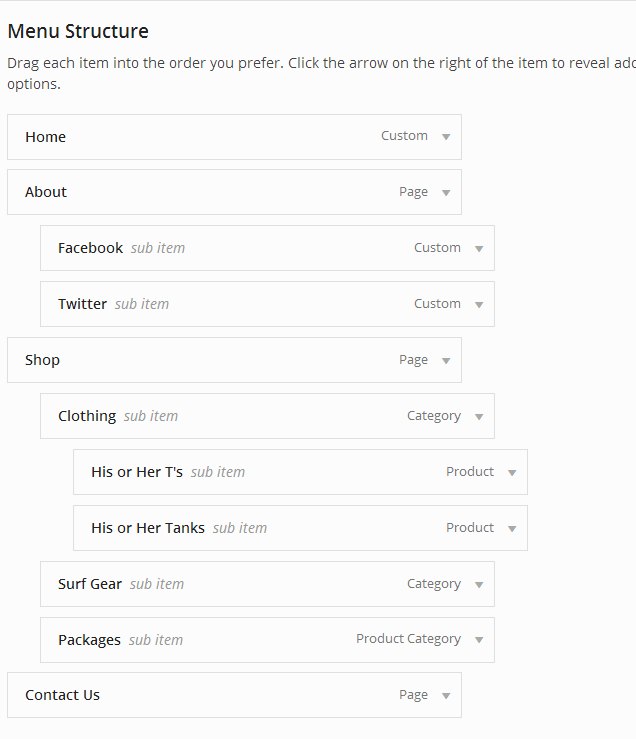
2. You can make a full width menu by clicking the full width check box in each menu item (again this is shown in the linked tutorial step 6).
Ben
In forum: Virtue ThemeIn reply to: Home Page Template
March 2, 2016 at 6:32 pm #84084You wrote:
“What does NOT work”.. Yes of course you can’t. You set it with the front-page template.. That’s the whole point.I really don’t know how else to communicate this…
Why would you be changing the front-page.php template then not wanting to use it for the front page?
I’m really unsure how to help?
feature sidebar is just a page with a sidebar with options for a slider in the header.. you can do that right from the theme options using the normal front-page.php template. That’s why it’s built that way yo ucan do everything without changing the template.
As long as there is a front-page.php file you will never be able to change the page template in the page itself because it’s already set to bt front-page.php
Ben
In forum: Virtue ThemeIn reply to: Home Page Template
Hi Ben,
Please find the link below.
Website : http://demo1.dev.ieathealthy.net
What I have done
a. Overridden the custom page for front-page.php in the child theme directory.
b. In the wordpress admin, I have selected Settings -> Reading -> Restaurant Home (My custom page as the front page display)what works
a. I can see my custom page as my front page.What does NOT work
a. I cannot change the front page to “Side bar” or “Feature Sidebar”I will provide the access details.
In forum: Virtue ThemeIn reply to: Search results
March 2, 2016 at 3:17 pm #84050Hey,
you would also need to make the area 100% width.. so with css it would look like this:.search-results .main { width: 100%; } .search-results .kad-sidebar { display: none; }Or you can use a child theme and filter with this function:
add_filter('kadence_display_sidebar', 'search_sidebar');

function search_sidebar($sidebar) {
  if (is_search()) {
    return false;
  }
  return $sidebar;
}
Ben
In forum: Virtue ThemeIn reply to: Search results
In forum: Virtue ThemeIn forum: Virtue ThemeTopic: Search results
In forum: Virtue ThemeIn reply to: Make wide text widget with icons
March 1, 2016 at 4:42 pm #83888Niclas, You need to use the fullwidth page template. You have a sidebar on that page.
Ben
In forum: Virtue ThemeIn reply to: WooCommerce Customisation
March 1, 2016 at 11:39 am #83832Hey,
I’m not working on your site. But I can send me a login and I can take a look.if you only want a left sidebar on the shop and no where else use this css:
@media (min-width: 992px) {
body.post-type-archive-product .main.col-lg-9 {float:right;}
}
Ben
In forum: Virtue ThemeIn reply to: Home Page Template
Hi,
Apologies for coming back on this..
Here is what I require..
I need a custom homepage. In the custom home page, I should be able to select “Feature Side bar”, “Fullwidth”, “sidebar” or “custom-template” from the page attribute -> Template and define this as the front-page/Home page.
If I override front-page.php in the child theme, as indicated above by placing the new custom-template.php in the child theme (“/var/www/html/wp-content/themes/virtue_premium_vendor_child”) I am not able to achieve this. Not sure what I am missing or doing incorrectly. Can you please help.
Thanks
In forum: Virtue ThemeIn reply to: WooCommerce Customisation
-
AuthorSearch Results



