
Notice: These forums are now retired and closed. For active support, please Submit a Ticket or visit our official WordPress.org community pages.
Kadence Theme | Kadence Blocks | Starter Templates | WooCommerce Email Designer | Ascend | Virtue | Pinnacle
Search Results for 'site'
-
AuthorSearch Results
-
In forum: Virtue Theme
Thanks Ben, the trawl through the server logs was inconclusive.
I read that perhaps because the portfolio post was generated by a Formidable Form submission, then the post remained linked to the FF entry and any changes would have to be made to the entry. This seems odd. Anyway, I have deleted the entry in Formidable Forms so now the post is independent!
The problem seems to have moved slightly. Now I have a portfolio post that will not become published. I can edit and select the “Publish” button but in the next refresh of Admin > All Portfolio screen, the post is showing as “Draft” again.
This is on the live site and I can’t recreate it on the DEV site.
Any thoughts?
Thanks,
Phil.In forum: Ascend ThemeTopic: WooCommerce Store Layout
AnonymousDecember 1, 2018 at 4:27 pm #209649Hi there,
I am working on the design of this shop:
*Login to see linkThe layout my client wants is:
–to have all the products in a single column (i.e. one product per row)
–to have each row / product thumbnail be a bit smaller, so you can see more products “above the fold” at once
–To have checkboxes next to each product, so someone can go down the page, check the products they want, and then click “add to cart” and all the products go in at onceIn an attempt to format the store this way, I am wondering the following:
#1 – I’m looking at the “sort by” toggle section in the upper righthand corner of the store. Is it possible to make the default layout be the “rows” option rather than the “grid” option? Screenshot –> *Login to see link
#2 – In the “customizing >> woocommerce” section, I have changed the thumbnails to be 100 pixels and saved the changes, but the thumbnails are not getting smaller on the live site. Is there another way to make each entry smaller? Screenshot –> *Login to see link
#3 – I’ve installed the “WooCommerce Stacked Product Layout” plugin and followed all the setup instructions on this page:
*Login to see linkBut I don’t see any changes reflected on the live site after following the instructions. Screenshot –> *Login to see link
Will this plugin work with your theme? Do you have another recommendation for another plugin?#4 – I have no idea how to make the checkboxes next to each product. Does your theme offer this capability? If not, do you know a plugin which will help us set this up?
Thank you in advance for your help! Cheers!
In forum: Virtue ThemeTopic: video background
Hi guys,
I have an mp4 video file that I’d like to use for the site’s body background, instead of a standard png or jpeg file. I’ve never added a video as a background. Is there any recommendation for the easiest or most common way to do this?
Thank you,
KeithIn forum: Virtue ThemeHey guys,
I am in the middle of developing one site using SiteOrigin PageBuilder (it’s familiar) and am starting a new site.
Would you recommend that I switch to Elementor for the new site?
What about our current site? It has about 30 pages with layouts that are only OK, and could be improved.Is the free version of Elementor good, and worth learning?
Thanks for the advice!
In forum: Virtue ThemeTopic: Blog categories
Hi. I already have a blog on my site called latest news but I want to create a separate blog page called videos and only show blogs that contain videos plus the latest blogs/news down the right just shows latest videos. Am I right in saying that in the page template for this blog I choose in the settings to only show videos once I create this category? But how do I only show latest videos on right and not all latest posts.
ThanksIn forum: Virtue ThemeIn reply to: Remove images from woocommerce archive page
Hello,
I recently update my theme files because woocommerce said they were out of date. I am getting close to finishing this site so I want to work out the bugs before going live.
In this thread you all helped me to remove the product images from the category pages, related items etc (all the images look very similar, and there are a lot of them).
After the update the area for the image is now showing although the image is not. Wonder if you could shed some light.
A sample is here.
https://esind.flashpoint.digital/product-tag/aviator/You had helped me to add this to my child functions file to remove them
dd_action(‘init’, ‘child_init_actions’, 11);
function child_init_actions() {
remove_action( ‘woocommerce_before_shop_loop_item_title’, ‘kt_woocommerce_template_loop_product_thumbnail’, 10 );
remove_action( ‘woocommerce_before_subcategory_title’, ‘kad_woocommerce_subcategory_thumbnail’, 10 );
}Thank you!
KevinIn forum: Virtue ThemeTopic: Center Top Menù on Mobile
Hello,
please see this website (follow secret reply with login data) http://www.cantieridibaia.it
How i can center the top bar menù on mobile? now is aligned to the left.
Thanks and best regards
In forum: Virtue ThemeIn reply to: Problem of displaying pages (except the home page)
In forum: Virtue ThemeIn reply to: Mobile sticky header
In forum: Ascend ThemeIn reply to: Header widget widths
The text color of the phone number pulls from your h5 settings which can be set from Theme Options > Typography. Or you can use css like this:
.kad-left-header .siteorigin-widget-tinymce.textwidget h5 {
    color: #000;
}
This css will create a little distance:
img.alignnone.wp-image-922.alignleft {
    margin-right: 10px;
}
And this will widen your header:
.kad-header-menu-inner.container {
    max-width: none;
}
Hannah
In forum: Virtue ThemeTopic: Mobile sticky header
Hi There,
Hope you can help.
I’m developing a new website using your great Virtue Premium theme and have am using the simple mobile sticky header which is working great however I need to add phone number and email address between the logo and the menu button, using the resized normal menu just looks a mess.
Can you suggest the best way to achieve this.
Thanks,
Mark.
In forum: Pinnacle ThemePage: *Login to see link
I want to customize the text on these images (Worship Schedule, Programs for Children, Events, and Sermons) to make them more readable:
screenshot 1:*Login to see linkscreenshot 2: *Login to see link
I’d like to do this via drop shadow or a block of background color (like we did on the image at the top of the page: *Login to see link
These images were created using SiteOrigin Page Builder via Appearance > Widgets > Home Widget Area > Layout Builder (1), using “Pinnacle: Image Menu Item”. It’s unclear to me where to style this text in the ways I would like to.
I’ve tried the Pinnacle Portfolio option and after a lot of custom CSS we just weren’t able to get the look/function. This is why we switched the above option.
Thanks!
In forum: Pinnacle ThemeIn reply to: Home page setting & activate premium errors
Hello,
1. Be sure that you are assigning the correct static page as your home page in Settings> Reading.
2. I suggest testing with any other possible emails that may be associated with your purchase or your WP site. Let me know if you have any success with another email.
-Kevin
In forum: Pinnacle ThemeHi,
1. I was setting a static page “home2” for home page but the page is not shown on the home page.
2. I tried to activate premium theme with ID & email address but those info wasn’t taken.
Our testing website : *Login to see link
Thank you for your help in advance.In forum: Ascend ThemeIn reply to: How do I make it easy to create blog posts?
November 29, 2018 at 11:30 am #209511You can look at https://developer.wordpress.com/calypso/ it’s a desktop app. If you set up jetpack on your site you can use it. Similar but still different interface.
Ben
In forum: Ascend ThemeIn reply to: Missing Ascend Social Link
November 29, 2018 at 11:24 am #209507Thanks Kevin!
I will leave this up, but realized that I had both Ublock Origin and HTTPS Everywhere enabled on the site – and that took the Twitter button off.
I have disabled since and it reappeared 🙂
Thank you
In forum: Ascend ThemeTopic: Missing Ascend Social Link
November 29, 2018 at 11:12 am #209502Hey Kadence Team,
I noticed today that my Twitter button is not visible on my website *Login to see link .
I went into the Widgets to see if I forgot to add it or enable it, but it’s there. I tried changing it, but the button is still missing.
Can you help me out?
Thanks
In forum: Pinnacle ThemeIn reply to: aspect ratios of images throughout the site
November 29, 2018 at 11:06 am #209501Hey,
For the portfolio grid page you can set the ratio in your portfolio page settings. Scroll down to the section for image ratio: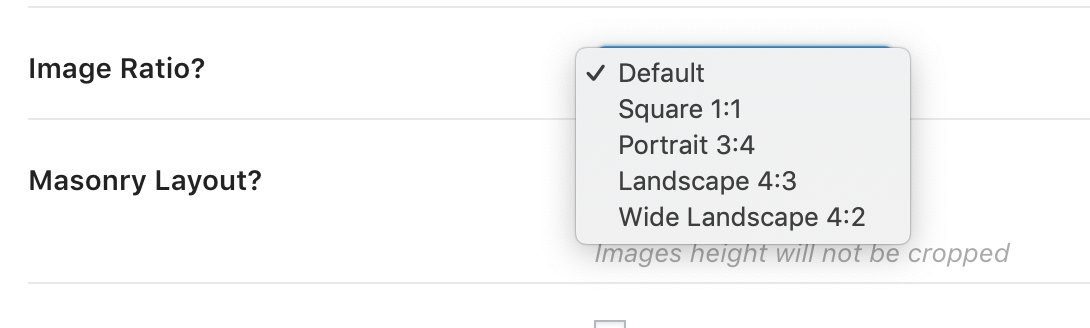
Inside a portfolio post for the slider, you can set the image ratio by setting the max width and max height in the portfolio settings.
Does that help with the portfolio items? You can set the ratio because you can set the slider or single image size in your portfolio post settings and you can set the ratio for the grid for the portfolio grid output.
For blog posts, If you want the grid to output images in whatever ratio you upload you can do that. Go to theme options > blog settings and turn off “Hard Crop excerpt images to the same height.”
For a standard blog list style if you set the post summary to “portrait image” that will output as a square see the last post in on this page: http://themes.kadencethemes.com/pinnacle-premium/our-blog/
If you set the post summary to landscape image that will output your image in whatever ratio you uploaded it. See the first post in the above link.
Does that help? If you can post a link to your site so I can see what you have set up that would really help me answer specifically.
Ben
In forum: Pinnacle Themeoh… I found the universal setting for this under tab Theme Options… Blog Options.
Thank You.
Thanks Hannah & thanks Kevin… you are so wonderful with customer service (5++ Stars). I am so grateful to have such a great Website theme to use and such professional, wonderful support!!
Thanks again.
In forum: Pinnacle ThemeHi,
Yes, I have chosen SiteOrigin PageBuilder to create my site template and so what I have logically deduced through deductive reasoning is this, without any hard coding to be done… I was looking in Theme Options, off hand, is there a universal setting for website design layout to be changed to one column instead of two columns… being that of eliminating the sidebar? I want to eliminate the sidebar from pages and posts.
Thanks.
-
AuthorSearch Results



