
Notice: These forums are now retired and closed. For active support, please Submit a Ticket or visit our official WordPress.org community pages.
Kadence Theme | Kadence Blocks | Starter Templates | WooCommerce Email Designer | Ascend | Virtue | Pinnacle
Search Results for 'widget '
-
AuthorSearch Results
-
In forum: Virtue Theme
In reply to: Testimonials
Hi Pascal,
1. You could typically use the Testimonial grid page template on your about page, but seeing as you’re wanting two separate categories to display you can use a shortcode like this: [testimonial_posts orderby=date items=4 columns=4 cat=photos] Have you already created separate categories for your feedback and reviews? If so, you can just replace “photos” with your category slug.
2. You can use the home widget area (enabled in theme options > home layout) then add a virtue:testimonial carousel widget (from appearance > widgets).
Hope that’s helpful!
Hannah
In forum: Pinnacle ThemeTopic: Pinnacle widget mobile
In forum: Virtue ThemeTopic: Testimonials
Hello Hello
I would like to show testimonials on my daughter’s site : *Login to see link , but I am confused .
I have read Kadence Doc : *Login to see link and *Login to see link but I am not sure how to go about it.1. I would like to create a testimonials page that could be reached via a sub-menu of the “about” in the main navigation menu . I would divide it into 2 groups ( “Clients feedback” and ” Press Reviews” ).
2. I would also like to show some testimonials on the home page maybe as a carousel widget or using a shortcode ? I can’t find shortcodes in the new Testimonials post editor.
Sorry to ask such basic questions, but I feel stuck right now.
Pascal
In forum: Ascend ThemeTopic: Featured Blog post
I’d like to add a featured blog post on the home page and have it look like it does on the main blog page, or at least very close to it. Featured image on the left, excerpt and read more button to the right.
Right now on the home page I just have it statically built out but it’s not really ideal when constantly adding new posts. I’d like it to be dynamic and just pull the most recent post. I know there are featured post widgets and plugins but none where I can get the image to display to the left and excerpt to the right.
Home page link (scroll to bottom under Latest Article)
*Login to see linkBlog Page:
*Login to see linkIn forum: Ascend ThemeDecember 13, 2018 at 11:18 am #210665Can you make sure your settings looks like this where you drag the first widget area to the top.
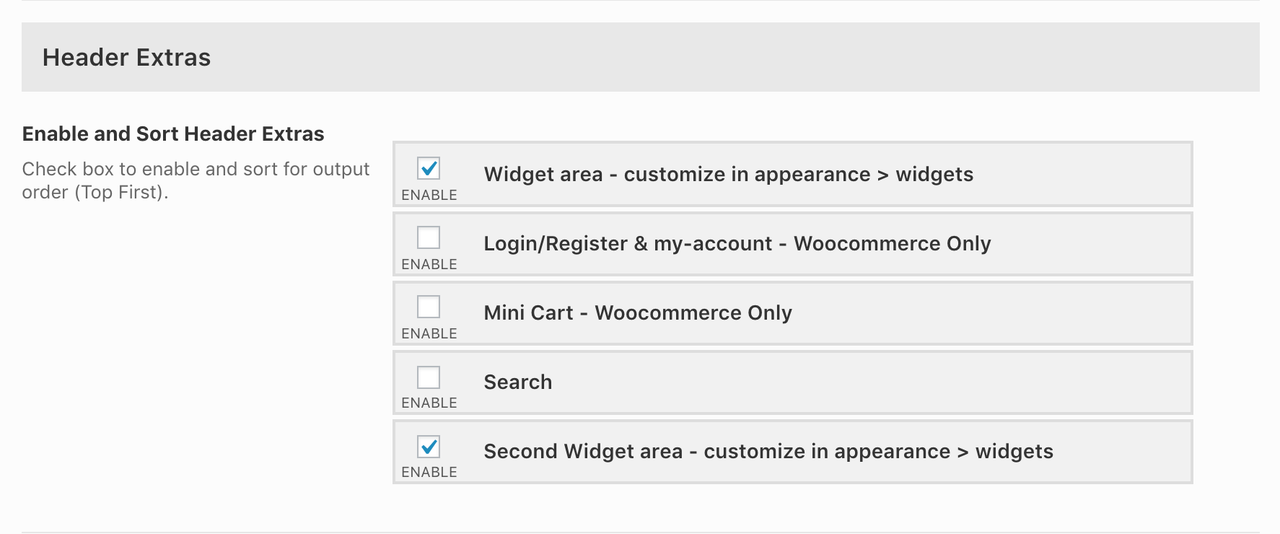
After that post back here.
In forum: Virtue ThemeIn reply to: How to make Kadence Silder Pro Fullwidth?
Actually, the slider wont display any wider than its container size. So to get it to show full page width, you have a few options. If you’re using the new editor, you can add it to a fullwidth column in the Kadence Blocks row layout block:
You can use site origin page builder and add the slider to a text widget that’s set to display “fullwidth stretched.” This will also work in elementor.
Another option is rather than adding the slider to your page content, try adding it in Theme Options> Home Slider. Then it will display in the same area and be fullwidth.
Let me know if any of those options work for you.
-Kevin
In forum: Virtue ThemeIn reply to: Image layout in Virtue/Elementor
Hey,
To add a second image to a column simply drag and drop the image widget underneath your top image. Then you can adjust the height of your images by clicking the image, setting the image size to Custom and then setting your desired height and width.
Hope that’s helpful!Hannah
In forum: Virtue ThemeIn forum: Virtue ThemeHello,
I have the virtue:testimonial carousel widget in the footer of my site. I would like to remove the arrows from the top, or move them down to the bottom. Either way, but they are blocking the title.
Here is my site: http://37.60.235.233/~bachfest/
Thanks,
AveryIn forum: Virtue ThemeIn reply to: Testimonial carousel custom css
Hello,
I am trying to re-format my testimonial carousel in a similar way. I used the custom css provided by Hannah to remove the photo, but the css to remove the arrows did not work. I have the widget in the footer. Can you give me any tips to troubleshoot this?
Thanks,
AveryIn forum: Membership ForumsIn reply to: Woo Elementor Pro product Single Image and Quantity
December 12, 2018 at 11:23 am #210551Hey,
If you are using Elementor Pro it adds some of its own widgets and template settings that are separate and work separately of the Kadence Woocommerce elementor plugin. So it’s important to clarify that The Kadence woocommerce elementor widgets can all be found in the woocommerce category.1. In your Kadence Woo Extras, Product gallery settings what is the image width you have set?
If you go to appearance > customize > Woocommerce > product images and look at “Main image width” can you tell me what it’s set to?
2. I just tried this. Couldn’t recreate can you tell me which widget you are using? Can you send me a screen shot?
Ben
In forum: Ascend ThemeIn reply to: How to display Blog Categories
December 12, 2018 at 11:06 am #210548You can always add a category widget which just shows you the categories as a menu or dropdown but there isn’t a grid system since post categories in WordPress by default don’t have a “featured image”.
Ben
In forum: Ascend ThemeHi Ben,
thanks for sorting it out! I see – I thought that was the Kadence Elementor PRO widget.. Maybe you should change their names to include Kadence, so it’s clear :).
In Woocommerce, I see 2 product grid widgets – “Product Archive main loop” (which I now know is yours) and “Products” (with 4 cart icons in a grid). Then there’s more product loops in other sections. Having “Kadence Product archive main loop” in the title would have probably saved you this ticket, worth a try 🙂
Trouble is that your widget only works on the shop archive page, but it says “This element is not designed for this post type” if on the homepage for example. And the other product loop (built in or elementor) widgets are scrambled still. BUT – Woo shortcodes like
[products limit="6" columns="3" visibility="featured" ]are displayed fine, so all good!Thanks for the CSS snippet too.
Thanks,
LukasIn forum: Ascend ThemeDecember 11, 2018 at 2:44 pm #210484Hey so it looked like you were not adding the kadence main loop widget but instead a widget elementor pro.
You can see all the Kadence widgets by looking in the woocommerce category in elementor.
Next it looks like you wanted three column layout but perhaps you wanted that layout also for larger 1500+ screens which the responsive css would make those 4 columns and three columns below 1500px when you set the max width to 1400px.
So I just added this little snippet of css to force 3 columns for those grids on larger screens:
@media (min-width: 1500px) {
    .kt-width-large .col-xl-3.col-md-4 {
        width: 33.33%;
    }
}
Ben
In forum: Membership ForumsHey,
I hope I’m following right. You can use a shortcode like the following to only display products from a specific category:[products limit="8" columns="4" category="hoodies"]
You can paste that into any text widget or content area. Then display the same shortcode with a different category underneath. Would that work for you?Hannah
In forum: Ascend ThemeIn reply to: How to display Blog Categories
In forum: Pinnacle ThemeHi Kadence,
I’ve been trying to figure out the topbar menu, but couldn’t really find much info/tutorial on it (to make it look like that of Ascend theme’s demo site topbar) and have been doing trial and error and becoming increasingly frustrated.
So my client wanted to have the text that says “Get $5 off your first order!” with a link to the Sign Up form. I managed to get it up by putting it in the layout builder within the topbar widget, but once I try to centralise vertically to the height of the topbar (by adding 3px top padding in the layout builder’s widget styles), my entire navigation menu goes off alignment as seen here.
The correct order should be “SHOP EVENTS & CATERING LOGO OUR STORY CONTACT”. Hopefully you can help me with this. Also I don’t really understand the use of the Topbar Icon Menu? I tried putting a “User” icon, but nothing appears. Pretty perplexed. Hope you can help me with this!
The website is *Login to see link , but is currently in maintenance mode, not sure if you’re able to access. Let me know if you need more info.
Thank you.
– Phoebe
In forum: Virtue ThemeIn reply to: Kadence button shortcode taller than other buttons
Thanks for all your help. Because I dropped [btn] into a pre-formatted Elementor block, the button was picking up that formatting (2 em). Basically I need to go away and learn more about Elementor. As Ben pointed out, it’s a lot better to drop in Elementor widgets for title, text and button rather than trying to format [btn] in a text field using CSS to overwrite the existing formatting.
Thanks again for the great support.
In forum: Pinnacle ThemeIn reply to: Site Header
December 10, 2018 at 5:52 pm #210420Your issue has to do with the widgets you added to the topbar. They are taller then what you’ve set the topbar to be causing this issue add this css:
#topbar .widget_text p {
    margin-bottom: 0;
}
Ben
In forum: Ascend ThemeIn reply to: Using old widgets with Gutenberg
December 10, 2018 at 11:29 am #210373Hi, I am trying to work out if you can use old Kadence widgets with Gutenberg and if so ow this can be done
Hey, I want to bring some clarity to this.
Using pagebuilder was the only way you were able to use Kadenece Widgets in your page or post content. And still, that is true. Gutenberg doesn’t change that. Using Gutenberg you can still use Kadence widgets inside of page builder either through the page builder interface or through the pagebuilder block.
Kadence Blocks will be an easier way to create similar/better content using Gutenberg but if you want access to old widgets you can easily still do that through the same methods you always have which is to use page builder.
Does that make sense?
Ben
-
AuthorSearch Results



