Kadence Fullpane Vertical Slider
Install and Activate
If you are a Kadence Member this plugin is part of your membership and you can download from your My Account page. Otherwise, you can purchase and download the Kadence Vertical Fullpane Slider plugin from here.
Next, install and activate the plugin from your WP Dashboard.
- Navigate to Plugins >> Add New.
- Click “Update Plugin” then click “Choose File” and select the plugin download zip file.
- Click “Install Now”.
- Once installed, click “Activate”.
*Note To use this plugin you need to have Page Builder by Siteorigin installed and activated.
Creating a Fullpane Vertical Slider
- Navigate to Pages >> Add New or else edit an existing page.
- Open the page builder editor and create a new row.

- Set the number of columns in the row to one, then click “Add Widget”.
- Select the Fullpane Vertical Slider widget.
- Click “Edit Widget” and set your slider settings.
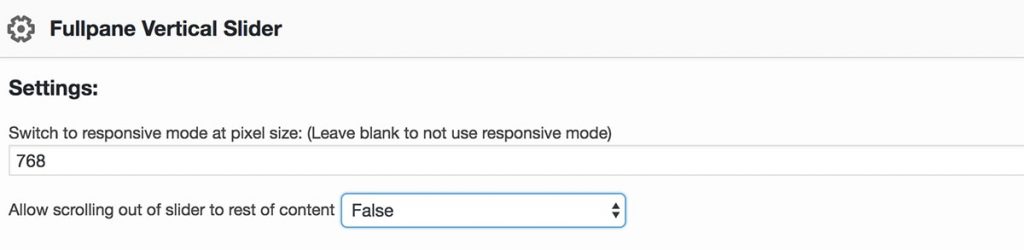
Responsive Settings: When in responsive mode, the slider scroll becomes disabled for mobile and tablet devices and you can scroll through the slides as normal content. See example by viewing this page on your mobile device.
Scroll Settings: This setting determines whether or not your page will continue to scroll into the rest of your page content, or if it will stop with the slider. See a True example here, and False here.
- Next, click “Add New Pane”.
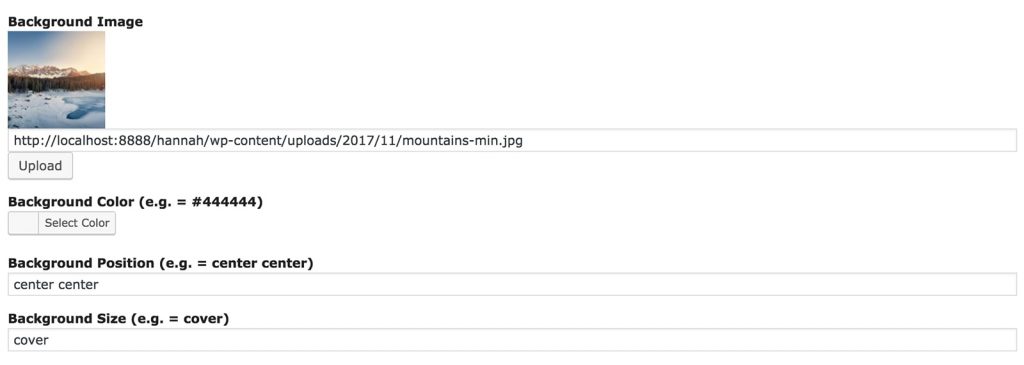
- Upload a background image (or select a background color).
- Set a position and size for your background image. *To learn more about background image sizing, check out this post.
- You can choose to leave your slide blank, or you can add whatever content you would like.

- Repeat the above steps for as many panes you want in your slider. When finished, click “Done” and publish your page!
Create Your Website With KadenceWP Today!


Written by Hannah
Hannah Ritner is the product expert at KadenceWP. With over 10 years at Kadence, she’s worn many hats, but her main drive has always been helping customers reach their goals. Hannah loves empowering people and has been a key player in building the Kadence Community. She’s all about making a real impact for businesses and their customers.
By Hannah
Hannah Ritner is the product expert at KadenceWP. With over 10 years at Kadence, she’s worn many hats, but her main drive has always been helping customers reach their goals. Hannah loves empowering people and has been a key player in building the Kadence Community. She’s all about making a real impact for businesses and their customers.
Updated July 22, 2024
Create Your Website With Kadence