
The Advanced Query Loop block (Kadence Blocks Pro) provides settings to create a custom query loop. However, sometimes, you need to alter the query beyond the capabilities of the Advanced Query Loop’s settings. In these cases, you can add a code snippet to alter the WordPress Query object. You can add PHP code to your site using a plugin like Code Snippets or your functions.php file (in a child theme).
If you want to modify the query arguments, you can make use of the ‘kadence_blocks_pro_query_loop_query_vars‘ filter. Here is an example that implements the filter.
Examples
add_filter( 'kadence_blocks_pro_query_loop_query_vars', function( $query, $ql_query_meta, $ql_id ) {

   if ( $ql_id == 5283 ) {
      $query['tax_query'] = array(
         array(
            'taxonomy' => 'category',
            'field' => 'slug',
            'terms' => 'sub',
         )
      );
   }

   return $query;
}, 10, 3 );
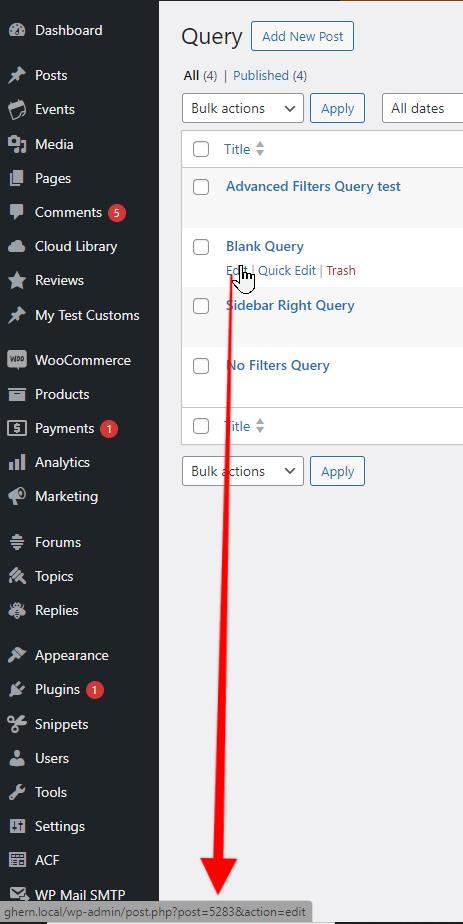
In the above code, the $ql_id is set to 5283. This is the post ID of the specific query you want to target. If you don’t provide the conditional “if” statement to target a query ID, all of your queries will share the arguments, which isn’t ideal. Among other ways, you can find the $ql_id by navigating to Kadence Blocks > All Queries, hovering over the edit link of your desired query, and looking at the bottom left corner of your browser window. Be sure to change the ID to suit your needs.
The example also uses the Simple Taxonomy Query provided by the WordPress Query documentation. Here are some additional examples that have been modified from the WordPress documentation.
Returns posts dated December 12, 2012
Source: https://developer.wordpress.org/reference/classes/wp_query/#date-parameters
add_filter( 'kadence_blocks_pro_query_loop_query_vars', function( $query, $ql_query_meta, $ql_id ) {

   if ( $ql_id == 5283 ) {


      $query['date_query'] = array(
         array(
            'year' => 2012,
            'month' => 12,
            'day' => 12,
         ),
      );
   }

   return $query;
}, 10, 3 );
Display posts where the custom field key is ‘color’ and the custom field value IS ‘blue’
Source: https://developer.wordpress.org/reference/classes/wp_query/#custom-field-post-meta-parameters
add_filter( 'kadence_blocks_pro_query_loop_query_vars', function( $query, $ql_query_meta, $ql_id ) {

   if ( $ql_id == 5283 ) {


      $query['meta_key'] = 'color';
      $query['meta_value'] = 'blue';
      $query['meta_compare'] = '=';
   }

   return $query;
}, 10, 3 );
Display posts with 25 comments or more
Source: https://developer.wordpress.org/reference/classes/wp_query/#comment-parameters.
add_filter( 'kadence_blocks_pro_query_loop_query_vars', function( $query, $ql_query_meta, $ql_id ) {

   if ( $ql_id == 5283 ) {
      $query['post_type'] = 'post';
      $query['comment_count'] = array(
         'value' => 1,
         'compare' => '>=',
      );
   }

   return $query;
}, 10, 3 );
Display posts that are not in a specific category
Source: https://developer.wordpress.org/reference/classes/wp_query/#category-parameters
add_filter( 'kadence_blocks_pro_query_loop_query_vars', function( $query, $ql_query_meta, $ql_id ) {

   if ( $ql_id == 5283 ) {
      $query['category__not_in'] = 5;
   }

   return $query;
}, 10, 3 );
Display posts from multiple specific taxonomies and terms
Source: https://developer.wordpress.org/reference/classes/wp_query/#taxonomy-parameters
add_filter( 'kadence_blocks_pro_query_loop_query_vars', function( $query, $ql_query_meta, $ql_id ) {

   if ( $ql_id == 5283 ) {
      $query['tax_query'] = array(
         'relation' => 'AND', // Relation between taxonomies

         array(
            'taxonomy' => 'category',  // First taxonomy type
            'field'    => 'slug',
            'terms'    => 'a',         // Slug of the first taxonomy term
         ),

         array(
            'taxonomy' => 'category',  // Second taxonomy type
            'field'    => 'slug',
            'terms'    => 'fruit',     // Slug of the second taxonomy term
         ),
      );
   }

   return $query;
}, 10, 3 );
Display posts from author
add_filter( 'kadence_blocks_pro_query_loop_query_vars', function( $query, $ql_query_meta, $ql_id ) {

   if ( $ql_id == 5283 ) {
     // Replace 123 with the user ID you want to filter by
     $query['author'] = 123;
     // Or use author__in for multiple users:
     // $query['author__in'] = array( 123, 456 );
   }

   return $query;
}, 10, 3 );
Show Related Posts for Custom Taxonomies
The Advanced Query Loop block includes an option to Show Related Posts, which by default uses the standard post categories and tags to determine related content. If you’re working with a custom post type and/or a custom taxonomy, you can use the following snippet to modify the query and show related posts based on a specific taxonomy.
add_filter( 'kadence_blocks_pro_query_loop_query_vars', function( $query, $ql_query_meta, $ql_id ) {

   if ( $ql_id == 5283 ) {
      $current_post_id = get_the_ID();

      // Get the taxonomy terms of the current page
      $terms = get_the_terms( $current_post_id, 'edownload' ); //Replace 'edownload' with your taxonomy term

	  // Ensure the terms are valid
      if ( $terms && ! is_wp_error( $terms ) ) {
         $term_slugs = wp_list_pluck( $terms, 'slug' );

      // Return the terms in the tax_query array
         $query['tax_query'] = array(
            array(
               'taxonomy' => 'edownload',  //Replace 'edownload' with your taxonomy term
               'field'    => 'slug',
               'terms'    => $term_slugs,
            ),
         );
      }
   }

   return $query;
}, 10, 3 );
Show Only In-Stock WooCommerce Products
By default, Adv Query Loop will display all products regardless of stock status. The following will modify the query so that it only shows in-stock products.
// Show only Products that are in-stock
add_filter( 'kadence_blocks_pro_query_loop_query_vars', function( $query, $ql_query_meta, $ql_id ) {
	if ( $ql_id == 149879 ) {  // <-- change to your Query Loop ID
		$query['meta_query'] = array(
			array(
				'key'     => '_stock_status',
				'value'   => 'instock',
				'compare' => '=',
			),
		);
	}
	return $query;
}, 10, 3 );
Show Only Woocommerce Products that are on sale
// Show only Products that are on sale
add_filter( 'kadence_blocks_pro_query_loop_query_vars', function( $query, $ql_query_meta, $ql_id ) {
	if ( $ql_id == 149879 ) {  // <-- change to your Query Loop ID
	  // Get all product IDs on sale (WooCommerce core helper)
          $sale_ids = wc_get_product_ids_on_sale();

          if ( ! empty( $sale_ids ) ) {
              // Force using these IDs
              $query['post__in'] = $sale_ids;

              // Optionally, ensure it’s querying products
              $query['post_type'] = 'product';
          } else {
            // If no products on sale, force an empty result
            $query['post__in'] = [0];
          }
	}
	return $query;
}, 10, 3 );
Enable Relevanssi Integration
The text search feature for Adv Query Loop uses the native WordPress search function which only considers the post title and post content values. Additional details such as custom post meta values, categories, and tags are not included so native searches will not consider these additional fields. Relevanssi replaces the native WP search functionality and gives you greater control over your search results. To learn more about Relevanssi, see their plugin page or the official website.
Adding the following code snippet will enable the Kadence Advance Query Loop to use the Relevanssi search query for a specific Advanced Query Loop block:
add_filter('kadence_blocks_pro_query_loop_query_vars', function( $query_args, $ql_query_meta, $ql_id ){

     if ( $ql_id == 5283 && function_exists( 'relevanssi_do_query' ) && isset( $query_args['s'] ) ) {
          $query_args['relevanssi'] = true;
     }

     return $query_args;
}, 10, 3);
