Skip to content
Help Center
  • Pricing
  • ProductsExpand
    • Premium PlansGet all the tools you need in one plan
    • Kadence ThemeLightning-fast performance theme for modern websites
    • Kadence BlocksDrop in ready designs with advanced controls for pixel perfect websites
    • Kadence Shop KitCreate a more effective WooCommerce shopping experience
    • Kadence ConversionsBoost sales and build engaged audiences with popups and banners
    • Kadence InsightsEasily create A/B tests. Optimize your pages to drive higher conversions.
    • View All Products
    • Get Kadence + Hosting
      In One Place

      Enjoy faster setup, top-tier performance, and worry-free WordPress hosting – Kadence Theme, Kadence Blocks, and Solid Security all pre-installed.

      Learn More

  • Kadence AI
  • Starter Templates
  • Blog
  • SupportExpand
    • Resource HubStart here for guides, Product docs, FAQs, and Troubleshooting tips, all in one place.
    • Contact SupportStuck on something? We’re here to help! Open a ticket for top-notch support.
    • Contact Our TeamGot pre-sales questions or need help choosing a plan? Open a ticket and our team will guide you.
    • About usCrafted with love in Missoula, Montana. Meet the team behind the mission.
Account Account
Get Kadence
Kadence Theme
  • Features
  • Pro
  • Starter Templates
  • HelpExpand
    • Documentation
    • Facebook Group
    • Submit a Ticket
    • Feature Requests
    • Roadmap
    • Changelog
Help Center
Kadence Theme

Getting Started

Customize Settings

Header

General WordPress

Troubleshooting

  • Troubleshooting White/Blank Screens in the Editor or Customizer
  • How to Download Previous Versions of the Kadence Theme and Plugins
  • Recommended Server Resources

Advanced

Theme Kit Pro

  • Kadence Custom Fonts

Kadence Elements

Woocommerce

Hooked Element Guides

  • How to Design a Post Grid/Carousel using a Kadence Element
  • Home
  • Knowledge Base
  • Kadence Theme
  • Kadence Blocks
  • Block Tutorials

How to customize the design library color palette

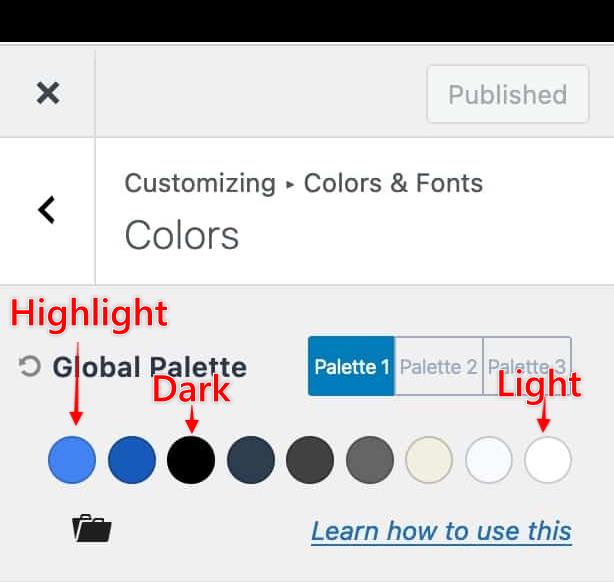
The Kadence Design Library offers a color palette. This palette consists of a light color, a dark color, and a highlight color. If you use the Kadence Theme, these colors are set in your customizer settings. If you do not use the Kadence Theme, you must add code to your website that defines these variables.

For Kadence Theme users, you can go to your Customizer > Colors & Fonts > Colors. Here, you can adjust your color palette.

The Light Color is defined by the ninth color, var(–global-palette9)
The Dark Color is determined by the third color, var(–global-palette3)
The Highlight Color is determined by the first color, var(–global-palette1)
colorsa-updated
Design Libary style palette updated

Other Theme Instructions

If you use a different theme, you will not have a built-in way to pre-define these colors. However, you can use custom code to insert these values manually onto your website. You can use the Code Snippets plugin to add code snippets to your website. You can add this code to the functions.php file using a child theme.

The following code adds the Kadence Color Palette variables to your website. You can customize these colors by changing the color code for each variable. You will notice there are multiple instances of each variable. Please change the color for each example so the code works.

function custom_global_colors_kadence( $global_colors ) {
    $global_colors = array(
        '--global-palette1' => '#2c6dff',
        '--global-palette2' => '#074ef3',
        '--global-palette3' => '#1b202c',
        '--global-palette4' => '#2f3749',
        '--global-palette5' => '#4a5566',
        '--global-palette6' => '#717f98',
        '--global-palette7' => '#eef2f5',
        '--global-palette8' => '#f8f9fd',
        '--global-palette9' => '#ffffff',
    );
    return $global_colors;
}
add_filter( 'kadence_blocks_pattern_global_colors', 'custom_global_colors_kadence' );


Do you feel this document was helpful?
The Kadence WP Logo
Crafted in Missoula, Montana
  • Follow Kadence on Facebook
  • Follow Kadence on Youtube
  • X
  • Follow Kadence on Instagram
Trustpilot
Products
  • Kadence Plans
  • Kadence Theme
  • Kadence Blocks
  • Kadence AI
  • Kadence Starter Templates
  • Kadence Shop Kit
  • Kadence Conversions
  • Kadence Pattern Hub
  • View All
Resources
  • Blog
  • Podcast
  • Knowledgebase
  • Support ticket
  • Feature Requests
  • FAQ
  • WordPress Hosting Services
About Us
  • About Kadence
  • Become an affiliate
  • Contact us
  • Terms
  • Privacy Policy
  • Security
Our Partner Brands
  • SolidWP
  • LearnDash
  • The Events Calendar
  • GiveWP
  • MemberDash
Kadence Community
  • Kadence Marketplace
  • Join the Facebook Group
  • Subscribe to our YouTube Channel
© 2024 Kadence WP | All prices are in USD
Logo for StellarWP an umbrella brand of Premium WordPress plugins
  • Pricing
  • Products
    • Premium PlansGet all the tools you need in one plan
    • Kadence ThemeLightning-fast performance theme for modern websites
    • Kadence BlocksDrop in ready designs with advanced controls for pixel perfect websites
    • Kadence Shop KitCreate a more effective WooCommerce shopping experience
    • Kadence ConversionsBoost sales and build engaged audiences with popups and banners
    • Kadence InsightsEasily create A/B tests. Optimize your pages to drive higher conversions.
    • View All Products
    • Get Kadence + Hosting
      In One Place

      Enjoy faster setup, top-tier performance, and worry-free WordPress hosting – Kadence Theme, Kadence Blocks, and Solid Security all pre-installed.

      Learn More

  • Kadence AI
  • Starter Templates
  • Blog
  • Support
    • Resource HubStart here for guides, Product docs, FAQs, and Troubleshooting tips, all in one place.
    • Contact SupportStuck on something? We’re here to help! Open a ticket for top-notch support.
    • Contact Our TeamGot pre-sales questions or need help choosing a plan? Open a ticket and our team will guide you.
    • About usCrafted with love in Missoula, Montana. Meet the team behind the mission.
Account Login
  • Features
  • Pro
  • Starter Templates
  • HelpExpand
    • Documentation
    • Facebook Group
    • Submit a Ticket
    • Feature Requests
    • Roadmap
    • Changelog