
Skip to content
Help Center
  • Pricing
  • ProductsExpand
    • Premium PlansGet all the tools you need in one plan
    • Kadence ThemeLightning-fast performance theme for modern websites
    • Kadence BlocksDrop in ready designs with advanced controls for pixel perfect websites
    • Kadence Shop KitCreate a more effective WooCommerce shopping experience
    • Kadence ConversionsBoost sales and build engaged audiences with popups and banners
    • Kadence InsightsEasily create A/B tests. Optimize your pages to drive higher conversions.
    • View All Products
    • Get Kadence + Hosting
      In One Place

      Enjoy faster setup, top-tier performance, and worry-free WordPress hosting – Kadence Theme, Kadence Blocks, and Solid Security all pre-installed.

      Learn More

  • Kadence AI
  • Starter Templates
  • Blog
  • SupportExpand
    • Resource HubStart here for guides, Product docs, FAQs, and Troubleshooting tips, all in one place.
    • Contact SupportStuck on something? We’re here to help! Open a ticket for top-notch support.
    • Contact Our TeamGot pre-sales questions or need help choosing a plan? Open a ticket and our team will guide you.
    • About usCrafted with love in Missoula, Montana. Meet the team behind the mission.
Account Account
Get Kadence
Kadence Theme
  • Features
  • Pro
  • Starter Templates
  • HelpExpand
    • Documentation
    • Facebook Group
    • Submit a Ticket
    • Feature Requests
    • Roadmap
    • Changelog
Help Center
Kadence Theme

Getting Started

Customize Settings

Header

General WordPress

Troubleshooting

  • Troubleshooting White/Blank Screens in the Editor or Customizer
  • How to Download Previous Versions of the Kadence Theme and Plugins
  • Recommended Server Resources

Advanced

Theme Kit Pro

  • Kadence Custom Fonts

Kadence Elements

Woocommerce

Hooked Element Guides

  • How to Design a Post Grid/Carousel using a Kadence Element
  • Home
  • Knowledge Base
  • Kadence Theme
  • Kadence Theme
  • Kadence Elements
  • Hooked Element Guides

How to Design a Post Grid/Carousel using a Kadence Element

The Post Grid/Carousel block is a feature of Kadence Blocks Pro. This block showcases a grid or carousel of posts. Although it has settings to adjust the style, you might want to add dynamic content such as custom fields, more images to the grid, or modify the layout beyond the preset options. In such a scenario, you can rely on Kadence elements, a pro feature of the Kadence theme plugin, to substitute a post grid/carousel block or add information using its diverse hooks.

Post Grid/Carousel Hooks

The Post Grid/Carousel block has several hooks. Advanced users can take this list of hooks and start inserting content using a Kadence element right away.

  • kadence_blocks_post_loop_start
  • kadence_blocks_post_loop_header
  • kadence_blocks_post_loop_header_meta
  • kadence_blocks_post_loop_content
  • kadence_blocks_post_loop_footer_start
  • kadence_blocks_post_loop_footer_end
  • kadence_blocks_post_loop_end

Step One: Post Grid/Carousel

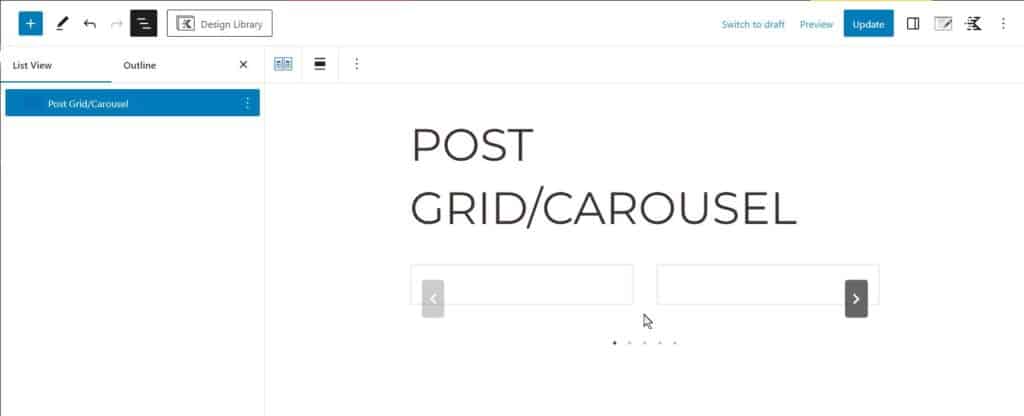
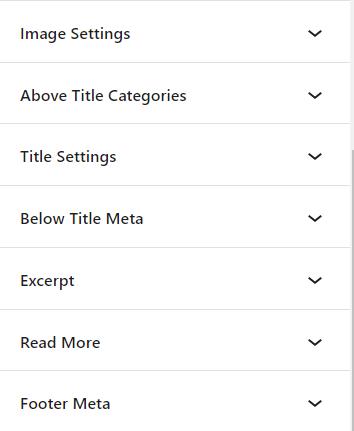
To start, add a post grid or carousel to your post. Pick the posts you want to showcase and select a layout from the block settings – grid, masonry, or carousel. At this point, you can design the layout using the settings. However, to replace the post grid entirely, disable all block sections. You can show or hide the image, above title categories, title, below title meta, excerpt, read more section, and footer meta. By hiding every section, you’ll be left with an empty carousel.
Step Two: Kadence Element

Once you have added the post grid, selected the desired posts and layout, and hidden all relevant data, you are prepared to create an element that will replace the post loop.

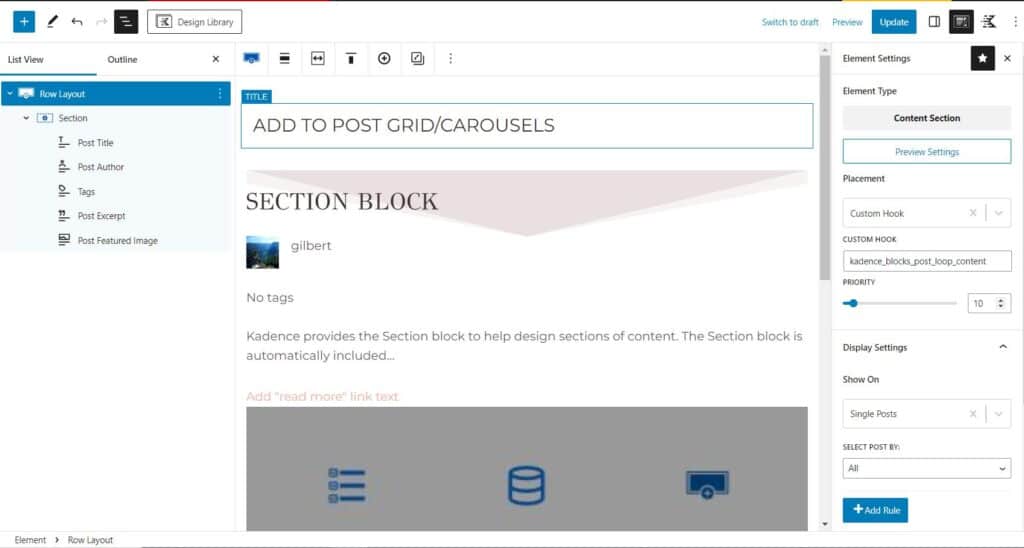
Create a Kadence Elements content section. Besides the element type, you should pay attention to the Placement and Display Settings. Change the Placement to Custom Hook (the last option in the select box). You can generally add your content section to any hook available on the front end. To completely replace the empty post grid you created in the first step, add the element to the kadence_blocks_post_loop_content hook. Also, pay attention to the page you show the element on and select the specific pages where you want to replace the post grids. If you select the entire site, every post grid/carousel block will be affected.

When creating the element, it’s crucial to keep in mind that it doesn’t serve as a substitute for the entire Post Grid/Carousel block. Rather, it replaces the loop items within the grid. Your focus should be on designing a template for a single entry in the carousel, which all posts in the grid will utilize.
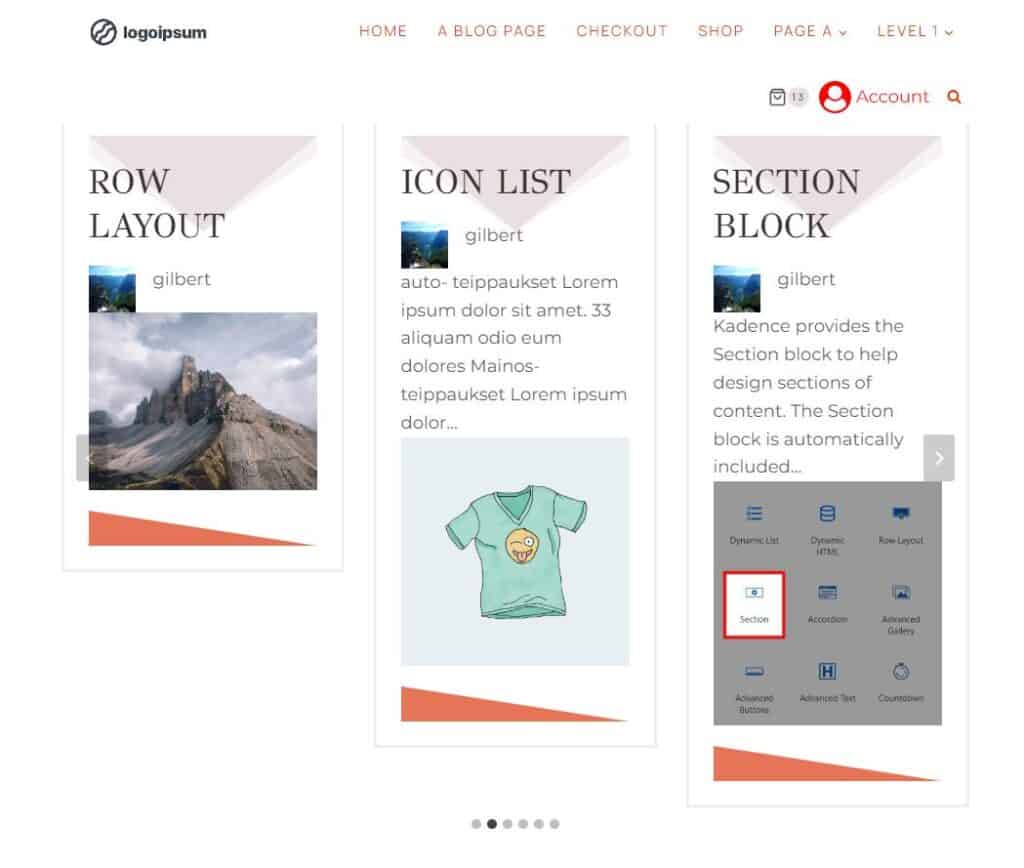
After you’ve saved your element with the correct placement and display settings, view the page with your empty Post Grid/Carousel. The carousel should now display a loop of posts using your element as a template.
Targeting a Specific Post Grid/Carousel

The instructions above will affect every Post Grid/Carousel on pages the element is configured to show on. This is fine if you have a single grid on a page or multiple grids that share the element template. If you want to target a specific grid, you must change a few settings and add custom PHP. However, the following instructions are helpful if you have more than one Post Grid/Carousel on a page and want to use different templates for them.

On your element, remove the Custom Hook placement
Set the Display Settings to “Entire Site”.
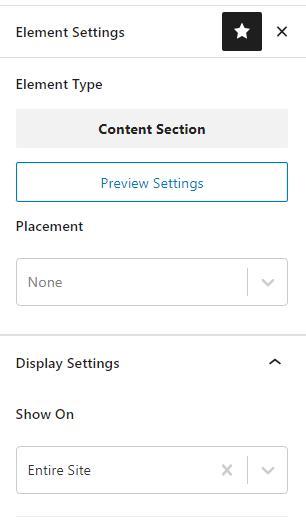
element settings for a special carousel

Add a custom class to your special post grid/carousel block, maybe “special-carousel”
Add this custom code snippet. You can add PHP code to your site using a plugin like Code Snippets or your functions.php file (in a child theme).

add_action('kadence_blocks_post_loop_start', function($attributes){
    if ( isset($attributes['className']) && strpos($attributes['className'], 'special-carousel') !== false ) :
        echo do_shortcode('[SPECIAL_ELEMENT_SHORTCODE]');
    endif;
});

Just change the ‘special-carousel’ class to your custom class name and ‘SPECIAL_ELEMENT_SHORTCODE’ to the correct element shortcode.

You can add the “special-carousel” custom class to the Post Grid/Carousel in the Advanced settings of the Advanced tab.
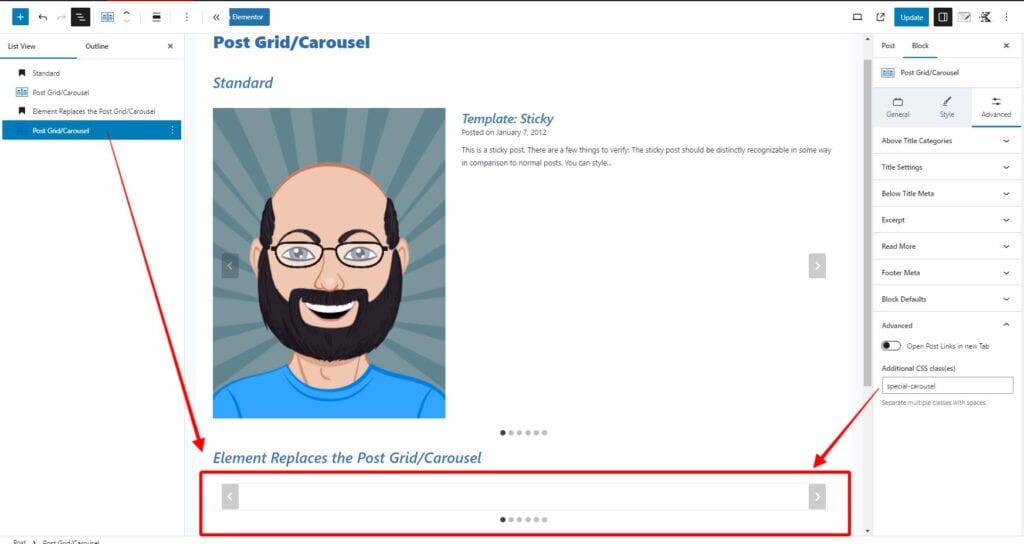
special carousel case

You can find the element shortcode in the dashboard (Appearance > Kadence -> Elements.
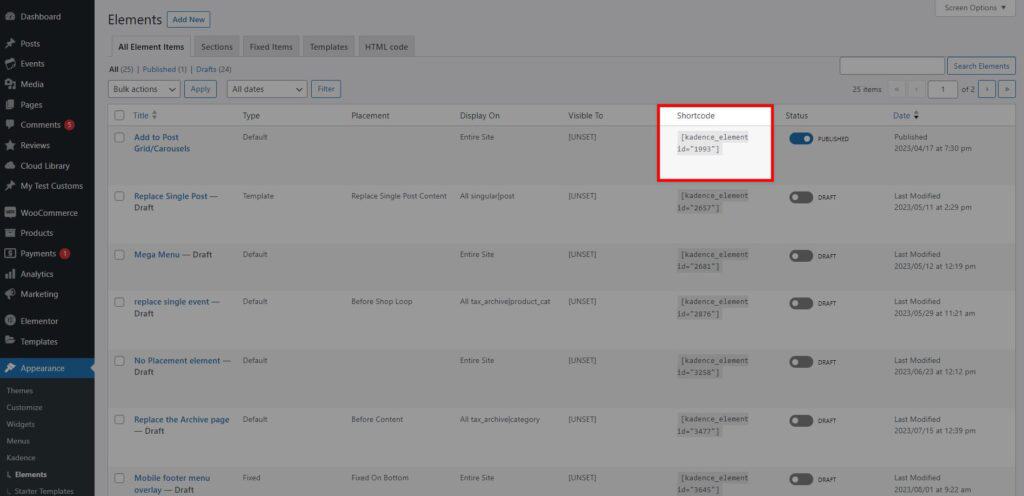
kadence elements shortcode

Finally, here is a screenshot showing the element affecting a single Post Grid/Carousel on a page with multiple carousels.
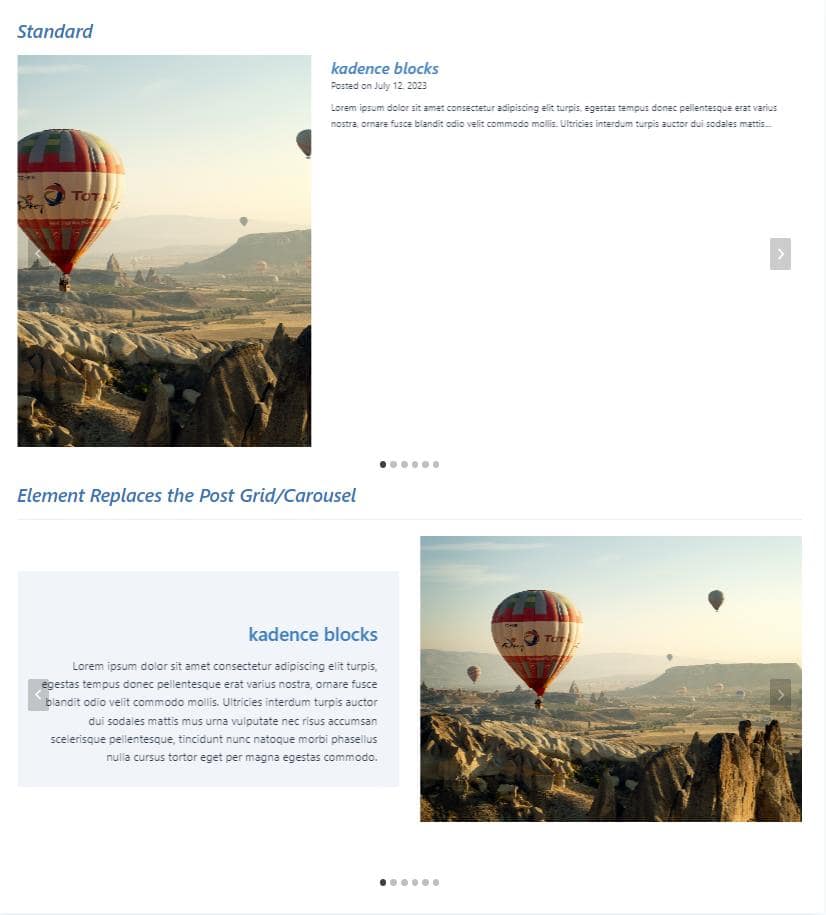

single affected post grid
Do you feel this document was helpful?
Programmatically Display Kadence Hook ElementsHow to make a Dynamic Search Results Title in Kadence
The Kadence WP Logo
Crafted in Missoula, Montana
  • Follow Kadence on Facebook
  • Follow Kadence on Youtube
  • X
  • Follow Kadence on Instagram
Trustpilot
Products
  • Kadence Plans
  • Kadence Theme
  • Kadence Blocks
  • Kadence AI
  • Kadence Starter Templates
  • Kadence Shop Kit
  • Kadence Conversions
  • Kadence Pattern Hub
  • View All
Resources
  • Blog
  • Podcast
  • Knowledgebase
  • Support ticket
  • Feature Requests
  • FAQ
  • WordPress Hosting Services
About Us
  • About Kadence
  • Become an affiliate
  • Contact us
  • Terms
  • Privacy Policy
  • Security
Our Partner Brands
  • SolidWP
  • LearnDash
  • The Events Calendar
  • GiveWP
  • MemberDash
Kadence Community
  • Kadence Marketplace
  • Join the Facebook Group
  • Subscribe to our YouTube Channel
© 2024 Kadence WP | All prices are in USD
Logo for StellarWP an umbrella brand of Premium WordPress plugins
  • Pricing
  • Products
    • Premium PlansGet all the tools you need in one plan
    • Kadence ThemeLightning-fast performance theme for modern websites
    • Kadence BlocksDrop in ready designs with advanced controls for pixel perfect websites
    • Kadence Shop KitCreate a more effective WooCommerce shopping experience
    • Kadence ConversionsBoost sales and build engaged audiences with popups and banners
    • Kadence InsightsEasily create A/B tests. Optimize your pages to drive higher conversions.
    • View All Products
    • Get Kadence + Hosting
      In One Place

      Enjoy faster setup, top-tier performance, and worry-free WordPress hosting – Kadence Theme, Kadence Blocks, and Solid Security all pre-installed.

      Learn More

  • Kadence AI
  • Starter Templates
  • Blog
  • Support
    • Resource HubStart here for guides, Product docs, FAQs, and Troubleshooting tips, all in one place.
    • Contact SupportStuck on something? We’re here to help! Open a ticket for top-notch support.
    • Contact Our TeamGot pre-sales questions or need help choosing a plan? Open a ticket and our team will guide you.
    • About usCrafted with love in Missoula, Montana. Meet the team behind the mission.
Account Login
  • Features
  • Pro
  • Starter Templates
  • HelpExpand
    • Documentation
    • Facebook Group
    • Submit a Ticket
    • Feature Requests
    • Roadmap
    • Changelog
