Notice: These forums are now retired and closed. For active support, please Submit a Ticket or visit our official WordPress.org community pages.
Kadence Theme | Kadence Blocks | Starter Templates | WooCommerce Email Designer | Ascend | Virtue | Pinnacle
Search Results for 'Page'
-
AuthorSearch Results
-
In forum: Virtue Theme
In reply to: Testimonials formating
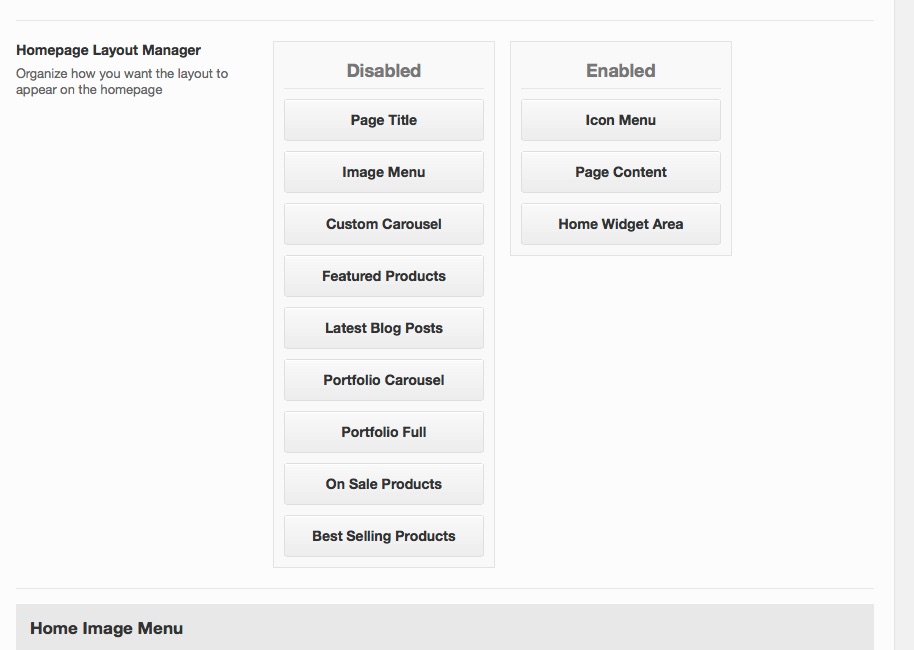
You can create an icon menu like the home icon menu by using the icon box shortcode within the visual editor widget. Click the Virtue Shortcodes tab and you’ll see it. So you can enable your icon menu first (in the homepage layout manager) then page content with your reviews then your shortcodes icon menu then more reviews (all within your static home page). Does that make sense?
Hannah
In forum: Virtue ThemeIn reply to: change from select options to buy now
1. You can change the additional information tab in Theme Options> Language Settings.
2. I’m working on a solution for this, but it’s proving to be difficult I’ll let you know if I come up with anything, but it will be a hack, as this is not a built in feature of the theme. I may also not be able to figure it out, and I’ll let you know if that’s the case.
3. That site is using a very basic blog as their home page. In Settings> Reading, set to “Your latest posts.” This will make your home page a blog, but you’ll have to do some styling in Theme Options> Advanced Styling to get it looking closer to their site.
In the future, please start new topics with new questions. It’s best to the initial question in a thread, and start new topics for new questions. This helps people who may use this thread as reference in the future find answers more quickly.
Thanks!,
KevinIn forum: Pinnacle ThemeIn reply to: Shortcode Form Not Showing Up
In forum: Pinnacle ThemeIn reply to: Blog Post Kadence Pro Slider Cropping
In forum: Pinnacle ThemeOn my page *Login to see link I was trying to move my MailMunch subscribe form from the bottom to the top of the page. I pasted the shortcode [mailmunch-form id=”350870″] into the page editor but nothing shows up after I update the page. Can you help me?
In forum: Virtue ThemeIn reply to: google map api key ->misc settings
In forum: Virtue ThemeIn reply to: Country and State Dropdown box not populating
It seems no drop down box displays the selected value. On the ‘Shop’ page, the drop down box that controls the sort order doesn’t show the selected value either. When you select the drop down you can see the values, select one and it works. It just doesn’t show on the page itself.
It’s the same symptom as the check out page.. the drop downs work – they just don’t show the selected value for the box. It is like the theme is telling it to display white font on a white background.
I went into the theme options and changed the drop down font to be black but it made no difference.
HELP please.
S.
In forum: Membership ForumsIn reply to: Member Suggestions
Hi there.
First of all, BIG thanks for the new members-only goodies this week!
I’ve been playing around with “Simple Share” to begin with. Great stuff – but I have a couple of (ahem..) simple additional feature requests if I may – which would keep the ethos of simplicity, but enhance the plugin further, I feel.
1. An option for consistent consistent custom colours for the Social Share icons (e.g. if a Website’s main colour was (say..) orange, you could enter a HEX colour code in a box on the Plugin options – and this would then override the “classic” icon colours for each Social network (i.e. they’d all be orange and not the “facebook blue”, “twitter blue” and so on.
Perhaps also offer a “Custom hover colour” option too – so it could go from the custom colour to a different hover colour (e.g. from the orange to red – etc.)
2. An option to auto insert a preset #hashtag OR multiple hashtags on the Twitter share links.
So, when visitor clicks the Twitter icon, it works just as it does now – but also auto-includes a hashtag (so as an example if a Site was about shaving, the Site admin / designer might enter “shaving” in an additional box on the plugin control panel.
End result when clicking the Twitter icon would be:
[Page Title] [Page URL] #[hashtag]
Or.. with multiple hashtag support:
[Page Title] [Page URL] #[hashtag1] #[hashtag2] #[hashtag3]
Due to limited space on Tweets (and avoiding opening cans of worms..) keeping it simple and having just ONE auto-hashtag should be OK though.
I love the simplicity of this plugin – and thought I’d mention the above ideas. I’ve managed to achieve both by editing my own CSS file and also the .php file of the plugin – so have seen them work well, albeit in a hard-code / CSS over-ride manner at the moment!
Keep up the great work,
John.
In forum: Virtue ThemeIn reply to: Portfolio navigation
September 22, 2016 at 5:10 am #114270Hi,
1 – I’ve change my permalink base and now the css code you give me on August 26 doesn’t work anymore.
Link : http://metissage-et-matieres.fr/la-galerie/
2 – I’d like to know if there is a way to hide my custom page 404 name “Page Erreur 404” in the search results, as you can see in this link :
http://metissage-et-matieres.fr/?s=accueilThanks for your help,
Gwendoline
In forum: Virtue ThemeIn reply to: Testimonials formating
Thanks Hannah,
I have it set up like this http://mimiemmanuel.com/wp-content/uploads/2016/09/home-layout.jpg
on mimiemmanuel.comwhat I’m hoping is possible is to have a second icon menu under the page content and a second page content above the first icon menu? ( I am using the page content area to display the reviews). and want them spread throughout the page hopefully three times.
Thanks for letting me know if thats possible, how?
Many thanks
In forum: Virtue ThemeIn reply to: change from select options to buy now
Dear all,
1.sorted with the tabs. thank you. now, how do i change this tab named Additional Information into Downloads (name)? this is for http://www.fittvolt.com
2. how do i put small virtue buttons of f (facebook) and t (teitter) in the right down corner? on the same line with th below?
© 2016 Mattheea Logistics | Terms and Conditions of Carriage f t
this is for http://www.mattheealogistics.co.uk3. any suggestions how shal i do my homepage for the bove to loos similar to
http://immortalisedmomentsintime.blogspot.co.uk/
thank you
claude
In forum: Virtue ThemeGreetings,
That worked.. Thanks a lot…
There is on more thing i wanna ask…
I’m trying to change the background color or image of my Shop page but it wont change for some odd reasons…CSS i tried using –
body.page-id-1904 .contentclass{
background-image: url(http://mofotechplay.com/wp-content/uploads/2016/08/mofo-wallpaper.png);
background-repeat:repeat;
background-size: center;
}Could u please help me with this too…
Any help is appreciated…
Thank you,
AshleyIn forum: Virtue ThemeGreetings,
Product page url : http://mofotechplay.com/product/reactor-z1-500/
Do reply for any clarification..
Thanks,
AshleyIn forum: Virtue ThemeIn forum: Virtue ThemeIs it possible?
I would like the featured image in the blog post to show on the home page with the title, etc. in the image. I do not want the actual post to show.
I see that it’s possible in Pinnacle, but was looking for Blog Photo Grid in Virtue and can’t find it.
Thank you for your assistance.
In forum: Virtue ThemeIn reply to: Unable to update virtue theme
September 21, 2016 at 4:06 pm #114217jazmine, Do not post in resolved topics. If you have a new question just create a new topic.
That image is set in the pagebuilder row. See the written part of this tutorial for images: https://www.kadencewp.com/using-page-builder-virtue-premium/
Ben
In forum: Virtue ThemeIn reply to: Post carousel
In forum: Virtue ThemeIn reply to: Unable to update virtue theme
In forum: Virtue ThemeIn reply to: Mysterious Content in Shop
September 21, 2016 at 3:37 pm #114204That is the category. You can change what shows on your shop page in your woocomemrce > settings > products. Just select to only show products.
Ben
In forum: Virtue ThemeIn reply to: Help with some menu css and padding block
September 21, 2016 at 3:36 pm #114203You can make it apply to all pages like this and that will turn it off for mobile :
#cat_nav {
    margin-bottom: -40px;
    position: relative;
    z-index: 100;
border-bottom: 4px solid YELLOW;
}
@media (max-width: 991px) {
#cat_nav {
    margin-bottom: 0px;
border-bottom: 0;
}
}
You can remove the default content padding with this css:
.contentclass {
    padding-bottom: 0;
}
Ben
-
AuthorSearch Results