
Notice: These forums are now retired and closed. For active support, please Submit a Ticket or visit our official WordPress.org community pages.
Kadence Theme | Kadence Blocks | Starter Templates | WooCommerce Email Designer | Ascend | Virtue | Pinnacle
Search Results for 'contact'
-
AuthorSearch Results
-
In forum: Kadence Theme
Topic: social icon links
June 13, 2025 at 2:54 pm #294018Hi Kadence team,
I use the social links widget.
The problem I’m having is:
– whatsapp: should I just fill in the phone number or should I put something else? When I enter only the phone number, with +xx xxx xx xx xx it doesn’t work.
1- Should I enter something other than the phone number ?– email: I’d like to use a personal shortcode ([secure_email mail=”[email protected]”])in the content of my pages to make my email addresses clickable (with a mailTo) and encode them so that they’re not detected by robots. The shortcode works fine on my pages, but not when I enter it in the widget field.
2- Are shortcodes not interpreted in the social networks widget?3- Are the links/informations entered in these fields encrypted?
Thank you and have a nice day
In forum: Kadence ThemeIn reply to: Adding ungerline to navigtion only on hover
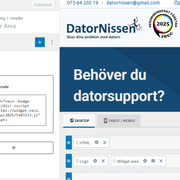
I have been trying in vane to contact you and no one has responded? I am a premium member and have tried to contact you about problems adding a company logo…
I have tried adding the code from the company that does my reviews “Reco” by adding shortcode to the widget area..
I am testing this as usual on my test site https://kadence.datornissen.com
As you can see the shortcode is affecting my header and I need to know how to fix this?
I should not have to hijack an old thread to get help…The cloudfare code that shows I am being blocked: Cloudflare Ray ID: 946d9b47be86d97f

 In forum: Kadence Theme
In reply to: Anyone available for a custom project?
AnonymousMay 6, 2025 at 10:33 am #293710Hi Taylor,
You might want to consider this service solution. You can contact the PRO Service team here. You can schedule a call so you can discuss your setup: https://www.kadencewp.com/wordpress-solutions/site-setup-service/
Let us know how we could help you further.
Kind Regards,
Michael TaroIn forum: Membership ForumsIn reply to: Downloads & Kadence Licenses gone?
May 6, 2025 at 7:06 am #293708It’s possible your account session expired or there’s an issue with the license association. Try logging out and back in, and check if you’re using the correct email linked to your purchase. If it still doesn’t show up, contacting Kadence support directly would be the best next step.
In forum: Kadence ThemeIn reply to: Admin Panel Slow to Load Despite Good Site Speed
AnonymousMay 1, 2025 at 9:48 am #293689Hi there,
We’d like to provide you guidance on this.
To troubleshoot this, I recommend adjusting your server settings to meet the minimum requirements values outlined here:
https://www.kadencewp.com/help-center/docs/kadence-blocks/recommended-server-resources/You can contact your hosting provider to help adjust these settings accordingly.
Also, please go through our troubleshooting guide (the ones you haven’t gone through yet) so we can rule out some possible causes: https://www.kadencewp.com/blog/how-to-troubleshoot-your-website/
Let us know how we could help you further.
Kind Regards,
Michael TaroIn forum: Kadence BlocksApril 15, 2025 at 3:43 pm #293575Issue opened on GitHub: [Issue] Unable to use comma-separated emails in the “Cc” field of the Form and Form (Adv) blocks as supported by wp_mail
The Kadence Form and Advanced Form blocks use the wp_mail() function to send emails triggered by the *_after_submit actions.
According the the codex, wp_mail() supports comma-separated email addresses for any of the “to:”, “cc:”, or “bcc:” values.
In both versions of the form blocks, the “cc” field is processed by WordPress’s sanitize_email() function. The sanitize_email function is only intended to sanitize a single email address.
This causes Kadence Blocks to sanitize a comma-separated list of recipients into a single, formatted email address like so:
$email_list = "[email protected], [email protected], [email protected]";
echo sanitize_email( $email_list ); // "[email protected]"
Oddly enough, the values in the “Send Email To:”, “Cc:”, and “Bcc:” fields all receive inconsistent treatment from one another in Kadence Blocks. See below:
Send Email To: accepts any trimmed value without using sanitize_email()
Cc: processes the trimmed value with sanitize_email()
Bcc: parses the trimmed value with explode(‘,’, $recipient) and processes each entry with sanitize_email()This is a strange oversight, considering the “Cc” and “Bcc” values are processed less than 10 lines apart (on the basic form).
Here are the relevant lines:
Basic Form: kadence-blocks/includes/form-ajax.php line 275
Advanced Form: kadence-blocks/includes/advanced-form/advanced-form-submit-actions.php line 125Here’s a temporary workaround:
/**
*
* FIX: Kadence Forms sending emails to comma-separated addresses
*
* Enhances the 'sanitize_email' function to support comma-separated
* emails. HOWEVER, should not be used on sites that enable frontend
* user registration or that rely on sanitize_email to validate if a
* value contains just one [1] email address.
*
*/
add_filter( 'sanitize_email', 'phvn_sanitize_emails', 10, 3 );
function phvn_sanitize_emails($sanitized_email, $original_email, $error_reason){// Check for commas in the original email
if( strpos($original_email, ',') ){// 1. Remove spaces from the original email
// 2. Separate the string by comma
// 3. Re-run the sanitization function on each email
$email_list = array_filter(
explode( ',', preg_replace('/\s+/u', '', $original_email) ),
fn($email) => sanitize_email($email)
);// Concatenate the list by comma
$sanitized_email = implode(',', $email_list);
}
return $sanitized_email;
}We didn’t bother checking the autoresponder after_submit action offered in Kadence Blocks Pro, but wouldn’t be surprised if a similar issue is present.
As a side note: Kadence Blocks fires the wp_mail() function multiple times – using each bcc’d email as the primary recipient, instead of just using the built-in “Bcc:” header provided by wp_mail() and firing the function once.
It’s pretty surprising that this issue hasn’t been brought up yet, given that it’s quite common to CC multiple recipients on business contact forms… we speculate that this issue is widespread – but most users assume it’s working properly since nothing else breaks, no errors are presented, and the other recipient settings work as intended. We identified the issue after a client insisted that they haven’t been receiving notifications from their contact forms, despite ruling out everything else from spam-filtering to DNS problems.
Please fix ASAP. Thank you.
In forum: Kadence ThemeApril 14, 2025 at 9:26 pm #293560Hello folks!
I’m trying to create a header layout using Kadence’s header builder that includes two separate menus in the same row:
A Shop menu (ideally as a hamburger dropdown)
A Static menu with always-visible page links (eg., About, Contact, etc.)
The goal is to keep the Shop items tucked away for minimal clutter, while showing the key pages at all times. I’m currently using the Kadence theme with the Pro addon.
Is there a way to set this up using available header elements (like secondary menus or HTML blocks), or would custom code be required, or would I need to use the mega menu option?
Thanks in advance!
In forum: Kadence BlocksApril 10, 2025 at 7:44 am #293528Hi Marika,
Glad to hear it works for you!
Feel free to write in again if you need help or contact us through the following support pages:
* https://www.kadencewp.com/free-support-tickets/
* https://www.kadencewp.com/premium-support-tickets/Best,
ChitoIn forum: Kadence ThemeIn reply to: sidebar in category too wide
April 9, 2025 at 8:36 am #293515Hey Frans,
Thanks for the update! Glad to hear everything’s okay now.
Feel free to write in again if you need help or contact us through the following support pages:
* https://www.kadencewp.com/free-support-tickets/
* https://www.kadencewp.com/premium-support-tickets/Best,
ChitoIn forum: Kadence ThemeIn reply to: Product title above image on single product page
April 9, 2025 at 8:35 am #293514Hey Frans,
Thanks for the update! Glad to hear everything’s okay now.
Feel free to write in again if you need help or contact us through the following support pages:
* https://www.kadencewp.com/free-support-tickets/
* https://www.kadencewp.com/premium-support-tickets/Best,
ChitoIn forum: Kadence BlocksExperiencing the same issue with a Go Daddy hosted site. Wondering if anyone has had other successes with this with or without contacting Go Daddy – because we all know how things go with Go Daddy more often than not – my experiences anyway! Is there a work around for this?
In forum: Kadence BlocksIn reply to: How to “map” a Contact form?
March 3, 2025 at 8:11 am #293154Hello,
Thanks for the reply.
Yes, they provide a tutorial for a email contact plugin or a tutorial for another WordPress page builder. Currently We solved the problem by installing the email contact plugin and encapsulating it inside a Kadence page. It’s less aesthetic but since much of the code is Javascript (and HTML) at the moment We “solved” it like this.
(I don’t know if I can send the link of the Consent Database since it’s a paid service).
Thank youIn forum: Kadence BlocksTopic: How to “map” a Contact form?
February 25, 2025 at 9:01 am #293084Hello, I’m new with WordPress and Kadence.
I need to activate a plugin for the Consent Database and it asks me to map the Contact form.
I used your Contact form from one of your free Starter kit.
Do you know how I can do it?(The plugin does not recognize it automatically).Thank you
In forum: Kadence BlocksIn reply to: Can’t add or edit page
February 20, 2025 at 9:28 pm #293059Same issue – and same solution right now – I have white screen on edit pages, posts and add new of both. I deactivate – do my updates and reactivate. The problem is Kadence is embedded on the Home Page and alot of other key pages – so I ahve tried EVERYTHING –
Tested all plugins – Kadence is the where the issue is
Tried to roll back seversal versions of WP even to 6.5 – same issue
Contacted support of firewall – they had me add .htacess info didn’t wor
change and test PHP versions
Read EVERYTHING on the (at least it felt like it) and was willing to try any suggestion – nothing
I am not afraid to test things and try anything as I have been working with websites for over 20 years…The problem is I don’t want to rebuild the site unless I absolutely have to – if I made the mistake – I would have already done it. Something is not right – and the longer I serarch for answers – the more I think it is a plugin issue – and not what I have been led to believe is a server configuration issue….
I have Kadenace block on other sites – and I don’t have any issues – so I don’t know what miraculous combination I have on this website with this hosting – GoDaddy to cause this issue – but my other sites with Kadenace have no issues so far.
I updated the hosting package – and when it came back up I have had this problem – for over a week now. The last thing hosting says is to install via installatron and see what happens – wth? That’s not a solution.
In forum: Kadence ThemeFebruary 18, 2025 at 8:37 pm #293025I’d like to modify the Contact Form Entry’s admin columns. The last two columns are “First Field” and “Second Field.” But I’ve got a date picker in my form and would really like to have that show up in the “Second Field” column instead of the default.
I dug around elsewhere and it seems like this may be possible with some custom PHP but I had some trouble confidently isolating that particular form field’s meta ID to plug into the PHP.
Any tips?
In forum: Kadence BlocksIn reply to: ERROR WHITE SCREEN OF DEATH!
AnonymousFebruary 14, 2025 at 10:21 am #292999Hi there,
The err_http2_protocol_error indicates a problem with the HTTP/2 protocol during client-server communication. This error typically arises from issues within the HTTP/2 communication between a web server and a browser.
It can occur on both the client and server sides, with causes ranging from server misconfiguration to incompatible settings or network problems.
You might find these helpful resources:
– https://wordpress.org/support/topic/failed-to-load-resource-neterr_http2_protocol_error-on-wordpress-multisite/
– https://stackoverflow.com/questions/73521296/how-to-solve-err-http2-protocol-error-which-occurs-only-when-editing-page-througCould you please contact your hosting provider to investigate the issue or attempt to edit the .htaccess file?
Let us know if we can assist you further.
Kind Regards,
Michael TaroIn forum: Kadence ThemeIn reply to: Page URL is automatically changing – Kadence Theme
February 10, 2025 at 7:09 am #292948I have contacted the hosting provider and they helped me solve this issue by doing some alteration in the Database.
In forum: Kadence BlocksFebruary 10, 2025 at 1:51 am #292944Hi,
thank you!
Yes, I use the Kadence’s built-in form.
So, if I do it this way the admin will not receive any copy or information about the emails that are sent from the contact form but the emails will only be received from the email placed in the “To”. Right?In forum: Kadence BlocksFebruary 8, 2025 at 5:02 am #292942To change the recipient email for the contact form in Kadence, follow these steps:
In your WordPress dashboard, go to Kadence > Theme Options.
Scroll down to the Contact Form section (if using Kadence’s built-in form).
Here, you can set the “To” email address where form submissions will be sent. Enter the new email address you want the form submissions to be sent to.
Save the changes.
If you are using a plugin like WPForms or Contact Form 7, you will need to adjust the recipient email settings within the plugin’s settings, typically under Forms > Edit > Notifications.In forum: Kadence BlocksFebruary 7, 2025 at 8:57 am #292930Good morning, I’m new to WordPress and Kadence.
I am trying to make a site and I used a Kadence starter template (free version) and I modified it.
Now I am trying to set up the contact form and I need the emails to arrive at a different email than the admin login email.
Where (and how) can I set it from?
Thank you very much -
AuthorSearch Results



