
Notice: These forums are now retired and closed. For active support, please Submit a Ticket or visit our official WordPress.org community pages.
Kadence Theme | Kadence Blocks | Starter Templates | WooCommerce Email Designer | Ascend | Virtue | Pinnacle
Search Results for 'page '
-
AuthorSearch Results
-
In forum: Kadence Theme
Hello, I want to apply custom CSS to all unordered lists in posts and pages, basically I want to add an icon in front of all items of the list. But the icon is appearing in my menu and also in the “tabs” block and in other blocks also
How can I exclude these ?
Ive tried adding “single-entry” before, but it is not working.single-entry ul {
list-style: none;
}
.single-entry ul li::before {
content:”📍”;
display: inline-block;
margin-right: 0.2rem;
}.single-entry ul ul li::before {
content: “📌”;
}
.single-entry ul ul ul li::before {
content: “🤷♀️”;
}In forum: Kadence ThemeJune 8, 2021 at 5:03 pm #266307Hi, I am not sure if I understand correctly what the problem is, but maybe this helps when it comes to showing the featured image:
For Pages in general:
Theme Customizer
Page Layout
Tab General
Scroll down to ‘Show Featured Image?’ and switch it to the right and set the settings that appear.For Posts in general:
Theme Customizer
Blog Posts
Single Post Layout
Tab General
Scroll down to ‘Show Featured Image?’ and switch it to the right and set the settings that appear.For Archive/Category layout pages (showing posts from that category) in general – this is what you would normally use to show posts:
Theme Customizer
Blog Posts
Archive Layout
Tab General
Post Item Elements: Featured. Make sure the eye is not crossed out (if the eye is crossed out, the image will not show).Showing a general background image for the page title on a category/archive page:
Theme Customizer
Blog Posts
Archive Layout
Tab Design
Archive Title Background – set an image here.Does this help for what you are looking for?
ChantalIn forum: Kadence ThemeJune 8, 2021 at 4:08 pm #266305Hello Hannah,
That gives me the colour of the background, but I want to post an image there, like I can on pages and posts with Featured Image.In forum: Kadence ThemeJune 8, 2021 at 1:12 pm #266301I have featured images in the transparent header of every post and page, but I cannot figure out how to get an image in the header of the generic Posts page.
I have created the page “News” to be the placeholder for the list of posts, and have given it a featured image, but that does not show.
How can I put a featured image (or any image!) in that place?In forum: Ascend ThemeIn reply to: Kadence Sliders not displaying properly
June 8, 2021 at 8:57 am #266297Hi,
While it’s not an intended part of the design you can force this to work using css like this:.kt-header-extras ul.sf-menu.sf-menu-normal { float: none; display: block; } .kt-header-extras .menu-widget-area-kt { display: block; } .kt-header-extras .sf-menu ul.kad-slider-canvas { position: static; display: block; border: 0; min-width: 0; }Just add in the custom css box in the theme options.
Also note that you can not load the same slider twice on the page, only once so in your test the second slider will never load because it’s the same as your first.
Ben
In forum: Ascend ThemeIn reply to: Kadence Sliders not displaying properly
The site I recently launched and have multiple Layered Sliders working is http://www.ucjf.org. I actually specify a different slider for each page as you go through the site. But I must point out that I’m simply placing the short code in a Visual Editor widget in a normal row, I’m not trying to use the Header and Second Header Wdidget in this instance.
Please disregard any reference I made above to https://ulster.netprophet.net as we’ve changed our design slightly and I’m using that platform for the new design rollout.
As I would like to get to the bottom of this, however, because we still may try to make use of it, I’ve recreated what I was trying to do HERE. I have the Kadence Slider shortcode placed in a Visual Editor widget in both the Header and Secondary Header widget and neither are displaying.
Sorry for all the confusion, but I’m trying to keep moving on this project as we work through these issues! Please let me know if I can do anything at all to help. I’d be happy to provide you access to the sites.
In forum: Kadence ThemeIn reply to: Kadence Cloud custom CSS
June 8, 2021 at 8:19 am #266295Hi Karla,
thank your for your response. I am aware of the custom CSS option for row blocks within the editor – and that is exactly what puzzles me. If I follow that concept to optimize a site for additional viewports – besides the three default Gutenberg ones – I need to add media queries for every single block on every page. Now, imagine if I need to add more than just one additional media query – you can do the math – it’s going to be a mess 🙂 I could live with this workflow if Kadence would have an option to save custom blocks in a cloud based library like described here which would transform Kadence into an absolute power tool: https://www.kadencewp.com/roadmap-blocks/feature-requests/save-custom-gutenberg-blocks/?fbclid=IwAR20UDJ_3qpa3kbtOuWu9XrhtrXGHJQklee26QdH5J7JSFawPiIs7lDV3uM
Since you asked for sample where additional viewports are required. The answer is basically for every project – if your design needs to stand out from the usual design concepts. If you take a look at the Kadence Starter Template “Print Store” you will notice that the design does not fit the viewport and that the objects are cut off at the bottom and top – please see attachment. Anyhow, I don’t want to complain – it is what it is and I will continue to apply classes to blocks and elements and apply the custom CSS in the Customizer > Additional CSS since to me it seems to be a more straight forward method to make a design consistent.
If I could make a wish – I would like to see least five viewport optimization options in Gutenberg 🙂
Best.
Alex In forum: Kadence Blocks
In reply to: Bug (?) Adding Post/Grid block breaks page update
Hello,
Thank you for reaching out to us and I’m sorry to hear you’re having this issue.
After adding the block and clicking the save button, kindly check your browser console log for errors.
If you see errors such as 403/500/503, kindly reach out to your hosting provider to check your website error logs as this might be caused by certain server/security/permission settings. It is possible that the API request of WordPress for saving pages is being blocked.
Hope this helps and let us know if we can assist you further.
Regards,
KarlaIn forum: Kadence ThemeTopic: Kadence Cloud custom CSS
June 4, 2021 at 2:43 am #266237I am struggling understanding the concept on how to customize a project (complete site, theme or single blocks) with custom CSS and prepare it to be uploaded into the cloud.
Since the Custom CSS from the Customizer will not be uploaded into the cloud, it is required to make the CSS changes for blocks etc. individually within the Gutenberg editor (for every block on every page). If this is the correct way to do it, how does someone for example deal with optimizing a site for additional viewports – besides the 3 default Gutenberg viewports? Isn’t it more straight forward to give an element a class and apply specific css rules in one style sheet within the Customizer > Custom CSS? Also, how to go about defining different font sizes for additional viewports without using the Customizer > Custom CSS?
Can someone maybe share best practices on how to efficiently work with Kadence cloud and custom CSS? Thanks.
In forum: Kadence ThemeIn reply to: How to show related post?
In forum: Kadence ThemeIn reply to: Rows in Category Pages /Homepage
Hi Daniel,
Sorry this is not more clear!
You are wanting a static page on your homepage as well as the latest posts, is that correct? If so, you can add latest posts to your static page using the Post Grid/Carousel block. Then in the Page Settings of your edit page you can choose a sidebar layout. Then set this page as your front page from Customize > Homepage Settings. Does this make sense?

Kindly,
HannahIn forum: Virtue ThemeIn reply to: portfolio on home page
Hi Carrie,
Unfortunately, you can only use the Page Content item once. For other content to add, you may use the Home Widget Area item and use the widgets included on the theme. Alternatively, use a Custom HTML/Text widget.
Here’s a screen recording for an example – https://share.getcloudapp.com/Wnuxwe19.
Hope this helps.
Regards,
KarlaIn forum: Kadence ThemeHi Team,
I have a contact form that comes up on a modal button on this page:
*Login to see linkThe form works fine on desktop, but at screenwidths less than 768px the button doesn’t cause the window to appear.
Have you come a cross this before?
Any thoughts what might be causing it?
Thanks,
Phil.In forum: Kadence BlocksWhen I add a Post/Grid block to a row, it immediately breaks the ability to save (that JSON error). I looked around and tried
1. removing one small class I wrote from CSS in the Customizer
2. deactivated plugins (although they’re all pro tools)
3. re-saved/changed permalinks
It’s only the Post/Grid block that causes the problem. (The site is new, under development, on my dev server and everything is up to date).
Is this a bug or is there another fix?In forum: Virtue ThemeIn reply to: portfolio on home page
Hi Karla
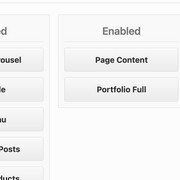
I reviewed the video, but did not find an answer. I do have the page content and portfolio full enable under home layout. But what I’d want is to be able to add another page content under portfolio, if that was possible. I have attached a layout to show you what I’m trying to do. Thank you.
 In forum: Kadence Blocks
In reply to: button link to different headers on same page
Howdy Alan,
Thanks for reaching out to us.
If you are using Kadence Pro, you will have this option. See screen recording here: https://share.getcloudapp.com/04u20kAJ
Learn more about anchor links here for your reference: https://wordpress.org/support/article/page-jumps/
Is this what you are trying to accomplish? Perhaps we can offer another solution.
Best,
AbzIn forum: Ascend ThemeI have to believe this is something amiss on a new site I’m working on, because this is still working just fine on a site I launched just last week albeit a bit differently.
My header (the same for each page) will consist of a logo I’ve created in the upper left corner, then a 760×250 slideshow right justified with no padding or margins. I may need some help achieving that BTW. I’ve tried inserting both a Kadence Standard and Layered Slider in the widget area in the header, but they don’t display! I typically use Layered Sliders even if I don’t take advantage of the layers, just easier to use IMO.
So I tried moving both of these sliders into rows on the page. The Standard Slider will display, the Layered will not! Needless to say I’m beyond confused. The site I’m working on is HERE.
Is something broken or am I just having a complete brain fart? When we get this working please let me know also how I would get the slideshow to display with no margins or padding. I’ll build any buffering I need into the logo.
Thanks!!
In forum: Virtue ThemeIn reply to: portfolio on home page
Hi Carrie,
Thank you for providing the link!
1. Close up the space between the first row above the portfolio
Kindly add this custom CSS code in Theme Options > Advanced Settings > Custom CSS:.home-padding { padding: 0 0 30px; }2. Add rows under the portfolio
Please could you specify what rows would you want to add below the portfolio? On the other hand, you may refer to this article regarding the Home Layout – https://www.kadencewp.com/blog/creating-a-home-page-with-virtue/.Hope this helps and let us know if we can assist you further.
Regards,
KarlaIn forum: Kadence ThemeTopic: Alternate sticky header
June 1, 2021 at 4:46 pm #266196I’d like an alternate sticky header to appear on scroll. Just need the site logo on the left and a CTA button on the right. I’m not sure this is possible. I tried setting the top bar only as the sticky header but then the top bar wants to appear at all times, including as the sticky header. Ideally I’d like to be able to select this option at the page level. Any thoughts?
In forum: Kadence ThemeIn reply to: CSS syntax error in tag ‘style amp-custom’.
June 1, 2021 at 10:46 am #266195Hi,
I don’t suggest you enable amp for pages unless you really know what you’re doing there. AMP is a different code and so it’s going to try to convert your page into an amp valid page: https://www.houndsconnect.co.uk/about/?amp
As you can see in the link above it doesn’t look good.In your amp settings, you can disable it for pages or even for that single page. In general, I don’t suggest you use amp unless you are prepared to make multiple versions of your content or you are aware of the amp project to understand its limitations so that you create pages that will validate for amp.
More than likely the error you got was just temporary. Your page validates here: https://search.google.com/test/amp?utm_source=gws&utm_medium=onebox&utm_campaign=suit&id=ifV1pNq7mpI1OV0YF2R2tw
Ben
-
AuthorSearch Results



