
Notice: These forums are now retired and closed. For active support, please Submit a Ticket or visit our official WordPress.org community pages.
Kadence Theme | Kadence Blocks | Starter Templates | WooCommerce Email Designer | Ascend | Virtue | Pinnacle
Search Results for 'page '
-
AuthorSearch Results
-
In forum: Kadence Theme
In reply to: Can you have a hooked element on latest posts page?
Great discussion on implementing a hooked element on the latest posts page! Leveraging hooks can significantly enhance user engagement and navigation. I’ve experimented with similar strategies on my site: https://www.3patticrown.me/. Looking forward to more insights on this!
In forum: Kadence BlocksMarch 6, 2025 at 12:04 am #293188Hi calpee,
I’m glad you reached out, I’d be happy to help.
Could you share a link to your product page so we can inspect where the variation swatches are coming from? Additionally, could you clarify what you mean by the “native mode” of Kadence and how it differs from the variation swatches displayed by the active plugin?
It would also be helpful to see more details about your setup, including the relevant settings you have configured. If possible, you can use a tool like Zight to record your screen or capture screenshots and share the links with us.
Best regards,
Teejay.In forum: Kadence BlocksIn reply to: Large amount of space under hero on mobile view.
March 5, 2025 at 11:58 pm #293187Hi Kim,
The space is coming from the min height setting you added for the Row Layout block or Section block container of the Slider block. I believe you set the min height so that the slider will cover the entire page on desktop view.
Here’s a screen recording for reference: https://share.zight.com/qGu4mlnD
You can try setting a smaller value for the min height setting of the Row Layout block or Section block for tablet and mobile where you added the min height setting for the desktop.
Here’s a screen recording for reference: https://share.zight.com/p9u4DroN
I hope this helps. Feel free to reach out for more help or open a new ticket for other topics.
Best regards,
Teejay.March 5, 2025 at 12:07 pm #293184Hello,
do you know how to remove the “Lost Password/Password Reset” from the WordPress login page (I’m using Kadence free version).
I tried some solutions found online but they don’t work.
Thank youIn forum: Kadence BlocksIn reply to: Default Icon for Icon List
AnonymousMarch 5, 2025 at 10:18 am #293182Hi Konrad,
We’d like to help you on this.
How about using the Block Defaults feature?
Kadence blocks has a built-in Block Defaults setting. Basically, you can make all the changes on the block then save it as default. What happens is the next time you use this block (on any page/post), then the block will already have saved settings on them.
See this for reference: https://www.kadencewp.com/help-center/docs/kadence-blocks/setting-block-defaults/
Please note that the Block Defaults setting doesn’t get applied to all block of the same type (e.g. Info Box) that are already added as content. It will only get applied to new blocks (e.g. Icon List) that are added.
For example, see this: https://www.loom.com/share/355cd5a394274776a654eacd92d2756e
Let us know how we could help you further.
Kind Regards,
Michael TaroIn forum: Kadence ThemeHi Stefan,
Glad you reached out, and thank you for providing detailed information about the issue you’re experiencing
To address your concern:
– I haven’t come across any similar cases reported by other Kadence users where the theme caused a conflict with WooCommerce or PayPal payments.– I understand that when you click the PayPal or credit/debit card payment button on your checkout page, the error message shows up. I tested the checkout process on your site by attempting to place an order using both the PayPal and credit/debit card payment options, and didn’t encounter the error message you described.
Here is a screencast for your reference:
https://share.zight.com/2NuQOQw6Please confirm if the issue is still occurring on your end.
It might be worth temporarily disabling other plugins (except WooCommerce, LearnPress, and the LearnPress WooCommerce add-on) to see if there’s a conflict. You can also switch to a default WordPress theme (like Twenty Twenty-Three) briefly to rule out any theme-related issues.
See more troubleshooting steps:
https://www.kadencewp.com/blog/how-to-troubleshoot-your-website/Please let us know how we can help further.
Cheers,
EzeIn forum: Kadence ThemeIn reply to: How show posts in Blog category?
Hi there,
I understand you want to display posts in your blog category.
To display posts in your blog category page(https://caplicut.com/blog-and-latest-updates/), kindly assign the posts to the Blog Category as shown in this screencast:
https://share.zight.com/DOuLZL8zIf that’s not what you are trying to achieve, please let me know with some additional information and I can clarify further.
Cheers,
EzeIn forum: Kadence ThemeIn reply to: Large Layout Shifts
March 4, 2025 at 12:11 pm #293167Hey there! am also facing this issue on my website although am using Wprocket and Permatters for website speed Optimization.
Am using https://pagespeed.web.dev/ for My Website.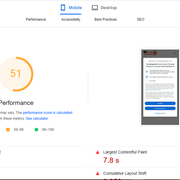 In forum: Kadence ThemeMarch 3, 2025 at 11:08 am #293157
On my homepage, I am using a wonder block and trying to change the color of the H! inside the font from blue to black. The copy is “Love Shouldn’t Come with a Price Tag: Why Pet Insurance is Non-Negotiable” If I go into typopgraphy in the customizer to change the color of the header, it doesn’t do anything. I am wondering if this is due to it being a Wonder Block?
Here is the url to my home page.. http://www.pawlicypal.org
In forum: Kadence BlocksIn reply to: How to “map” a Contact form?
March 3, 2025 at 8:11 am #293154Hello,
Thanks for the reply.
Yes, they provide a tutorial for a email contact plugin or a tutorial for another WordPress page builder. Currently We solved the problem by installing the email contact plugin and encapsulating it inside a Kadence page. It’s less aesthetic but since much of the code is Javascript (and HTML) at the moment We “solved” it like this.
(I don’t know if I can send the link of the Consent Database since it’s a paid service).
Thank youIn forum: Kadence BlocksGood morning, can you think how to hide the native way to show the variations swatches in the file/shop page? If I have activated the option in shop kit it shows the double variations, those of the native mode of kadence and those of the active plugin Variations swatches. If I deactivate the option in shop kit, neither of the two options is shown.
Why do we want to do this? Because we have imported the products with their variations to a new website and we already had the plugin variations swatches on the old website. If we do not hide the native form of kadence shop kit the 2 possibilities are shown in the archive/shop page.
In forum: Kadence ThemeFebruary 28, 2025 at 7:02 am #293135Hello,
First: I know Woocommerce and Paypal are third party and is not your problem to solve. Equally I need to ask if you at Kadence have any suggestion to share. Considering that someone on WordPresss.org forum suggested to another guy´s question: “it can be your Theme Yoku”.
I use Kadence theme, latest update. Never had an issue with woocommerce and Kadence, ever. And I started using KAdence themes back with the early classic themes many years ago – over a decade ago?
For my online courses I use Learnpress LMS. And I use the (Thimpress .com) Learnpress Woocommerce add-on in which they use PayPal within their add-on.After updating all plugins as well as theme to the latest versions/iterations, the online store decline payments (payPal/woocommerce). I press the payment buttons for PayPal and /or credit/debit card payment in Woocommerce. Thej PayPal pop-up opens. And then an error message shows up and decline the payment. The Checkout page.
“- Your order could not be processed. Check fees for your payment method and review your order history before placing an order”.
Thats the error message buyers get.”
Kadence team, do you know of any similar situation for any other user of your theme that reported a similar issue and it was resolved, being an error between plugins and theme?
Link to my website in a private comment below.
Best regards
Stefan L.-
This topic was modified 1 year, 2 months ago by
Stefan Lindblad.
-
This topic was modified 1 year, 2 months ago by
-
This topic was modified 1 year, 2 months ago by
In forum: Kadence BlocksIn reply to: Gallery adv lightbox repeating image
February 28, 2025 at 6:00 am #293132Hi there!
Is there a fix to this bug? It’s there on my homepage: brima-art.de
In forum: Kadence BlocksTopic: 3.4.10 Broke Icon Lists
In forum: Kadence ThemeTopic: E_Error/Themes tab
February 27, 2025 at 8:25 am #293109Hi everyone,
I recently had to update my PHP-Version in order for a plugin to run smoothly. Ever since, WordPress notifies me every morning that a fatal error has occurred on my website.
The website can still be accessed, I can, however, only log into the Dashboard in recovery mode. I tested all plugins, but the error seems to be within the Kadence theme in the theme tab. I have to click „continue“ for the error to resolve itself and then it runs smoothly again.
I have no idea how to fix it myself without a nudge in the right direction.
Ein Fehler vom Typ E_ERROR wurde in der Zeile 133 der Datei /homepages/20/d4297797614/htdocs/wordpress/wp-content/themes/kadence/inc/class-theme.php verursacht. Fehlermeldung: Uncaught TypeError: Kadence\Theme::Kadence\{closure}(): Argument #1 ($component) must be of type Kadence\Component_Interface, Kadence\Options\Component given in /homepages/20/d4297797614/htdocs/wordpress/wp-content/themes/kadence/inc/class-theme.php:133
Stack trace:
#0 [internal function]: Kadence\Theme->Kadence\{closure}()
#1 /homepages/20/d4297797614/htdocs/wordpress/wp-content/themes/kadence/inc/class-theme.php(135): array_filter()
#2 /homepages/20/d4297797614/htdocs/wordpress/wp-content/themes/kadence/inc/class-theme.php(73): Kadence\Theme->__construct()
#3 /homepages/20/d4297797614/htdocs/wordpress/wp-content/themes/kadence/inc/class-theme.php(58): Kadence\Theme::setup_instance()
#4 /homepages/20/d4297797614/htdocs/wordpress/wp-content/themes/kadence/inc/functions.php(25): Kadence\Theme::instance()
#5 /homepages/20/d4297797614/htdocs/wordpress/wp-content/themes/kadence/functions.php(31): Kadence\kadence()
#6 /homepages/20/d4297797614/htdocs/wordpress/wp-settings.php(672): include(‘/homepages/20/d…’)
#7 /homepages/20/d4297797614/htdocs/wordpress/wp-config.php(186): require_once(‘/homepages/20/d…’)
#8 /homepages/20/d4297797614/htdocs/wordpress/wp-load.php(50): require_once(‘/homepages/20/d…’)
#9 /homepages/20/d4297797614/htdocs/wordpress/wp-login.php(12): require(‘/homepages/20/d…’)
#10 {main}
thrownCan anyone help me?
The website is anishas-kamera.de
In forum: Membership ForumsIn reply to: 2 Alignment Questions
February 26, 2025 at 11:40 am #293100Thank you Victor, right now I have a floating footer on the home page that uses Kadence Elements. Is there another way to have a floating footer set up that would use the same type of VH parameter? That would be amazingly helpful.
For the releases page, check out https://jlstage.wpengine.com/music/. I really appreciate your help here and attention to detail. What a great community!
In forum: Kadence BlocksIn reply to: Advanced Gallery Block – editing thumbnails
February 26, 2025 at 6:34 am #293096Hi Michelle,
I’m here to assist you!
The Gallery (Adv) block has the following settings depending on the gallery type you select:
* Thumbnail Image Sizes
* Thumbnail Image Ratio
* Image RatioHere’s a video for reference: https://share.zight.com/KouR5plD
If you can’t adjust the size of the images, please let me know which gallery type you’re using and how the images appear on your page. I’ll be happy to assist further.
Best,
ChitoIn forum: Kadence ThemeIn reply to: How can we decrease the DOM Size?
February 25, 2025 at 11:53 am #293089Hey there,
Welcome to Kadence Support. We are here to help.
The DOM (Document Object Model) includes all of the inner HTML elements on a page. Typically, a warning appears when the DOM exceeds around 1,600 elements, and a more serious warning may occur when it exceeds 1,800 elements.
I ran your website through the PageSpeed Insights tool, and your scores were excellent! Including a 99 for performance. While the tool flagged a DOM size warning (2,045 elements), this is fairly standard. Your website still passes the PageSpeed Insights test, meaning this warning is more of an advisory note than a critical issue.
We have a guide on LCP (Largest Contentful Paint) that covers DOM size, which you can reference here. This guide also includes tips for reducing DOM size, such as combining paragraph elements where possible.
I hope this helps! Let me know if you have any other questions or need further assistance.
Thanks!
In forum: Kadence ThemeIn reply to: Logo not appearing on home page
February 25, 2025 at 11:00 am #293088Hi Amrapali,
I’m glad you reached out. I’d be happy to help.
I checked your website, and the logo appears correctly on the homepage from my end.Check the screenshot for reference: https://share.zight.com/jkujBvpb
I have noticed you have a cache plugin installed. Clear the website and browser cache from your end and check in incognito window.
- Check the article to clear the cache: https://www.kadencewp.com/kadence-theme/knowledge-base/troubleshooting/clearing-your-website-cache/
- Check the article to clear the browser cache and cookies: https://support.google.com/accounts/answer/32050?hl=en&co=GENIE.Platform%3DDesktop
I hope this helps, please let us know if we can assist you further.
Best Regards,
ArchitaIn forum: Kadence ThemeFebruary 23, 2025 at 11:42 am #293073Logo not appearing on home page although it does appear on the Blog page. Any help is appreciated. *Login to see link
-
This topic was modified 1 year, 2 months ago by
-
AuthorSearch Results



