Hello,
In theme options> Home layout, you should be able to set the posts up to 16. Can you post a link so I can be sure I’m referring to the same carousel as you are?
One option that would allow you to customize the carousel even more would be to add it to your page content via a page builder widget or shortcode. You could also add it to the home widget area.
Here’s an example of the shortcode you could add to a text editor:
[carousel type=post columns=3 items=20]
For more shortcode options, see this page:
http://docs.kadencethemes.com/ascend-premium/shortcodes/
Does that help?
-Kevin
Hi HAnnah and Ben –
I’m sorry for this basic question. I don’t see a way to get image captions to be visible using the Ascend Free version. I’ve set up a portfolio post and inserted a Gallery and added captions to the images in my gallery but none of them show up when viewing the page. And I don’t see an option when creating the gallery to turn captions on/off (which seems to be in some of your other themes)
Any advice?
thanks
John.
Pages with Critical Crawler Issues
As of Jun 30
Export CSV
1 – 1 of 1
Mark as fixed
Ignore
New
URL
Page Authority
Issue Type
Hi Kevin, Here it is:-
URL – crawler issues.
Page Authority
Issue Type
Page not found >
https://adventuretravelcoach.com/lost-password/
Hi Kadence theme,
how to increase the quantity of homepage post carousel header?
(default setting are only quantity of 8 for post carousel header)
Kevin – it’s the descriptions for the archives – product categories, tags, etc.
Here’s one of my categories with a description at the top:
https://www.beautifulworldart.com/art-subject/usa/georgia/
This is not using Elementor or Kadence Woo Templates. Neither has an option to output the description.
The description is set using the description section when editing WooCommerce Categories or Tags. Every Category/Tag can have its own description.
Ascend outputs it if its included. I am using Kadence Woo Templates on the product pages for this site but not on the WooCommerce archives.
Thanks,
Mark
PS I am using a child theme but I haven’t altered the archive templates.
This reply has been marked as private.
Hello,
I’m not sure what you’re referring to. Can you please link directly to the page in question so I can see where the error is coming from?
-Kevin

Hi
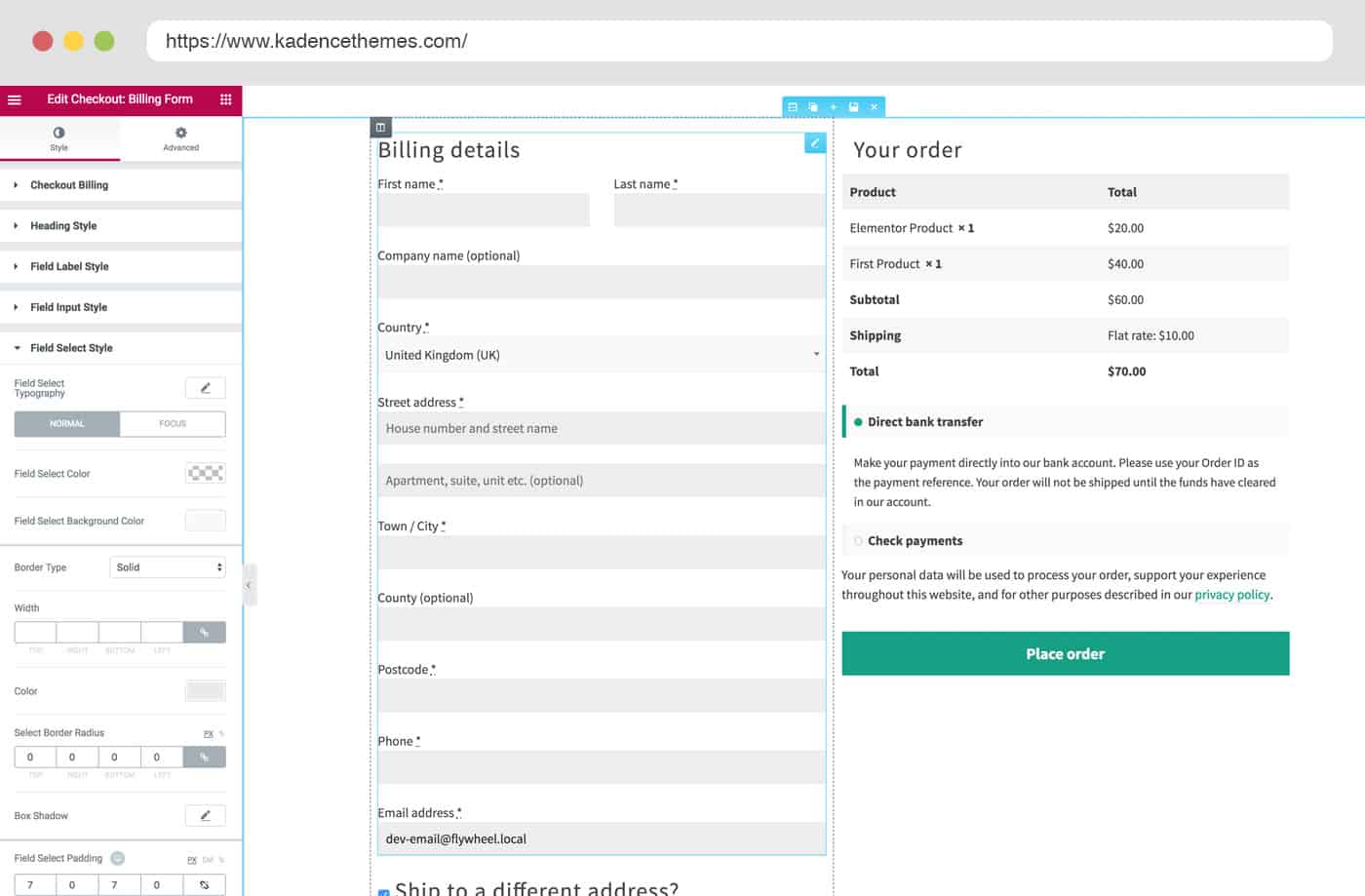
I would like to be able to edit the layout of the checkout and shop pages and thought that the new Kadence WooCommerce Elementor Pro would help with this but I can’t get it to do what I need. I feel like it is perhaps not working correctly – I have installed all 3 plugins required.
1. On the checkout page if I use Elementor to edit I can drag the various checkout widgets onto the page but when I do this the check box for specifying a different shipping address doesn’t appear so you have to use the shipping address widget – but then the checkout page is very crowded with all the billing and shipping fields displayed from the start. If I don’t use Elementor the shipping check box is active but the layout looks terrible – 1 full width column – I would prefer two columns like in your screen shot https://www.kadencewp.com/wp-content/uploads/2018/06/checkout_edit-min.jpg
Can you tell me where I am going wrong here?
2. The shop page – I can’t get the elementor editor to open at all on this page – I have tried setting different pages as the shop page but no luck.
The examples of this elementor plugin look great and I hope you can point me in the right direction so I can make the most of them. I found laying out the individual product pages with elementor to work well.
Thanks
Kirianne
This reply has been marked as private.
Hello,
Can you specify the issue that you’re experiencing? I just tested on a fully updated site running pinnacle premium, and page builder is working fine.
have you trie testing for a plugin conflict by deactivating your active plugins one by one to see if the issue goes away when a certain plugin is OFF?
Be sure to clear your cache after each time.
Let me know if this is helpful.
-Kevin
Hello Kirianne,
Since the plugin is so new, we do not yet have any templates available for the checkout and shop pages. Templates for both will be added as soon as possible to make editing easier on those pages. Ben may have some ready already, but he’s out at the moment and I cannot confirm this.
He will be back tomorrow or Monday to fill. Certainly expect more features for in the future for the plugin.
Sorry I can’t provide more templates at this moment. Let me know if you need anymore assistance.
-Kevin
I decided to use Google Calendar embed code for a page. But want to have a shortcode in a calendar sidebar. Can’t seem to find the shortcode to use there. Google calendar settings only have embed codes. Any advice?
*Login to see link
Hi, I received a notification that I have a default URL page. After investigating I found the page under Posts – categories. There is no option to remove the page?
Thanks in advance
*Login to see link
Hi
I social icons broken. *Login to see link
FB is working on home page but not the others. i have been struggling for about 2hours now cannot get it fixed
message:
Sorry, that page doesn’t exist!
You can search Twitter using the search box below or return to the homepage.
العربية Български език বাংলা Català Čeština Dansk Deutsch Ελληνικά English English UK Español فارسی Suomi Filipino Français ગુજરાતી עִבְרִית हिन्दी Hrvatski Magyar Bahasa Indonesia Italiano 日本語 ಕನ್ನಡ 한국어 मराठी Bahasa Melayu Nederlands Norsk Polski Português Română Русский Slovenčina Српски Svenska தமிழ் ภาษาไทย Türkçe Українська мова Tiếng Việt 简体中文 繁體中文
© Twitter 2018 Abou
Hello, nav bar: top navigation settings, they need styling differently on subpages so that are visible. I’m just guessing it is because I have styled the sitewide styles for it to transparent so it looks cool on the homepage, but it breaks it elsewhere throughout the site. How do I style it so it looks cool throughout the site and for individual override settings on the Edit Page > Home Page screen to make the homepage nav styles the exception – Help!
Thanks this did the trick!
But do you know any way to better customize the whole page(other paddings and stuff)?
I use pagebuilder and dont want to use much css.
Hello,
I have recently updated all plugins and themes to current releases.
The most valuable plugin Page Builder by SiteOrigin v 2.7.2 does not work with theme Pinnacle Premium v 2.4.2.
I use wordpress v 4.9.6-pl_PL
When I change theme for the other one i.e Twenty Seventeen the plugin Page Builder by SiteOrigin v 2.7.2 starts to work properly.
Does anyone knows how to fix it?
Mario
Hi there
I am trying to use Kadence WooCommerce Elementor Pro to customise the checkout page and the shop page. Do you have a pre made template for the checkout to make formatting it easier – to make it more like the example you provide – *Login to see link If you don’t have a template to upload can you give some instructions about how to achieve a similar look?
Thanks
Kirianne
One other odd experience that I’m not sure why it’s happening, but on the product page my template has the product gallery on the top left. When I click an image, it opens twice, two lightboxes one over the other? At first I thought it was just an odd effect but when I close the lightbox, there is indeed a second one open behind it.
Maybe a result of some setting I’m using in Ascend conflicting? If that’s not general behavior, let me know and I’ll sit down and make note of my Ascend settings for products to see if that helps narrow down why it does that.
For reference sake, I’m not seeing this with existing Woo Templates plugin from Kadence.
Thanks!
Mark