I upgraded to the latest Pinnacle Premium this morning and it immediately took my site down. Giving you a heads up, Kadence, that there’s a problem. I restored the previous version and it immediately restored my site.
I would stick to one plugin. They won’t really clash but you don’t need to use more then one. I personally think wordfence take a lot of resources to run. so to me it slows down the site but in terms of a complete solution you may want to look at securi’s cloud based firewall or something like cloudflare.
In general I recommend good passwords, a good host and a plugin that hardens wordpress. (securi’s plugin has a lot of good hardening options).
If you want to go further to me then you should pay the money for a cloud based firewall. But thats just my opinion.
Ben
Hey,
The site language should be set based on settings in wordpress > settings > general.
It doesn’t matter what files are in your languages folder if it’s not set to that language it shouldn’t be using them. If you site is then thats really odd.
Can you send a login so I can see this?
Ben
Hello!
Would it be possible for you to send a link to the site that you’re working on so we can get a better look at how it’s behaving?
Thanks,
Kevin
Hello! I was able to accomplish this on my demo site by adding the Virtue Image Widget into a Page Builder row that can accommodate a single widget. It looks like you might be using a row that has room for two widgets. Try changing “Set row layout” to 1 and let me know if that solves your issue.
Thanks,
Kevin
Hi Jakub,
Looks like there is an error on your .org site. It could have to do with your permissions. Have you tried contacting your host?
Hannah
Hi,
I am trying to better format my image to the other information I’ve placed on my page. I am using page builder and rows. I have tried to use all the widgets you have for images in your site. It seems to me that Virtue Image works the best, but does not give me an option on height or width. Do you have any suggestions??? Ideally, I would like the image to fit the whole left side.
*Login to see link
Thanks-
Dear Support
I have added a slider to my home site. Underneath, I would like to have a static text box where I can explain my product in detail. Is there any way to add in just a text box?
Any assistance you could offer with these three things would be very much appreciated. Again, thank you for your effort.
The website I am using Virtue Theme with is *Login to see link
Sincerely,
Rajai
Dear Support
I have added a slider (Revolution Slider) to my home site which I recieved as a bundel when I purchased the Virtue Theme.
It works perfectly on a standard PC, but, when it will not resize properly on a mobile or tablet. I have clicked the mobile and tablet options, and this doesn’t seem to alter anything.
Any assistance you could offer with these three things would be very much appreciated. Again, thank you for your effort.
Sincerely,
Rajai
Dear Support
I would like to increase the size of the blog pics. I have saved them as 600×350 and also as 1200×627, and, while I can decrease the size through the media option, I cannot increase it. Is there a way to get the images larger in the blogs in particular?
Any assistance you could offer would be very much appreciated. Again, thank you for your effort.
My Website using the Virtue Theme is http://www.atlasnecklace.com
Sincerely,
Rajai
Hi,
I am putting together my companies website in both Pinnacle and Virtue. For the contact page I see that you have Contact Template… I am using the page builder to better format this page and am using the contact template. Where can I insert our company email so that people can contact us?
Thanks-
Hi
I am using Virtue Premium as my theme that also uses TablePress, and I would like to add WooCommerce functionality to the site.
From the bit of reading I have done, it appears that having a child theme when using WooCommerce is advisable? Your thoughts?
My current site is http://www.switchboardsunlimited.co.za
Thanks
Wayne
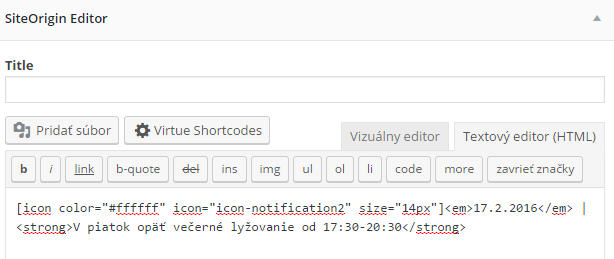
If you add the icon to topbar through SiteOrigin editor automatically add “br” me why.
I need:
icon + text in a row without “br”


There is white space in the footer of some of the pages on my site. See link below
*Login to see link
Temppassword1
Hey Ben, I know how to translate the theme update safe because the po file goes actually into the child theme, which would work because each site has a different child theme. However, when you translate the po files from Woocommerce you musst put them into wp-content/languages in order to make them update safe and by doing that it would make EVERY site have the same language for Woocommerce…
Thanks for the replies. I am wanting a site-wide image of a forest I have uploaded to be on the sides – yes like the 2nd post, but not so close to the edge. As it is now – I have the slider & lots of white space around the content. I like having a site-wide theme – the forest picture. I also love the scrolling feature. I may just leave it at that if I like it and keep it simple. Hopefully that makes sense.
Ok I have fixed part of the problem. The image menu icons now appear as they should again. for some reason the website changed the id of menu items so the css code was no longer pointing at the correct place. This has not fixed the parallax problem seen when changing page size.
I have also noticed that some pages have a white space below the footer. I have disabled instagram and facebook plugin as there was some sort of API error

Hey
Ok so this is all wrong. First no widget should be use an h1 tag. For SEO reasons you should only have 1 h1 tag on a page.
Second you shouldn’t have to load a specific font just for one title, If it’s a company logo tell theme to make it an image else use there own css to load whatever font they must have. It’s really laughably stupid to not directly code in how they want it to look. Every site defines a font family for the h1 tag.
The widget does have css added.. they are styling there own h1 font with this:
#wn-insurance-quote-editor #qqc h1 {
font-size: 26px;
line-height: 30px;
color: #ffffff;
margin-top: 0;
font-weight: 300;
}
They just aren’t defining the font title.. All they would have to do is fix that. Since they are not it means that in every single site that it’s being used the site owner would have to fix this.. Thats insane. Tell theme to blame there bad coding on there own developers.
So I suggest you tell them to fix there stuff. Take out the h1 and add a logo if they want it to look a certain way. You shouldn’t need to load a font family for them.
In terms of tricks to make the font family work, there isn’t really a good one. and you can just tell them that too. You can’t load google fonts so you would have to directly load it through css in your site. Meaning making a webfont, see here: http://www.fontsquirrel.com/tools/webfont-generator
Ben
HI 😉
I am creating a site using pinnacle and I have followed all the instructions to change the theme header on other pages but it isn’t working. I uploaded the premium theme after I was using the free version. Maybe that is the problem. I have the caching off so I should be able to see changes instantly. I am wondering what the heck I am doing wrong.
Please help!! The option to have a different header on every page is essential to this project.
Thanks
*Login to see link
This reply has been marked as private.




