
Notice: These forums are now retired and closed. For active support, please Submit a Ticket or visit our official WordPress.org community pages.
Kadence Theme | Kadence Blocks | Starter Templates | WooCommerce Email Designer | Ascend | Virtue | Pinnacle
Search Results for 'site'
-
AuthorSearch Results
-
In forum: Virtue Theme
In reply to: Custom sidebars not working
My site url is: https://gronn-teknologi.no/
In forum: Ascend ThemeTopic: Site load time & mobile menu
AnonymousMarch 3, 2019 at 1:18 pm #218456Hi there, Kadence team,
I am working to put the final touches on this website:
I have tried to reduce the size of most of the images on the site (originals were often above 5000 pixels wide, I’ve reduced to 1800 or even 1200 where possible), and I am using a plugin that is supposed to help improve site load time – however, the site is still loading quite slowly, especially on mobile.
In fact, several mobile pages will not load at all, and the mobile menu only seems to work when I am on the home page.
I have speed tested my internet on both my laptop and my browser and it’s not a bandwidth issue.
I am also checking with my website host to see if I just need to increase my hosting package. But I am also wondering if you can take a quick look at the site and let me know if there is something obvious that is causing the site to load so slowly.
I am especially concerned about the mobile menu not working.
Thank you in advance for any help you can be!
Best regards,
AmberIn forum: Ascend ThemeHello. I am trying to make the “List” view my default view in the store on my client’s website rather than the “Grid” view that is currently the default now. I have read other people’s resolutions, such as editing the “loop-start.php” file or the “archive-product.php” file. I can’t seem to find the correct area of code to edit and other options, such as plugins that change the default view to list rather than view, don’t work properly for me. Can you help me out please? Thanks!
Here’s the link to the store I am wanting to change. Default view is “Grid”, but I am wanting it to be “List” instead.
In forum: Virtue ThemeI am setting up a WooCommerce shop on our Virtue themed site. Right now on the checkout page with the BACS direct payment method the bank details sections doesn’t flow correctly. I assumed, that each section heading for any new bank would be aligned to left and be on a separate line. Currently the second bank heading floats to the right illogically.
I have also added a screenshot, where I indicate where I expect the heading to actually be. The specific test order should be accessible here.
In forum: Membership ForumsMarch 2, 2019 at 11:34 pm #218405Hey,
That site you linked to is using THE ESSENTIAL GRID plugin, I suggest you use that plugin if that you want layout. The Kadence Galleries will not allow for that many images to be filtered and won’t give you a subfilter option.The Kadence Gallery filter only filters what is shown in the gallery and only by the category that the image is assigned to.
You can give images a category in your media library of WordPress.
When setting up a gallery in Kadence Galleries you will see an option for “Add image category filter to gallery”
And then right under that a multi-select where you and define which categories you want to add for the filter to filter on.
see here: https://www.kadencewp.com/kadence-galleries-plugin/
In forum: Ascend ThemeIn reply to: This block contains unexpected or invalid content.
March 2, 2019 at 11:24 pm #218402That was strange, I’m trying to recreate to see if there is something I should add in the blocks for other people. I fixed your site by installing the Gutenberg Plugin and using this method of recovering the block.
https://www.kadenceblocks.com/docs/how-to-recover-a-broken-block/Ben
In forum: Ascend ThemeParse error: syntax error, unexpected ‘<‘ in /hermes/bosnaweb17a/b2182/ipg.grabbmediacom1/2moods/wp-content/themes/ascend_premium/functions.php on line 1
The error above is what shows when you visit the site.
Themes folder shows last modified 7:10 pm march first for ascend and twentynineteen themes. Cant see any updated files within of same date. Was this a core update issue? Thanks Bill.
In forum: Virtue ThemeIn reply to: API License isn’t working
This reply has been marked as private.March 2, 2019 at 10:06 am #218382In forum: Ascend ThemeHey guys,
I haven’t worked on my site for a while, so I think it’s maybe an update that’s changed something in the setup.
I’m attempting to update a few blocks, but after loading up the page in the editor, I’ve found a few of the blocks have changed to show:
“This block contains unexpected or invalid content.”
[Resolve] [Convert to HTML]Clicking on either of the options doesn’t seem to restore the block as expected.
The ‘Convert to Blocks’ option after hitting ‘Resolve’ also doesn’t seem to be doing anything either.
On the front-end, everything still looks how it should. I haven’t yet published the apparently resolved blocks as I don’t want to lose any content, and on the editor screen, the block preview just shows as blank/white/nothing.
Hopefully, you’re able to take a peek and get things working as expected.
I’ll reply to this with login details.
Many thanks,
ChrisIn forum: Membership ForumsIn reply to: Z-index issues with Modal
March 1, 2019 at 6:02 pm #218343Thanks, for posting!
I know what’s going on. A z-index is assigned to rows and columns because you can technically overlay columns with a negative margin. This is causing the issue with the modal being inside a row.
For a temp fix add the class “includes-modal” into the row settings where you have a modal.
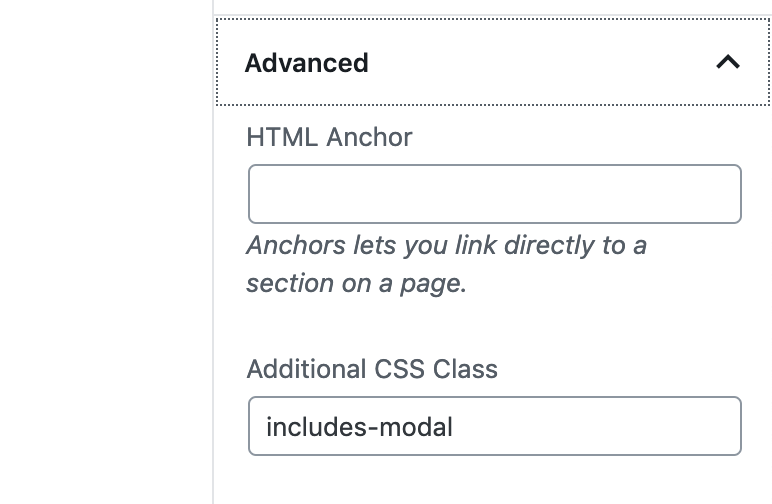
Then add this CSS in your site’s custom CSS:
.includes-modal {
    position: relative;
    z-index: 100;
}
I’m going to brainstorm some ways to check for this so I can automate a long term solution.
Ben
In forum: Membership ForumsIn reply to: Custom Fonts Import/Export
March 1, 2019 at 5:46 pm #218341Hey,
I’m not sure I can imagine this working well being controlled from a multisite dash. I think you would create issues with domain allow origin policies. Plus I just can’t imagine it being very practical for most people.I’ll have to look into an import/export as I believe that would be the most likely update for me.
Ben
In forum: Virtue ThemeIn reply to: Visual Editor tab and visual editor not working
In forum: Virtue ThemeIn reply to: Visual Editor tab and visual editor not working
Hello,
I’m not experiencing this on my site. Seems to me that there’s something going on with a conflict of plugins. Instead of deactivating all of your plugins, make sure that you leave the classic editor active. You need that in order to access the visual and text editors.
Can you post a link to your site so I can see if there are any obvious errors?
-Kevin
In forum: Membership ForumsIn reply to: Media Gallery setup
Tech support found out that your Kadence Galleries plugin only works for up to php 7.0, not 7.2. The site was working on 7.2. They recommend you upgrade to 7.2 as soon as you can. So, I changed my php to 7.0 and the plugin installed and activated properly. Hope this helps.
In forum: Virtue ThemeI want to have a max width of 600 px on the white box (site editor widget) in the row. If I do that with margins, that will be a problem on mobile. Whats the best way to style that please?
Thank you!
CarrieIn forum: Virtue ThemeIn reply to: Virtue Header
In forum: Virtue ThemeIn reply to: Virtue Header
I’m seeing the infobox issue, but can’t really tell why it’s doing that. In your screenshots I see multiple cache options in your admin topbar. Are you running multiple caching plugins on your site? If so, you should choose one option and remove the others.
This could be breaking the CSS output of your site.
-Kevin
In forum: Membership ForumsHello,
I’m using Ascend Premium on WP 5.1 and all Kadence plugins are up to date. I’ve added a Kadence Tabs block and inserted a media/text block. It looks fine in the editor but when I view the page the text is in the middle of the text area rather than at the top. I’ve not seen a way to control this. How can I do this? In the Tabs demo on your site I see the text is not center aligned but at the top.
I don’t have a link I can share.
In forum: Membership ForumsIn reply to: Custom Fonts Import/Export
In forum: Membership ForumsIn reply to: Custom Fonts Import/Export
Hello,
If you’re a Kadence Member, then you can use this plugin to add any fonts you like to your site:
https://www.kadencewp.com/product/kadence-custom-fonts/As for the multisite question, I’m not sure about that. I’ll flag this for a developer followup so Ben can let us know.
-Kevin
-
AuthorSearch Results



