Notice: These forums are now retired and closed. For active support, please Submit a Ticket or visit our official WordPress.org community pages.
Kadence Theme | Kadence Blocks | Starter Templates | WooCommerce Email Designer | Ascend | Virtue | Pinnacle
Search Results for 'widget area'
-
AuthorSearch Results
-
In forum: Membership Forums
In reply to: widget dock
July 21, 2017 at 10:30 am #152553Since the dock is a widget area you can place anything into it.
Ben
In forum: Virtue ThemeOne option to limit the best selling products to a certain category would be to add them via shortcode like this:
[carousel type=best-products orderby=date columns=4 items=8 speed=9000 scroll=all cat=YOUR-CATEGORY-SLUG]You can add that to a text widget in your page content, or you can go to Appearance> Widgets, and add the text widget to the Home Widget area and paste the shortcode into the text box.
Be sure to add your category slug to the end of the shortcode so you’re outputting the correct products.
I’m having a hard time visualizing what you’re after with the portfolio. Are you wanting to add products to your portfolio page?
-Kevin
In forum: Membership ForumsIn reply to: widget dock
Hello Alex,
You should be able to add the mail chimp opt in to the pop up by using shortcode.
Find the Shortcode for the form that you’ve created, and copy it. Then, go to Appearance> Widgets and add a Visual Editor to the widget dock widget area.
Within the Visual Editor, place your form shortcode.
This should allow the mailchimp form to show in the widget dock.Let me know if that works for you.
-Kevin
In forum: Virtue ThemeIn reply to: Show only image for blog posts on homepage
July 20, 2017 at 11:03 pm #152484So the best thing would be to disable the “latest posts” you’re adding through the theme options > home layout and enabled the home widget area. Then in your appearance > widgets add this shortcode to a text widget:
[blog_grid columns="3" items="6"]Then you would have a grid where the images would be next to each other. And you can hide all the content below with css.
#kad-blog-grid .blog_item .postcontent {
    display: none;
}
Add that in your theme options > advanced settings > custom css box.
Ben
In forum: Virtue ThemeIn reply to: Rendering / responsiveness
July 20, 2017 at 2:21 pm #152420You don’t seem to be using that widget area though? Why keep it?
yes you would need to remove the css you added to force the menu beside the logo.
I see the css I sent you working fine in safari. did you make sure to clear your cache?
Ben
In forum: Virtue ThemeIn reply to: Cart Total in Top Bar & Home Widget Area
July 20, 2017 at 10:53 am #152393Hey,
Please post a link when asking for support.You can use css to change the icon.
a.cart-contents .icon-basket:before {
    content:"e0c1";
}
In your theme options > home layout, you can set and enable where you want the home widget area to appear.
Ben
In forum: Virtue ThemeJuly 20, 2017 at 9:38 am #152382I have selected to show the cart total in the top bar and it does. However, the icon used is a basket and I would like to change it to a cart. Can this be changed? If so, where?
Where is the “Home Widget Area” displayed?
Cynthia
In forum: Ascend ThemeHi There,
I have Ascend Theme. The widget area into the top bar in the right side in desktop computer mode, it show up correctly, but in device mode or either in tablet does not show up. The site is *Login to see link Am I doing something incorrectly in the settings? I have already activated the option that fix the header + top bar. I hope you can help me.
Thanks in advance.
Hugo.In forum: Virtue ThemeIn reply to: Rendering / responsiveness
In forum: Virtue ThemeIn reply to: Rendering / responsiveness
July 19, 2017 at 1:05 pm #152316Hey,
You seem to have enabled the header widget area, then added css to push the menu that is designed to be below the logo beside it… I’m not really sure why you are doing this since you don’t seem to be using the header widget area… BUt if you’re going to continue with this set up then I suggest you add this css:@media (min-width: 992px){ .kad-header-left { width:20%; } .col-md-12.kad-header-right { width:80%; float:right; } } @media (max-width: 1200px){ #nav-main ul.sf-menu a { padding: 10px; } }In forum: Virtue ThemeHello.
I am developing in *Login to see link in section NEWS that is a area widget where I use Editor Visual, I like background color 100% of width like *Login to see link in section INNOVATIEVE PRODUCTEN
How i do this?
Thanks
In forum: Virtue ThemeIn reply to: Change header image by category
July 14, 2017 at 12:01 pm #151903Hey,
You can’t change the logo this way, you would have to edit the templates/header.php to do it that way. What I suggest you do instead of such a major code change is to not use the logo as a banner and instead add your banner through the below header shortcode input. Or header widget area. This would allow you to use a widget visibility plugin to control when certain widgets show.It’s always difficult to offer support and suggestions without a link. Thus its always best to follow support guidelines and post a link to your site.
Ben
In forum: Virtue ThemeIn reply to: how do i put text on topbar (left, centre, right)
Gotcha. So I would actually recommend using the topbar widget area. You can enable that from Theme Options > Topbar Settings. Then from Appearance > Widgets add three separate text widgets to your topbar widget area, each with a line of text. Then add this to your custom css box:
@media (min-width: 992px) {
#topbar .textwidget {
    width: 33.3%;
    float: left;
}
.col-md-6.col-sm-6.kad-topbar-right {
    width: 100%;
}
}
Let me know how that works!
And just to note, if you choose to do it this way you will not need your first snippet of css.Hannah
In forum: Virtue ThemeIn reply to: Auto-upload content to a page?
July 12, 2017 at 4:41 pm #151662You can use https://wordpress.org/plugins/widgets-on-pages/
Which will create a widget area you can add the content you want on both pages into.
Then add the shortcode for the widget area to both pages and they will both have the same content.
Ben
In forum: Ascend ThemeIn reply to: custom menu location
In forum: Ascend ThemeIn reply to: add cart and search icon to menu
In forum: Virtue ThemeIn reply to: Title for Image menu on homepage
Hi Sanne,
There isn’t a built-in option for this, but one workaround would be to enable the home widget area just above your image menu and add a title to a visual editor widget in your home widget area (from Appearance > Widgets). Would that work for you?Hannah
In forum: Pinnacle ThemeIn reply to: Testimonials On Front Page
July 11, 2017 at 5:08 pm #151490Hey, so your overlap is because your image was floated left and not cleared. Using Pinnacle shortcodes add a divider to clear floats.
Widgets are added, edited in the appearance > widgets page.
You have to show a grid not a carousel if you want to have an image show with the testimonials. That carousel is not designed to have an image included.
So you can again add the shortcode either in a text widget in the home widget area or in your page content just make sure to clear your floats.
Ben
In forum: Pinnacle ThemeIn reply to: Testimonials On Front Page
Hi there, Ben,
I just tried both options.
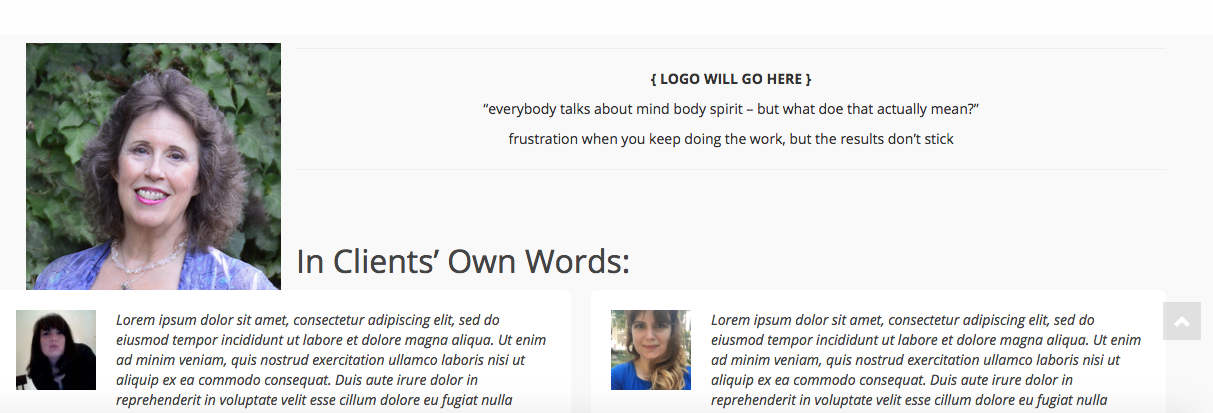
When I used the short code, the testimonials section overlapped with the content that was supposed to be above it, even when I added break code ( ) between the short code and the content above it. Please see this screenshot.
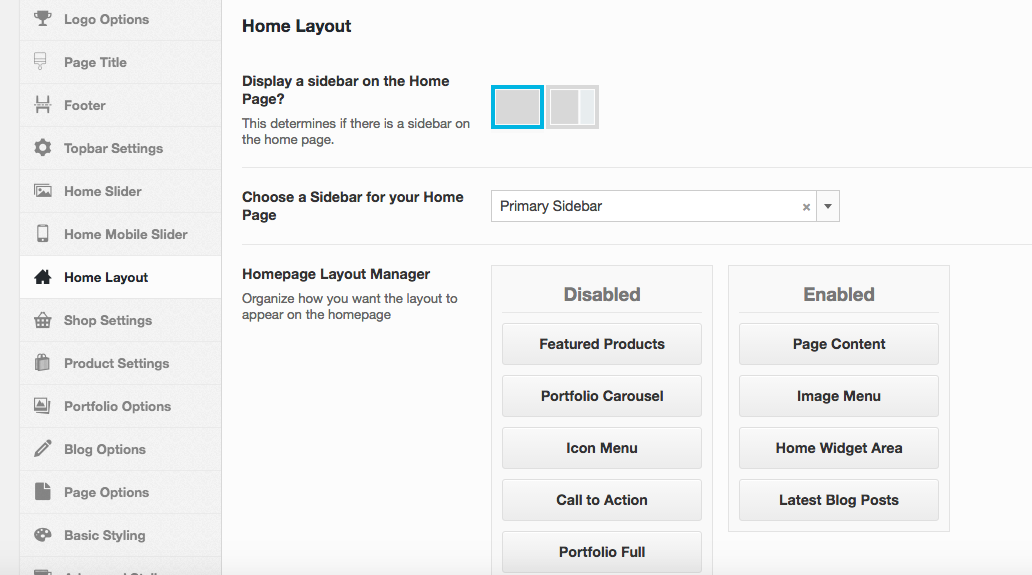
I also tried adding the “home widget area” option into the homepage layout manager – please see this screenshot – but when I scroll down the page to see the area where I specify the widget content, I can’t find where I am supposed to add a testimonials widget.
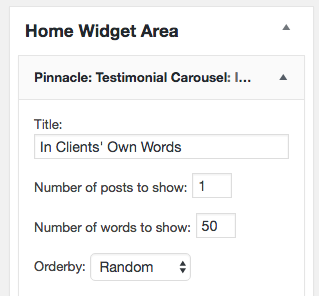
Lastly, I went under Appearance >> Widgets and added the Pinnacle Testimonial Carousel to the Home Widget Area, but it did not display anything at all on the front page.
Please see screenshot here.Can you see what I might be doing wrong, or have any additional advice?
Thank you,
AmberIn forum: Ascend ThemeIn reply to: Create Header Marketing Banner
-
AuthorSearch Results