
Kadence Theme Pro Update Adds Tools for Managing Kadence Elements

On Thursday, September 22, 2022, the Kadence team released an update to the Kadence Theme Pro plugin, adding two new features that allow for easier management of Kadence Elements. Kadence Elements are either full page templates or groups of blocks that can be used for custom templates and theme building, drop in content areas, or fixed elements on the page to more easily manage these elements.
These two new features added to Kadence Theme Pro plugin version 1.0.6 make using Kadence Elements even easier than before.
Native duplication capability
The first addition allows a site owner or editor to quickly duplicate an element. Instead of using a duplicator plugin, you can now duplicate an element quickly and easily right on the admin dashboard.
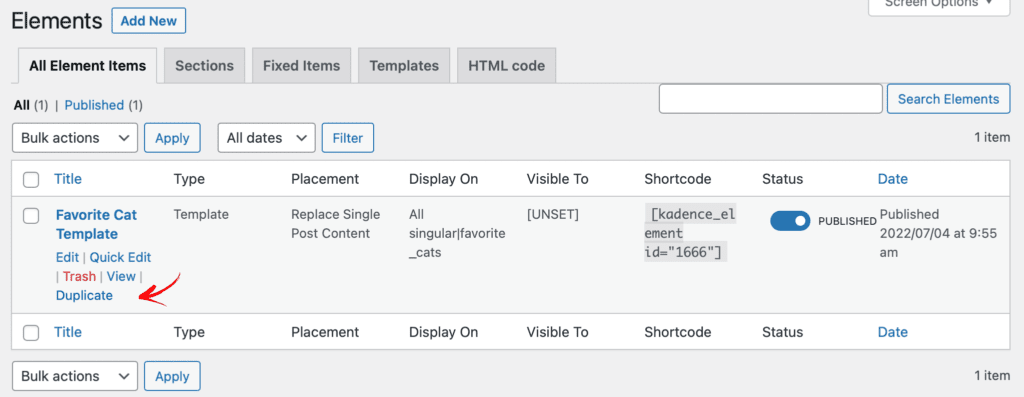
Often when users are creating new elements, there is a need to create a similar but modified element for a separate use case. For example, a site owner creates a custom post type that has a template page (or an archive page), but there is a need for a separate template layout for a group of posts, or even a singular post. A staff directory might want a different layout for HR staff members than it would for the engineering team. This duplication capability makes creating additional elements simplified and easy for the web team.
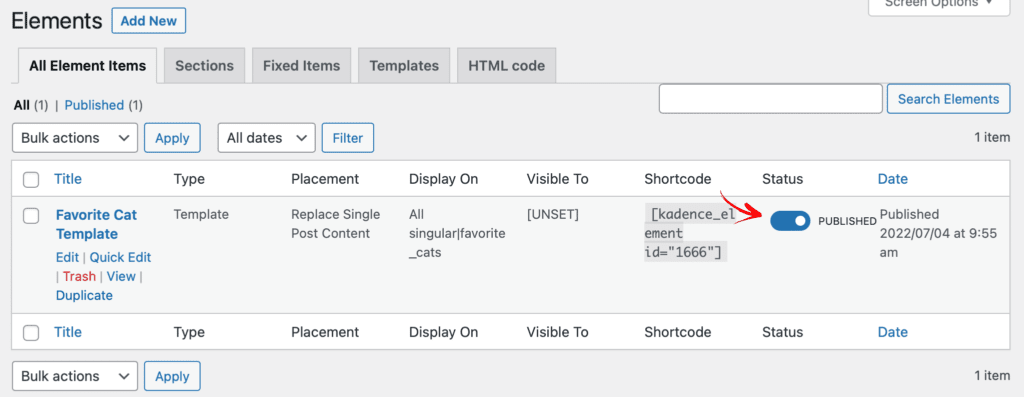
Enable/disable element capability
The second addition allows for fast enablement or disablement of an element. When adding a new element to a site, various rules can be applied for a specific element. For example, a section might be enabled for every blog post, but during testing it becomes apparent that a tweak needs to be made. Rather than deleting the element or turning off display rules within Kadence elements editing screen, a site owner can easily toggle display on or off right on the element listing overview page.
Additional Updates
The Kadence team also added a number of bug fixes and enhancements to the Kadence Theme Pro plugin this week, as well as some updates to the Kadence Theme available on the WordPress repository. These include updates to integrations with The Events Calendar and minor bug fixes. The Kadence Theme changelog has all of the information regarding these releases.
Kadence Blocks remains in active development with a focus on refactoring some foundational elements within Kadence Blocks. We will keep you posted on future updates.
To remain in touch with Kadence updates, join our mailing list, or follow any of our social channels to be the first to know of new releases to help you create more effective WordPress sites with Kadence.
Kadence Bundles for Deep Development
If you’re looking to create dynamic sites with Kadence, we highly recommend getting a Kadence Bundle so that you can unlock all that Kadence has to offer. From the beautiful exclusive Pro Starter Templates to Kadence Elements, animate on scroll effects and so much more, Kadence Bundles make developing with WordPress Blocks a breeze.
Create Your Website With KadenceWP Today!


Written by Kathy Zant
Kathy is a writer and speaker who helps businesses and people thrive. She creates some of the best content and tutorials about how to get more out of technology, marketing how-tos that help you grow your business, reports on security issues you need to know as they occur, and gives you all the tutorials to stay ahead and secure your life and business.
8 responses to “Kadence Theme Pro Update Adds Tools for Managing Kadence Elements”
-
-
Nice work. I’m using Kadence Elements more and more with each site I build – they are really useful in several ways!
I’m pleased to see all the ongoing updates and improvements that keep coming 🙂 -
Great work. Thumbs up.
-
Hi there. Quick question. Whenever I update my Kadence, it wipes out all the changes I have made to my original template. What am I doing wrong? I don’t want to have to rebuild the website each time Kadence updates. Please advise. Thanks.
-
If you make changes to the theme itself, an update will definitely do that. If you want to preserve changes, consider creating a child theme so that when the main theme updates, your child theme modifications remain. https://www.kadencewp.com/child-themes/
-
-
Thanks a lot, very useful additions.
-
One thing I love about Kadence is, it always helps me reduce the number of plugins indeed to install on my website.
-
I’ve been using Kadence for a few months now and it’s amazing! It’s easy for the reader’s eye and blazing fast. I love this new duplicate option as I’ve been using a plugin previously to duplicate content.


By Kathy Zant
Kathy is a writer and speaker who helps businesses and people thrive. She creates some of the best content and tutorials about how to get more out of technology, marketing how-tos that help you grow your business, reports on security issues you need to know as they occur, and gives you all the tutorials to stay ahead and secure your life and business.
Updated May 27, 2024
Create Your Website With Kadence


Nice! I can see that native duplicate capability being really helpful for my store. Thanks for the update!