
Notice: These forums are now retired and closed. For active support, please Submit a Ticket or visit our official WordPress.org community pages.
Kadence Theme | Kadence Blocks | Starter Templates | WooCommerce Email Designer | Ascend | Virtue | Pinnacle
Search Results for 'page '
-
AuthorSearch Results
-
In forum: Virtue Theme
In reply to: Anchor link
Hello Christine,
Since you have only a single Advanced Gallery block, you can’t use HTML anchor links. I would recommend separating the gallery blocks so you can insert an HTML anchor for it and add it as a link on texts within a page.
I’ll attach a screen recording of an example for your reference.
Hope this helps.
Kind Regards,
KarlaIn forum: Virtue ThemeIn reply to: crop thumbnail not working in gallery
Hello Christine,
Thank you for reaching out.
I see you have a third-party plugin to rebuild thumbnails. What I did is rebuilt that image’s thumbnails and purged the page cache to fix the thumbnail being shown. I’ll send a screen recording of what I did for your reference.
Hope this helps.
Best Regards,
KarlaIn forum: Virtue ThemeIn reply to: Anchor link
In forum: Virtue ThemeIn reply to: Help on the following please
July 22, 2021 at 4:40 pm #266970Hi Ben, I did it!!!! please see this page, I manage to link 1 and 2
https://liliacraftparty.com/patterns-page-2/
so the only possible way is to link each page, and I will do it that way, sorry I did not manage to make me understand!
I did change the color of the “add to cart” and now I know how to do it
also as you can see Im using Text/drop dowm menu with links to each category on all these pagesok, for now is all set, I think, sorry again for all the trouble and now I know that I have to write here my questions, Im working on this website to make it look better and more professional and easy to navigate
we keep in touch and thank you so much again
LiliaIn forum: Virtue ThemeIn reply to: Help on the following please
July 22, 2021 at 4:28 pm #266969Hi,
That is a product category archive. It’s not a custom page. It’s created automatically by WordPress. They are hiding the product title, price and add to cart button by adding this css:.details_product_item {
display: none;
}They are not building that with a page.
if I made one page of story, and another page that will be the continuation of thr story, how I place a pagination at bottom of each page to say 1, 2, and that when someone is reading 1, link number 2 and go to that page , and if they want to come back to 1, link 1 and return to that page.
That isn’t a thing. Pages can’t be interlinked like that, It doesn’t work that way. If you wanted to force something like that you would have to manually add links to each page.
Pagination is not about linking pages, it’s for an archive and allows you to have one archive (a category for example) and show a specific amount of posts at a time in that archive.
Please link to your site, link directly to your product category page.
Ben
In forum: Virtue ThemeIn reply to: Help on the following please
July 22, 2021 at 3:09 pm #266968Hi Ben, ok, I will try to explain with another website that use Virtue Theme, is Broomefields, please see the picture, and the link is this https://www.bromefields.com/product-category/knitting-patterns/hats/ that when p
do you see the pagination at bottom? how I do that? and as you can see these are NOT blog post, I know that blog post have their own pagination, Im talking about pages, so in other words, for example:
if I made one page of story, and another page that will be the continuation of thr story, how I place a pagination at bottom of each page to say 1, 2, and that when someone is reading 1, link number 2 and go to that page , and if they want to come back to 1, link 1 and return to that page.please let me know
Thank you
Lilia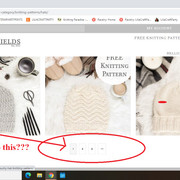 In forum: Virtue Theme
In reply to: Help on the following please
July 22, 2021 at 1:25 pm #266965You tell me to use shortcode, please help me to understand how to use it and please confirm that I can use it on these pages
I’m not telling you to use a shortcode. I’m telling you not to, and not to do this. WordPress already has an archive created you don’t need to make custom pages to show your posts with pagination.
I do not understand what you are trying to do or why. I understand you think you are being clear. But I don’t get it. I don’t know why you are creating pages so please add a link to the page you have created where you want to add pagination.
Ben
In forum: Virtue ThemeIn reply to: Help on the following please
July 22, 2021 at 12:59 pm #266962Hi Ben, thank you so much, ok, the color for “add to cart” was explained by Karla and as per her instructions I can do that on the CSS, she gave me the code, I will work on that this afternoon.
The drop down menu, as is not possible to do it, I will use Text and drop down menu and link each line to a category manually so that’s also all setRegarding the pagination, can you please explain a little about this “You can’t have pagination on a page using a shortcode. Pagination will appear for archives and not pages by default.”
What I need to do is the following:
I have like 100 patterns and I want to show then on several pages, each page will be the same, I mean with the Tex/Drop down menu with categories link to each category, but with different patterns, each page, until complete the 100 patterns, so I will have from page 1 to 10 (just an example), what I want is to have the pagination that go to each page, like 1, 2, 3, and go on…..
You tell me to use shortcode, please help me to understand how to use it and please confirm that I can use it on these pages
To make the patterns pictures with products, I will use carrousel that conteins 3 pictures only, this way will not scroll, the pictures/products will be just there, that’s the reason I will need several pages until complete 100 patterns and also will grow because I continue adding my patterns designs
ok, let me know and thank you so much again
LiliaIn forum: Virtue ThemeIn reply to: Help on the following please
July 22, 2021 at 12:42 pm #266960Hey,
1. If you want to delete categories you can do that in your admin under products > categories.
https://share.getcloudapp.com/BluK9BKOThere is no built-in way to hide a category in a category widget like you show in your photo. This is not a theme issue this is simply how woocommerce works.
2. Always post a link with support requests. Always. We can help with custom css if you want a custom style but only if you link to where you want to make a change and explain exactly what color you want it to be. The virtue theme does not include settings to change the add to cart button color in non hover state. However, the hover color will by default be the primary color you set in your theme options > basic styling.
3. You can’t have pagination on a page using a shortcode. Pagination will appear for archives and not pages by default.
Ben
“Shoppers who have the ability to personalize their products tend to be more engaged, purchase more often, and spend more per visit than those who can’t customize their goods in any way.”
The above phrase can be seen in the following article on product customization: *Login to see link
Examples of great pages using this can be found here: *Login to see link
It would be great if Kadence Woo Extras could include product customization, which is completely missing from the kadence suite. As a base example, I would mention the “Advanced Product Fields” plugin which can be found here: *Login to see link
And a demo page can be found here: *Login to see linkKadence Woo Extras already has the variation swatches, but it’s desperately missing the rest for a great customized product experience.
I’ve added this feature request in the following link: *Login to see link
Go there and give your vote if you would like this in the kadence suite as well.
In forum: Virtue Themesomething strange and i cannot put my finger on it
I am using this shortcode
[[display-posts category=”commonly-asked-questions” include_excerpt=”true” image_size=”thumbnail” wrapper=”div” wrapper_class=”display-posts-listing grid” meta_key=”_thumbnail_id”]]
which generates 4 posts on a page, 2 columns, with featured image
I have this on one website which works beatuifully, but on another site, same theme version, same setup in theme options, same post with same options, and it will just not work, what am i doing wrong
here is the site that works
scroll to the bottom “Whiteboard Solutions – Questions & Answers” sections
and here is a test page i am trying the same code on *Login to see link
any help greatly appreaciated
In forum: Kadence ThemeIn reply to: Showing featured image in post archive/category
Hello,
Thank you for reaching out.
After activating the Archive Custom Page Title Backgrounds option, edit each category and you should be able to see the Above Header Background Image option. This is where you will assign the image for each of them.
Here’s a screen recording for your reference – https://share.getcloudapp.com/d5uAKXZ4.
Hope this helps.
Best Regards,
KarlaIn forum: Kadence ThemeJuly 21, 2021 at 12:45 pm #266940Hi,
Thanks for your request on menu-specific dropdown settings. It’s being considered. Also very soon the feature request page will be getting some work and updated.As for your issue a dropdown menu will always have a background by default, even if you add custom content. There are no plans to change that and I don’t consider that a bug. If you need a special border-radius on the dropdown you need to use css. Since there is also a box shadow applied to the dropdown adding a border-radius to an inner element won’t look right.
Ben
In forum: Kadence BlocksJuly 21, 2021 at 4:38 am #266936Hi, I’ve inserted a local video in Row Layout under Background Setting. I played a lot with CSS, but I can’t get this video prevent from autoplay after page is loaded.
Thank for any hints.
In forum: Virtue ThemeIn reply to: Anchor link
In forum: Virtue ThemeTopic: Help on the following please
July 20, 2021 at 4:34 pm #266926Hello, I have a couple of questions I will need help please
1- If I use a product categories is possible to delete or hide some categories from the dropdown list? please see picture, let me know how
2- how I can change the color of the background “add to cart” buttom on products
3- how I can make this pagination on one page, is not on posts, is on a page, I want to create several pages with my products and have this pagination as shows in second picture, please let me know how I can do itThank you and please Ben, help me on this
thank you again
LiliaIn forum: Virtue ThemeTopic: Anchor link
Hello,
I have a gallery with 80 images in rows of 4, do you know if there is any way to anchor link to the middle of the gallery? I have a blog post and would like to make a link in the blog post that when clicked goes to the gallery page and right to the row where image 36 is.
ThanksIn forum: Kadence BlocksIn reply to: Form Block Field Recipient Placeholder
I tested and realized the placeholder is not working in the recipient email field. I have a drop-down field with email addresses for members of the company so users can select who they want to contact and would like that email value to be the recipient. The email log shows {field_4}
Here is the page: https://acsdm.com/refined/contact/
Below are screenshots of:
– your demo page
– my field settings (the email form is actually field 4)
– the email log results

 In forum: Kadence Theme
In reply to: Removing padding top on pages
July 20, 2021 at 1:20 pm #266920Hi Tony,
try the following.
First post:
WP backend -> Appearance -> Customize -> Page Layout and play with these 2 settings:
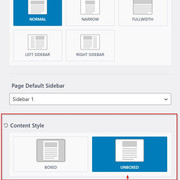
1./2./3.
WP backend -> Appearance -> Customize -> Header and play with all the header settings:

Have fun :)!
In forum: Kadence ThemeHi,
I’m using the pro version of Kadence Theme and I’m trying to add the featured image of each category as the background for archive titles. However, I couldn’t figure out how to do it via theme settings. Other threads about this topic showed contradicting answers, and I just couldn’t figure out if this option is available.
I already activate the “Archive Custom Page Title Backgrounds” addon.
Can you please help?
Thanks! -
AuthorSearch Results



