
Notice: These forums are now retired and closed. For active support, please Submit a Ticket or visit our official WordPress.org community pages.
Kadence Theme | Kadence Blocks | Starter Templates | WooCommerce Email Designer | Ascend | Virtue | Pinnacle
Search Results for 'post grid'
-
AuthorSearch Results
-
In forum: Virtue Theme
Hi there,
On my blog archive page, the Primary Sidebar keeps showing, despite my best efforts to change it to a custom sidebar. Did I miss a step here?
1. Under Virtue Misc Settings, I created a custom sidebar called “blogsidebar”
2. Under Virtue Blog Options > Blog Category/Archive Defaults:
Category Display Type: Grid Post, Three Column
Display the sidebar on blog archives? (Yes)
Choose a Sidebar: “blogsidebar”3. I set the template for the blog page to Blog Grid. On the page’s settings, I set the Display Sidebar to yes, and chose “blogsidebar”.
I was able to get “blogsidebar” to correctly show on blog posts, just not on the blog archive page.
Here is the blog archive page, wrong sidebar: *Login to see link
Here is a blog post with the correct sidebar: *Login to see linkThanks in advance!
JenniferIn forum: Ascend ThemeIn reply to: How to display Blog Categories
December 12, 2018 at 11:06 am #210548You can always add a category widget which just shows you the categories as a menu or dropdown but there isn’t a grid system since post categories in WordPress by default don’t have a “featured image”.
Ben
In forum: Ascend ThemeHi Ben,
thanks for sorting it out! I see – I thought that was the Kadence Elementor PRO widget.. Maybe you should change their names to include Kadence, so it’s clear :).
In Woocommerce, I see 2 product grid widgets – “Product Archive main loop” (which I now know is yours) and “Products” (with 4 cart icons in a grid). Then there’s more product loops in other sections. Having “Kadence Product archive main loop” in the title would have probably saved you this ticket, worth a try 🙂
Trouble is that your widget only works on the shop archive page, but it says “This element is not designed for this post type” if on the homepage for example. And the other product loop (built in or elementor) widgets are scrambled still. BUT – Woo shortcodes like
[products limit="6" columns="3" visibility="featured" ]are displayed fine, so all good!Thanks for the CSS snippet too.
Thanks,
LukasIn forum: Pinnacle ThemeIn reply to: Front page posts no longer displaying properly
In forum: Pinnacle ThemeMy front page displays three posts using the code:
[blog_posts type=grid items=”3″ orderby=”date” cat=”latest-news”]It has been working properly for a year now. Today I was updating the posts and everything seemed fine until I went to my home page to check my coding. I don’t think I changed anything, but I may have “updated” the page. Now the posts do not display correctly. Please help. My website is http://www.plcnh.org
Thank you.
-DonnaIn forum: Ascend ThemeIn reply to: change Ascend theme to Child theme
Hey,
1. Create a page and set the page template to blog. Then, once the page has refreshed, you should see a Blog Options tab. From there you can select “Grid with first post as standard” from the Post output style dropdown. Then, under your Page Title and Subtitle tab you can upload an image and add a title and subtitle. No need to use Canva.
2. Yes, just set the Post output style ti Photo and the number of columns to 3.
3. Which editor are you using? Or are you using a page builder? You can add a call to action widget on top of any image background (if using a page builder plugin this is easy).
4. Do you mean the demos? You can open the image in a new tab by right clicking then save the image. Or you can find tons of free stock photos here: https://unsplash.com/
Hope that’s helpful!
Hannah
In forum: Virtue Themehi,
I have a problem with the Portfolio Post Options
if I choose for: image grid. ( project options )
Then, If i click on a photo, the photo will open like a new page, and I cannot click to the next image, or see the next picture.I have to go back in my browser to go back to my portfolio page.
If I choose for an other option with the portfolio Post options,
for exemple: Image Carousel. Then If I click on a photo, the photo will open in a kind of ‘slider’, ( backgrond portfolio page is darker ) and I can click to the next image, and see all pictures in my portfolio.If I close this ‘slider’ I am back on my portfolio page.
Hope you have any advice
regards,
Bertexample: ( no slider )
*Login to see linkexample: ( with pop-up slider )
*Login to see linkIn forum: Pinnacle ThemeIn reply to: Staff – gaps in staff member listings
In forum: Pinnacle ThemeIn reply to: aspect ratios of images throughout the site
November 29, 2018 at 11:06 am #209501Hey,
For the portfolio grid page you can set the ratio in your portfolio page settings. Scroll down to the section for image ratio: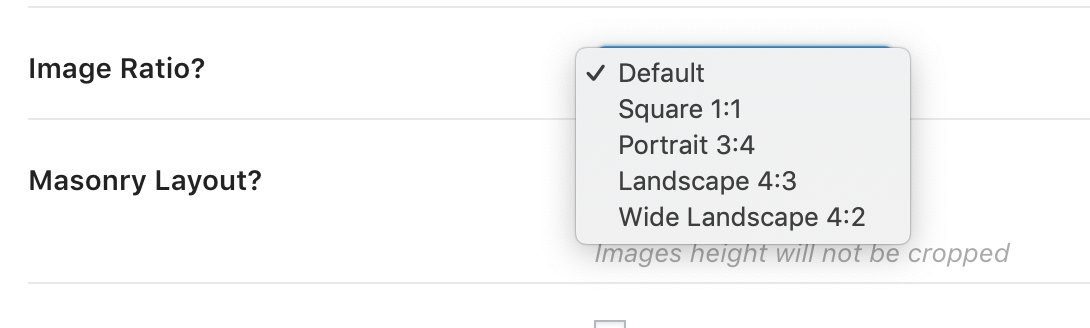
Inside a portfolio post for the slider, you can set the image ratio by setting the max width and max height in the portfolio settings.
Does that help with the portfolio items? You can set the ratio because you can set the slider or single image size in your portfolio post settings and you can set the ratio for the grid for the portfolio grid output.
For blog posts, If you want the grid to output images in whatever ratio you upload you can do that. Go to theme options > blog settings and turn off “Hard Crop excerpt images to the same height.”
For a standard blog list style if you set the post summary to “portrait image” that will output as a square see the last post in on this page: http://themes.kadencethemes.com/pinnacle-premium/our-blog/
If you set the post summary to landscape image that will output your image in whatever ratio you uploaded it. See the first post in the above link.
Does that help? If you can post a link to your site so I can see what you have set up that would really help me answer specifically.
Ben
In forum: Virtue ThemeHello,
My website is almost done but there is a thing I’ld like to change on my homepage but just can’t see where to do so !!
I’m confused but I’ve been everywhere and I know I have once make some change and now impossible to find where.
In my homepage : *Login to see link I’ld like to change the bottom part from a 4 grid post display to a carousel of post .
Can you tell me where how to do so ?
I’m really sorry to ask you a so stupid question but I struggle with this one !!!
Thanks
GerardIn forum: Virtue ThemeTopic: Post Grid issue after update
Hi! I updated my theme and can’t get Post Grid to work on my homepage any longer. Nothing else appears to have been affected by the update. I can set Post Grid up on any other page except the home page (where I want it.) I have gone through everything three times and can’t find the issue with the home page. Can you take a look, please? smartypantsfinance.com
In forum: Virtue ThemeIn reply to: Portfolio on Homepage does not appear again…
November 23, 2018 at 12:02 pm #208542When loading the grid a masonry layout requires javascript to align items. that alignment and js function runs after the images init load. When you remove an image in your library but not in your post then WordPress stalls looking for that image and while it can push on the javascript that runs the alignment for the grid is stuck because it’s expecting the image which won’t load because it’s been deleted.
With virtue 5 (coming soon) this will be changed a bit and force the load of the grid but it won’t take away from the fact that in both the grid and the single post you had an empty slide so it’s ideal not to remove images until you remove them from the post.
I hope that helps clarify.
Ben
In forum: Ascend ThemeNovember 22, 2018 at 2:55 am #208363I’d like to add an issue to this please.
4) With shortcode blog grids I am using shortcode audio in excerpt. The issue is that one one post there is no gap below title and audio player except and the other there is. Yet both blog posts have the same amount of text and layout???
In forum: Ascend ThemeNovember 22, 2018 at 2:51 am #208362Hello
I’ve noticed 3 things I’d really like to answer to if possible.1) Is it possible to turn off ‘…read more’ links in post excepts, when I use shortcode to display them. Ideally I’d like to turn it off for a specific category, if this is possible? I used css to display:none which sort of works regardless of category but it leaves the …. I can’t seem to target this with css and see no option to turn it off. Any ideas on how I can do this please?
2) When using shortcode for blog grids in Ascend premium is there any way you can select how many columns to display it in? I can’t see this anywhere and it always seems to always revert to 3 columns.
3) I was using sitebuilder by origin and found it to be very buggy when inserting woocommerce short code. It would create an unwelcome border around the content and it wouldn’t display properly (over lapping content and going off screen). Since then I removed sitebuilder as I couldn’t debug it.
Thank you
TomIn forum: Virtue ThemeIn reply to: Portfolio on Homepage does not appear again…
Hello,
I’m having the same problem with my posts grid display. All of a sudden no more posts are displayed. I’ve been working on my site and having made no changes on my post grid template page and now it looks like this : http://roadbook-video.com/articles/
But the posts seem to be transparent. When the mouse hoover on the page I can see the link and even click on it but no display !!!
Mystery !! I’ve clear the cache on my browser (Chrome and Firefox )
Please I need help.
ThanksIn forum: Virtue ThemeIn reply to: Design the phone
November 19, 2018 at 3:46 pm #208000Hey,
You can’t show a list for desktop and a grid for mobile Unless you want to remove the toggle buttons on mobile. Is that ok with you?Please post a link directly to the page you are referencing
Ben
In forum: Virtue ThemeIn reply to: Virtue Gallery Thumbnail Size
November 15, 2018 at 3:50 pm #207620Hey marcello,
In the future, Please create your own topic, do not post in someone else’s thanks!
The gallery grid is not based on a pixel size. It’s based on a percentage. the columns work through 6 and to get more you would either have to force it using css or jump to 12 which would work as part of the bootstrap grid system. Css for 8 columns on desktop screens would be this for that gallery:
@media (min-width: 1200px){
#pl-68 .kad-wp-gallery .g_item {
    width: 12.5%;
}
}
You can force the images to show at a max size by using css but that will mean they are spaced further apart on larger screens where the column is larger then 100px:
#pl-68 .kad-wp-gallery .grid_item {
    max-width: 100px;
    margin: 0 auto;
}
CSS can be added into your theme options > advanced settings > custom CSS box.
Ben
In forum: Virtue ThemeIn reply to: Homepage: Latest From Blog Section Increase
No, I must be doing something wrong, Hannah.
Here is what I’ve done.
Settings> Reading> Homepage Displays> Latest Posts
Home Page> Default Template>
Theme Options> Homepage Layout> Home Layout Manager> Enable is blank
Theme Options> Homepage Layout> Home Layout Manager> Page Content Options> Latest Post Display set to post excerpt > Use Grid Format On> Post Columns set to three
Nothing changes. <scratching head>
In forum: Virtue ThemeIn reply to: Homepage: Latest From Blog Section Increase
Followup question…Hannah.
So I can’t have a Slider on the frontpage with a blog Post Grid below with more than 2 columns?
If I want more than 2 columns of posts on frontpage, I have to lose the slider and just have a traditional Blog Post Page in grid form?
Thank you,
PamIn forum: Virtue ThemeIn reply to: Homepage: Latest From Blog Section Increase
Hi Pam,
If you’re enabling the Latest Blog Posts in the homepage layout manager you can only set the number of columns to one or two. If your homepage is set as the latest posts page from Settings > Reading then you can set “Use Post Grid Format” to “On” from Theme Options > Home Layout > Page Content Options. Then you’ll see an option to set the number of columns (up to four). Or you can always add a shortcode into your home content area or a text widget within the home widget area. A shortcode like this should work for you:[blog_grid orderby=date items=8 columns=4]
You can see a full list of shortcodes here: http://docs.kadencethemes.com/virtue-premium/shortcodes/
Hope that’s helpful!Hannah
-
AuthorSearch Results



