Can you post a link to your site? It’s possible you have a js error that is causing issues.
Ben
Hey,
Ok got it. Yea there isn’t anything you can do about this.
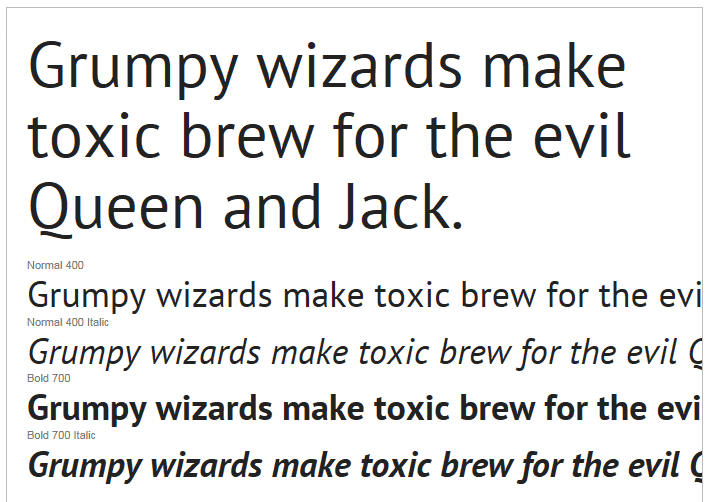
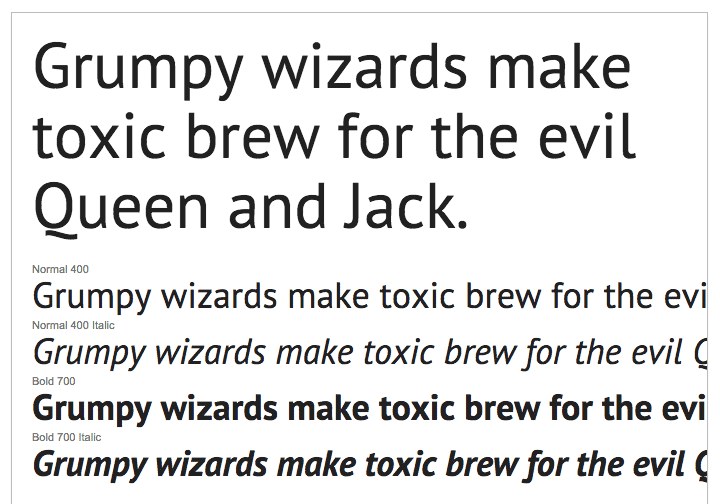
This is old but has some good images to show you how the two OS are different :
https://damieng.com/blog/2007/06/13/font-rendering-philosophies-of-windows-and-mac-os-x
Here is a screen shot of the google site for pt sans:
Windows:
Mac:
Ben
Hi Hannah,
I put 4 image menu in my homepage. In mobile display the 2 image menu is overlapping with the other 2 image menu.
here’s my website http://www.princessandthepea.com.ph
Thank you.
Hi Alex,
What css are you adding? Can you post a link to your site?
Hannah
Hi Ben – i know that this board hasn’t been active for a while… is there a tutorial for how to make your website look like the link you provided up top? I have Virtue Premium and I need several shop categories and this seems like a great format. My format is making my page look messy and confusing. This is my first page that i have created so the simpler the better! Thanks!
Hi All,
i am new with website building, so I have this question:
I want to have copy of mywebsite (if something one day will broken I want to have it), how I understant this called backup?
can you please let me know best way to have safe copy of my site? simples and best way need (I am working on Virtue Premium theme, i want to save it too).
Regards,
Andrius
Hi Ben,
1) yes i use a child team functions.php. Thats is the code i put in my child teem functions.php. When added, the site goes blank! I dont know what is going on.
2) Perfect, that is what i was looking for. Many thx.
Hope you can help me with question 1 as well.
gr Alex
Hi, Good day,
I just want to ask if there is a way to add a tittle before the payment method on the checkout page. I want to put a title “Chose payment type”
Here’s my website link http://www.princessandthepea.com.ph
And I’m using the Premium Virtue theme.
Thank you,
Hi
I have problem for some time now, i cannot update the theme v3.1.2, im running IIS 7.5 on my own server.
I have this Message: An error occurred while updating Virtue – Premium: Could not remove the old theme.
And then the website is all white page afterwards.
Hope you can help with this Issue
supervisionalarm.dk
BG Jan
Hi! Hope your weekend was a blast!
My site is up and running however the Kadence slider is not re-sizing the images so I must have something not set correctly?
link to the site is *Login to see link
Ok, I’ll try that. This is response I recover from Ipage,
Thank you for contacting Support.
I’m sorry for the inconvenience. Currently, cache is enabled in your account. This is the reason you are unable to see the updated changes. I have disabled it now. Could you please check your website again after clearing the browser cache and cookies?
You can check Cache Control Tool at: https://www.ipage.com/controlpanel/cachecontrol/ .
To learn more about clearing the browser cache and cookies, please refer the link: http://www.ipage.com/knowledgebase/beta/article.bml?ArticleID=1799 .
Thank you!
Praveen K
Customer Support
I can’t seem to find where to clear cache. I’m using a Samsung galaxy tab 4 10.1 bright white
Janine,
Can you post in a new topic. Provide a link to your site?
EDIT – disregard, you have created a topic, Thanks! lets finish there.
Thanks!
Ben
Hi Janine,
So you’re setting the Default post summary feature Image from Theme Options > Blog Options, correct? Have you tried clearing your cache? Can you post a link to your site?
Hannah
An update – the failure is actually seen on all devices (mobile & PC ) it just works most of the time on PC (Firefox)
I looked at the HTTP traffic – when it fails the website traffic shows this
POST /shop/1-designer-dog-collars-peacock/ HTTP/1.1
HTTP/1.1 403 Forbidden (text/html)
It just does not do it all the time
the site is http://www.korbell-designer-collars.com
adding a product to the cart sometimes works and sometimes does not. I’m stumpted!
help appreciated!
Hey Jose,
Is there a way you can send me a temp login to your site using the “Set as private reply”
I would like to see whats happening. see If I can track it down for you.
Ben
Hey,
I don’t think its related but I can tell you that you should fix this plugin or remove it: plugnedit it’s causing errors on your site.
Can you send me a temp login to your site so I can see your sliders settings. You can post using the “Set as private reply”
Ben
Hey,
I’m looking at your site. Where are you using a light font weight?
Ben
Hey,
Sorry for the delay. Looks like your fonts are being blocked on the second site. Try deactivating your plugins to test. If that doesn’t work try contacting your host.
Hannah
I need help badly. I updated to the new WordPress “Billie”. I had also wanted to start my website over cause I didn’t like it so I had reset the website back orginal. I purchased Kadience Premium Theme “Virtue”. Now whenever I’m in Virtue theme options to make changes to Web site it say ” There was a problem with your action. Please try again or reload the page.”
I contacted my hosting company Ipage. They said try a new browsers. I did that still didn’t work. If I make changes thru WordPress it makes and saves the changes but I want to make my changes thru the Theme I purchased. What can I do? Please help me.
Hi! Sorry for the delay. Are you able to post a link to your site? You can set as a private reply if you’d like.
Hannah




