
Skip to content
Help Center
  • Pricing
  • ProductsExpand
    • Premium PlansGet all the tools you need in one plan
    • Kadence ThemeLightning-fast performance theme for modern websites
    • Kadence BlocksDrop in ready designs with advanced controls for pixel perfect websites
    • Kadence Shop KitCreate a more effective WooCommerce shopping experience
    • Kadence ConversionsBoost sales and build engaged audiences with popups and banners
    • Kadence InsightsEasily create A/B tests. Optimize your pages to drive higher conversions.
    • View All Products
    • Get Kadence + Hosting
      In One Place

      Enjoy faster setup, top-tier performance, and worry-free WordPress hosting – Kadence Theme, Kadence Blocks, and Solid Security all pre-installed.

      Learn More

  • Kadence AI
  • Starter Templates
  • Blog
  • SupportExpand
    • Resource HubStart here for guides, Product docs, FAQs, and Troubleshooting tips, all in one place.
    • Contact SupportStuck on something? We’re here to help! Open a ticket for top-notch support.
    • Contact Our TeamGot pre-sales questions or need help choosing a plan? Open a ticket and our team will guide you.
    • About usCrafted with love in Missoula, Montana. Meet the team behind the mission.
Account Account
Get Kadence
Help Center

Account

  • My Account Page
  • Kadence License Activation & Renewal FAQ
  • Understanding Site Limits and License Usage Guidelines
  • How to Upgrade Your Kadence Purchase
  • How to Renew Your Subscription Early

Kadence General

  • How to Add and Edit WordPress Menus
  • How to eliminate empty space on Posts, Pages, and Archives
  • How to Manually Install and Update Free Kadence Plugins from WordPress.org
  • How to Install and Use the Temporary Login Without Password Plugin on a WordPress Website

Additional Plugins

  • Kadence WooCommerce Email Designer
  • Kadence Page Transitions
  • Kadence Galleries
  • Kadence White Label
  • Kadence Simple Share (Add Social Share Icons to Posts)
  • Kadence Child Theme Builder (Create and Sell Child Themes)
  • Kadence CAPTCHA
  • Kadence Reading Time
  • Classic Kadence Themes and Plugins

Optimization

  • What is Page Speed Insights?
  • Improving Largest Contentful Paint (LCP)
  • Troubleshooting Broken Styles/Features when using Optimization/Caching Plugins
  • Home
  • Knowledge Base
  • Kadence General
  • Additional Plugins

Kadence Reading Time

The Kadence Reading Time plugin is a useful tool for WordPress users who want to display an estimated reading time for their posts. This feature can encourage visitors to read through your content. The plugin automatically calculates the estimated reading time based on your global words-per-minute setting, so you do not have to manually set the reading time for each post. Shorter posts will have a quicker read time than longer ones automatically.
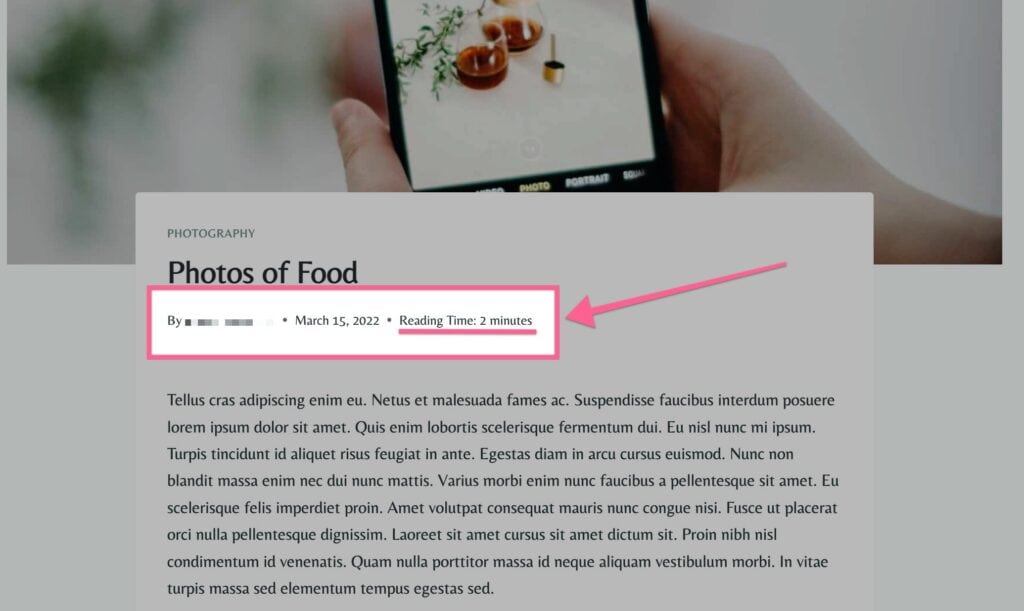
Kadence Reading Time Sample
Table of Contents
  • Getting/Activating Kadence Reading Time
  • Kadence Reading Time Settings
  • Kadence Reading Time Shortcode

Getting/Activating Kadence Reading Time

The Kadence Reading Time Plugin is only available with the Kadence Full or Lifetime Full Plan. You can purchase either the Full or the Lifetime Full Plan by Clicking Here.

Once you have access to the Kadence Full Plan or Lifetime Plan, you can download Kadence Reading Time from your Kadence Downloads & License page.
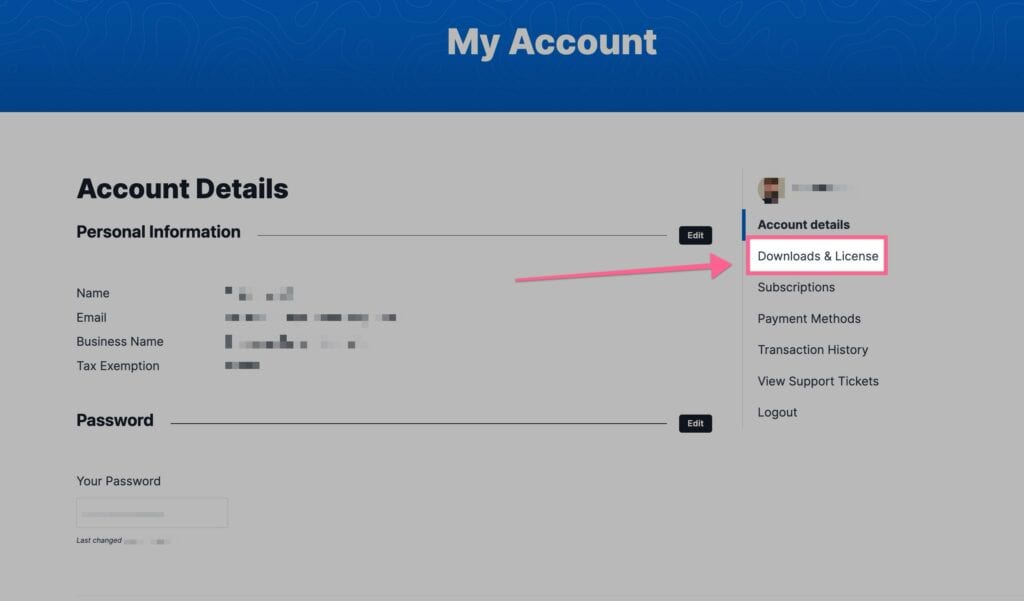
Downloads and licenses

You will see the Kadence Reading Time plugin in your Product List. You can download the Zip File. Be sure to leave the file compressed and don’t unzip it.
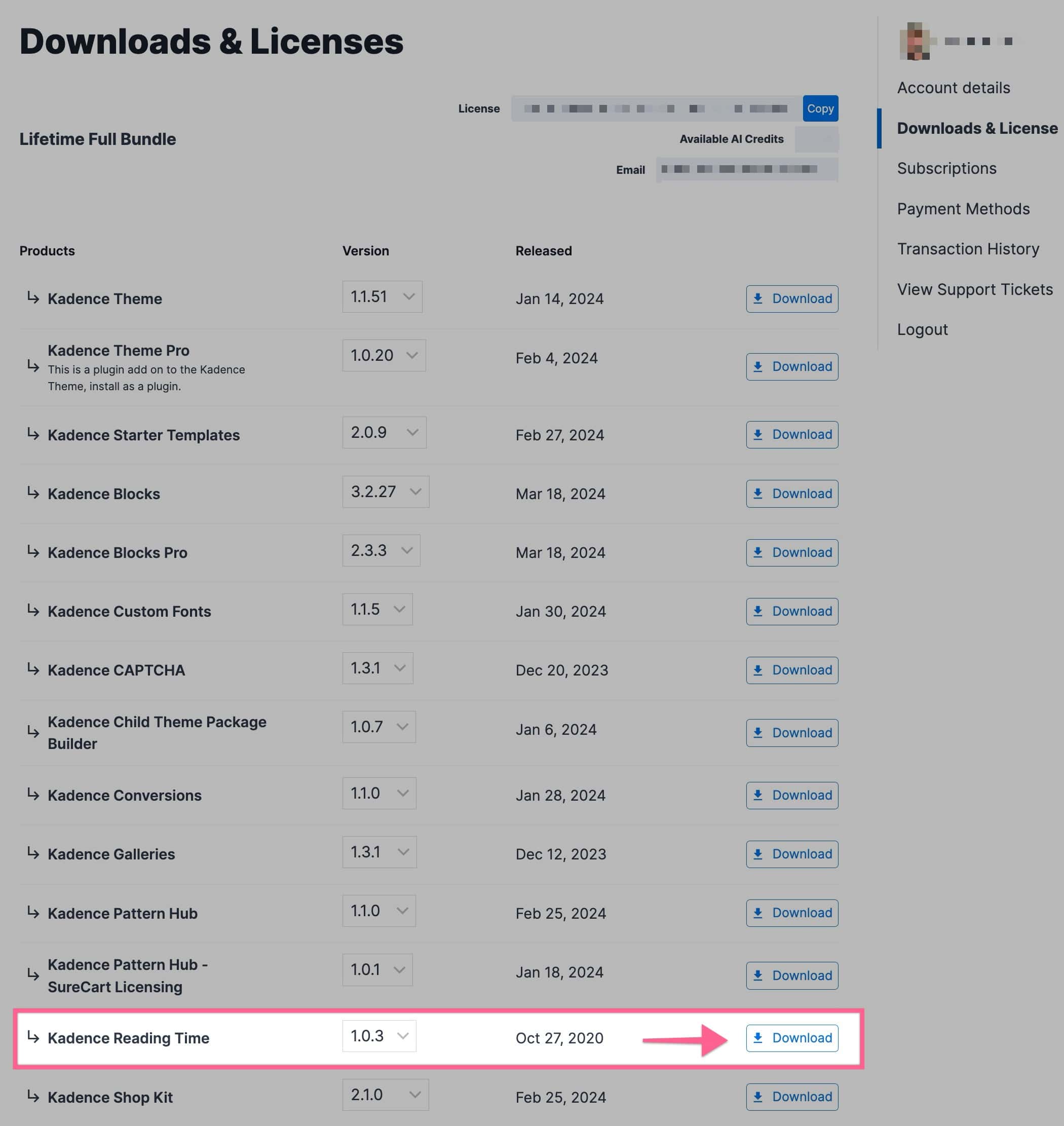
Kadence Reading Time Download

You can upload your Zip file by going to your WordPress Dashboard -> Plugins -> Add New Plugin. Then you can click on the Upload Plugin button at the top of the page. This will allow you to choose a file. Pick the Kadence Reading Time Zip File downloaded from your Kadence Account.
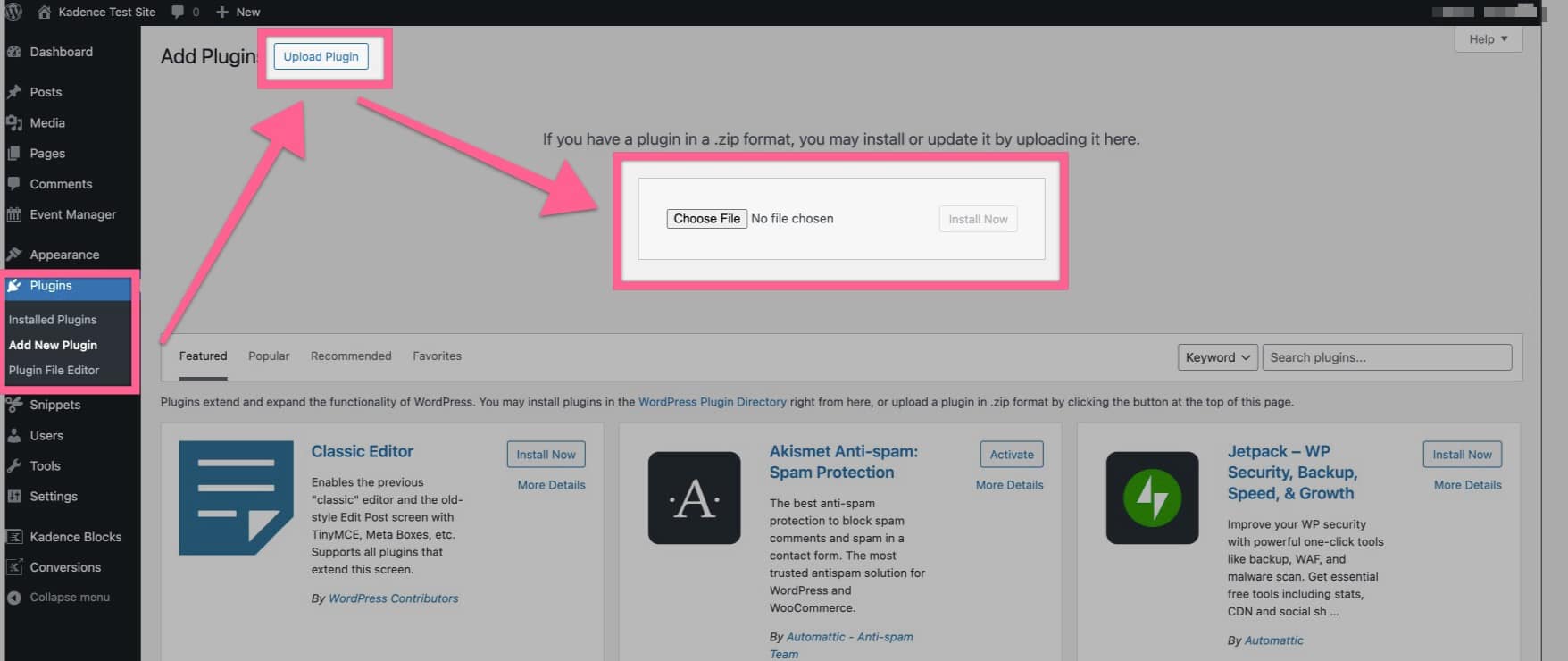
Upload Plugin

Once you have uploaded your plugin and activated it, you are all set to get started using Kadence Reading Time.

Kadence Reading Time Settings

You can access your Kadence Reading Time Settings by going to your Dashboard -> Appearance -> Kadence -> Reading Time
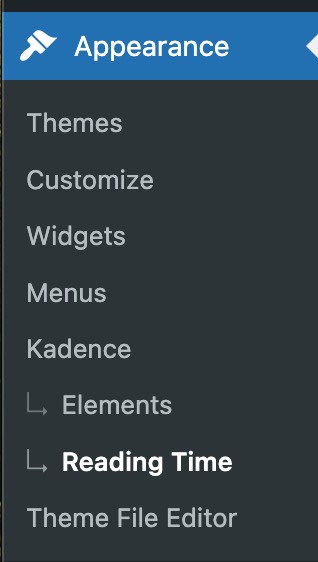
Kadence Reading Time

You can adjust the Reading Time Settings to customize your Kadence Reading Time plugin.

You can insert the reading time before the content on single posts.

You can also insert the reading time for excerpts on archive pages.

You can Choose the Word Per Minute to Calculate the Read Time. The default for this setting is 250. Which means the default read time is calculated at 250 words per minute. You can change this as you see fit.

You can adjust the Label. The default label is Reading Time.

You can also adjust the Postfix, which by default, is Minutes.

You have the option to set a Postfix for singular. This is for whenever the read time would be only 1 minute long, which is singular. By default this is set to Minute.

Finally, you have the option to Insert the Reading Time in the Post Meta. This inserts your Reading Time into your Post Meta for each post.

You can press the Save Changes button to save any changes made.
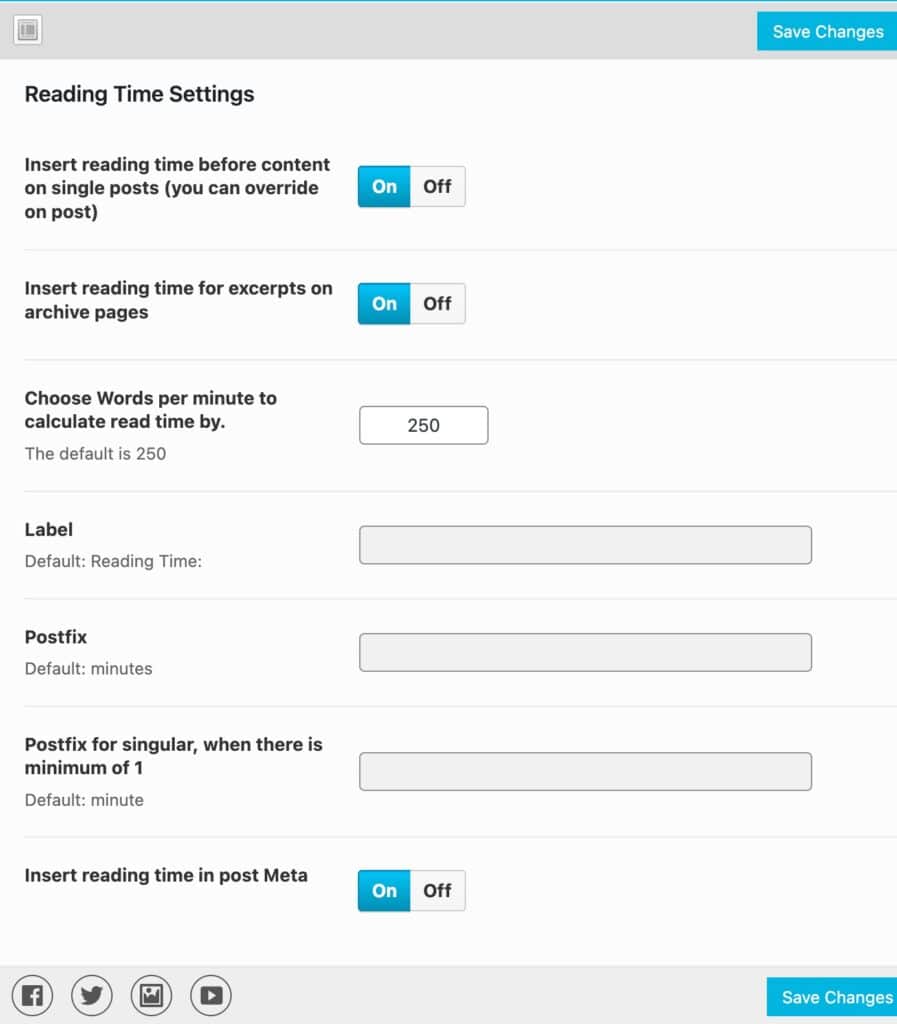
Kadence Reading Time Plugin Settings

Kadence Reading Time Shortcode

If you have a Custom Post Type or want to share your Reading Time somewhere other than what is available, you can use the [kt_reading_time] ShortCode to do so. You can also just use this ShortCode wherever you need. The Kadence Reading Time ShortCode can be added to a WordPress ShortCode Block and added to different Post Types or Elements.
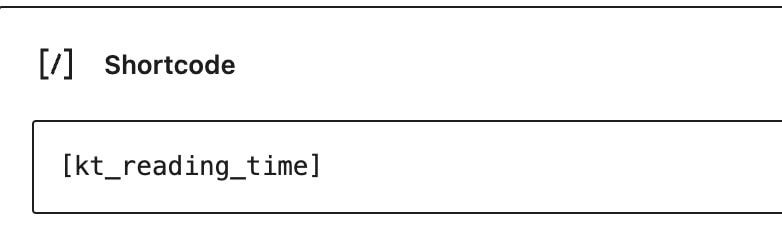

Kadence Reading Time Shortcode
Do you feel this document was helpful?
Kadence CAPTCHAClassic Kadence Themes and Plugins
The Kadence WP Logo
Crafted in Missoula, Montana
  • Follow Kadence on Facebook
  • Follow Kadence on Youtube
  • X
  • Follow Kadence on Instagram
Trustpilot
Products
  • Kadence Plans
  • Kadence Theme
  • Kadence Blocks
  • Kadence AI
  • Kadence Starter Templates
  • Kadence Shop Kit
  • Kadence Conversions
  • Kadence Pattern Hub
  • View All
Resources
  • Blog
  • Podcast
  • Knowledgebase
  • Support ticket
  • Feature Requests
  • FAQ
  • WordPress Hosting Services
About Us
  • About Kadence
  • Become an affiliate
  • Contact us
  • Terms
  • Privacy Policy
  • Security
Our Partner Brands
  • SolidWP
  • LearnDash
  • The Events Calendar
  • GiveWP
  • MemberDash
Kadence Community
  • Kadence Marketplace
  • Join the Facebook Group
  • Subscribe to our YouTube Channel
© 2024 Kadence WP | All prices are in USD
Logo for StellarWP an umbrella brand of Premium WordPress plugins
  • Pricing
  • Products
    • Premium PlansGet all the tools you need in one plan
    • Kadence ThemeLightning-fast performance theme for modern websites
    • Kadence BlocksDrop in ready designs with advanced controls for pixel perfect websites
    • Kadence Shop KitCreate a more effective WooCommerce shopping experience
    • Kadence ConversionsBoost sales and build engaged audiences with popups and banners
    • Kadence InsightsEasily create A/B tests. Optimize your pages to drive higher conversions.
    • View All Products
    • Get Kadence + Hosting
      In One Place

      Enjoy faster setup, top-tier performance, and worry-free WordPress hosting – Kadence Theme, Kadence Blocks, and Solid Security all pre-installed.

      Learn More

  • Kadence AI
  • Starter Templates
  • Blog
  • Support
    • Resource HubStart here for guides, Product docs, FAQs, and Troubleshooting tips, all in one place.
    • Contact SupportStuck on something? We’re here to help! Open a ticket for top-notch support.
    • Contact Our TeamGot pre-sales questions or need help choosing a plan? Open a ticket and our team will guide you.
    • About usCrafted with love in Missoula, Montana. Meet the team behind the mission.
Account Login
