Notice: These forums are now retired and closed. For active support, please Submit a Ticket or visit our official WordPress.org community pages.
Kadence Theme | Kadence Blocks | Starter Templates | WooCommerce Email Designer | Ascend | Virtue | Pinnacle
Search Results for 'cache'
-
AuthorSearch Results
-
In forum: Virtue Theme
In reply to: Portfolio sidebar menu – home page
Hi Kevin, tks for the speedy answer
1/ Your css doesn’t alter the font size of the portfolio article. I made it 10px to be sure and cleared browser cache several times! (is there something else I have to do?)
2/ The all grey first box is (was always) selected for home layout, it’s Ben’s code in functions.php that is putting the portfolio menu everywhere (see first post in this thread).Tks, John
In forum: Virtue ThemeIn reply to: Images not loading….
March 14, 2016 at 2:47 pm #85776Yes but your site usually has a cache, that is what hannah was referring too.
Can you make sure you update to the latest version.. Looks like now you are using 3.2.9
https://www.kadencewp.com/manually-updating-a-theme/
Ben
In forum: Virtue ThemeTopic: CSS File not attaching
odetowood.com is my site and the css file does not always get called correctly and it requires me to empty the page cache often. I’m not sure if this is Kadence issue or a different WordPress issue. Hopefully (only for the sake of the this issue) when you click on odetowood.com it will load without style. If not, clicking the logo from other pages causes the issue too. Hopefully someone knows the solution! Thank you in advance!
In forum: Virtue ThemeIn reply to: Problems after changing site url
In forum: Virtue ThemeIn reply to: Images not loading….
In forum: Pinnacle ThemeTopic: Home Page Header Disappeared
Hi,
Firstly – just bought Pinnacle Premium yesterday and am loving it. A seriously beautiful and flexible theme, thank you so much.
Now: after attempting to put a revolution slider on my Home Page, deciding I didn’t like it, and wanting to revert back to the standard Page Title Header I have made, I discovered that my Page Title Header now refuses to show up on the Home Page, It’s still on every other page, just not the Home Page. You can have a look here: *Login to see link
I’ve attempted several things, including resetting the Theme Options in the Page Title and Header Layout sections, I’ve also deleted the page I based it off and reconstructed it in the hope it would turn off. Based on searching the forums, I also tried flushing my cache. I’m at my wits’ end, so looking forward to hearing from someone who can tell me what’s wrong. Thanks again!
In forum: Virtue ThemeIn reply to: Product Overlap Issue
In forum: Virtue ThemeIn reply to: CSS does not work in the Netherlands
Hi Hannah, hi Ben,


These are the screenshots I received from my followers in Holland.
And yes, Ben, I use W3 Total Cache.
Also, I noticed a second bug:
When accessing my website http://www.travelworldonline.de/traveller or http://www.travelworldonline.de/traveller from my cellphone the content and images on the pages is shown correctly, but when I click on the navigation bars on the top right I get the following message: “Attempt to assign property of non-object … ” and I cannot click through to the linked categories and pages.
In forum: Virtue ThemeIn reply to: Using Virtue premium with Yoast seo
March 12, 2016 at 8:35 am #85454Hey,
I use yoast on this site and others with woocommerce and virtue. can you post a link? I would be happy to take a look. Had you cleared your cache? Checked your php error logs?Ben
In forum: Virtue ThemeIn reply to: ALT not applied to carousel – use_image_alt="true"
In forum: Virtue ThemeIn reply to: How to update outdated templates
In forum: Virtue ThemeIn reply to: ALT not applied to carousel – use_image_alt="true"
March 12, 2016 at 2:41 am #85395Hey,
When I click on you cache link I see the alt tags showing as links like they should. What am I missing?Ben
In forum: Virtue ThemeIn reply to: Custom CSS Box is not working
Hi Hannah,
I started with 3.5 yesterday and was using that when this started. One of the fixes I tried was updating to 3.5.2 and that’s what I’m using now. WordPress and the two plugins are up to date. I cleared my cache.
Here’s what happened in case this helps: yesterday I set up the site, including a few lines of code in the custom css box. Everything was working fine. Last night I added the slider to the home page. When I installed that, I lost the styles from the custom css box. From then on, I have not been able to get those styles back. I put the css back in the box, but they don’t show on the website. When I log out and log back in, the styles are gone from the box.
Deleting the home slider doesn’t help.
I just replaced the background image I had been using. I had css in the box to add a white background to the content div, hide the page title and give the sidebar a background color. The css is currently in the box, but not showing on the site, and has been disappearing each time I log out.
I don’t know what to try next besides a different theme.
Any suggestions would be appreciated.
Terry
In forum: Virtue ThemeIn reply to: Custom CSS Box is not working
In forum: Virtue ThemeIn reply to: How to update outdated templates
In forum: Virtue ThemeIn reply to: How to update outdated templates
In forum: Virtue ThemeIn reply to: ALT not applied to carousel – use_image_alt="true"
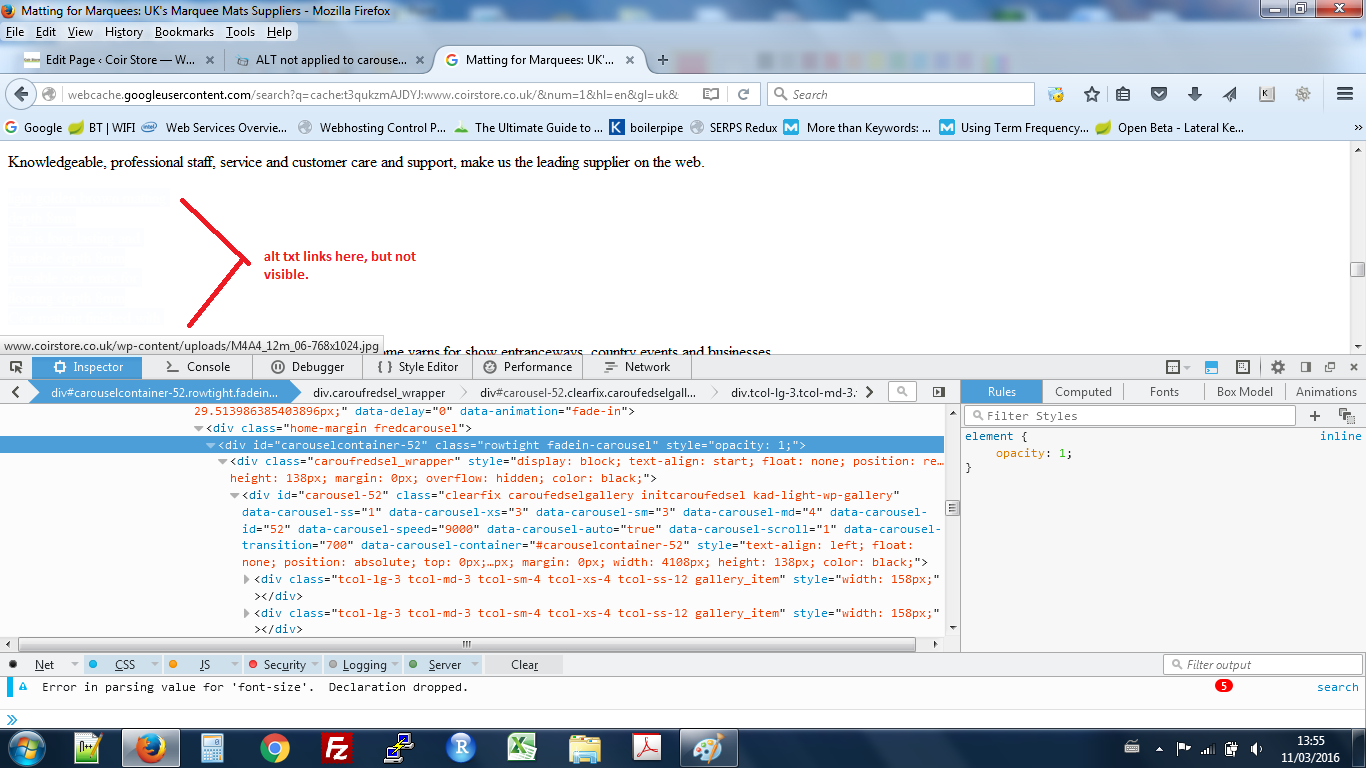
cache
ok looked again the links are there bu they are white on white background, so how do i set the link colour to appearlook for this line in cashed txt
“make us the leading supplier on the web.”
the carosel is directly below this, you will see the links are there but not visible unless you mouse over the
see attachedIn forum: Virtue ThemeIn forum: Virtue ThemeIn reply to: Logo and Main Menu aligning on the bottom Edge
In forum: Virtue ThemeIn reply to: Logo and Main Menu aligning on the bottom Edge
W3 Total cache no longer works and is not available so I went with Clear Cache for Me. I also flushed my browser cache and tried it on a new laptop. I can setup a GoToMeeting if you want to check my setting to see if I missed something. It’s weird though I move the slider to 0, 0, and it didn’t move. Is that because I shrunk the row height to 110?
-
AuthorSearch Results