
Skip to content
Help Center
  • Pricing
  • ProductsExpand
    • Premium PlansGet all the tools you need in one plan
    • Kadence ThemeLightning-fast performance theme for modern websites
    • Kadence BlocksDrop in ready designs with advanced controls for pixel perfect websites
    • Kadence Shop KitCreate a more effective WooCommerce shopping experience
    • Kadence ConversionsBoost sales and build engaged audiences with popups and banners
    • Kadence InsightsEasily create A/B tests. Optimize your pages to drive higher conversions.
    • View All Products
    • Get Kadence + Hosting
      In One Place

      Enjoy faster setup, top-tier performance, and worry-free WordPress hosting – Kadence Theme, Kadence Blocks, and Solid Security all pre-installed.

      Learn More

  • Kadence AI
  • Starter Templates
  • Blog
  • SupportExpand
    • Resource HubStart here for guides, Product docs, FAQs, and Troubleshooting tips, all in one place.
    • Contact SupportStuck on something? We’re here to help! Open a ticket for top-notch support.
    • Contact Our TeamGot pre-sales questions or need help choosing a plan? Open a ticket and our team will guide you.
    • About usCrafted with love in Missoula, Montana. Meet the team behind the mission.
Account Account
Get Kadence
Kadence Theme
  • Features
  • Pro
  • Starter Templates
  • HelpExpand
    • Documentation
    • Facebook Group
    • Submit a Ticket
    • Feature Requests
    • Roadmap
    • Changelog
Help Center
Kadence Theme

Getting Started

Customize Settings

Header

General WordPress

Troubleshooting

  • Troubleshooting White/Blank Screens in the Editor or Customizer
  • How to Download Previous Versions of the Kadence Theme and Plugins
  • Recommended Server Resources

Advanced

Theme Kit Pro

  • Kadence Custom Fonts

Kadence Elements

Woocommerce

Hooked Element Guides

  • How to Design a Post Grid/Carousel using a Kadence Element
  • Home
  • Knowledge Base
  • Kadence Theme
  • Kadence Blocks
  • Kadence Blocks Pro

Kadence Blocks Pro Plugin

Kadence Blocks Pro is a premium plugin that extends the functionality of the free Kadence Blocks plugin. Blocks Pro adds additional Pro Kadence Blocks that can be used in the Block Editor while also unlocking powerful Pro Features, such as Dynamic Content and Conditional Display.

To use Kadence Blocks Pro on your website, the free Kadence Blocks plugin must also be installed and activated, as Kadence Blocks Pro is an extension of the free plugin, not a replacement.

The Kadence Blocks Pro plugin is available in both the Kadence Plus and Kadence Ultimate Plans. You can also purchase the Kadence Blocks Pro plugin individually. Not sure if you want Kadence Blocks Pro? Click here to try a live demo of Kadence Blocks Pro.

Table of Contents
  • Installing Kadence Blocks Pro
  • Licensing Kadence Blocks Pro
  • Kadence Block Pro Features

This video is hidden as it needs to be updated

Installing Kadence Blocks Pro

Installing the Kadence Blocks Pro plugin is easy. Just follow the steps below to get started.

Once you have access to the Kadence Blocks Pro Plugin, you can download it from your Kadence Downloads & License page.
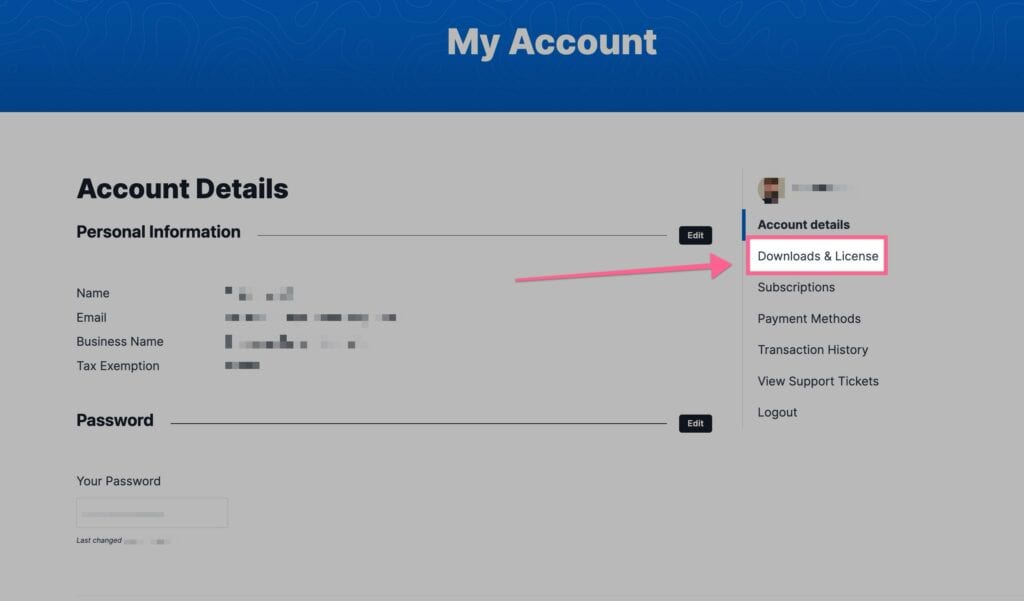
Downloads and licenses

You will see Kadence Blocks Pro listed in your Products list. You can click on the Download button to download the Kadence Blocks Pro Zip. Be sure to leave the file compressed and don’t unzip it.
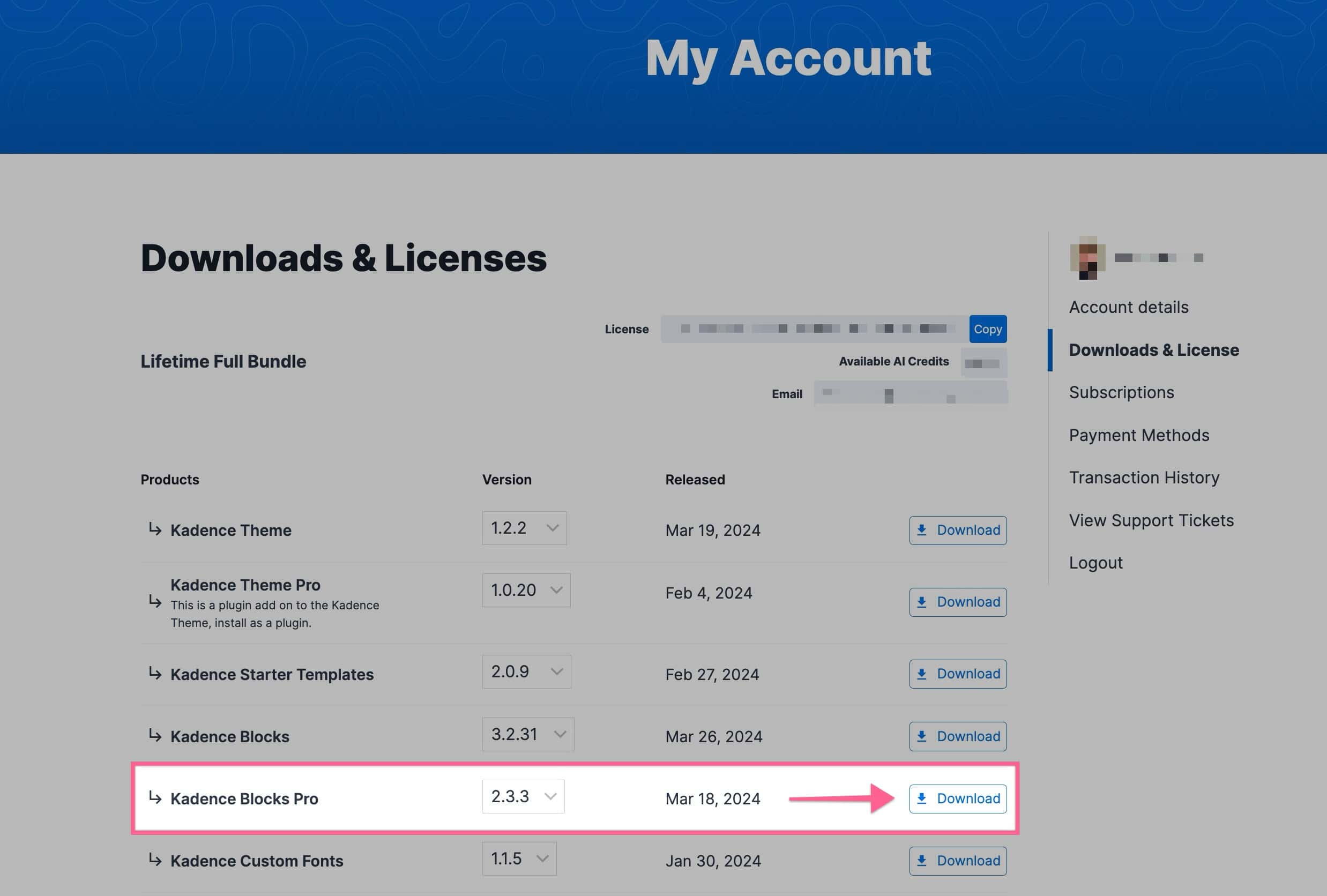
Download Kadence blocks pro

Next, navigate to your WordPress Dashboard and go to Plugins -> Add New Plugin. At the top of the Add New Plugin page, click on the Upload Plugin button.
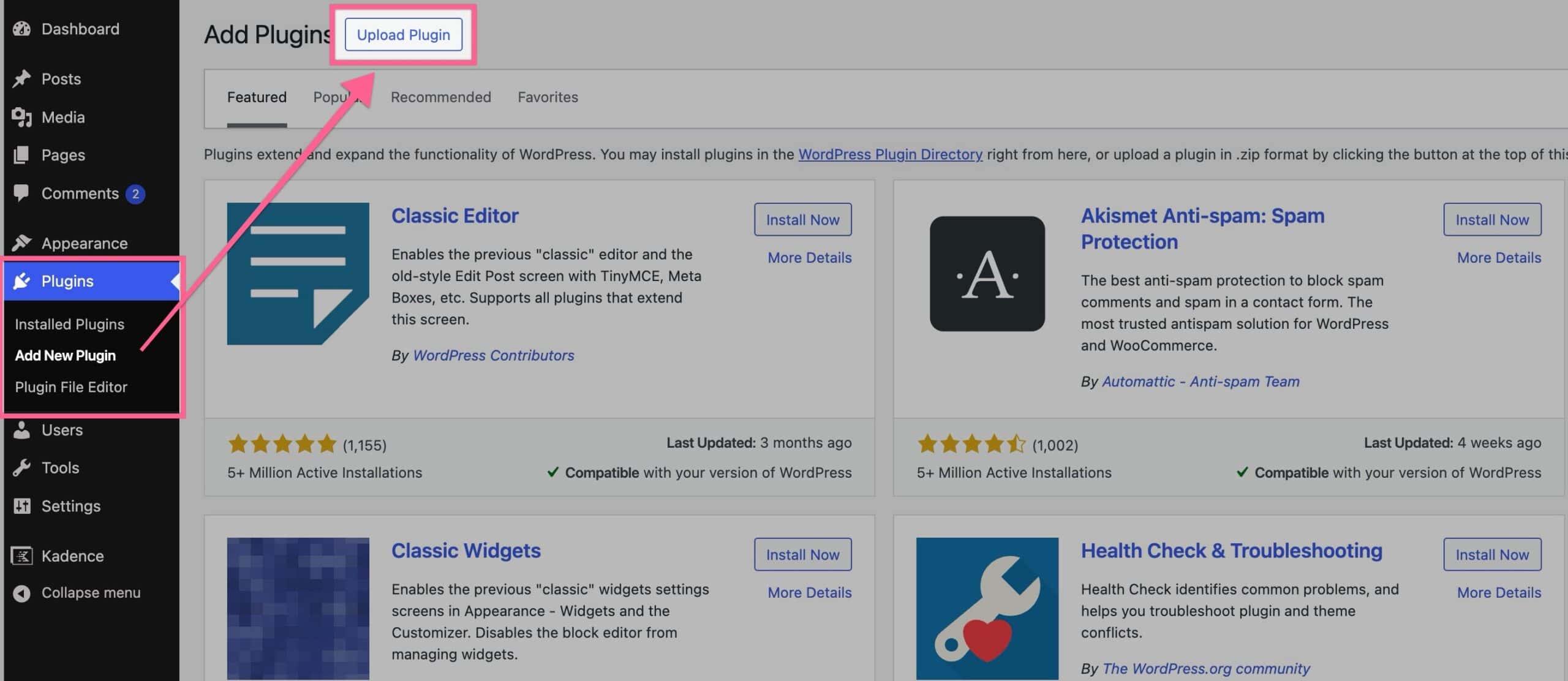
Upload Kadence Blocks Pro

Then, click on the Choose File button and select your Kadence Blocks Pro zip file. Once you have selected the file, click the Install Now button.
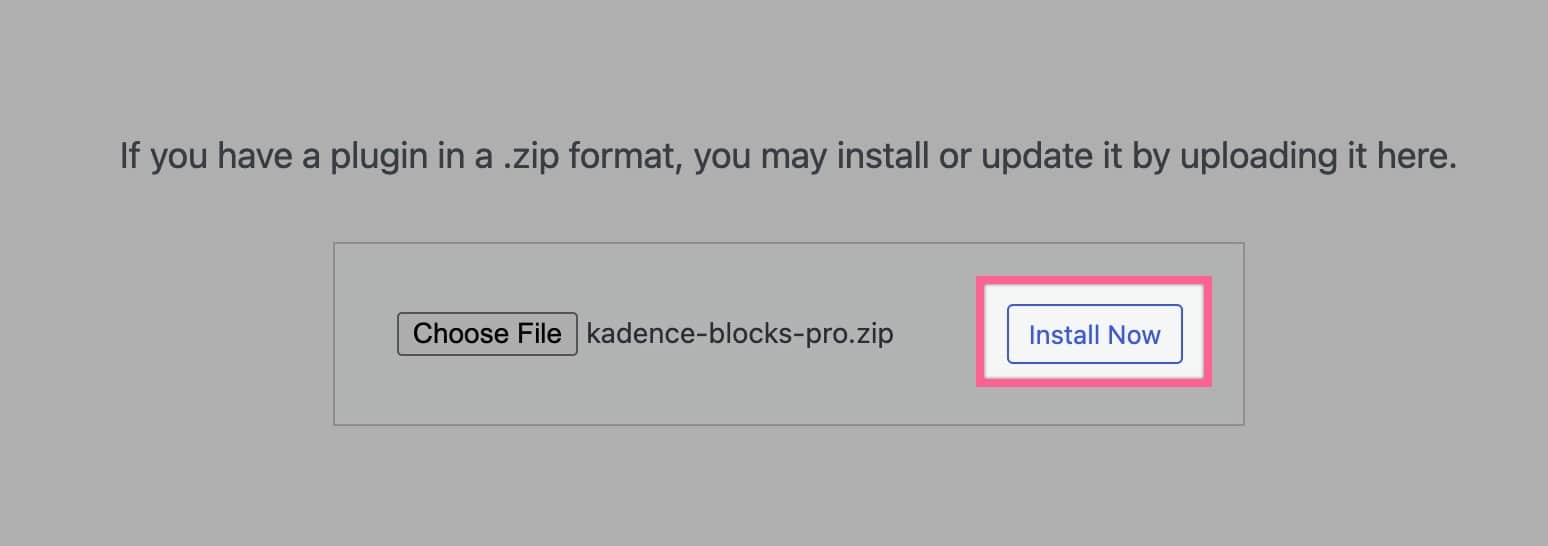
Install Blocks Pro

Once the plugin is installed, click the blue Activate Plugin button to activate your plugin.
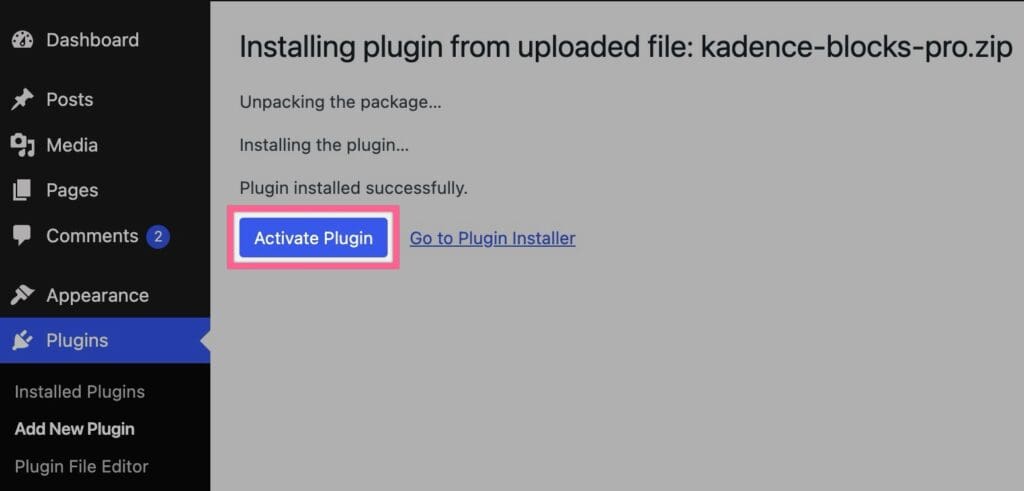
Activate Kadence Blocks Pro

Now your Kadence Blocks Pro plugin is Activated on your website.

Licensing Kadence Blocks Pro

With our new licensing system, there’s no need to manually enter a license key. Simply upload and install the latest plugin ZIP file to your site, and the license will be applied automatically.

Kadence Block Pro Features

Once you have the Kadence Blocks Pro plugin activated, you have unlocked all of the features of Kadence Blocks Pro. These features include:

  • Animate on Scroll – Create a beautiful experience for your visitors with on-scroll animation to reveal your content in an engaging way. (This feature is also available in Kadence Creative Kit)
  • Custom Icons – Never be without the perfect icon, with custom icons you can upload your own custom icon or an entire set.
  • Dynamic Content – Dynamically pull in custom fields into your blocks for powerful site control. Really useful for Kadence Elements Templating.
  • Conditional Display – Display Row Layout Blocks or Sections based on conditions that you can set in the Block Settings.
  • Custom Fonts – Create the perfect design with the perfect font. Easily upload a custom font or use Adobe Fonts.
  • Premium Design Library – Speed up your development with access to all of the premium design library items and starter sites.
  • Page Specific Scripts – Need to add custom tracking script to a single page or post? Now you can right in the editor tools.
  • Query Loop (Adv) Block – Add advanced query loops across your website with advanced customization features.
  • Repeater Block – Display repeater custom fields dynamically using the Kadence Repeater Block.
  • Image Overlay Block – Create an image link with an overlay title and subtitle.
  • Video Popup Block – Display a thumbnail with overlay and hover effects that link to a video popup on click. Works with both local and external videos.
  • Modal Block – Easily create a call to action button that opens a modal box with any content. Customize overlay, animation, size and placement.
  • Post Grid/Carousel – Add a grid or carousel of posts, pages, or custom post types and customize to your desired layout. Select by individual posts or taxonomy.
  • Portfolio Grid/Carousel – Add a grid or carousel of posts, pages, or custom posts types with an image heavy design. Select by individual posts or taxonomy.
  • Product Carousel – Add a WooCommerce product carousel to your page or post, select products by category, on sale, best selling, or individually.
  • Split Content – Create a two column row using an image or video in one column with adjustable width.
  • Advanced Slider – Create beautiful sliders in the block editor.
  • User Info – Display information about the current logged in user including gravatar, name, and join date.

Do you feel this document was helpful?
The Kadence WP Logo
Crafted in Missoula, Montana
  • Follow Kadence on Facebook
  • Follow Kadence on Youtube
  • X
  • Follow Kadence on Instagram
Trustpilot
Products
  • Kadence Plans
  • Kadence Theme
  • Kadence Blocks
  • Kadence AI
  • Kadence Starter Templates
  • Kadence Shop Kit
  • Kadence Conversions
  • Kadence Pattern Hub
  • View All
Resources
  • Blog
  • Podcast
  • Knowledgebase
  • Support ticket
  • Feature Requests
  • FAQ
  • WordPress Hosting Services
About Us
  • About Kadence
  • Become an affiliate
  • Contact us
  • Terms
  • Privacy Policy
  • Security
Our Partner Brands
  • SolidWP
  • LearnDash
  • The Events Calendar
  • GiveWP
  • MemberDash
Kadence Community
  • Kadence Marketplace
  • Join the Facebook Group
  • Subscribe to our YouTube Channel
© 2024 Kadence WP | All prices are in USD
Logo for StellarWP an umbrella brand of Premium WordPress plugins
  • Pricing
  • Products
    • Premium PlansGet all the tools you need in one plan
    • Kadence ThemeLightning-fast performance theme for modern websites
    • Kadence BlocksDrop in ready designs with advanced controls for pixel perfect websites
    • Kadence Shop KitCreate a more effective WooCommerce shopping experience
    • Kadence ConversionsBoost sales and build engaged audiences with popups and banners
    • Kadence InsightsEasily create A/B tests. Optimize your pages to drive higher conversions.
    • View All Products
    • Get Kadence + Hosting
      In One Place

      Enjoy faster setup, top-tier performance, and worry-free WordPress hosting – Kadence Theme, Kadence Blocks, and Solid Security all pre-installed.

      Learn More

  • Kadence AI
  • Starter Templates
  • Blog
  • Support
    • Resource HubStart here for guides, Product docs, FAQs, and Troubleshooting tips, all in one place.
    • Contact SupportStuck on something? We’re here to help! Open a ticket for top-notch support.
    • Contact Our TeamGot pre-sales questions or need help choosing a plan? Open a ticket and our team will guide you.
    • About usCrafted with love in Missoula, Montana. Meet the team behind the mission.
Account Login
  • Features
  • Pro
  • Starter Templates
  • HelpExpand
    • Documentation
    • Facebook Group
    • Submit a Ticket
    • Feature Requests
    • Roadmap
    • Changelog
