Skip to content
Help Center
  • Pricing
  • ProductsExpand
    • Premium PlansGet all the tools you need in one plan
    • Kadence ThemeLightning-fast performance theme for modern websites
    • Kadence BlocksDrop in ready designs with advanced controls for pixel perfect websites
    • Kadence Shop KitCreate a more effective WooCommerce shopping experience
    • Kadence ConversionsBoost sales and build engaged audiences with popups and banners
    • Kadence InsightsEasily create A/B tests. Optimize your pages to drive higher conversions.
    • View All Products
    • Get Kadence + Hosting
      In One Place

      Enjoy faster setup, top-tier performance, and worry-free WordPress hosting – Kadence Theme, Kadence Blocks, and Solid Security all pre-installed.

      Learn More

  • Kadence AI
  • Starter Templates
  • Blog
  • SupportExpand
    • Resource HubStart here for guides, Product docs, FAQs, and Troubleshooting tips, all in one place.
    • Contact SupportStuck on something? We’re here to help! Open a ticket for top-notch support.
    • Contact Our TeamGot pre-sales questions or need help choosing a plan? Open a ticket and our team will guide you.
    • About usCrafted with love in Missoula, Montana. Meet the team behind the mission.
Account Account
Get Kadence
Kadence Theme
  • Features
  • Pro
  • Starter Templates
  • HelpExpand
    • Documentation
    • Facebook Group
    • Submit a Ticket
    • Feature Requests
    • Roadmap
    • Changelog
Help Center
Kadence Theme

Getting Started

  • Installing the Kadence Theme
  • How to use the Kadence Theme Style Guide
  • Installing Kadence Starter Templates (Unlock AI and Pre-Designed Templates)
  • Getting Started with Kadence Site Assist
  • Starter Templates: AI Powered Vs Pre-Designed
  • Getting Started with a Pre-Designed Starter Template
  • Setting up Posts, Pages, and Archive Layouts in Kadence

Customize Settings

  • The Kadence Theme Performance Settings
  • How to use the Kadence Theme Color Palette
  • Typography Settings
  • How to Style Buttons in the Kadence Theme
  • How to Add a Sidebar
  • Sticky Sidebars
  • Page Layout Customizer Settings
  • Single Post Layout Customizer Settings
  • Archive Layout Customizer Settings
  • Kadence WooCommerce Customizer Settings
  • Understanding CSS Clamp and How It Works in the Kadence Theme
  • The Kadence Theme Breadcrumb Settings
  • How to add Scroll To Top
  • How to Enable Scroll to ID
  • How to Add an Author Box to Your Posts
  • Search Results Customizer Settings
  • How to customize the Kadence Footer
  • How to Import, Export, and Reset Kadence Theme Customizer Settings Using Starter Templates Plugin
  • How to Host Google Fonts Locally
  • How to Remove the Page Title in Kadence Theme
  • How to Enable the Kadence Lightbox Feature for Image Links

Header

  • How to Customize the Kadence Header
  • Kadence Classic Header Items
  • Customizing the Classic Header Navigation Colors (Default Header, Transparent Header, Sticky Header)
  • Editing a Row in the Header
  • Customizing the Mobile Navigation Area
  • Customizing the Topbar
  • Edit Dropdown Menu Styling
  • Social Media Icons in the Header
  • Working with the Sticky Header
  • How to Use a Transparent Header
  • Preventing the Theme Transparent Header from Overlapping Page Content

General WordPress

  • How to Change the Number of Posts Displayed on Your Blog Page in WordPress
  • How to specify different CSS styles for mobile, tablet, and PC layouts
  • Enabling ICO File Uploads in WordPress
  • How to Reset Your WordPress Website for Free
  • How to Create Patterns in WordPress (Reusable Blocks)
  • Understanding PHP Deprecated Notices on Your Site
  • How to create a staging website
  • Reserved Slugs and Terms
  • Using the WordPress Dashboard
  • How to Bulk Update Links and Text (Search & Replace)
  • How to Add a Featured Image to a WordPress Post
  • How to Regenerate Permalinks in WordPress
  • Simulating a Mobile Environment For Testing
  • How to Enable Categories and Tags for Pages
  • Set Site Favicon
  • How do I add Custom CSS
  • Adding Google Analytics
  • How To Backup Your WordPress Website
  • How to add a Custom Post Type
  • Fix: Page Not Updating
  • How to Find the Page or Post ID
  • How to prevent spam comments
  • How do I turn off comments?
  • How to Remove All Spam Comments

Troubleshooting

  • How to Reset Your WordPress Website for Free
  • Troubleshooting the “Updating page failed. You’re probably offline.” Error
  • How to Create a Screen Recording for Free
  • Website Favicon is missing on Google Search Results
  • How to Diagnose and Fix Common Google Ads Issues on your site
  • Fixing Mixed Content Errors in WordPress
  • How to resolve the ERR_HTTP2_PROTOCOL_ERROR console error?
  • Troubleshooting White/Blank Screens in the Editor or Customizer
  • Understanding PHP Deprecated Notices on Your Site
  • How to Download Previous Versions of the Kadence Theme and Plugins
  • Fix Starter Template Import Problems When Using Hostinger with Kadence
  • How to run the WordPress built-in database repair tool
  • Recommended Server Resources
  • Troubleshooting the “Update Failed: Service Unavailable” error when updating Pro Kadence WP plugins
  • How to Enable the WordPress Error Logs
  • WordPress Error “Incompatible Archive”
  • Temporarily Deactivating Plugins
  • How to View Console Log Errors
  • Clearing Your Website Cache
  • Getting 500 Errors
  • Broken Styles after version 1.1.15

Advanced

  • How to Use Category & Taxonomy Images with Kadence Dynamic Content
  • How To Add Custom Snippets with Code Snippets
  • Customizing Kadence Related Posts with kadence_related_posts_args Filter
  • How to Use a Post Grid/Carousel Block as Related Posts
  • Customize Pagination in Kadence Theme Using kadence_pagination_args
  • How to Enable Transparent Header on 404 Page
  • How to Customize the Kadence Comment Form
  • Add Thumbnails to Next/Previous Post Navigation
  • Adjusting the Kadence Theme’s scroll offset using a filter
  • Remove title tags on Kadence SVG Icons
  • Adding Kadence Breadcrumbs To Hooked Elements
  • Disable Default Kadence Theme Schema Markup
  • Adding Elements after Specified Paragraphs
  • Common Code Snippets for Kadence Users
  • How to translate using LocoTranslate
  • How to hook elements inside of post or page content
  • What is a Child Theme, Should I Install One, if so How?
  • Adding Custom Fonts to Kadence
  • How to make a custom 404 page
  • How to change a theme icon to something custom
  • Change Any Text on Your Site
  • Changing Various Heading HTML Tags
  • How to Display Custom Post Types with Kadence Template Elements
  • Adding Google Tag Manager with a child theme or code snippet plugin
  • Replace Author HTML (Multiple Author Support)
  • Theme hooks

Theme Kit Pro

  • Kadence Theme Kit Pro Plugin
  • How to create a Mega (multicolumn menu)
  • How to use Conditional Headers
  • Kadence Infinite Scroll
  • Kadence Maintenance Mode
  • How to add scripts in header/footer
  • How to use the Color Palette Switch (Dark Mode)
  • How to use Element Hooks
  • WooCommerce Addons
  • How to Add Icons to Your Classic WordPress Menu Items
  • Archive Custom Page Title Backgrounds (Kadence Theme Kit Pro)
  • Theme hooks
  • Header Addons
  • How to add contact information
  • How to add a toggle open menu for desktop
  • How to add a login and account Menu
  • Kadence Custom Fonts
  • How to open the side cart when a product is added to cart

Kadence Elements

  • How To Use Hooked Element Shortcodes
  • What are Kadence Hooked Elements?
  • Installing and Creating Kadence Elements
  • The Four Types of Kadence Elements
  • Kadence Element Settings
  • Kadence Content Section Hooked Elements
  • Kadence Template Hooked Elements
  • Kadence HTML Editor Hooked Elements
  • Kadence Fixed Section Hooked Elements
  • Switching between different Kadence Elements Types
  • Importing/Exporting Kadence Elements

Woocommerce

  • How to Track WooCommerce Cart Actions with JavaScript
  • How to add Extra/Payment Information to Your WooCommerce Product Pages
  • How to Add Image Switch on Hover for Product Archives
  • How to Add a Mini Cart to the Site Header
  • How to Change the WooCommerce Product Loop Title Tags

Hooked Element Guides

  • How to Use an Element to Replace the Archive Loop Item Content
  • How to Create a Custom Single Post Template with Kadence Hooked Elements
  • How to Create a Custom Archive Page Template with Kadence Hooked Elements
  • How to Replace Specific Posts’ Sidebar Content Using a Kadence Element
  • Programmatically Display Kadence Hook Elements
  • How to Design a Post Grid/Carousel using a Kadence Element
  • How to make a Dynamic Search Results Title in Kadence
  • Adding Kadence Breadcrumbs To Hooked Elements
  • How to Replace the Footer Using a Kadence Element
  • Home
  • Knowledge Base
  • Kadence Theme
  • Kadence Theme
  • Theme Kit Pro

How to add a login and account Menu

Login and Account menu options are a part of Kadence Theme Kit Pro.

To add these to your Kadence site’s header, enable Header Addons in your Kadence dashboard at Appearance > Kadence.
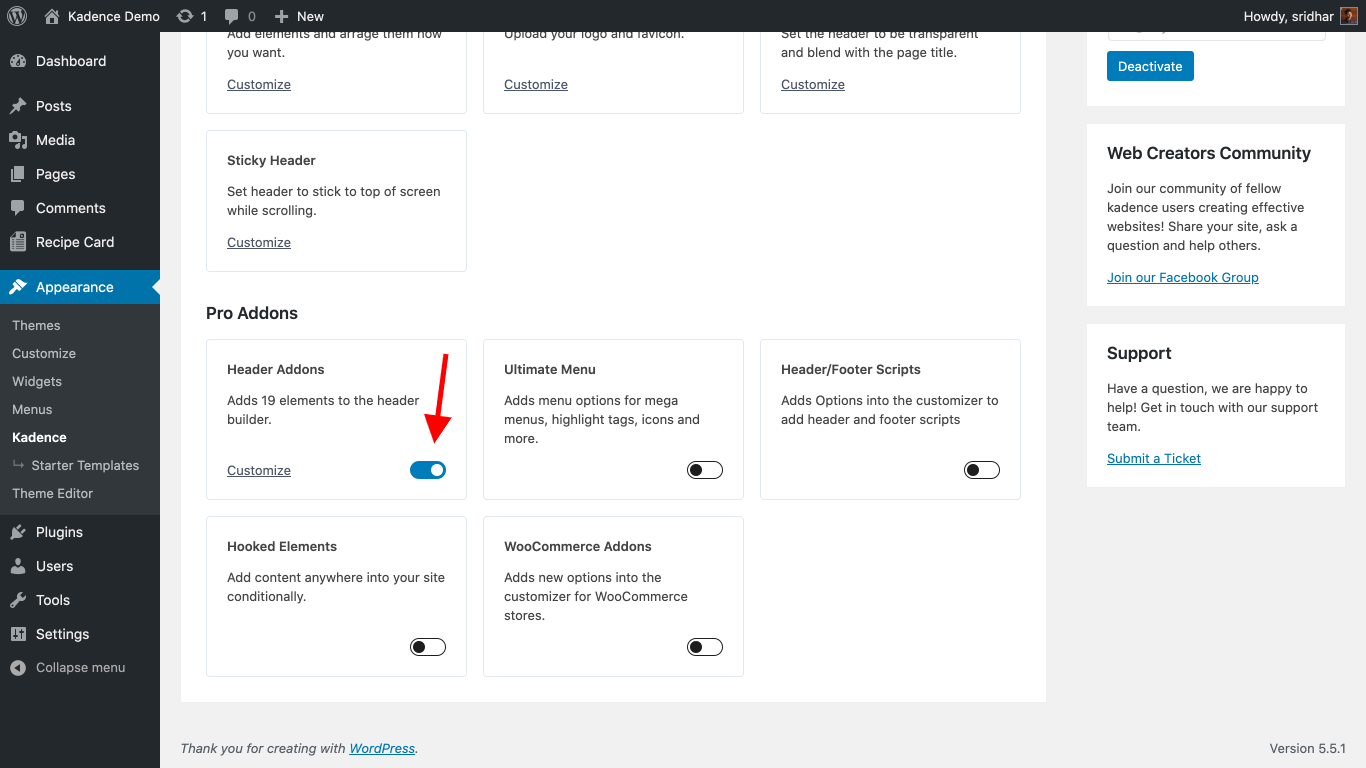
Enabling Header Addons in Kadence Pro

To add Login and Account items to your site’s header head over to the WordPress Customizer at Appearance > Customize.

Click on the Header section.

Locate Account under Available Items and drag it to your desired position in the header builder.
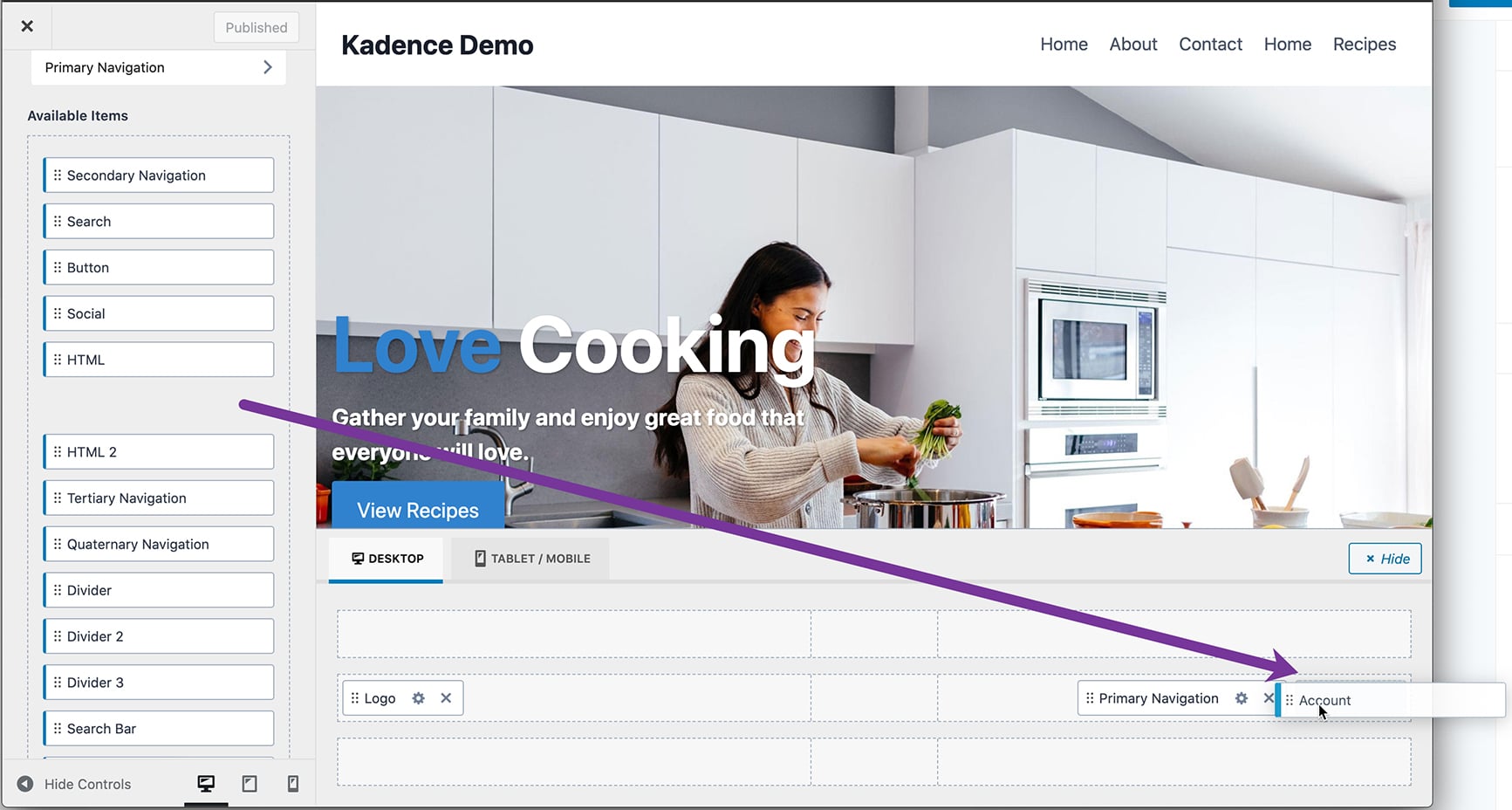
Dragging Account item in the Header Builder

To edit the settings for Account item, either click on the pencil icon next to it or the gear icon in the header builder.
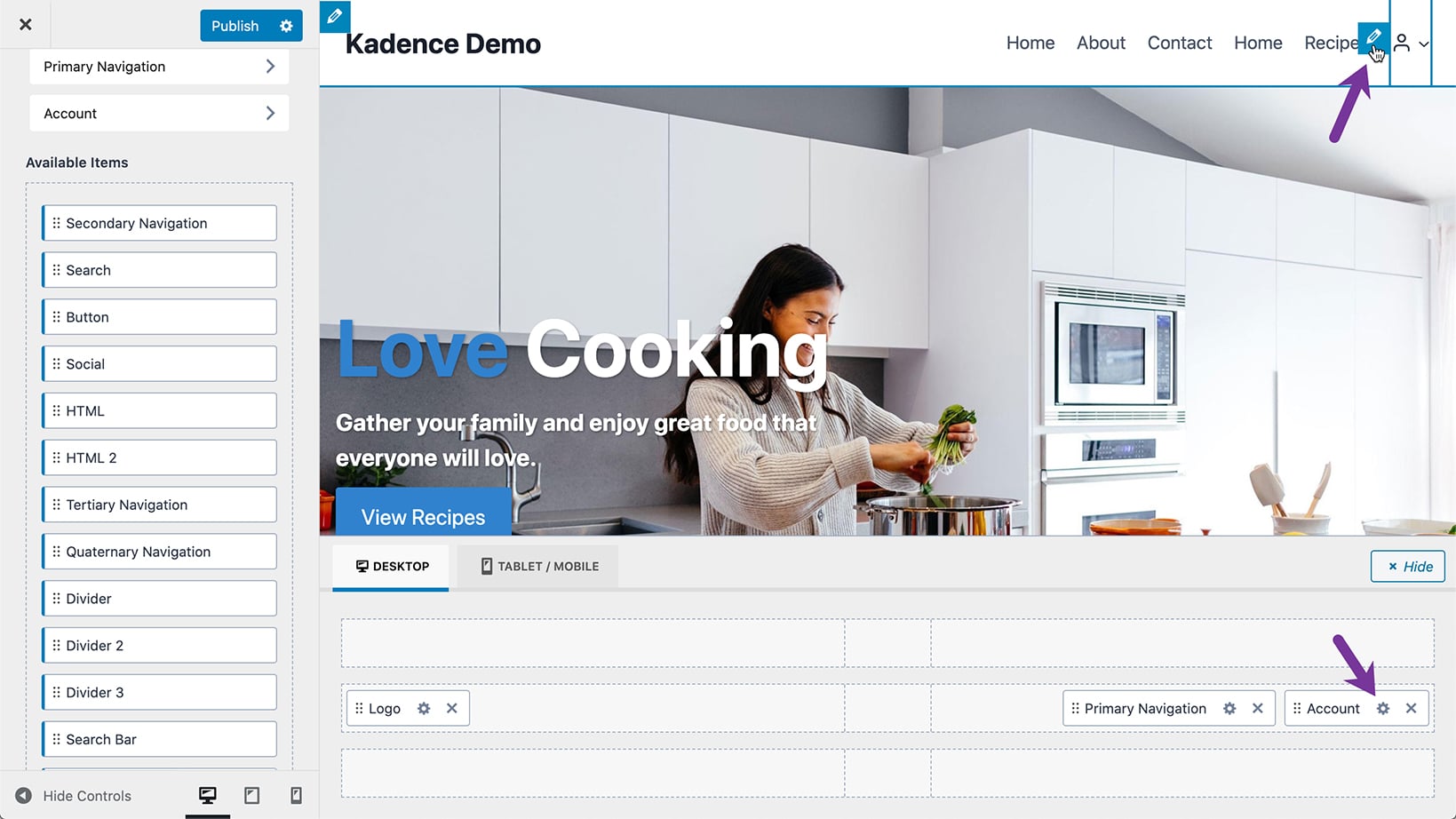
Settings for Account header item

That takes you to the Header Account where you can find GENERAL and DESIGN settings for the Account item.
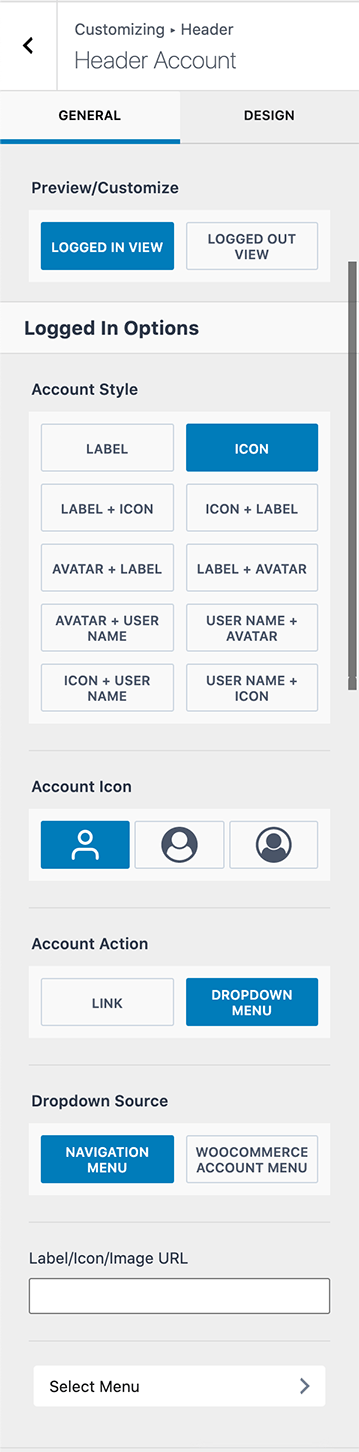
Header Account settings

The default “Account” label text can be changed by entering a custom one in the Account Label field.

If you want the Header Account item in the header to link to a specific URL, that can be entered in the Label/Icon/Image URL field.

To make a navigation menu appear for your site’s logged-in users when you click on the Account element in the header, click Select Menu and pick/create a menu of your choice under the Logged In Account location.

To configure the settings for logged out users, click on LOGGED OUT VIEW.
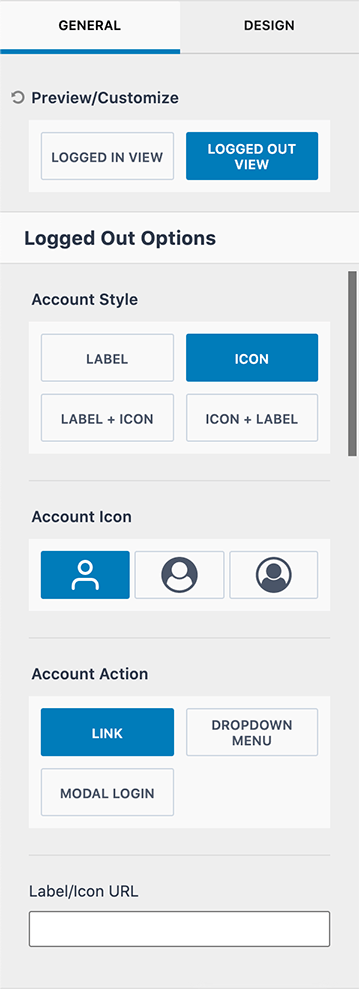
Header Account Logged Out View

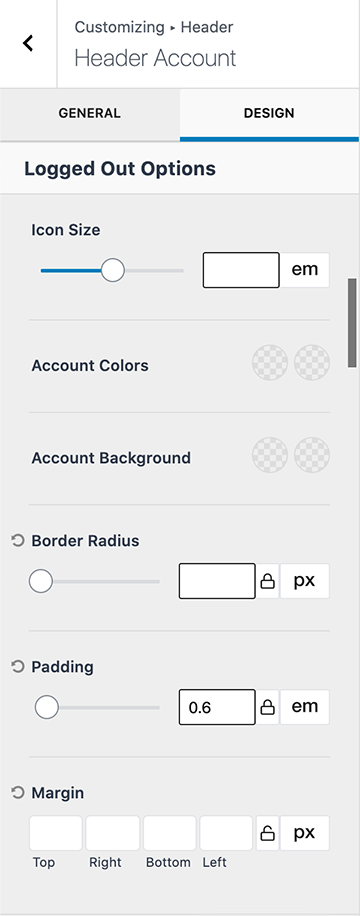
To configure the appearance of Header Account item go to DESIGN tab.
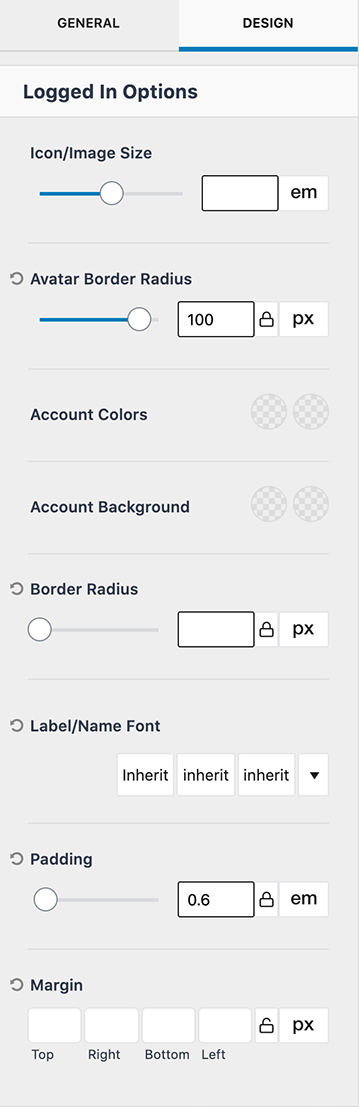
Header Account Logged In Design options
Logged in View
Header Account Logged Out Design options
Logged out view

Do you feel this document was helpful?
How to add a toggle open menu for desktopKadence Custom Fonts
The Kadence WP Logo
Crafted in Missoula, Montana
  • Follow Kadence on Facebook
  • Follow Kadence on Youtube
  • X
  • Follow Kadence on Instagram
Trustpilot
Products
  • Kadence Plans
  • Kadence Theme
  • Kadence Blocks
  • Kadence AI
  • Kadence Starter Templates
  • Kadence Shop Kit
  • Kadence Conversions
  • Kadence Pattern Hub
  • View All
Resources
  • Blog
  • Podcast
  • Knowledgebase
  • Support ticket
  • Feature Requests
  • FAQ
  • WordPress Hosting Services
About Us
  • About Kadence
  • Become an affiliate
  • Contact us
  • Terms
  • Privacy Policy
  • Security
Our Partner Brands
  • SolidWP
  • LearnDash
  • The Events Calendar
  • GiveWP
  • MemberDash
Kadence Community
  • Kadence Marketplace
  • Join the Facebook Group
  • Subscribe to our YouTube Channel
© 2024 Kadence WP | All prices are in USD
Logo for StellarWP an umbrella brand of Premium WordPress plugins
  • Pricing
  • Products
    • Premium PlansGet all the tools you need in one plan
    • Kadence ThemeLightning-fast performance theme for modern websites
    • Kadence BlocksDrop in ready designs with advanced controls for pixel perfect websites
    • Kadence Shop KitCreate a more effective WooCommerce shopping experience
    • Kadence ConversionsBoost sales and build engaged audiences with popups and banners
    • Kadence InsightsEasily create A/B tests. Optimize your pages to drive higher conversions.
    • View All Products
    • Get Kadence + Hosting
      In One Place

      Enjoy faster setup, top-tier performance, and worry-free WordPress hosting – Kadence Theme, Kadence Blocks, and Solid Security all pre-installed.

      Learn More

  • Kadence AI
  • Starter Templates
  • Blog
  • Support
    • Resource HubStart here for guides, Product docs, FAQs, and Troubleshooting tips, all in one place.
    • Contact SupportStuck on something? We’re here to help! Open a ticket for top-notch support.
    • Contact Our TeamGot pre-sales questions or need help choosing a plan? Open a ticket and our team will guide you.
    • About usCrafted with love in Missoula, Montana. Meet the team behind the mission.
Account Login
  • Features
  • Pro
  • Starter Templates
  • HelpExpand
    • Documentation
    • Facebook Group
    • Submit a Ticket
    • Feature Requests
    • Roadmap
    • Changelog