
Skip to content
Help Center
  • Pricing
  • ProductsExpand
    • Premium PlansGet all the tools you need in one plan
    • Kadence ThemeLightning-fast performance theme for modern websites
    • Kadence BlocksDrop in ready designs with advanced controls for pixel perfect websites
    • Kadence Shop KitCreate a more effective WooCommerce shopping experience
    • Kadence ConversionsBoost sales and build engaged audiences with popups and banners
    • Kadence InsightsEasily create A/B tests. Optimize your pages to drive higher conversions.
    • View All Products
    • Get Kadence + Hosting
      In One Place

      Enjoy faster setup, top-tier performance, and worry-free WordPress hosting – Kadence Theme, Kadence Blocks, and Solid Security all pre-installed.

      Learn More

  • Kadence AI
  • Starter Templates
  • Blog
  • SupportExpand
    • Resource HubStart here for guides, Product docs, FAQs, and Troubleshooting tips, all in one place.
    • Contact SupportStuck on something? We’re here to help! Open a ticket for top-notch support.
    • Contact Our TeamGot pre-sales questions or need help choosing a plan? Open a ticket and our team will guide you.
    • About usCrafted with love in Missoula, Montana. Meet the team behind the mission.
Account Account
Get Kadence
Kadence Theme
  • Features
  • Pro
  • Starter Templates
  • HelpExpand
    • Documentation
    • Facebook Group
    • Submit a Ticket
    • Feature Requests
    • Roadmap
    • Changelog
Help Center
Kadence Theme

Getting Started

  • Installing the Kadence Theme
  • How to use the Kadence Theme Style Guide
  • Installing Kadence Starter Templates (Unlock AI and Pre-Designed Templates)
  • Getting Started with Kadence Site Assist
  • Starter Templates: AI Powered Vs Pre-Designed
  • Getting Started with a Pre-Designed Starter Template
  • Setting up Posts, Pages, and Archive Layouts in Kadence

Customize Settings

  • The Kadence Theme Performance Settings
  • How to use the Kadence Theme Color Palette
  • Typography Settings
  • How to Style Buttons in the Kadence Theme
  • How to Add a Sidebar
  • Sticky Sidebars
  • Page Layout Customizer Settings
  • Single Post Layout Customizer Settings
  • Archive Layout Customizer Settings
  • Kadence WooCommerce Customizer Settings
  • Understanding CSS Clamp and How It Works in the Kadence Theme
  • The Kadence Theme Breadcrumb Settings
  • How to add Scroll To Top
  • How to Enable Scroll to ID
  • How to Add an Author Box to Your Posts
  • Search Results Customizer Settings
  • How to customize the Kadence Footer
  • How to Import, Export, and Reset Kadence Theme Customizer Settings Using Starter Templates Plugin
  • How to Host Google Fonts Locally
  • How to Remove the Page Title in Kadence Theme
  • How to Enable the Kadence Lightbox Feature for Image Links

Header

  • How to Customize the Kadence Header
  • Kadence Classic Header Items
  • Customizing the Classic Header Navigation Colors (Default Header, Transparent Header, Sticky Header)
  • Editing a Row in the Header
  • Customizing the Mobile Navigation Area
  • Customizing the Topbar
  • Edit Dropdown Menu Styling
  • Social Media Icons in the Header
  • Working with the Sticky Header
  • How to Use a Transparent Header
  • Preventing the Theme Transparent Header from Overlapping Page Content

General WordPress

  • How to Change the Number of Posts Displayed on Your Blog Page in WordPress
  • How to specify different CSS styles for mobile, tablet, and PC layouts
  • Enabling ICO File Uploads in WordPress
  • How to Reset Your WordPress Website for Free
  • How to Create Patterns in WordPress (Reusable Blocks)
  • Understanding PHP Deprecated Notices on Your Site
  • How to create a staging website
  • Reserved Slugs and Terms
  • Using the WordPress Dashboard
  • How to Bulk Update Links and Text (Search & Replace)
  • How to Add a Featured Image to a WordPress Post
  • How to Regenerate Permalinks in WordPress
  • Simulating a Mobile Environment For Testing
  • How to Enable Categories and Tags for Pages
  • Set Site Favicon
  • How do I add Custom CSS
  • Adding Google Analytics
  • How To Backup Your WordPress Website
  • How to add a Custom Post Type
  • Fix: Page Not Updating
  • How to Find the Page or Post ID
  • How to prevent spam comments
  • How do I turn off comments?
  • How to Remove All Spam Comments

Troubleshooting

  • How to Reset Your WordPress Website for Free
  • Troubleshooting the “Updating page failed. You’re probably offline.” Error
  • How to Create a Screen Recording for Free
  • Website Favicon is missing on Google Search Results
  • How to Diagnose and Fix Common Google Ads Issues on your site
  • Fixing Mixed Content Errors in WordPress
  • How to resolve the ERR_HTTP2_PROTOCOL_ERROR console error?
  • Troubleshooting White/Blank Screens in the Editor or Customizer
  • Understanding PHP Deprecated Notices on Your Site
  • How to Download Previous Versions of the Kadence Theme and Plugins
  • Fix Starter Template Import Problems When Using Hostinger with Kadence
  • How to run the WordPress built-in database repair tool
  • Recommended Server Resources
  • Troubleshooting the “Update Failed: Service Unavailable” error when updating Pro Kadence WP plugins
  • How to Enable the WordPress Error Logs
  • WordPress Error “Incompatible Archive”
  • Temporarily Deactivating Plugins
  • How to View Console Log Errors
  • Clearing Your Website Cache
  • Getting 500 Errors
  • Broken Styles after version 1.1.15

Advanced

  • How to Use Category & Taxonomy Images with Kadence Dynamic Content
  • How To Add Custom Snippets with Code Snippets
  • Customizing Kadence Related Posts with kadence_related_posts_args Filter
  • How to Use a Post Grid/Carousel Block as Related Posts
  • Customize Pagination in Kadence Theme Using kadence_pagination_args
  • How to Enable Transparent Header on 404 Page
  • How to Customize the Kadence Comment Form
  • Add Thumbnails to Next/Previous Post Navigation
  • Adjusting the Kadence Theme’s scroll offset using a filter
  • Remove title tags on Kadence SVG Icons
  • Adding Kadence Breadcrumbs To Hooked Elements
  • Disable Default Kadence Theme Schema Markup
  • Adding Elements after Specified Paragraphs
  • Common Code Snippets for Kadence Users
  • How to translate using LocoTranslate
  • How to hook elements inside of post or page content
  • What is a Child Theme, Should I Install One, if so How?
  • Adding Custom Fonts to Kadence
  • How to make a custom 404 page
  • How to change a theme icon to something custom
  • Change Any Text on Your Site
  • Changing Various Heading HTML Tags
  • How to Display Custom Post Types with Kadence Template Elements
  • Adding Google Tag Manager with a child theme or code snippet plugin
  • Replace Author HTML (Multiple Author Support)
  • Theme hooks

Theme Kit Pro

  • Kadence Theme Kit Pro Plugin
  • How to create a Mega (multicolumn menu)
  • How to use Conditional Headers
  • Kadence Infinite Scroll
  • Kadence Maintenance Mode
  • How to add scripts in header/footer
  • How to use the Color Palette Switch (Dark Mode)
  • How to use Element Hooks
  • WooCommerce Addons
  • How to Add Icons to Your Classic WordPress Menu Items
  • Archive Custom Page Title Backgrounds (Kadence Theme Kit Pro)
  • Theme hooks
  • Header Addons
  • How to add contact information
  • How to add a toggle open menu for desktop
  • How to add a login and account Menu
  • Kadence Custom Fonts
  • How to open the side cart when a product is added to cart

Kadence Elements

  • How To Use Hooked Element Shortcodes
  • What are Kadence Hooked Elements?
  • Installing and Creating Kadence Elements
  • The Four Types of Kadence Elements
  • Kadence Element Settings
  • Kadence Content Section Hooked Elements
  • Kadence Template Hooked Elements
  • Kadence HTML Editor Hooked Elements
  • Kadence Fixed Section Hooked Elements
  • Switching between different Kadence Elements Types
  • Importing/Exporting Kadence Elements

Woocommerce

  • How to Track WooCommerce Cart Actions with JavaScript
  • How to add Extra/Payment Information to Your WooCommerce Product Pages
  • How to Add Image Switch on Hover for Product Archives
  • How to Add a Mini Cart to the Site Header
  • How to Change the WooCommerce Product Loop Title Tags

Hooked Element Guides

  • How to Use an Element to Replace the Archive Loop Item Content
  • How to Create a Custom Single Post Template with Kadence Hooked Elements
  • How to Create a Custom Archive Page Template with Kadence Hooked Elements
  • How to Replace Specific Posts’ Sidebar Content Using a Kadence Element
  • Programmatically Display Kadence Hook Elements
  • How to Design a Post Grid/Carousel using a Kadence Element
  • How to make a Dynamic Search Results Title in Kadence
  • Adding Kadence Breadcrumbs To Hooked Elements
  • How to Replace the Footer Using a Kadence Element
  • Home
  • Knowledge Base
  • Kadence Theme
  • Kadence Theme
  • General WordPress

Set Site Favicon

The favicon is the icon that shows in your browser tab. In Virtue and Pinnacle, the favicon was set in Theme Options> Misc Settings. WordPress now includes this option within the customizer.
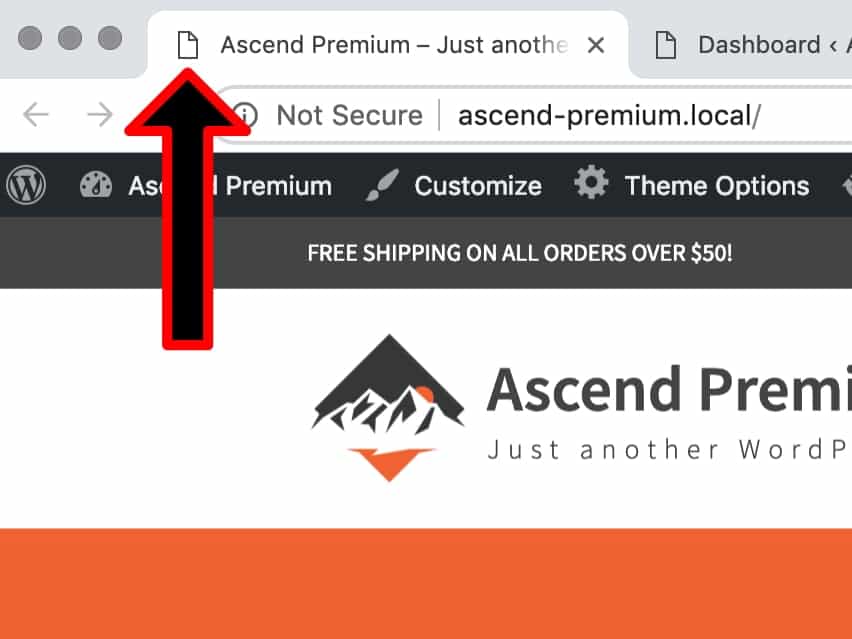
No Favicon Assigned

To set the favicon, navigate to Appearance> Customize:
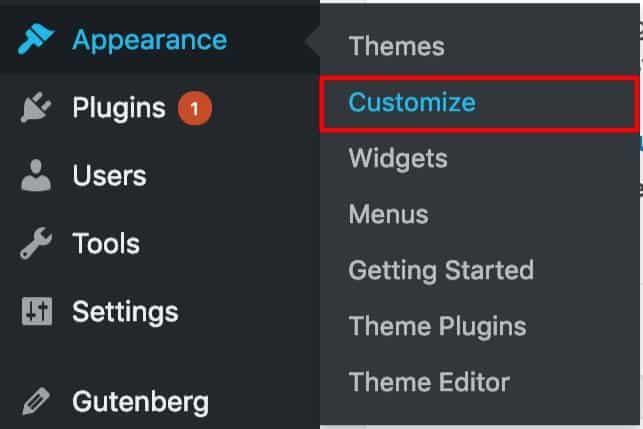
Appearance Customize

In the customizer, open the “Site Identity” tab:
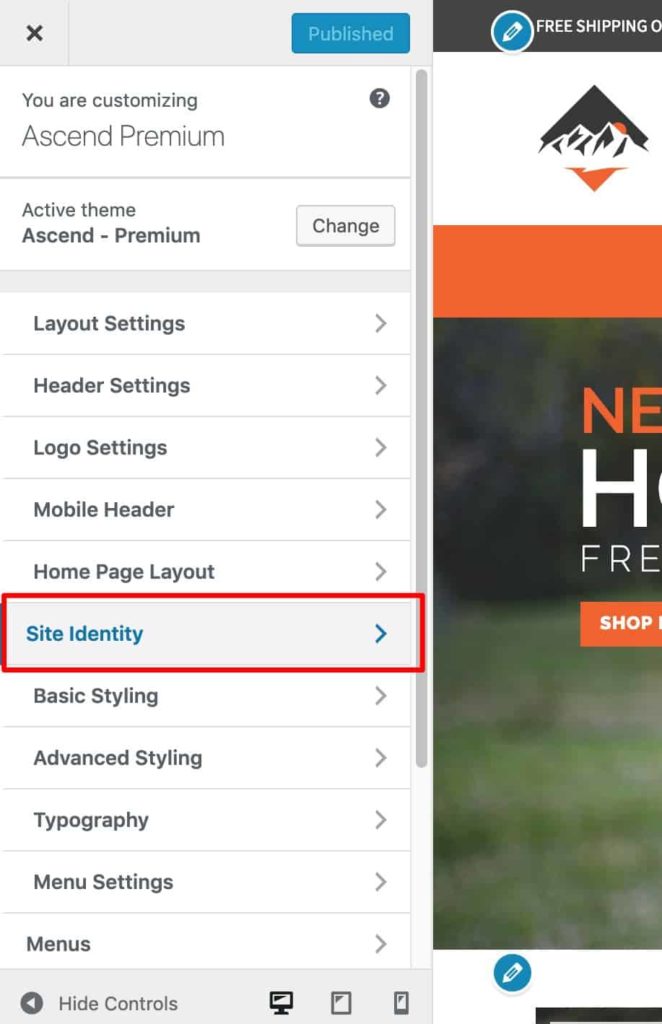
Site Identity

Upload your favicon and save the setting:
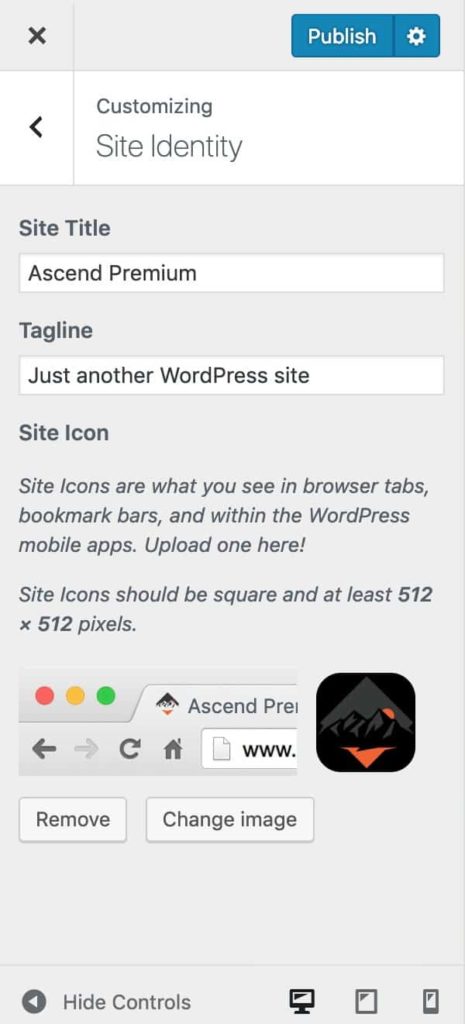
Favicon Assigned

If using Virtue or Pinnacle themes, be sure that the favicon is not already set in Theme Options> Misc Settings.


Do you feel this document was helpful?
How do I add Custom CSS
The Kadence WP Logo
Crafted in Missoula, Montana
  • Follow Kadence on Facebook
  • Follow Kadence on Youtube
  • X
  • Follow Kadence on Instagram
Trustpilot
Products
  • Kadence Plans
  • Kadence Theme
  • Kadence Blocks
  • Kadence AI
  • Kadence Starter Templates
  • Kadence Shop Kit
  • Kadence Conversions
  • Kadence Pattern Hub
  • View All
Resources
  • Blog
  • Podcast
  • Knowledgebase
  • Support ticket
  • Feature Requests
  • FAQ
  • WordPress Hosting Services
About Us
  • About Kadence
  • Become an affiliate
  • Contact us
  • Terms
  • Privacy Policy
  • Security
Our Partner Brands
  • SolidWP
  • LearnDash
  • The Events Calendar
  • GiveWP
  • MemberDash
Kadence Community
  • Kadence Marketplace
  • Join the Facebook Group
  • Subscribe to our YouTube Channel
© 2024 Kadence WP | All prices are in USD
Logo for StellarWP an umbrella brand of Premium WordPress plugins
  • Pricing
  • Products
    • Premium PlansGet all the tools you need in one plan
    • Kadence ThemeLightning-fast performance theme for modern websites
    • Kadence BlocksDrop in ready designs with advanced controls for pixel perfect websites
    • Kadence Shop KitCreate a more effective WooCommerce shopping experience
    • Kadence ConversionsBoost sales and build engaged audiences with popups and banners
    • Kadence InsightsEasily create A/B tests. Optimize your pages to drive higher conversions.
    • View All Products
    • Get Kadence + Hosting
      In One Place

      Enjoy faster setup, top-tier performance, and worry-free WordPress hosting – Kadence Theme, Kadence Blocks, and Solid Security all pre-installed.

      Learn More

  • Kadence AI
  • Starter Templates
  • Blog
  • Support
    • Resource HubStart here for guides, Product docs, FAQs, and Troubleshooting tips, all in one place.
    • Contact SupportStuck on something? We’re here to help! Open a ticket for top-notch support.
    • Contact Our TeamGot pre-sales questions or need help choosing a plan? Open a ticket and our team will guide you.
    • About usCrafted with love in Missoula, Montana. Meet the team behind the mission.
Account Login
  • Features
  • Pro
  • Starter Templates
  • HelpExpand
    • Documentation
    • Facebook Group
    • Submit a Ticket
    • Feature Requests
    • Roadmap
    • Changelog