
With Kadence Blocks 3.0, Kadence Blocks moved many of our default size settings to use custom variables so you can set small, medium, and large sizes for standard element size settings and let us handle the rest.
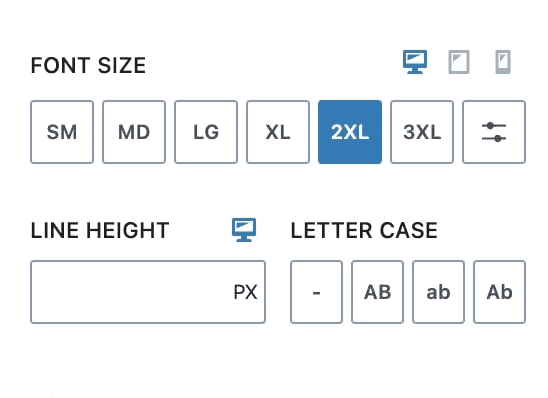
It is easy to still set your own custom sizes using pixels, or any other unit you want, in the font size block setting. However, sticking with the default variable options will help you keep consistency in your designs and limit the need for responsive overrides. Plus, your design is easier to manage in the long term. For those times when precise controls are required, Kadence Blocks puts that power in your hands as well.
Note: Kadence Blocks uses its own fluid “clamp” font size system, which does not sync with the WordPress Core variable font sizes used in blocks like Paragraph and Heading. Adjusting Kadence font sizes will not affect the WordPress Core font size presets.
The default font size values
Here are the default font size values for each variable size:
'sm'   => 'clamp(0.8rem, 0.73rem + 0.217vw, 0.9rem)',
'md'   => 'clamp(1.1rem, 0.995rem + 0.326vw, 1.25rem)',
'lg'   => 'clamp(1.75rem, 1.576rem + 0.543vw, 2rem)',
'xl'   => 'clamp(2.25rem, 1.728rem + 1.63vw, 3rem)',
'xxl'  => 'clamp(2.5rem, 1.456rem + 3.26vw, 4rem)',
'xxxl' => 'clamp(2.75rem, 0.489rem + 7.065vw, 6rem)',
If you’re interested in the technology behind CSS clamp, you can read more about it here. Essentially, CSS Clamp establishes the high-end viewport size (for example, a desktop browser) and a low-end viewport size (for example, a mobile phone). And no matter how the site is loaded or how a user resizes their browser window, your site will flexibly change the sizes of these elements based on the detected browser window size.
How to set your own clamp values
We have a filter so users can set their font size variable values. Add this PHP code snippet and edit the values appropriately:
/**
 * Customize Kadence Blocks Variable Font Sizes
 */

add_filter( 'kadence_blocks_variable_font_sizes', 'change_kadence_blocks_variable_font_sizes', 15 );

function change_kadence_blocks_variable_font_sizes() {
    return array(
        'sm'   => 'clamp(0.8rem, 0.73rem + 0.217vw, 0.9rem)',
        'md'   => 'clamp(1.1rem, 0.995rem + 0.326vw, 1.25rem)',
        'lg'   => 'clamp(1.75rem, 1.576rem + 0.543vw, 2rem)',
        'xl'   => 'clamp(2.25rem, 1.728rem + 1.63vw, 3rem)',
        'xxl'  => 'clamp(2.5rem, 1.456rem + 3.26vw, 4rem)',
        'xxxl' => 'clamp(2.75rem, 0.489rem + 7.065vw, 6rem)',
    );
}
When using Kadence alongside WordPress Core, you might want to adjust the WordPress Core font sizes, like those in the Paragraph block or other blocks that use variable font sizes. You can do this with a simple code snippet that modifies these values.
Keep in mind: changes made with this snippet will appear on the front-end of your site, but they won’t be visible in the block editor.
/**
 * Customize WordPress Core Font Sizes
 * Front-end only
 */

// Central definition of fluid font sizes
function change_wp_core_variable_font_sizes() {
    return array(
        'sm'   => 'clamp(0.8rem, 0.73rem + 0.217vw, 1.05rem)',
        'md'   => 'clamp(0.98rem, 1.02rem + 0.217vw, 1.3rem)',
        'lg'   => 'clamp(1.2rem, 1.2rem + 1.2vw, 1.5rem)',
        'xl'   => 'clamp(1.75rem, 1.526rem + 0.543vw, 1.9rem)',
        'xxl'  => 'clamp(2.25rem, 1.728rem + 1.63vw, 3rem)',
        'xxxl' => 'clamp(2.5rem, 1.456rem + 3.26vw, 4rem)',
    );
}

// Enqueue front-end CSS variables
add_action( 'wp_enqueue_scripts', function() {
    $fonts = change_wp_core_variable_font_sizes();

    $map = array(
        'sm'   => 'small',
        'md'   => 'medium',
        'lg'   => 'large',
        'xl'   => 'x-large',
        'xxl'  => 'xx-large',
        'xxxl' => 'xxx-large',
    );

    $css = ":root {\n";
    foreach ( $map as $key => $slug ) {
        $css .= "  --wp--preset--font-size--{$slug}: {$fonts[$key]};\n";
    }
    $css .= "}\n";

    wp_register_style( 'wp-core-fluid-fonts', false );
    wp_enqueue_style( 'wp-core-fluid-fonts' );
    wp_add_inline_style( 'wp-core-fluid-fonts', $css );
});
