
When using Kadence Elements (available in Theme Kit Pro), you may have noticed the “After First, Second, Third, and Fourth Paragraphs” Element Placement options.

But what if you want to add a Hooked Element to a paragraph beyond the 4th one? You can achieve this by customizing and using a Code Snippet.
Code snippets can be added to the functions.php file of a child theme or through a plugin like Code Snippets. You can read documentation on using the Code Snippets Plugin here.
Code Snippet
add_action( 'the_content', 'myplugin_inject_content' );
function myplugin_inject_content( $content ) {

    $additional_content = do_shortcode('');

    if ( is_single() ) {
        $paragraph_position = 8; //position start from 0; position 8 will show the element content after the 9th paragraph
        $content = myplugin_prefix_insert_after_paragraph( $additional_content, $paragraph_position, $content );
    }

    return $content;
}
function myplugin_prefix_insert_after_paragraph( $additional_content, $paragraph_position, $content ) {
    $paragraphs = explode( '</p>', $content );
    foreach ($paragraphs as $key => $paragraph) {
        //add closing p back
        if ( trim( $paragraph ) != '' ) {
            $paragraphs[$key] .= '</p>';
        }
        //add additional content at the wanted position
        if ( $paragraph_position == $key ) {
            $paragraphs[$key] .= $additional_content;
        }
    }

    return implode( '', $paragraphs );
}
This code snippet requires two modifications. The first modification is on the 4th line of code:$additional_content = do_shortcode();
Inside the parentheses and quotes, you should paste your Element’s Shortcode.
You can find your Element Shortcode by navigating to Dashboard -> Appearance -> Kadence -> Elements and checking the element details.
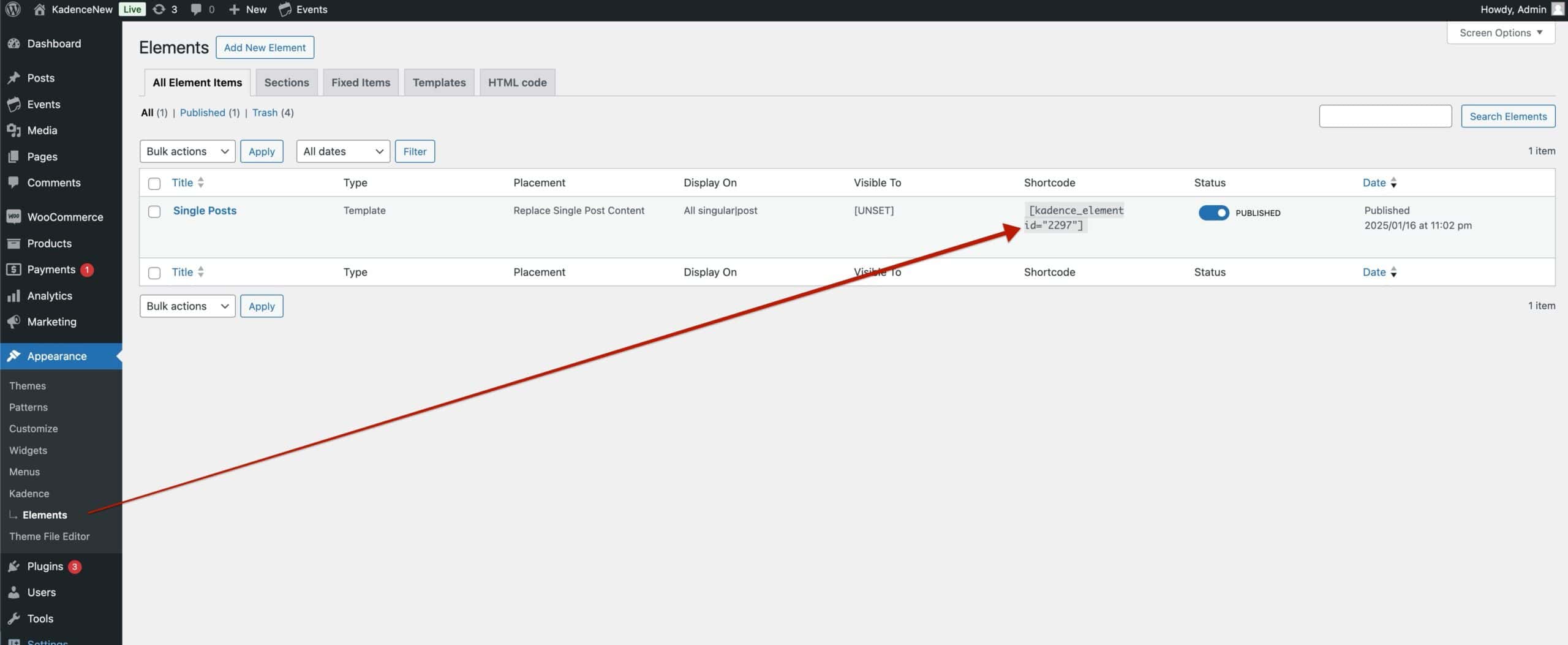
Once you have found the Element ShortCode, you can paste it inside of the provided Code Snippet. This should make the 4th line of code look something like this:
$additional_content = do_shortcode('[kadence_element id="2297"]');
The next modification is to specify which Paragraph the element will display after. This is located on the 7th line of code:$paragraph_position = 8;
You can adjust the number 8 to match the specific paragraph number you want the element to display after. Keep in mind that paragraph counting in this custom code starts from 0, not 1. So, if the paragraph position is set to 8, the element will display after the 9th paragraph.
With this snippet, you can place the Hooked Element deeper into the content than the default options allow, making Hooked Elements even more customizable.

