
Kadence Blocks provides an easy way to apply block-level custom CSS directly inside the WordPress editor. This feature is available in the Row Layout and Section blocks under the Advanced tab.
Steps to Add Block Level Custom CSS
1. Select the Row or Section Block
- Click on the Row Layout or Section block in the editor.
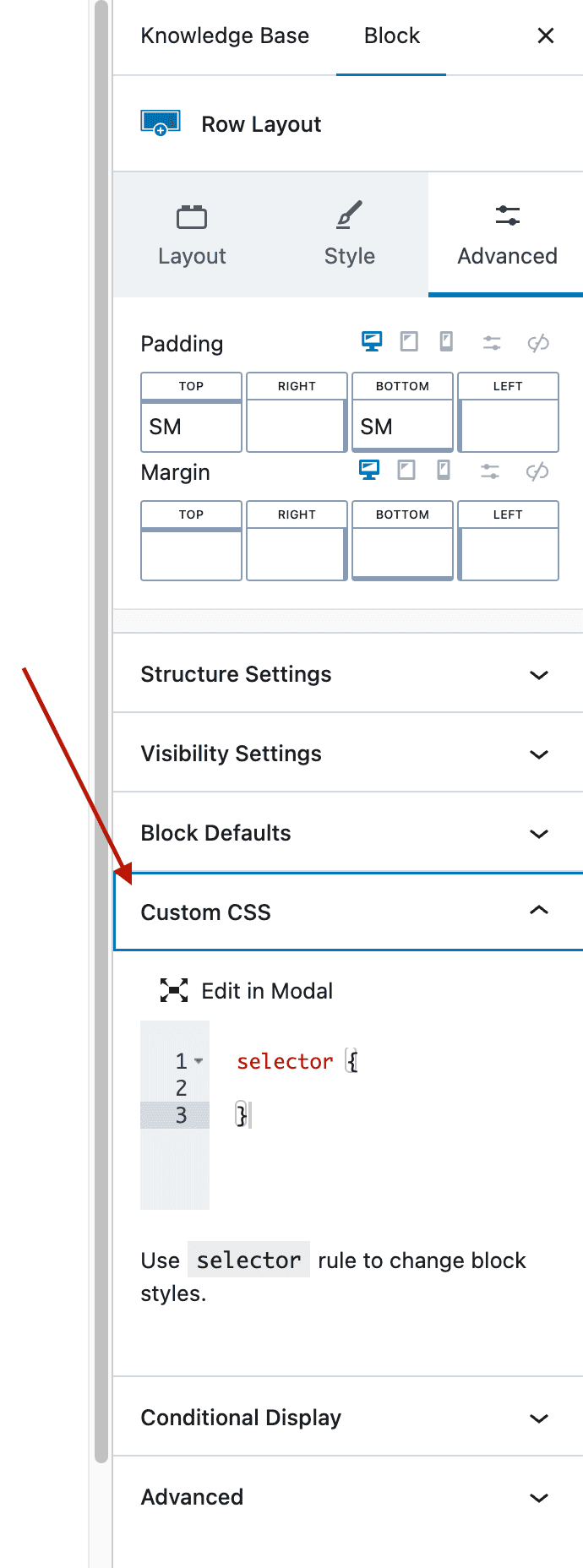
- Go to the Block settings sidebar on the right.
2. Navigate to Advanced tab
- Click the Advanced tab.
- Scroll down until you see the Custom CSS panel.
3. Insert Your CSS
- Inside the editor, you’ll see a pre-filled keyword selector.
- Use selector as a placeholder. It automatically maps to the current block you’re editing.
Example:
selector {
    background-color: #f5f5f5;
    border-radius: 10px;
    padding: 20px;
}
This ensures that your CSS only applies to the selected block, without affecting other elements on the page.
Example Use Cases
Targeting all Info Box blocks inside the specific Row or Section Block
selector .wp-block-kadence-infobox {
    height: 100%;
}
Targeting all Kadence Buttons (Adv) Block
selector .kb-button:hover {
  transform: scale(1.2);
}
