
You can run custom JavaScript immediately after someone submits a Kadence Form on your site. Kadence Blocks makes this possible by providing JavaScript events that fire only when the form is successfully submitted. The event you use depends on the type of form block you are working with.
For example, you might want to do the following:
- Track submissions in Google Analytics or Google Tag Manager
- Trigger an animation or send the data to another application
- Hide or show HTML elements
Form (Adv) Block Submission Event
Event name: kb-advanced-form-success
Example:
document.body.addEventListener('kb-advanced-form-success', function (event) {
    console.log('Advanced Form submitted!', event.detail);
    alert('Thank you for submitting the advanced form!');
});
Targeting a Specific Advanced Form
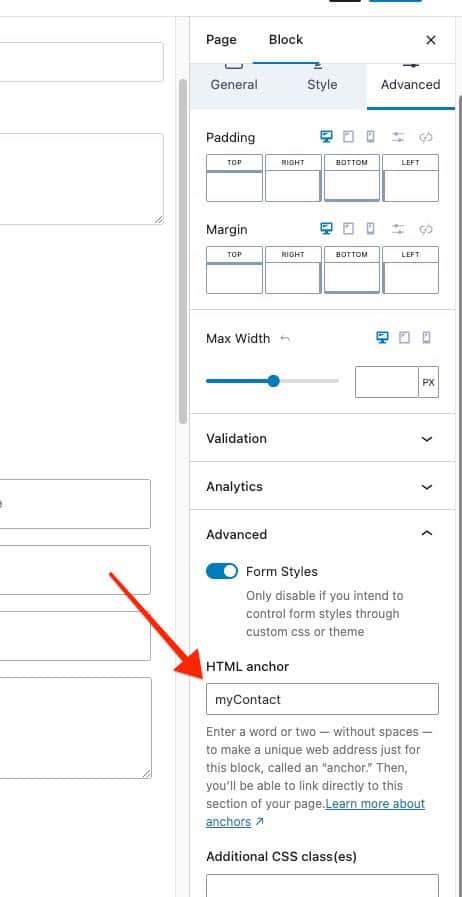
You can make your script run only for one specific form by using the HTML Anchor setting in the block.
- In the block settings, go to Advanced > HTML Anchor and set a unique anchor.
Example:myContact
- JavaScript Example:
document.body.addEventListener('kb-advanced-form-success', function(event) {
  const uniqueId = 'wp-block-kadence-advanced-form' + event.detail.uniqueId;
  const formDiv = document.querySelector('#myContact');
  if (formDiv.classList.contains(uniqueId)) {
    console.log("This form");
  }
});
How it works:
- The HTML Anchor you set (e.g., myContact) becomes the form’s ID in the page HTML.
- The script checks if the submitted form’s unique ID matches that element before running your custom code.
Form Block Submission Event
Event name: kb-form-success
Example:
document.body.addEventListener('kb-form-success', function (event) {
    console.log('Form submitted!', event.detail);
    alert('Thank you for submitting the form!');
});
Targeting a Specific Form Block
You can also run your script for only one specific Form block by giving it an HTML Anchor.
- In the block settings, set the HTML Anchor to something unique.
Example:myContact - Use this JavaScript:
 document.body.addEventListener('kb-form-success', function (event) {
   const form = document.querySelector('.kadence-form-' + event.detail);
   if (form && form.id === 'myContact') {
      console.log('form sent');
   }
});
How it works:
- The HTML Anchor you set becomes the ID of the form element.
- The script checks if the submitted form’s ID matches before running your code.

