This guide explains how to programmatically populate option values for Select, Checkbox, and Radio fields inside the Form (Adv) block.
By default, these fields require options to be entered manually. Since Dynamic Content is not yet supported, you can instead use the WordPress render_block_data filter to inject options automatically. These options can come from arrays, WordPress posts, taxonomies, or other data sources.
Each option must be returned as an array with two keys:
- label → the text displayed to users
- value → the stored value when the form is submitted
Want to see this functionality built-in without the need of custom code? Then, consider voting on this Feature Request to show your support. We often implement popular requests into our products.
Example 1: Static Options (Array)
Use this approach when you want a predefined set of options, such as countries, departments, or product categories.
add_filter('render_block_data', function ($parsed_block, $block, $parent_block ) {
    $inputName = $block['attrs']['inputName'];

    // Match your Field Name
    if ('my-dynamic-field' === $inputName ) {
        $parsed_block['attrs']['options'] = get_dynamic_options();
    }

    return $parsed_block;
}, 20, 3);

function get_dynamic_options(): array {
    $items = [
        'Option 1',
        'Option 2',
        'Option 3',
    ];

    return array_map(function ($item) {
        return [
            'value' => $item,
            'label' => $item,
        ];
    }, $items);
}
Usage
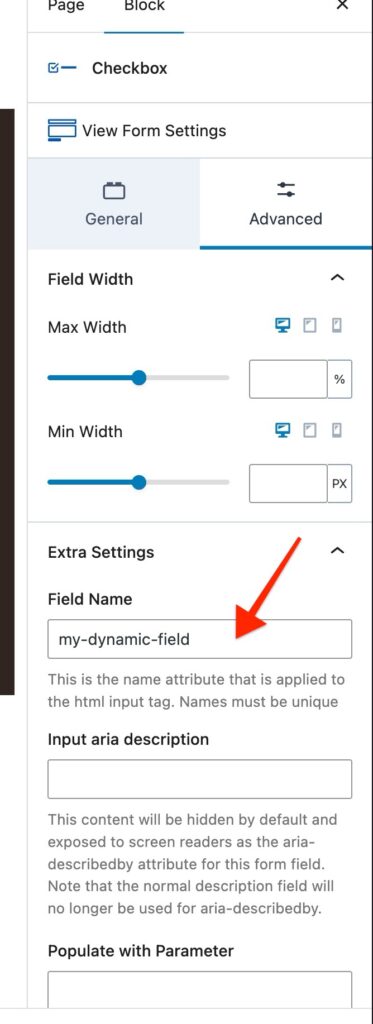
- In your Form (Adv) block, select the field.
- Go to Advanced > Extra Settings > Field Name.
- Enter my-dynamic-field (view screenshot)
Example 2: Dynamic Options from Posts (Using WP_Query)
add_filter('render_block_data', function ($parsed_block, $block, $parent_block ) {
    $input_name = $block['attrs']['inputName'];

    if ( isset( $input_name ) && 'post-dropdown' === $input_name ) {
        $parsed_block['attrs']['options'] = get_dynamic_post_options();
    }

    return $parsed_block;
}, 20, 3);

function get_dynamic_post_options(): array {
    $options = [];

    $query = new WP_Query([
        'post_type'      => 'post',    // Change to custom post type if needed
        'posts_per_page' => 10,        // Adjust limit
        'post_status'    => 'publish',
        'orderby'        => 'date',
        'order'          => 'DESC',
    ]);

    if ($query->have_posts()) {
        foreach ($query->posts as $post) {
            $options[] = [
                'value' => (string) $post->ID, // Stored on form submission
                'label' => $post->post_title,  // Shown in dropdown
            ];
        }
    }

    wp_reset_postdata();

    return $options;
}
Usage
- In your Form block, select the field.
- In Advanced > Extra Settings > Field Name, enter: post-dropdown
- The field will now display the latest 10 posts as selectable options.
With these approaches, you can programmatically populate Select, Checkbox, and Radio fields in Form (Advanced), pulling from either static data or dynamic WordPress content.