
The Portfolio Grid/Carousel block (Kadence Blocks Pro) provides settings to display posts in a grid or carousel layout. However, sometimes you need to alter the query beyond the block’s built-in settings. In these cases, you can add a code snippet to modify the WordPress Query object directly. You can add PHP code to your site using a plugin like Code Snippets or your child theme’s functions.php file.
If you want to modify the query arguments, you can make use of the kadence_blocks_pro_portfolio_grid_query_args filter.
Adding Custom CSS Classes to Portfolio Grid/Carousel Blocks
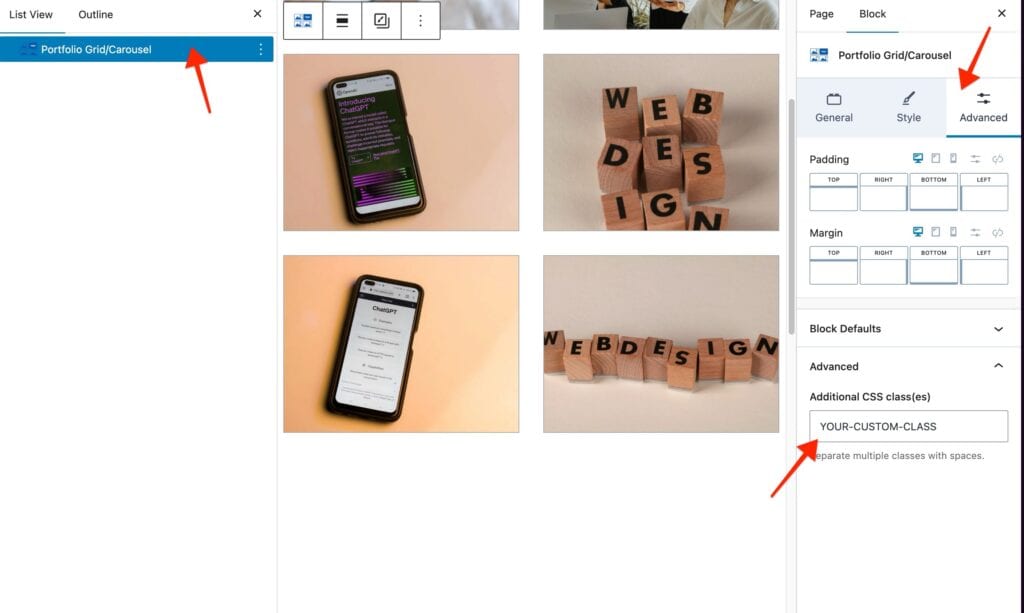
The examples in this document rely on the Portfolio Grid/Carousel Block having a Custom CSS Class applied. To add a Custom CSS Class, select the Portfolio Grid/Carousel Block in the WordPress Editor, then navigate to Block Settings → Advanced Tab → Advanced → Additional CSS Class(es) and enter your class.
Example 1: Query Multiple Post Types
add_filter( 'kadence_blocks_pro_portfolio_grid_query_args', function( $args, $attributes ) {

    // Target a specific Portfolio Grid/Carousel block using a custom class
    if ( isset( $attributes['className'] ) && strpos( $attributes['className'], 'YOUR-CUSTOM-CLASS' ) !== false ) {

        // Show posts from multiple post types. Adjust the array as needed.
        $args['post_type'] = array( 'post', 'SECONDARY_POST_TYPE' );

        // Order posts by publish date
        $args['orderby'] = 'date';
        $args['order']   = 'DESC';
    }

    return $args;

}, 10, 2 );- Targets only blocks with the specified class (
YOUR-CUSTOM-CLASS). - Queries multiple post types (
postandSECONDARY_POST_TYPE). - Orders posts by publish date, newest first.
Example 2: Show Only Posts with a Populated Custom Field
add_filter( 'kadence_blocks_pro_portfolio_grid_query_args', function( $args, $attributes ) {

    // Target a specific Portfolio Grid/Carousel block using a custom class
    if ( isset( $attributes['className'] ) && strpos( $attributes['className'], 'YOUR-CUSTOM-CLASS' ) !== false ) {

        // Specify the post type(s) you want to query
        $args['post_type'] = 'post';

        // Only show posts where a specific custom field exists
        $args['meta_query'] = array(
            array(
                'key'     => 'YOUR_CUSTOM_FIELD',  // Replace with your field name
                'compare' => 'EXISTS',
            ),
        );

        // Order posts by publish date
        $args['orderby'] = 'date';
        $args['order']   = 'DESC';
    }

    return $args;

}, 10, 2 );- Targets blocks with the specified class (
YOUR-CUSTOM-CLASS). - Filters posts to include only those where the custom field has a value.
- Orders posts by publish date, newest first.
Explore More Examples
Even though the Query Loop (Advanced) Block and the Portfolio Grid/Carousel Block use different filters and methods for accessing the current block, the Custom Queries for the Advanced Query Loop Block (Filter) documentation provides many examples of the WordPress Query object being used logically. While these examples cannot be copied and pasted directly, they can be adapted for use with the Portfolio Grid/Carousel Block

